
Caller vs Dokta
Side-by-side comparison to help you choose the right product.

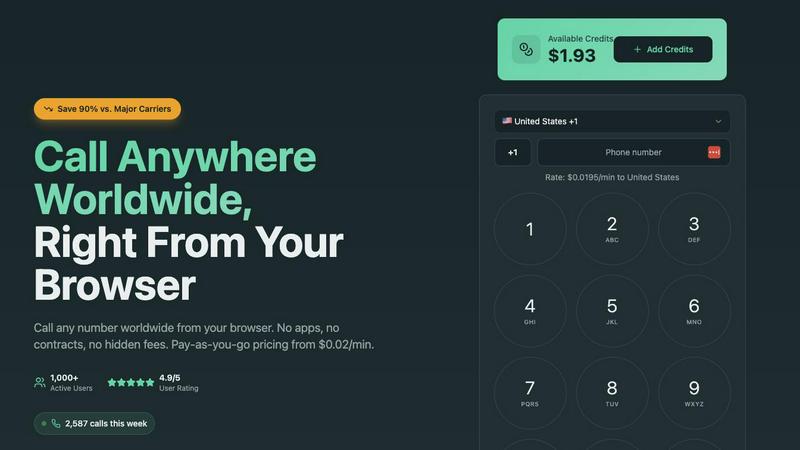
Make affordable international calls from your browser with no hidden fees, starting at just $0.02 per minute.
Last updated: March 1, 2026

Dokta automates document management for SMBs and freelancers, streamlining invoicing, quotes, and cash flow in one easy-to-use platform.
Last updated: April 4, 2026
Visual Comparison
Caller
Dokta

Feature Comparison
Caller
Pay-As-You-Go Pricing
Caller operates on a pay-as-you-go model, allowing users to pay only for the minutes they actually use. Rates start as low as $0.02 per minute, making it significantly cheaper than traditional calling services and ensuring there are no hidden fees or monthly subscriptions.
Global Coverage
With the ability to call over 200 countries worldwide, Caller provides extensive global coverage. Users can reach landlines and mobile phones in all major destinations, ensuring they can stay connected with clients, family, and friends no matter where they are.
High-Definition Audio Quality
Caller prides itself on delivering crystal clear audio quality. The service uses enterprise-grade infrastructure to provide HD voice quality, ensuring that conversations are as clear as if the parties were in the same room, enhancing the overall communication experience.
Instant Setup and Accessibility
Getting started with Caller is quick and straightforward. Users can create an account in seconds without the need for a credit card. There are no complicated setups or downloads required, allowing users to make calls instantly from any device with an internet connection.
About Dokta
Automated Invoice Management
Dokta simplifies the invoicing process by allowing users to generate invoices and quotes effortlessly. Users can create professional invoices and quotes in just a few clicks, ensuring that they maintain a consistent and polished appearance that is essential for client interactions.
Real-Time Cash Flow Tracking
The platform provides users with real-time insights into their financial status, including billed amounts, collected payments, unpaid invoices, and VAT status. This feature helps users maintain a clear understanding of their cash flow, which is crucial for effective financial management and decision-making.
Automatic Document Analysis
Dokta's AI engine performs automatic reading and classification of documents within 60 seconds. This rapid analysis includes extracting key details such as document type, amounts, deadlines, and client or supplier information, facilitating prompt action without manual input.
Client and Supplier Management
Dokta enriches user data by automatically retrieving SIRET numbers, providing payment scoring, and maintaining a complete historical record for each client or supplier. This feature allows users to manage relationships effectively and stay informed about their clients' payment behaviors.
Use Cases
Caller
International Business Communications
Businesses can utilize Caller to maintain regular communication with clients and partners across the globe. The low rates and high-quality connections make it a practical choice for sales teams and customer support, allowing for seamless interactions without incurring high costs.
Personal Calls to Family and Friends
Individuals can use Caller to keep in touch with loved ones living abroad. The ease of use and affordability make it a perfect solution for families wanting to maintain close relationships despite geographical distances.
Emergency Calls
Caller can be a reliable option for making emergency calls when immediate communication is necessary. With no setup delays and the ability to connect instantly through a web browser, users can reach emergency services or family members quickly and efficiently.
Remote Team Collaboration
For remote teams, Caller provides a convenient way to communicate without the need for traditional phone lines. Team members can make international calls to collaborate effectively, share ideas, and resolve issues in real-time, all while saving on communication costs.
Dokta
Freelance IT and Consulting
Freelancers in the IT and consulting sectors can utilize Dokta to manage recurring contracts and monthly invoicing autonomously. This feature helps them focus on their projects while ensuring that their billing is handled smoothly and professionally.
Creative Freelancers
For creative professionals, Dokta streamlines the workflow from proposal to payment. Users can send quotes with an acceptance link, turning accepted proposals into invoices with a single click, significantly enhancing efficiency in project management.
Auto-Entrepreneurs
Auto-entrepreneurs benefit from Dokta's compliance features, ensuring that invoices adhere to legal requirements. The platform allows for easy tracking of payments and deadlines, reducing administrative burdens and providing peace of mind.
Small to Medium-Sized Businesses
SMBs can leverage Dokta to centralize their document management, enabling effective tracking of finances and client relationships. The platform's automation features can save significant time spent on administrative tasks, allowing businesses to allocate resources more strategically.
Overview
About Caller
Caller is an innovative online communication tool that redefines the way individuals and businesses communicate globally. Designed for simplicity and efficiency, Caller allows users to make phone calls to clients, friends, family, banks, and government offices from anywhere in the world directly through their web browser. This eliminates the need for app installations, cumbersome SIM cards, or complex VoIP setups. With its user-friendly interface, Caller operates on a pay-as-you-go model, offering significant savings of up to 90% compared to traditional carriers. This makes it a highly attractive option for anyone looking for a cost-effective and flexible solution for international calling. The platform is particularly beneficial for individuals and businesses seeking instant connectivity, as users can initiate calls by simply entering a phone number and clicking to connect. Caller ensures high-definition audio quality and secure transactions, making it a reliable choice for all communication needs.
About Dokta
Dokta is an innovative AI-powered document management platform specifically designed for freelancers, solo entrepreneurs, auto-entrepreneurs, and small to medium-sized businesses (SMBs). It streamlines the entire document management process by allowing users to drop any document type—be it invoices, quotes, or contracts—into the platform. Dokta's sophisticated AI engine promptly reads, classifies, and extracts essential data from these documents in under 60 seconds, significantly reducing the time and effort typically required for document handling. The platform effectively manages the full document lifecycle, enabling users to create professional invoices and quotes, track payments, automate reminders for outstanding invoices, and manage contracts and deadlines efficiently. With Dokta, users can eliminate the hassles of lost files and missed deadlines, freeing them to focus on their core business. The system automatically builds a client database from uploaded documents, tracks cash flow in real time, and allows easy export of data to CSV format for accounting purposes. Whether you are a freelance developer, consultant, trades contractor, or a growing SMB, Dokta positions your documents at the core of your business operations, all managed seamlessly by AI technology.
Frequently Asked Questions
Caller FAQ
How does Caller work?
Caller operates through a web browser, allowing users to make phone calls without the need for applications or complicated setups. After creating an account, users can add credits and start calling any number worldwide instantly.
Is there a subscription fee?
No, Caller does not have any subscription fees. Users only pay for the minutes they use, with no hidden charges or monthly commitments, making it a flexible and budget-friendly option.
Can I call any country with Caller?
Yes, Caller provides global coverage, enabling users to call over 200 countries. This includes both landlines and mobile phones, ensuring comprehensive connectivity.
How is the call quality with Caller?
Caller offers high-definition audio quality powered by enterprise-grade infrastructure. Users can expect crystal clear connections, making conversations pleasant and effective, similar to being in the same room.
Dokta FAQ
How does Dokta ensure data security?
Dokta is hosted in Europe on AWS and complies with GDPR regulations, ensuring that user data is protected and secure. Additionally, it uses AES-256 encryption for data at rest and in transit.
Is there a free trial available for Dokta?
Yes, Dokta offers a free tier that allows users to manage up to 15 documents per month without any cost. This tier is perfect for testing the platform's capabilities before committing to a paid plan.
Can I export my data from Dokta?
Absolutely! Dokta allows users to export their financial data to CSV format, making it easy to share with accountants or integrate into other financial management systems.
What types of documents can I upload to Dokta?
Users can upload various types of documents, including invoices, quotes, contracts, and receipts. Dokta's AI engine is capable of analyzing these documents to extract relevant information efficiently.
Alternatives
Caller Alternatives
Caller is an innovative online communication tool designed for making affordable international calls directly from your web browser. As a member of the productivity and management category, it caters to both individual users and businesses seeking a cost-effective solution for global communication. Users often seek alternatives to Caller for various reasons, such as pricing, specific features, or compatibility with different platforms. Factors to consider when choosing an alternative include pricing transparency, call quality, global coverage, and ease of use. When exploring alternatives, users should prioritize services that offer flexible pricing models without hidden fees, ensuring that they only pay for the minutes they utilize. It's also essential to assess the quality of the call experience, including audio clarity and security measures in place to protect user transactions. A comprehensive understanding of user needs will help in selecting a service that aligns with communication goals, whether for personal use or business purposes.
Dokta Alternatives
Dokta is an AI-driven document management platform designed for freelancers, solo entrepreneurs, auto-entrepreneurs, and small to medium-sized businesses (SMBs). It simplifies the document lifecycle by enabling users to store, classify, and manage documents such as invoices, quotes, and contracts effortlessly. With features like automated reminders, payment tracking, and real-time cash flow management, Dokta serves as a vital tool for its users, allowing them to focus on their core business activities. Users often seek alternatives to Dokta for various reasons, including pricing concerns, specific feature requirements, or platform compatibility. When considering an alternative, it is essential to evaluate the software's ease of use, scalability, customer support, and integration capabilities with existing tools. Understanding these factors will help users find a solution that aligns with their unique needs and enhances their productivity.