ClearMind AI vs Proofapp

Side-by-side comparison to help you choose the right product.

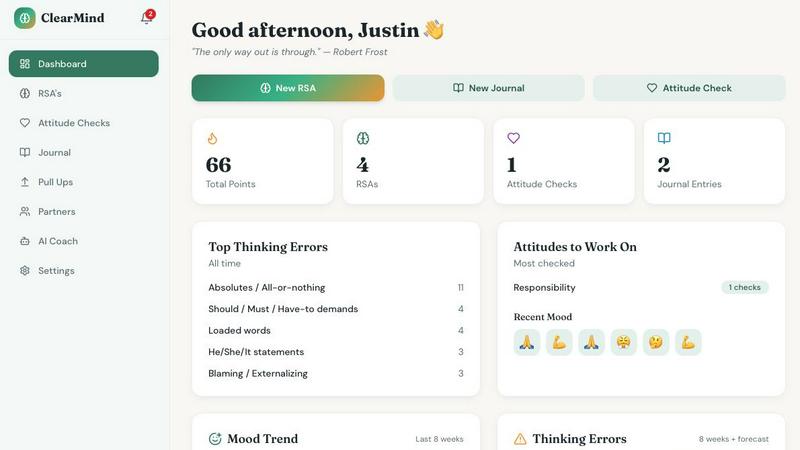
ClearMind AI is a free voice-first journaling app that uses CBT principles and AI analysis to help users identify and reframe unhealthy thinking.

Last updated: March 11, 2026

Proofapp enables visual feedback directly on websites to eliminate miscommunication and streamline design reviews.

Last updated: March 4, 2026

Visual Comparison

ClearMind AI
ClearMind AI screenshot

Proofapp

Proofapp screenshot

Feature Comparison

ClearMind AI

RSA Wizard

The RSA Wizard is the central feature, guiding users through a structured Rational Self-Analysis process. Users can record or type a description of an emotionally charged situation. The AI then analyzes the input to identify specific cognitive distortions, such as catastrophizing or black-and-white thinking, and helps reframe these thoughts with clear, objective reasoning. This step-by-step wizard transforms abstract emotional reactions into concrete, manageable thought patterns for review and revision.

Daily Journal with Emotion Detection

This feature provides a voice-dictation journal for daily entries, enhanced with AI-powered emotion detection. As users speak or type about their day, the system identifies underlying emotional tones and tracks them over time. This allows for the visualization of mood patterns and correlations between events, thoughts, and feelings, offering data-driven insights into emotional triggers and trends that might otherwise go unnoticed.

Progress Dashboard & AI Growth Coach

The Progress Dashboard offers a holistic view of a user's development through streaks, trend graphs, and personalized recommendations. Complementing this is the AI Growth Coach, a conversational agent that has access to the user's RSA history, journal entries, and mood data. This coach provides tailored guidance, answers questions, and suggests exercises based on the user's unique thinking patterns and historical progress.

Accountability Partners & Social Features

ClearMind AI incorporates a social framework to foster motivation and support. Users can invite friends to be Accountability Partners, share anonymized progress, and stay committed to their practice. The system includes "Pull Ups" for gentle accountability nudges and "Kudos" to celebrate milestones and wins, creating a supportive community environment for shared cognitive growth.

About Proofapp

Visual Commenting

This foundational feature allows users to click directly on any area of a captured website screenshot to leave precise, contextual feedback. By pinning comments visually, it completely eliminates the guesswork and lengthy descriptions common in email or chat (e.g., "top left, under the navigation"). Each comment initiates a thread where team members and clients can reply, fostering clear and focused discussions tied directly to the design element in question, ensuring everyone is literally on the same page.

Multi-Breakpoint Testing

Proofapp automatically captures and presents screenshots of the submitted website at both desktop and mobile viewports simultaneously. This feature is critical for modern web development and design, allowing teams to review and collect feedback on a site's responsiveness and user experience across different devices within a single project. It ensures that visual and functional issues are caught and addressed for all breakpoints, not just a single screen size.

Secure, Account-Free Sharing

Project owners can generate secure, shareable links to send to clients and stakeholders for review. A significant advantage is that recipients can view the project and leave detailed feedback without the friction of creating a user account or remembering a password. These links can also be set to expire, providing control over access. This streamlines the client onboarding process and encourages faster, more direct participation in the feedback cycle.

Real-Time Collaboration & Notification

All activity within a Proofapp project is synchronized in real-time. When a new comment is pinned or a thread is updated, team members see the changes instantly without needing to refresh the page. Coupled with integrated real-time notifications and Slack integration, this feature ensures that feedback loops are tight and that no comment goes unnoticed, enabling dynamic, live collaboration that mimics an in-person review session.

Use Cases

ClearMind AI

Professionals facing high-pressure deadlines, critical feedback, or interpersonal conflicts at work can use the RSA Wizard to deconstruct stressful events. By analyzing the automatic thoughts triggered by a difficult meeting or a missed target, the tool helps reframe perceptions, reduce anxiety, and develop more rational, solution-oriented responses, leading to improved performance and reduced burnout.

Improving Personal Relationship Dynamics

Individuals seeking to enhance communication and reduce conflict in personal relationships can utilize the journal and RSA features. After a disagreement, a user can process their emotional reaction, identify any irrational beliefs (e.g., "they never listen"), and reframe them. Over time, this practice cultivates empathy, objectivity, and healthier communication patterns, strengthening relational bonds.

Building Consistent Self-Reflection Habits

For anyone looking to develop a structured mindfulness or self-improvement routine, ClearMind AI serves as a guided daily practice. The combination of voice-first journaling and the structured RSA process lowers the barrier to entry for consistent reflection, helping users build the habit of examining their thoughts and emotions systematically rather than ruminating on them passively.

Supporting Complementary Personal Development

Individuals already engaged in coaching, therapy, or other personal development work can use ClearMind AI as a between-session tool. It provides a structured way to document insights, practice cognitive restructuring techniques learned in therapy, and track emotional patterns to discuss with a licensed professional, thereby augmenting and reinforcing their primary growth journey.

Proofapp

Freelancer-Client Website Approvals

Freelancers, such as web designers or developers, can use Proofapp to present their work professionally and collect clear, actionable feedback from clients. Instead of trading confusing emails and annotated screenshots, the freelancer shares a single link. Clients click directly on the design to leave comments, which are organized in one dashboard. This use case saves hours per project, reduces revision rounds, and presents a polished, efficient workflow that enhances client satisfaction and trust.

Agency Managing Multiple Client Projects

Digital and marketing agencies handling several client websites simultaneously benefit from Proofapp's project organization and multi-page support. They can manage all feedback for each client in a dedicated, visual workspace, avoiding the chaos of mixing feedback across email inboxes and chat channels. The platform's structure allows project managers to track progress, resolve comments, and ensure nothing falls through the cracks, scaling collaboration efficiently across their entire portfolio.

In-House Design & Development Team Sprints

Internal product teams, including UX/UI designers and front-end developers, can integrate Proofapp into their sprint cycles for internal reviews and QA. The visual commenting and real-time features facilitate quick, precise communication between departments, ensuring that feedback on new features or bug reports is contextual and clear. This leads to faster iteration, fewer misunderstandings, and a more streamlined path from staging to production.

Marketing Team Landing Page Reviews

Marketing teams launching campaigns can use Proofapp to collaboratively review landing pages, ad creatives, and email templates. Team members from copywriting, design, and analytics can all pin feedback on specific elements like headlines, call-to-action buttons, or imagery. The ability to attach files and have threaded discussions ensures all contextual information is preserved, leading to more cohesive and effective marketing assets that are approved faster.

Overview

About ClearMind AI

ClearMind AI is a comprehensive digital self-improvement platform designed to enhance mental clarity and emotional resilience through structured cognitive reframing. At its core, the application leverages principles from Cognitive Behavioral Therapy (CBT) and Rational Self-Analysis (RSA) to help users systematically identify, challenge, and replace distorted or irrational thought patterns. It is engineered for individuals seeking to improve their decision-making, emotional regulation, and interpersonal relationships through proactive mental habit formation, rather than passive journaling or generic motivational advice. The platform distinguishes itself with a voice-first interface, allowing for natural expression, and is powered by artificial intelligence that analyzes user input to provide personalized insights and reframing exercises. Its primary value proposition is offering a 100% free, accessible toolkit that demystifies therapeutic techniques, enabling users to build healthier thinking patterns, track progress over time, and develop greater objectivity in responding to life's challenges. It is explicitly positioned as a skill-building and self-reflection aid, not a replacement for professional therapy.

About Proofapp

Proofapp is a sophisticated visual feedback and website review platform engineered to transform the collaborative workflow between designers, developers, and their clients. At its core, Proofapp addresses the chronic inefficiencies and miscommunications inherent in traditional feedback methods, such as endless email chains and vague textual notes. The platform operates by allowing users to upload any website URL, after which it automatically captures synchronized screenshots at both desktop and mobile breakpoints. Stakeholders can then pin comments directly onto the visual design, engage in threaded discussions, attach files, and mark feedback as resolved, all within a centralized, visual dashboard. A standout feature is that reviewers can participate without needing to create an account, significantly lowering the barrier to client collaboration. With capabilities like real-time notifications, Slack integration, multi-page project support, and customizable branding, Proofapp is designed for professionals ranging from solo freelancers to large agencies. Its primary value proposition is the elimination of scattered, ambiguous feedback by providing a structured, visual, and actionable environment that consolidates all project communication, thereby reducing revision cycles, saving significant time, and accelerating the path from review to launch.

Frequently Asked Questions

ClearMind AI FAQ

What is Rational Self-Analysis (RSA)?

Rational Self-Analysis is a structured cognitive technique modeled after therapeutic practices like Cognitive Behavioral Therapy. It is a process where an individual systematically examines a distressing situation, records their automatic thoughts and emotions, identifies cognitive distortions within those thoughts, and then challenges and replaces them with more balanced, evidence-based rational responses. ClearMind AI's RSA Wizard digitizes and guides this entire process.

Is this app a replacement for therapy?

No, ClearMind AI is explicitly not a replacement for therapy, diagnosis, or medical advice. It is designed as a self-help tool for skill-building, self-reflection, and cognitive habit formation. For clinical mental health conditions, diagnosis, or treatment, it is essential to consult a licensed mental health professional. The app includes clear disclaimers advising users to seek professional help for serious concerns.

How does voice input work?

The app utilizes voice-first technology, allowing users to verbally describe their experiences, thoughts, and feelings. This audio input is transcribed and analyzed by the AI in real-time. The system detects emotional tone and linguistic cues to identify thinking patterns and emotional states, making the entry process more natural, accessible, and efficient than traditional text-based journaling.

Is my data private?

Based on the provided context, ClearMind AI emphasizes being a free tool without a "catch," which typically includes a commitment to user privacy. While specific privacy policy details are not listed here, such platforms generally employ data encryption and anonymization. Users should review the app's official privacy policy for detailed information on data collection, storage, usage, and sharing practices.

Proofapp FAQ

How does Proofapp capture website screenshots?

Proofapp uses a secure, automated system to render and capture the webpage at the URL you provide. It processes the site to generate high-fidelity screenshots at predefined desktop and mobile breakpoints, ensuring an accurate visual representation for review. The process is typically completed within seconds, and the screenshots are stored securely within your project for your team and clients to annotate.

Do clients or reviewers need an account to give feedback?

No, one of Proofapp's key features is that reviewers do not need to create an account. Project owners simply generate a secure, shareable link and send it to their clients or stakeholders. Recipients can click the link, view the project, and immediately start leaving visual comments and participating in threads, making the feedback process incredibly frictionless and accessible.

Can I use Proofapp for websites that are not live or are behind a login?

The standard capture process requires a publicly accessible URL. For sites in development on localhost, staging servers, or behind authentication, Proofapp may not be able to capture them automatically. In such cases, users often manually upload full-page screenshots or use browser extensions to facilitate the review process, though native support for password-protected staging sites may be a feature under consideration.

What kind of integrations does Proofapp support?

Proofapp offers direct integration with Slack to send real-time notifications about new comments and project activity directly into your team's channels. This helps keep everyone informed without needing to constantly check the Proofapp dashboard. The platform is designed with an API-forward approach, suggesting potential for future expansions and custom integrations with other project management and development tools.

Alternatives

ClearMind AI Alternatives

ClearMind AI is a personal development application designed to improve decision-making and emotional regulation. It operates within the cognitive and behavioral self-help category, utilizing a structured process akin to Rational Self-Analysis to help users identify and reframe distorted thinking patterns. This approach is grounded in principles similar to those found in cognitive behavioral therapy, moving beyond simple journaling to offer a systematic method for mental clarity. Users often explore alternatives to such tools for a variety of practical reasons. These can include seeking different pricing models or subscription tiers, desiring specific features not offered, or needing compatibility with a preferred operating system or device. Individual preferences for interface design, coaching styles, or the depth of psychological methodology also drive the search for other options. When evaluating alternatives, it is crucial to consider the core methodology and its evidence base. Look for tools that provide a structured framework for cognitive restructuring, not just passive content or generic affirmations. Security and data privacy are paramount, as these applications handle sensitive personal reflections. Ultimately, the best choice aligns with your specific goals for personal growth, learning style, and budget.

Proofapp Alternatives

Proofapp is a specialized design tool in the visual feedback and website review category. It streamlines collaboration by allowing teams and clients to pin comments directly on live website screenshots, centralizing feedback to replace scattered emails and vague notes. Users explore alternatives for various reasons, including budget constraints, specific feature requirements like advanced video review or native app prototyping, integration needs with their existing project management stack, or different team structures and permission models. The search often stems from a need for a tool that aligns more precisely with a company's unique workflow or scale. When evaluating alternatives, key considerations include the core functionality of visual commenting, the ease of use for both creators and reviewers, the quality of real-time collaboration features, and the depth of integrations. Pricing transparency, security standards, and the availability of a free tier for testing are also critical factors in making an informed decision.

Continue exploring
