
FilexHost vs MeetingMind
Side-by-side comparison to help you choose the right product.

FilexHost
FilexHost simplifies file hosting and sharing with instant URLs and built-in viewers for various file types.
Last updated: February 26, 2026

MeetingMind
MeetingMind automatically records and summarizes Zoom meetings into private notes on your Mac.
Last updated: March 1, 2026
Visual Comparison
FilexHost

MeetingMind
Feature Comparison
FilexHost
Instant Subdomains
FileXHost provides users with instant subdomains for their uploaded files, formatted as your-file.filex.host. This feature eliminates the hassles of domain setup, allowing for immediate sharing of files right after upload.
Free SSL Encryption
Every link generated by FileXHost is secured with free SSL encryption. This ensures that all file transfers are secure, protecting sensitive information from unauthorized access and enhancing user trust in the platform.
Smart View Modes
FileXHost's smart view modes allow users to choose between direct rendering of files or a download page. This flexibility ensures that recipients can either view files inline or download them for offline access, catering to different user preferences.
Optional Password Protection
To enhance security, FileXHost offers optional password protection for shared links. Users can set expiry settings for their files ranging from 24 hours to an indefinite period, allowing them to control access and ensure privacy.
MeetingMind
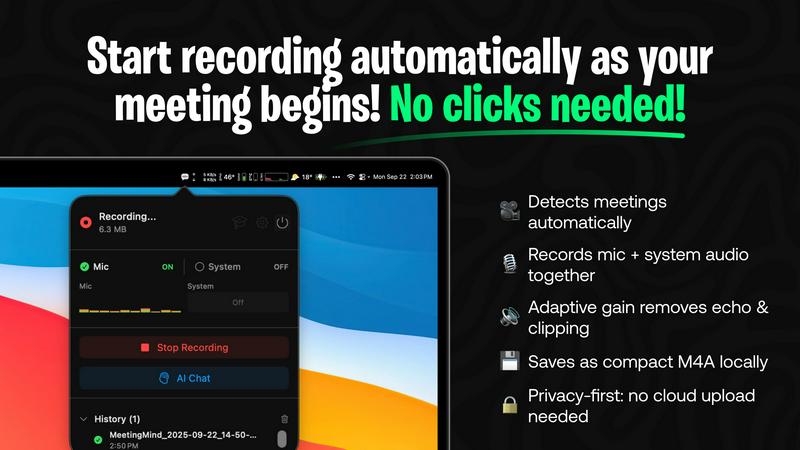
Automatic Zoom Detection
MeetingMind eliminates the need for manual recording controls by intelligently detecting when a user joins or starts a Zoom meeting. The application automatically initiates recording in the background, ensuring that every meeting is captured from the very beginning without any clicks or commands from the user. This hands-free operation is crucial for maintaining focus during meetings and guarantees that no part of the discussion is missed due to human error or delayed recording start.
Local AI Processing & Privacy
A cornerstone feature of MeetingMind is its commitment to user privacy through local on-device processing. All audio recording, transcription, and AI summarization occur directly on the user's Mac. This architecture ensures that sensitive meeting audio and transcripts are never uploaded to external servers, providing complete data sovereignty and security. Users can opt for a local AI model via Ollama or choose a cloud provider via OpenRouter, maintaining flexibility while prioritizing local processing for maximum confidentiality.
Intelligent Transcription & Markdown Export
The tool provides real-time, speaker-attributed transcripts that are formatted in clean, readable markdown. After the meeting concludes, users receive a comprehensive document that includes the full transcript, an AI-generated summary, and extracted action items. This markdown format is highly versatile, allowing for easy copying, sharing, and integration into note-taking apps, project management tools, or knowledge bases, thereby streamlining the workflow from discussion to documentation.
Menu Bar Integration & Adaptive Audio Capture
MeetingMind runs as a discreet menu bar application, remaining invisible and non-intrusive until needed. It features adaptive audio capture that simultaneously records both microphone audio (for participant voices) and system audio (for presentation sounds, shared media, or other participants' audio). This dual-channel recording ensures complete meeting context is preserved with clarity, capturing every spoken word and digital sound played during the session.
Use Cases
FilexHost
Professional Report Sharing
Professionals can utilize FileXHost to share client reports or presentations quickly. The drag-and-drop feature allows for instant uploads, while the secure, shareable links streamline the distribution process, eliminating the need for lengthy email attachments.
Web Development Hosting
Developers can host landing pages or mock APIs effortlessly on FileXHost. The platform's ability to render HTML files as live websites simplifies the testing and demonstration of web projects to clients or stakeholders.
Digital Product Distribution
Creators can distribute digital products such as eBooks, music, or art files without the hassle of email attachment limits. The built-in support for various media types ensures that products are presented professionally and can be accessed easily.
Team Collaboration
FileXHost serves as a valuable tool for teams needing to collaborate on projects. By providing a central repository for files, team members can upload, share, and access necessary documents without complicated permission requests or delays.
MeetingMind
Remote Team Stand-ups and Syncs
For distributed teams conducting daily stand-ups or weekly syncs via Zoom, MeetingMind automatically captures these frequent, often rapid-fire meetings. Team members can fully engage in the discussion without worrying about note-taking. Afterwards, the AI-generated summary and action items provide a clear, shareable record of updates, blockers, and next steps, ensuring alignment and accountability across the entire remote team.
Client Consultations and Discovery Calls
Professionals such as consultants, sales representatives, and freelancers can use MeetingMind to meticulously record client meetings. The accurate transcript ensures every client requirement, concern, and agreed-upon deliverable is documented verbatim. This creates a reliable single source of truth that prevents scope creep, builds trust through transparency, and serves as a valuable reference when crafting proposals or project plans.
Educational Lectures and Training Sessions
Educators and trainers delivering lectures or workshops over Zoom can employ MeetingMind to create automated lecture notes. The system captures the instructor's audio and any supporting audio from slides or videos. Students or trainees can then receive a formatted transcript and summary, which aids in study, revision, and accessibility, ensuring key concepts and instructions are not lost.
Project Planning and Brainstorming Sessions
During intensive project kickoff or creative brainstorming meetings, ideas flow quickly and decisions are made. MeetingMind acts as a reliable scribe, capturing all contributions and discussions. The resulting document, with its clear transcript and condensed summary, allows teams to revisit the creative process, confirm decisions, and extract concrete action items, effectively bridging the gap between ideation and execution.
Overview
About FilexHost
FileXHost is an innovative file hosting and sharing solution designed to simplify the way users manage and distribute files online. With its intuitive "Drop & Share" functionality, FileXHost allows users to upload a wide range of file types—from documents and images to entire websites—without the need for cumbersome setups or configurations. It caters to professionals, developers, and creators alike, enabling them to share files quickly and securely. The platform's core value proposition lies in its speed and ease of use, allowing users to generate instant secure URLs for sharing files without requiring recipients to navigate complex access requests. With built-in security features like free SSL encryption and customizable sharing settings, FileXHost ensures that users can deliver their files confidently, knowing they are protected and presented beautifully.
About MeetingMind
MeetingMind is a sophisticated, AI-powered meeting assistant application designed exclusively for macOS to revolutionize the productivity of professionals engaged in virtual meetings. Its primary function is to automatically detect, record, and transcribe Zoom meetings, transforming live discussions into actionable, searchable, and intelligently summarized notes. The tool's core value proposition lies in its seamless automation and robust privacy-first approach. It operates quietly from the macOS menu bar, requiring no manual intervention to start or stop recordings, thereby ensuring users can focus entirely on the meeting content. By leveraging advanced on-device AI processing, MeetingMind guarantees that all audio data, including both microphone input and system audio, is captured and processed locally. This means sensitive meeting conversations never leave the user's computer, offering a significant privacy advantage over cloud-based alternatives. It is ideally suited for business professionals, remote teams, educators, consultants, and anyone who participates in frequent virtual calls and needs to ensure no critical detail, decision, or action item is forgotten. The output is delivered in clean, formatted markdown, complete with speaker-attributed transcripts and AI-generated summaries, making post-meeting review and knowledge retention exceptionally efficient.
Frequently Asked Questions
FilexHost FAQ
What is FileXHost?
FileXHost is a file hosting and sharing platform that allows users to upload various file types and generate secure, shareable links instantly. Ideal for professionals, developers, and creators, it emphasizes ease of use and security.
Is it really free?
Yes, FileXHost offers a free plan that allows users to host up to 1,000 files, with a maximum size of 25MB per file. However, this plan includes ads and has a 7-day expiry for hosted files.
What file types are supported?
FileXHost supports a wide range of file types, including PDFs, Excel sheets, images, audio and video files, ZIP archives, and HTML projects, ensuring versatility for various user needs.
How do I update my site?
To update your site, simply upload the new version of your file or website ZIP. FileXHost will generate a new secure link while maintaining the original format and accessibility for recipients.
MeetingMind FAQ
How does MeetingMind ensure privacy during recording?
MeetingMind ensures privacy through a fundamental design principle: all audio processing occurs locally on your Mac. The application records microphone and system audio directly to your device and uses on-device AI (or a user-selected cloud API) to generate transcripts and summaries. This means the raw audio data from your meetings is never uploaded to or stored on external servers, giving you complete control and confidentiality over your sensitive conversations.
What is included in the free 60 minutes per day plan?
The free plan is a fully-featured tier that includes 60 minutes of recording time per calendar day. It encompasses all core functionalities: automatic Zoom meeting detection, live transcription, AI-generated summaries and action items, local on-device processing for privacy, and markdown export. This plan is designed to be perpetually free and is sufficient for many daily short meetings like stand-ups or one-on-one check-ins.
What are the benefits of the one-time Unlimited purchase?
The Unlimited version is a single, one-time purchase that removes the daily 60-minute recording limit, allowing for unrestricted recording duration. It includes all features from the Free plan, guarantees lifetime access to the application, and includes future updates at no additional cost. This model provides significant long-term value compared to subscription-based services, with no recurring fees.
Is there a way to use cloud-based AI instead of local processing?
Yes, MeetingMind offers flexibility in its AI processing backend. While it defaults to and highly recommends local processing via Ollama for maximum privacy, users have the option to configure the application to use OpenRouter. This service acts as a gateway to various cloud-based large language models (like GPT-4, Claude, etc.) for generating summaries and insights, allowing users to choose based on their preference for model power versus data privacy.
Alternatives
FilexHost Alternatives
FilexHost is a user-friendly file hosting and sharing platform designed to simplify the process of sharing various file types, including documents, media, and websites. By employing a drag-and-drop interface, users can quickly upload files and generate secure, shareable URLs without the need for complex configurations or user accounts. This service falls under the category of productivity and management tools, catering to individuals and professionals alike. Despite its advantages, users often seek alternatives to FilexHost for several reasons, including pricing structures, specific feature sets, and compatibility with different platforms. When exploring alternatives, it is essential to consider factors such as storage capacity, file size limits, security features, and user experience. Additionally, evaluating whether the service offers essential functionalities like password protection, analytics, and ease of access for recipients can aid in making an informed decision.
MeetingMind Alternatives
MeetingMind is a specialized AI meeting assistant for macOS that automatically records and summarizes Zoom meetings into searchable notes. It falls within the productivity and meeting management software category, designed to help professionals capture and organize discussions without manual effort. Users often explore alternatives for various reasons, including budget constraints, the need for cross-platform compatibility beyond macOS, or requirements for different feature sets such as integration with other video conferencing tools or collaboration platforms. Specific organizational policies regarding data storage and processing can also drive the search for different solutions. When evaluating alternatives, key considerations should include the platform's supported operating systems, the depth of its AI summarization capabilities, its approach to user privacy and data security, and how well it integrates into your existing workflow. The ideal tool balances automated efficiency with reliable, accurate outputs that fit your specific meeting culture and technical environment.