
Hush Touch | Voice-to-Text for MacOS vs Nanobananapro
Side-by-side comparison to help you choose the right product.

Hush Touch | Voice-to-Text for MacOS
Hush Touch is an offline voice-to-text app for Mac that learns your vocabulary and ensures accurate transcription.
Last updated: February 26, 2026

Nanobananapro
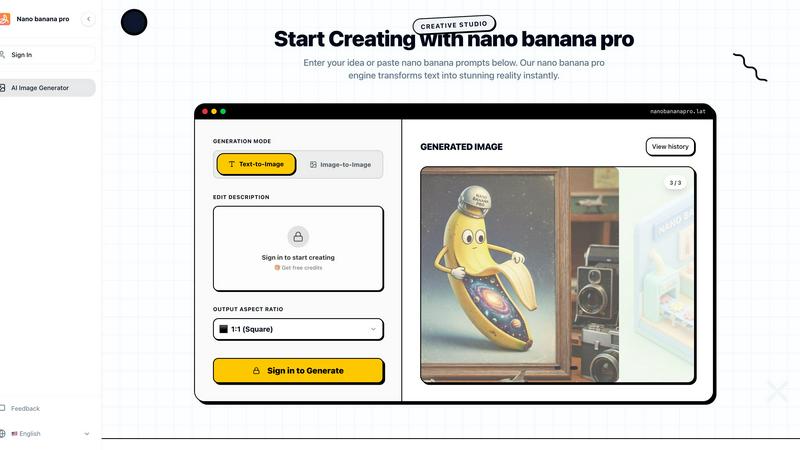
Nano Banana Pro instantly generates professional 4K AI images from text for creators and marketers.
Last updated: March 1, 2026
Visual Comparison
Hush Touch | Voice-to-Text for MacOS

Nanobananapro
Feature Comparison
Hush Touch | Voice-to-Text for MacOS
Dual-Engine Recognition
Hush Touch employs a dual-engine recognition system that combines the capabilities of DictationTranscriber and SFSpeechRecognizer. This powerful blend ensures natural flow and accurate punctuation while boosting your custom vocabulary. The final text output benefits from an additional pass by Apple Intelligence, enhancing overall transcription accuracy.
Smart Text Processing
This feature allows Hush Touch to process your speech intelligently, removing filler words and correcting common mistakes in real time. The app can detect recurring phrases and format lists automatically, making dictation smoother and output more polished without requiring extensive manual editing.
Custom Vocabulary Learning
Hush Touch supports a custom vocabulary of up to 500 terms, which can learn from your corrections over time. This feature is especially beneficial for users who frequently utilize specialized terminology, including medical terms, technical jargon, or brand names, ensuring that the app recognizes your unique language.
Context Modes & Hands-Free Dictation
With four distinct context modes—General, Email, Code, and Notes—Hush Touch provides tailored dictation experiences for various writing tasks. It also supports hands-free operation, allowing users to initiate dictation using Siri or a hotkey, with automatic text insertion after a brief pause, enhancing convenience and workflow efficiency.
Nanobananapro
Nano Banana 2 Engine
At the heart of Nanobananapro is the proprietary Nano Banana 2 engine, a state-of-the-art AI model responsible for its core image generation capabilities. This advanced engine interprets detailed "nano banana prompts" to produce high-fidelity, 4K resolution images with remarkable speed and accuracy. It forms the technological foundation that enables both text-to-image and image-to-image generation modes, ensuring users have access to a powerful and reliable creative tool for transforming ideas into visual reality.
4K High-Fidelity Image Generation
Nanobananapro specializes in producing exceptionally high-quality visuals, offering output in stunning 4K resolution. This feature ensures that all generated artwork, from social media graphics to detailed manga panels, is suitable for professional use and large-format printing. The platform allows users to select their desired output aspect ratio, including a standard 1:1 square, providing flexibility for different platforms and project requirements while maintaining impeccable detail and clarity.
Advanced AI-Powered Editing Suite
Beyond simple generation, Nanobananapro includes a sophisticated suite of AI-powered editing tools. Key functionalities include professional-grade photo restoration, capable of fixing scratches and enhancing details in old photographs, and intelligent style transfer, which allows users to blend artistic styles from reference images. This suite transforms the platform from a mere generator into a comprehensive creative studio for refining and perfecting visual assets.
Intuitive Web-Based Interface
Designed for accessibility, Nanobananapro operates entirely through a seamless, user-friendly web interface. This eliminates the need for complex software installation or high-end hardware, allowing creators to start projects instantly from any modern browser. The interface simplifies the creative process into clear steps: describing an idea, customizing parameters, and generating results, making advanced AI art creation accessible to users of all skill levels.
Use Cases
Hush Touch | Voice-to-Text for MacOS
Drafting Emails
Hush Touch is ideal for busy professionals who need to draft emails quickly. By dictating their messages, users can maintain productivity and focus on their thoughts without the distraction of typing, all while enjoying the app's intelligent text processing features.
Creating Notes
Students and professionals can leverage Hush Touch to take notes during lectures or meetings. The app captures spoken information accurately, allowing users to concentrate on the content rather than the mechanics of writing, ultimately improving retention and understanding.
Writing Documents
Writers and content creators can use Hush Touch to compose articles, reports, or other lengthy documents. The adaptive learning and custom vocabulary features ensure that the output aligns with their unique style and terminology, making writing more efficient and enjoyable.
Transcribing Meetings
Hush Touch is an excellent tool for transcribing meetings or interviews. Users can simply dictate the conversation as it unfolds, with the app capturing key points, action items, and follow-up tasks accurately, thus streamlining communication and documentation processes.
Nanobananapro
Manga and Comic Art Creation
Nanobananapro is an invaluable tool for manga artists and webcomic creators. It can instantly colorize black-and-white sketches, maintaining consistent artistic style across panels. This dramatically accelerates the production pipeline, allowing artists to focus on storytelling and line art while the AI handles time-consuming coloring tasks, making it perfect for meeting tight publishing schedules or building a consistent visual identity for serialized content.
Digital Marketing and Social Media Content
Content marketers and social media managers can leverage Nanobananapro to create viral visuals quickly. The platform excels at rendering text perfectly within images, making it ideal for designing eye-catching posters, informative infographics, engaging memes, and branded headers for platforms like X (Twitter) and Instagram. This enables the rapid production of a high volume of professional-quality graphics to support marketing campaigns and social media strategies.
Photo Restoration and Enhancement
Individuals and professionals can use Nanobananapro's AI tools to restore and enhance old or damaged photographs. The platform can automatically repair scratches, improve clarity, and upscale images to 4K resolution, breathing new life into precious memories. This use case is particularly valuable for archivists, historians, and anyone looking to preserve family history with modern digital quality.
Indie Development and Prototyping
Indie game developers, app creators, and entrepreneurs can use Nanobananapro to generate product mockups, concept art, and visual assets for pitch decks and prototypes. The ability to quickly visualize ideas from text descriptions allows for rapid iteration and presentation, saving significant time and resources in the early stages of product development and fundraising efforts.
Overview
About Hush Touch | Voice-to-Text for MacOS
Hush Touch is an innovative voice-to-text application designed specifically for macOS users, offering a seamless and private dictation experience. This app distinguishes itself by operating entirely on-device, ensuring that your voice data remains secure and confidential. With a lightweight installation package of just 5.5 MB, Hush Touch integrates effortlessly into everyday writing workflows, whether you're drafting emails, creating notes, or composing documents. The application harnesses the power of two Apple transcription engines, enhancing accuracy and fluency in real-time transcription. Hush Touch is ideal for professionals, students, and anyone who values efficiency and privacy in their dictation processes. By learning your vocabulary and preferences over time, it delivers polished text output while eliminating filler words and improving punctuation. With a one-time purchase of $20 for a lifetime license, Hush Touch is an economically sensible choice for users seeking reliable voice dictation without recurring subscription costs.
About Nanobananapro
Nanobananapro is a comprehensive, web-based AI creative studio engineered to democratize access to professional-grade image generation and editing tools. It functions as a powerful all-in-one platform that leverages its proprietary Nano Banana 2 engine to transform textual descriptions, known as "nano banana prompts," into high-fidelity visual art. The platform is specifically designed for a broad spectrum of digital creators, including indie developers, manga and comic artists, content marketers, and social media managers, who require high-quality visuals without the steep learning curve or prohibitive cost associated with traditional graphic design software. Its core value proposition lies in its ability to generate stunning 4K resolution images and perform sophisticated editing tasks like photo restoration and style transfer through an intuitive, seamless web interface. As an independent platform, Nanobananapro is dedicated to making advanced AI capabilities accessible, offering a free tier to start and a scalable Pro plan. This positions it as a versatile solution for rapidly turning creative ideas into polished, professional artwork in a matter of seconds, effectively bridging the gap between complex AI technology and practical, everyday creative needs.
Frequently Asked Questions
Hush Touch | Voice-to-Text for MacOS FAQ
Is Hush Touch really a one-time purchase?
Yes, Hush Touch is available for a one-time fee of $20, which grants users a lifetime license. There are no hidden fees or subscription costs, making it a cost-effective choice for voice dictation software.
How does Hush Touch ensure my privacy?
Hush Touch processes all voice data entirely on your Mac, meaning there is no cloud dependency or data collection involved. This on-device processing ensures your dictation remains private and secure.
Can I customize the vocabulary in Hush Touch?
Absolutely! Hush Touch allows users to create a custom vocabulary of up to 500 terms and learns from corrections made during dictation. This feature is particularly useful for professionals who use specialized language.
What are the system requirements for Hush Touch?
Hush Touch is specifically designed for macOS, ensuring compatibility with the latest Apple hardware and software updates. Users should have a Mac capable of running the latest version of macOS to ensure optimal performance.
Nanobananapro FAQ
What is Nanobananapro?
Nanobananapro is a comprehensive, web-based AI creative studio. It is built on top of the proprietary Nano Banana 2 engine and offers a seamless experience for generating high-quality art, restoring photos, and designing marketing assets from textual prompts. As an independent platform, its mission is to make powerful AI image generation and editing tools accessible to a wide audience of creators.
Is Nanobananapro free to use?
Yes, Nanobananapro offers a free tier that provides users with credits to start creating and exploring the platform's core capabilities. This allows new users to test the AI's functionality and output quality. For users with higher volume needs or who require advanced features, a scalable Pro plan is available, offering greater generation limits and enhanced capabilities.
What are nano banana prompts?
Nano banana prompts are the textual descriptions or ideas that a user inputs into the Nanobananapro platform to guide the AI image generation process. These prompts are interpreted by the underlying Nano Banana 2 engine to create the corresponding visual artwork. The platform also provides a library of such prompts for user inspiration and to help achieve specific styles or results.
Do I own the images I create with Nanobananapro?
Based on the platform's positioning as a tool for creators, users typically retain ownership of the images they generate. This is standard for creative AI tools, allowing indie developers, artists, and marketers to commercially use the visuals they create for their projects, social media, and products. It is always advisable to review the platform's specific Terms of Service for the definitive policy.
Alternatives
Hush Touch | Voice-to-Text for MacOS Alternatives
Hush Touch | Voice-to-Text for MacOS is a sophisticated voice-to-text application designed specifically for the macOS platform. It belongs to the AI Assistants category, providing users with a seamless dictation experience that prioritizes privacy by operating entirely offline. Users often seek alternatives to Hush Touch due to varying needs such as pricing, feature sets, platform compatibility, or specific functionalities that may better suit their unique workflows. When searching for alternatives, it is essential to consider factors such as the application’s ease of use, accuracy of transcription, and whether it operates offline or requires cloud connectivity. Additionally, users may want to evaluate the pricing model, including whether a one-time purchase or subscription service is more advantageous for their dictation needs. Understanding these aspects will aid in selecting the most suitable voice-to-text solution.
Nanobananapro Alternatives
Nanobananapro is a web-based AI creative studio, specifically an AI image generator and editor, designed to transform text prompts into high-resolution 4K visuals. It serves as an all-in-one solution for creators seeking professional-grade image generation and editing tools through an accessible, browser-based interface. Users may explore alternatives for various reasons, including budget constraints, specific feature requirements not covered by the platform, or a preference for different deployment models such as desktop applications or integration within other software suites. The need for different artistic styles, control levels, or output formats also drives the search for other tools. When evaluating an alternative, key considerations should include the core AI model's capability and output quality, the range of generation and editing features offered, the overall user experience and learning curve, pricing structure and transparency, and the platform's commitment to data privacy and security. Assessing these factors against one's specific creative workflow and project needs is essential for finding a suitable match.