
Hush Touch | Voice-to-Text for MacOS vs ResponseHub
Side-by-side comparison to help you choose the right product.

Hush Touch | Voice-to-Text for MacOS
Hush Touch is an offline voice-to-text app for Mac that learns your vocabulary and ensures accurate transcription.
Last updated: February 26, 2026

ResponseHub
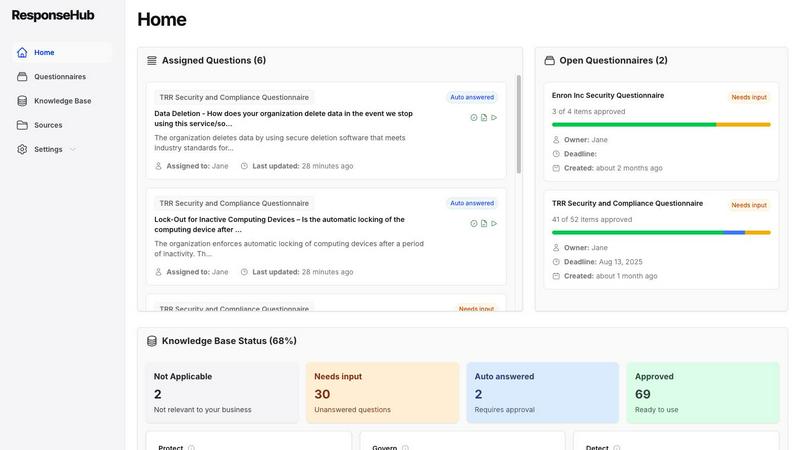
ResponseHub uses AI to automate and accurately answer security questionnaires, saving teams significant time.
Last updated: February 28, 2026
Visual Comparison
Hush Touch | Voice-to-Text for MacOS

ResponseHub
Feature Comparison
Hush Touch | Voice-to-Text for MacOS
Dual-Engine Recognition
Hush Touch employs a dual-engine recognition system that combines the capabilities of DictationTranscriber and SFSpeechRecognizer. This powerful blend ensures natural flow and accurate punctuation while boosting your custom vocabulary. The final text output benefits from an additional pass by Apple Intelligence, enhancing overall transcription accuracy.
Smart Text Processing
This feature allows Hush Touch to process your speech intelligently, removing filler words and correcting common mistakes in real time. The app can detect recurring phrases and format lists automatically, making dictation smoother and output more polished without requiring extensive manual editing.
Custom Vocabulary Learning
Hush Touch supports a custom vocabulary of up to 500 terms, which can learn from your corrections over time. This feature is especially beneficial for users who frequently utilize specialized terminology, including medical terms, technical jargon, or brand names, ensuring that the app recognizes your unique language.
Context Modes & Hands-Free Dictation
With four distinct context modes—General, Email, Code, and Notes—Hush Touch provides tailored dictation experiences for various writing tasks. It also supports hands-free operation, allowing users to initiate dictation using Siri or a hotkey, with automatic text insertion after a brief pause, enhancing convenience and workflow efficiency.
ResponseHub
Intelligent Document Parsing and Analysis
ResponseHub's AI-powered parser is engineered to handle any spreadsheet format, regardless of complexity. It adeptly navigates cover sheets, multiple tabs, and ambiguous column headers to accurately identify and extract every security question. This eliminates the manual, error-prone task of copying and pasting questions, providing a clean, structured starting point for the response process directly within the platform.
Automated Knowledge Base with AI Suggestions
The platform maintains a dynamic, centralized Automated Knowledge Base that is continuously refined and updated. As you complete questionnaires, the AI suggests new entries based on your answers and source documents. Furthermore, the Knowledge Base auto-updates whenever new policy documents or sources are uploaded, ensuring your repository of approved responses is always current and comprehensive, reducing repetitive work.
Citation-Backed Answer Generation with Confidence Scoring
Every answer generated by ResponseHub is meticulously referenced to the exact source document, including the specific policy, page, section, and sentence. This provides complete auditability and confidence. Additionally, the platform employs a finely-tuned answer-confidence rating for each response and offers AI-powered, one-click explainers for complex questions, guiding users on interpretation and necessary actions.
Collaborative Workflow and Delegation Tools
ResponseHub streamlines team collaboration by allowing users to assign specific questions to subject matter experts across the organization for review or input. The workflow includes clear delegation paths and final approval controls. Every change and comment is logged and tracked within the system, providing full visibility into the response process and ensuring accountability.
Use Cases
Hush Touch | Voice-to-Text for MacOS
Drafting Emails
Hush Touch is ideal for busy professionals who need to draft emails quickly. By dictating their messages, users can maintain productivity and focus on their thoughts without the distraction of typing, all while enjoying the app's intelligent text processing features.
Creating Notes
Students and professionals can leverage Hush Touch to take notes during lectures or meetings. The app captures spoken information accurately, allowing users to concentrate on the content rather than the mechanics of writing, ultimately improving retention and understanding.
Writing Documents
Writers and content creators can use Hush Touch to compose articles, reports, or other lengthy documents. The adaptive learning and custom vocabulary features ensure that the output aligns with their unique style and terminology, making writing more efficient and enjoyable.
Transcribing Meetings
Hush Touch is an excellent tool for transcribing meetings or interviews. Users can simply dictate the conversation as it unfolds, with the app capturing key points, action items, and follow-up tasks accurately, thus streamlining communication and documentation processes.
ResponseHub
Accelerating Enterprise Sales Cycles
For sales and technical teams pursuing large enterprise deals, lengthy security questionnaires are a common and critical gate. ResponseHub enables these teams to return comprehensive, professional responses in hours instead of days, dramatically accelerating the sales cycle. This speed and reliability prevent deal slippage and allow sales engineers to focus on crafting technical solutions rather than administrative paperwork.
Streamlining Security and Compliance Operations
Security and compliance officers are responsible for ensuring consistent, accurate, and policy-aligned responses across all vendor assessments. ResponseHub serves as a force multiplier, automating the bulk of the response work and providing a single source of truth via its Knowledge Base. This ensures compliance, reduces individual workload, and allows these professionals to focus on strategic risk management rather than manual questionnaire completion.
Empowering Startup and Scale-up Technical Leadership
CTOs, VPs of Engineering, and technical founders in fast-growing companies often become bottlenecks, personally handling complex security reviews that pull them away from product development. ResponseHub empowers these leaders to delegate the questionnaire process with confidence, knowing answers will be accurate and cited. This reclaims crucial time for building product and scaling engineering teams.
Managing High-Volume Questionnaire Influx
Organizations experiencing rapid growth or operating in regulated industries frequently face waves of simultaneous questionnaires from multiple prospects. Manually managing this volume is unsustainable. ResponseHub provides the scalability to handle multiple, complex questionnaires concurrently without sacrificing accuracy or increasing headcount, turning a chaotic process into a manageable, efficient workflow.
Overview
About Hush Touch | Voice-to-Text for MacOS
Hush Touch is an innovative voice-to-text application designed specifically for macOS users, offering a seamless and private dictation experience. This app distinguishes itself by operating entirely on-device, ensuring that your voice data remains secure and confidential. With a lightweight installation package of just 5.5 MB, Hush Touch integrates effortlessly into everyday writing workflows, whether you're drafting emails, creating notes, or composing documents. The application harnesses the power of two Apple transcription engines, enhancing accuracy and fluency in real-time transcription. Hush Touch is ideal for professionals, students, and anyone who values efficiency and privacy in their dictation processes. By learning your vocabulary and preferences over time, it delivers polished text output while eliminating filler words and improving punctuation. With a one-time purchase of $20 for a lifetime license, Hush Touch is an economically sensible choice for users seeking reliable voice dictation without recurring subscription costs.
About ResponseHub
ResponseHub is an AI-powered security questionnaire automation platform engineered to liberate organizations from the manual, time-consuming, and high-stakes burden of completing vendor security assessments and compliance questionnaires. It serves as a critical operational tool for security teams, sales engineers, compliance officers, and technical leaders in startups and growing companies who are frequently inundated with complex security reviews from potential enterprise clients. The platform's core value proposition is its ability to transform a process that traditionally consumes days of valuable personnel time into one that can be confidently completed in a matter of hours. ResponseHub achieves this by intelligently parsing uploaded questionnaire spreadsheets, cross-referencing each question against an organization's uploaded policy documents, standard operating procedures (SOPs), and an ever-evolving, AI-suggested internal knowledge base. This process generates precise, citation-backed answers, ensuring responses are not only rapid but also accurate, consistent, and fully auditable. By mitigating legal and reputational risk and freeing critical team members from administrative tedium, ResponseHub directly enables organizations to refocus energy on core business activities such as closing deals, shipping product, and driving growth.
Frequently Asked Questions
Hush Touch | Voice-to-Text for MacOS FAQ
Is Hush Touch really a one-time purchase?
Yes, Hush Touch is available for a one-time fee of $20, which grants users a lifetime license. There are no hidden fees or subscription costs, making it a cost-effective choice for voice dictation software.
How does Hush Touch ensure my privacy?
Hush Touch processes all voice data entirely on your Mac, meaning there is no cloud dependency or data collection involved. This on-device processing ensures your dictation remains private and secure.
Can I customize the vocabulary in Hush Touch?
Absolutely! Hush Touch allows users to create a custom vocabulary of up to 500 terms and learns from corrections made during dictation. This feature is particularly useful for professionals who use specialized language.
What are the system requirements for Hush Touch?
Hush Touch is specifically designed for macOS, ensuring compatibility with the latest Apple hardware and software updates. Users should have a Mac capable of running the latest version of macOS to ensure optimal performance.
ResponseHub FAQ
What types of documents can I upload to ResponseHub?
You can upload an unlimited number of source documents in PDF format, including information security policies, privacy policies, disaster recovery plans, product descriptions, and standard operating procedures (SOPs). If you lack formal policies, ResponseHub offers a free policy generator to create foundational documents in minutes, providing immediate structure for the platform to utilize.
How does ResponseHub ensure the accuracy of its AI-generated answers?
Accuracy is ensured through a multi-layered approach. First, the AI cross-references each question directly against your uploaded source documents to find verbatim or contextual matches. Every answer is accompanied by a clear citation pointing to the exact source. Second, the platform provides confidence ratings for each answer and question explainers, empowering your team to review and validate. The system is designed for human-in-the-loop verification, not fully autonomous output.
Can ResponseHub handle complex Excel questionnaires with multiple tabs?
Yes, this is a core capability. The AI-powered parser is specifically designed to handle complex spreadsheet structures, including workbooks with multiple sheets, cover pages, merged cells, and non-standard column headers. It intelligently identifies and extracts all questions across all tabs, organizing them within the platform for a streamlined response experience, effectively eliminating "spreadsheet hell."
Is there a way to import existing security answer knowledge?
Absolutely. If you have an existing repository of security answers in tools like Notion or Google Sheets, you can export that data to a CSV file and import it directly into ResponseHub to seed your Automated Knowledge Base. Alternatively, you can choose to generate an initial knowledge base structured around the NIST Cybersecurity Framework to quickly establish a comprehensive starting point.
Alternatives
Hush Touch | Voice-to-Text for MacOS Alternatives
Hush Touch | Voice-to-Text for MacOS is a sophisticated voice-to-text application designed specifically for the macOS platform. It belongs to the AI Assistants category, providing users with a seamless dictation experience that prioritizes privacy by operating entirely offline. Users often seek alternatives to Hush Touch due to varying needs such as pricing, feature sets, platform compatibility, or specific functionalities that may better suit their unique workflows. When searching for alternatives, it is essential to consider factors such as the application’s ease of use, accuracy of transcription, and whether it operates offline or requires cloud connectivity. Additionally, users may want to evaluate the pricing model, including whether a one-time purchase or subscription service is more advantageous for their dictation needs. Understanding these aspects will aid in selecting the most suitable voice-to-text solution.
ResponseHub Alternatives
ResponseHub is an AI-powered platform in the security and compliance automation category, specifically designed to automate the completion of vendor security questionnaires. It uses artificial intelligence to parse complex documents, cross-reference questions against internal policies, and generate accurate, citation-backed answers, transforming a process that typically takes days into one completed in hours. Organizations may explore alternatives to ResponseHub for various reasons. Common drivers include budget constraints and specific pricing model needs, such as preferring per-user licensing over per-questionnaire pricing. Some may require deeper integrations with existing GRC or CRM platforms, while others might seek different feature emphases, like enhanced manual review workflows or support for questionnaire types beyond standard security assessments. When evaluating an alternative solution, key considerations should include the core AI and automation capabilities for parsing and answering questions, the flexibility and intelligence of the underlying knowledge base management, and the platform's ability to ensure accuracy and auditability. The ideal tool should not only accelerate the process but also reduce risk by generating reliable, consistent responses that align with your organization's actual security posture and documented controls.