
Looktara vs MyImageUpscaler
Side-by-side comparison to help you choose the right product.

Looktara
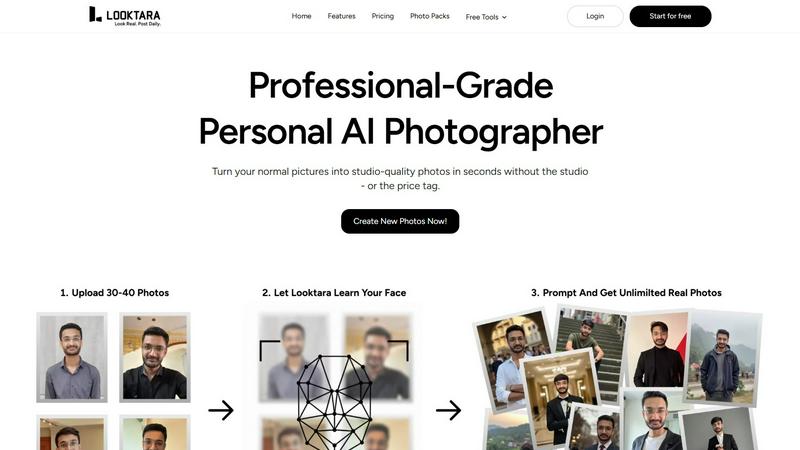
Looktara is your personal AI photographer creating professional, personalized headshots in minutes.
Last updated: February 28, 2026

MyImageUpscaler
MyImageUpscaler is an AI-powered tool that enhances images to 4K quality while preserving sharp details and text.
Last updated: February 26, 2026
Visual Comparison
Looktara
MyImageUpscaler

Feature Comparison
Looktara
Personalized AI Model Training
Looktara's foundational feature is its ability to create a unique, encrypted AI model from approximately 30 user-uploaded photos. This training process captures the user's precise facial features, expressions, bone structure, and personal style nuances. The resulting model is not a generic filter but a dedicated digital twin capable of generating new images that maintain a consistent and authentic likeness across all outputs, ensuring every photo is distinctly recognizable as the user.
Context-Aware Style Generation
Unlike standard AI generators that apply random or mismatched aesthetics, Looktara intelligently adapts styling to suit specific contexts and platforms. The AI can generate images tailored for professional LinkedIn profiles, casual Instagram posts, engaging Twitter headers, or authentic dating app profiles. This ensures clothing, backgrounds, lighting, and overall vibe are appropriate for the intended use, enhancing brand consistency and personal narrative.
Rapid Studio-Grade Photo Production
After the initial model is trained, Looktara delivers high-quality, studio-grade photographs in approximately five seconds per prompt. This feature provides immense value by eliminating the need for costly and time-consuming professional photoshoots. Users can generate a diverse portfolio of images on demand, anytime and anywhere, making it an incredibly efficient solution for maintaining a fresh and dynamic online presence.
Integrated Free Editing Tools
Beyond AI photo generation, Looktara offers a suite of complimentary utility tools to handle common image editing tasks. This suite includes functionalities like background removal, face blurring, image cropping, resizing, compression, format conversion, and adding text behind images. This integrated ecosystem allows users to prepare source photos for training and perform final tweaks on generated images without needing separate software.
About MyImageUpscaler
Advanced Detail Preservation
MyImageUpscaler employs cutting-edge AI algorithms that ensure every image retains its essential details during the upscaling process. Unlike traditional methods that may introduce blurriness or artifacts, our technology guarantees crisp, high-quality results that are faithful to the original image.
Rapid Processing Speed
With MyImageUpscaler, users can process images in under 10 seconds, making it an incredibly efficient tool for those needing quick results. This rapid turnaround is ideal for professionals who work under tight deadlines or need to handle bulk image processing without sacrificing quality.
Batch Processing Capability
The platform supports batch processing, allowing users to upscale and enhance up to 500 images simultaneously. This feature is particularly useful for businesses and content creators who need to manage large quantities of images, saving both time and effort while delivering consistent quality across multiple files.
Platform-Ready Presets
MyImageUpscaler provides platform-specific presets designed for popular social media and e-commerce platforms, including Amazon, Instagram, YouTube, and TikTok. These presets ensure that images are optimized for each platform's requirements, making it easier for users to produce content that looks great anywhere online.
Use Cases
Looktara
Professional Branding and LinkedIn Profiles
Professionals across industries use Looktara to create a consistent library of high-quality headshots and situational workplace images. This allows them to project authority, approachability, and industry relevance on platforms like LinkedIn. Users can generate photos in various professional attire and settings—from office environments to conference speaking scenarios—ensuring their profile remains current and engaging without recurring photoshoot costs.
Social Media Content Creation for Influencers
Influencers and content creators leverage Looktara to maintain a steady stream of authentic personal imagery for platforms like Instagram, Twitter, and TikTok. The tool enables them to generate photos in diverse outfits and locations that match their content calendar's theme, whether it's travel, fitness, fashion, or casual daily life, all while preserving their genuine likeness and saving substantial time on content production.
Dating Profile Optimization
Individuals on dating apps such as Tinder, Bumble, and Hinge use Looktara to create a variety of appealing, genuine, and context-appropriate photos. The AI can generate images that showcase different aspects of personality and lifestyle—from a smart casual look for a first impression to hobby-based action shots—helping users present a well-rounded and authentic profile that stands out while ensuring privacy and safety.
Personal Portfolio and Website Imagery
Freelancers, artists, consultants, and small business owners utilize Looktara to produce professional photos for their personal websites, portfolios, and marketing materials. This includes clean headshots for an "About Me" page, images that depict them in a work context, or relaxed photos that build rapport with potential clients, all contributing to a polished and trustworthy online presence.
MyImageUpscaler
E-Commerce Sellers
E-commerce sellers can benefit immensely from MyImageUpscaler by enhancing product images to capture customer attention. High-quality visuals lead to better engagement and increased sales, making this tool essential for online retailers looking to improve their listings.
Content Creators
Content creators, including bloggers and social media influencers, can utilize MyImageUpscaler to resize and enhance images for their platforms. By producing sharp, professional-looking images, they can elevate their content and attract more followers, contributing to their overall brand growth.
Real Estate Agents
Real estate agents can prepare high-resolution images for MLS listings using MyImageUpscaler. Clear and detailed photos of properties can significantly impact a buyer's interest, making this tool crucial for agents needing to showcase homes effectively.
Photographers
Photographers can streamline their workflow by processing large batches of images with MyImageUpscaler. Whether it's for client projects or personal portfolios, the ability to enhance multiple images quickly allows photographers to focus more on their art and less on tedious editing tasks.
Overview
About Looktara
Looktara is an advanced personal AI photography tool engineered to solve the pervasive problem of generic and unrealistic AI-generated imagery. It functions as an on-demand, professional-grade photographer that learns and replicates a user's unique likeness and style. The core technology involves users uploading approximately 30 photos of themselves, which the system uses to train a personalized, encrypted AI model. This model then generates studio-quality solo photographs in about five seconds based on user prompts. Looktara is specifically designed for professionals, influencers, and individuals seeking to elevate their personal or professional brand across digital platforms. Its primary value proposition lies in its commitment to authenticity and contextual appropriateness, ensuring generated photos feature natural expressions, realistic skin textures, and styling that aligns with the user's industry and desired vibe—be it authoritative, warm, or relaxed. By prioritizing user-specific realism over generic filters, Looktara has established itself as a trusted solution, having created over 18 million photos for more than 102,207 customers.
About MyImageUpscaler
MyImageUpscaler is an innovative AI-driven image enhancement and upscaling platform tailored for businesses, content creators, and individuals seeking high-quality image processing solutions. Designed to deliver remarkable results, MyImageUpscaler allows users to upscale images by 2x to 4x while meticulously preserving sharpness and enhancing fine details. This technology is particularly beneficial for e-commerce sellers, real estate agents, and photographers who require high-resolution images without sacrificing quality. With a free tier offering 10 credits and no credit card required, users can immediately experience the capabilities of the platform. Paid plans start at an affordable $9 per month, making it an accessible option for those looking to elevate their visual content. The platform's advanced algorithms ensure that crucial aspects, such as text and logos, remain sharp and legible, allowing for professional-grade outputs suitable for marketing materials, branded content, and social media posts. Ultimately, MyImageUpscaler empowers users to upscale smarter, not harder, providing a seamless and efficient image enhancement experience.
Frequently Asked Questions
Looktara FAQ
How many photos do I need to upload to train my Looktara AI model?
You need to upload approximately 30 photos of yourself to train your personalized Looktara AI model effectively. These photos should be clear, well-lit, and showcase your face from a variety of angles and with different expressions. This diversity helps the AI learn your unique features comprehensively, leading to more accurate and realistic generated images.
Is my data and likeness secure with Looktara?
Yes, Looktara places a high priority on user security and privacy. The personal AI model created from your uploaded photos is encrypted. The company emphasizes that your data and digital likeness are handled with strict confidentiality, ensuring that your personal information and generated images remain secure and under your control.
How realistic are the photos compared to other AI generators?
Looktara is specifically engineered to produce highly realistic and authentic images, which is its core differentiation from conventional AI photo generators. It avoids common pitfalls like overly smooth "plastic" skin, unnatural facial features, and awkward poses. By focusing on your unique likeness and context-aware styling, it delivers results that are coherent with real-world photography and your personal brand.
Can I control the style and setting of the generated photos?
Absolutely. Looktara provides significant control through user prompting. You can describe the desired setting (e.g., "coffee shop," "modern office"), style (e.g., "professional suit," "casual weekend wear"), and even the mood or vibe (e.g., "confident," "friendly," "relaxed"). The AI then generates photos tailored to these specific instructions, giving you creative say over the final output.
MyImageUpscaler FAQ
How does MyImageUpscaler enhance images without losing quality?
MyImageUpscaler utilizes advanced neural network technology to intelligently upscale images while preserving essential details and clarity. Unlike traditional resizing methods that can result in pixelation or blurriness, our AI reconstructs realistic details based on a vast dataset of high-quality images, ensuring professional results.
What makes MyImageUpscaler different from other image enhancement tools?
MyImageUpscaler stands out due to its unique combination of ease of use, text preservation, and affordability. It offers a web-based solution that eliminates the need for expensive software installations, providing access to professional-grade enhancements without the steep learning curve often associated with desktop applications.
Can I process multiple images at once?
Yes, MyImageUpscaler enables batch processing of up to 500 images simultaneously. This feature is designed to save users time and effort, allowing for efficient handling of large projects while maintaining consistent quality across all images.
Is there a free trial available, and what does it include?
Yes, MyImageUpscaler offers a free tier that includes 10 credits for users to try the service without requiring a credit card. This allows potential customers to experience the platform's capabilities and determine if it meets their image enhancement needs before committing to a paid plan.
Alternatives
Looktara Alternatives
Looktara is a specialized personal AI photography tool within the generative art category. It distinguishes itself by creating a unique, encrypted AI model from user-uploaded photos to produce highly personalized and realistic studio-grade portraits in seconds. This focus on authenticity and professional-grade output caters to individuals seeking to enhance their digital presence with consistent, high-quality imagery. Users may explore alternatives for various reasons, including budget constraints, specific feature requirements not met by a single platform, or a desire for different artistic styles and generation capabilities. Some may seek tools with broader creative control, different pricing models, or platforms integrated into larger creative suites. The need can stem from both personal preference and professional necessity. When evaluating alternatives, key considerations include the quality and realism of the AI-generated output, the degree of personalization and model training offered, generation speed, cost structure, and the range of available styles and contexts. Security and data privacy practices are also paramount, as is the tool's ability to produce images that genuinely reflect one's unique likeness and professional brand across diverse scenarios.
MyImageUpscaler Alternatives
MyImageUpscaler is an AI-powered image enhancement platform that specializes in upscaling images while preserving their quality and fine details. It is primarily designed for businesses and content creators who need to enhance their photos quickly and efficiently. Users often seek alternatives to MyImageUpscaler for various reasons, including pricing structures, feature sets, and compatibility with different platforms. As they explore their options, it is essential to consider factors such as processing speed, image quality, batch processing capabilities, and the availability of free tiers or lower-cost plans to ensure that their needs are met effectively. When choosing an alternative to MyImageUpscaler, users should pay close attention to the specific features offered, such as the degree of image enhancement and the ability to preserve text and labels. Additionally, evaluating the user interface and ease of use can significantly impact the overall experience. Users should also consider the scalability of the solution, especially if they need to process large batches of images or require preset formats for various platforms like e-commerce or social media.