
LuxSign vs MeetingMind
Side-by-side comparison to help you choose the right product.

LuxSign offers a secure, compliant platform for fast electronic signatures and document management across the EU.
Last updated: February 26, 2026

MeetingMind
MeetingMind automatically records and summarizes Zoom meetings into private notes on your Mac.
Last updated: March 1, 2026
Visual Comparison
LuxSign

MeetingMind
Feature Comparison
LuxSign
Multiple Signature Methods
LuxSign offers various signature methods to accommodate user preferences, allowing individuals to draw their signature, type their name, or upload an image. In addition, the platform supports custom initials for quick document signing, ensuring flexibility and convenience for all users.
Advanced Security
The platform prioritizes security through industry-standard encryption protocols that protect documents during upload, storage, and transmission. Furthermore, LuxSign guarantees that all data is securely hosted in Luxembourg, complying with stringent EU data protection regulations, thus instilling confidence in users about their document safety.
Collaboration Workspaces
LuxSign provides collaboration workspaces that facilitate teamwork and organization. Users can create shared environments for their teams, manage document folders, control member access, and work together seamlessly on signing workflows, making it easier to handle multiple documents and signers.
Complete Audit Trail
Every action taken within LuxSign is meticulously logged, providing a complete audit trail that includes timestamps, IP addresses, and signer information. This feature ensures transparency and is essential for compliance verification, allowing businesses to maintain detailed records of all signing activities.
MeetingMind
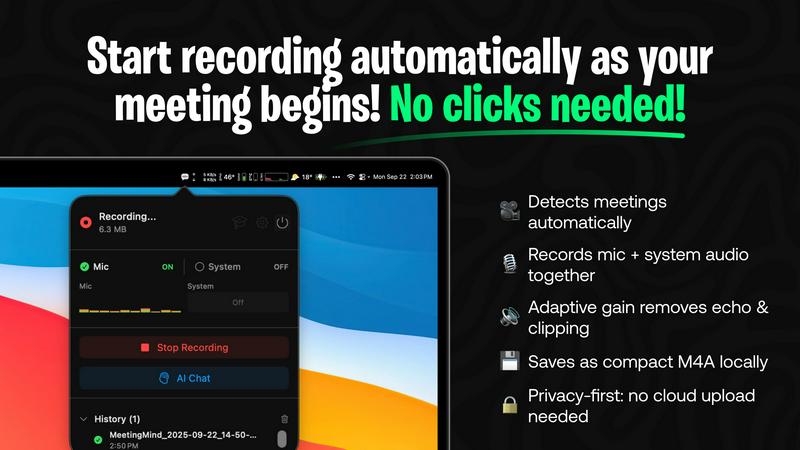
Automatic Zoom Detection
MeetingMind eliminates the need for manual recording controls by intelligently detecting when a user joins or starts a Zoom meeting. The application automatically initiates recording in the background, ensuring that every meeting is captured from the very beginning without any clicks or commands from the user. This hands-free operation is crucial for maintaining focus during meetings and guarantees that no part of the discussion is missed due to human error or delayed recording start.
Local AI Processing & Privacy
A cornerstone feature of MeetingMind is its commitment to user privacy through local on-device processing. All audio recording, transcription, and AI summarization occur directly on the user's Mac. This architecture ensures that sensitive meeting audio and transcripts are never uploaded to external servers, providing complete data sovereignty and security. Users can opt for a local AI model via Ollama or choose a cloud provider via OpenRouter, maintaining flexibility while prioritizing local processing for maximum confidentiality.
Intelligent Transcription & Markdown Export
The tool provides real-time, speaker-attributed transcripts that are formatted in clean, readable markdown. After the meeting concludes, users receive a comprehensive document that includes the full transcript, an AI-generated summary, and extracted action items. This markdown format is highly versatile, allowing for easy copying, sharing, and integration into note-taking apps, project management tools, or knowledge bases, thereby streamlining the workflow from discussion to documentation.
Menu Bar Integration & Adaptive Audio Capture
MeetingMind runs as a discreet menu bar application, remaining invisible and non-intrusive until needed. It features adaptive audio capture that simultaneously records both microphone audio (for participant voices) and system audio (for presentation sounds, shared media, or other participants' audio). This dual-channel recording ensures complete meeting context is preserved with clarity, capturing every spoken word and digital sound played during the session.
Use Cases
LuxSign
Contract Signatures
Businesses can utilize LuxSign for signing contracts securely and efficiently. By enabling multiple signers and offering both parallel and sequential signing workflows, organizations can expedite the approval process while ensuring compliance with legal standards.
Human Resources Documentation
HR departments can streamline the signing of employee contracts, offer letters, and other essential documents using LuxSign. The platform's ease of use allows for rapid document turnaround, enhancing the onboarding experience for new employees.
Financial Agreements
Financial institutions can leverage LuxSign for signing agreements related to loans, investment contracts, and other financial documents. The security measures in place ensure that sensitive information remains protected throughout the signing process.
Legal Document Management
Law firms and legal departments can adopt LuxSign for managing various legal documents, including client agreements and court filings. The comprehensive audit trails and secure storage facilitate compliance with legal standards and provide peace of mind during document handling.
MeetingMind
Remote Team Stand-ups and Syncs
For distributed teams conducting daily stand-ups or weekly syncs via Zoom, MeetingMind automatically captures these frequent, often rapid-fire meetings. Team members can fully engage in the discussion without worrying about note-taking. Afterwards, the AI-generated summary and action items provide a clear, shareable record of updates, blockers, and next steps, ensuring alignment and accountability across the entire remote team.
Client Consultations and Discovery Calls
Professionals such as consultants, sales representatives, and freelancers can use MeetingMind to meticulously record client meetings. The accurate transcript ensures every client requirement, concern, and agreed-upon deliverable is documented verbatim. This creates a reliable single source of truth that prevents scope creep, builds trust through transparency, and serves as a valuable reference when crafting proposals or project plans.
Educational Lectures and Training Sessions
Educators and trainers delivering lectures or workshops over Zoom can employ MeetingMind to create automated lecture notes. The system captures the instructor's audio and any supporting audio from slides or videos. Students or trainees can then receive a formatted transcript and summary, which aids in study, revision, and accessibility, ensuring key concepts and instructions are not lost.
Project Planning and Brainstorming Sessions
During intensive project kickoff or creative brainstorming meetings, ideas flow quickly and decisions are made. MeetingMind acts as a reliable scribe, capturing all contributions and discussions. The resulting document, with its clear transcript and condensed summary, allows teams to revisit the creative process, confirm decisions, and extract concrete action items, effectively bridging the gap between ideation and execution.
Overview
About LuxSign
LuxSign is a cutting-edge electronic signature platform designed specifically for businesses that prioritize security, compliance, and efficiency. Built in Luxembourg, it leverages the country's robust data protection laws to provide a cloud-based solution that ensures all documents are encrypted end-to-end and stored securely within EU borders, thereby guaranteeing full compliance with GDPR regulations. LuxSign is tailored for organizations of all sizes, from small businesses to large enterprises, that require legally valid signatures for their contracts across the European Union. The platform adheres to eIDAS SES standards, offering legal validity and a variety of features such as parallel and sequential signing workflows, customizable signature fields, and automated notifications. By streamlining document signing processes, LuxSign enhances productivity while maintaining the highest levels of security and compliance.
About MeetingMind
MeetingMind is a sophisticated, AI-powered meeting assistant application designed exclusively for macOS to revolutionize the productivity of professionals engaged in virtual meetings. Its primary function is to automatically detect, record, and transcribe Zoom meetings, transforming live discussions into actionable, searchable, and intelligently summarized notes. The tool's core value proposition lies in its seamless automation and robust privacy-first approach. It operates quietly from the macOS menu bar, requiring no manual intervention to start or stop recordings, thereby ensuring users can focus entirely on the meeting content. By leveraging advanced on-device AI processing, MeetingMind guarantees that all audio data, including both microphone input and system audio, is captured and processed locally. This means sensitive meeting conversations never leave the user's computer, offering a significant privacy advantage over cloud-based alternatives. It is ideally suited for business professionals, remote teams, educators, consultants, and anyone who participates in frequent virtual calls and needs to ensure no critical detail, decision, or action item is forgotten. The output is delivered in clean, formatted markdown, complete with speaker-attributed transcripts and AI-generated summaries, making post-meeting review and knowledge retention exceptionally efficient.
Frequently Asked Questions
LuxSign FAQ
How does LuxSign ensure document security?
LuxSign employs industry-standard encryption methods for documents during upload, storage, and transmission. Additionally, all data is hosted on secure servers in Luxembourg, ensuring compliance with EU data protection laws.
Is LuxSign compliant with GDPR regulations?
Yes, LuxSign is fully compliant with GDPR and Luxembourg's data protection laws, guaranteeing that your documents are handled with the utmost security and privacy.
Can I use LuxSign for multiple signers?
Absolutely. LuxSign supports up to four signers per document, allowing for both parallel and sequential signing workflows to suit your needs.
What types of documents can I upload to LuxSign?
LuxSign supports a variety of document formats, including PDF, DOC, and DOCX files, with automatic conversion available to streamline your signing process. Users can upload files up to 10MB effortlessly.
MeetingMind FAQ
How does MeetingMind ensure privacy during recording?
MeetingMind ensures privacy through a fundamental design principle: all audio processing occurs locally on your Mac. The application records microphone and system audio directly to your device and uses on-device AI (or a user-selected cloud API) to generate transcripts and summaries. This means the raw audio data from your meetings is never uploaded to or stored on external servers, giving you complete control and confidentiality over your sensitive conversations.
What is included in the free 60 minutes per day plan?
The free plan is a fully-featured tier that includes 60 minutes of recording time per calendar day. It encompasses all core functionalities: automatic Zoom meeting detection, live transcription, AI-generated summaries and action items, local on-device processing for privacy, and markdown export. This plan is designed to be perpetually free and is sufficient for many daily short meetings like stand-ups or one-on-one check-ins.
What are the benefits of the one-time Unlimited purchase?
The Unlimited version is a single, one-time purchase that removes the daily 60-minute recording limit, allowing for unrestricted recording duration. It includes all features from the Free plan, guarantees lifetime access to the application, and includes future updates at no additional cost. This model provides significant long-term value compared to subscription-based services, with no recurring fees.
Is there a way to use cloud-based AI instead of local processing?
Yes, MeetingMind offers flexibility in its AI processing backend. While it defaults to and highly recommends local processing via Ollama for maximum privacy, users have the option to configure the application to use OpenRouter. This service acts as a gateway to various cloud-based large language models (like GPT-4, Claude, etc.) for generating summaries and insights, allowing users to choose based on their preference for model power versus data privacy.
Alternatives
LuxSign Alternatives
LuxSign is a sophisticated electronic signature platform developed in Luxembourg, designed to facilitate secure document signing for businesses. As part of the productivity and management category, it ensures compliance with eIDAS SES standards, making its electronic signatures legally valid across all EU member states. Users may seek alternatives to LuxSign due to various factors, including pricing, specific feature requirements, or the need for integrations with existing workflows and platforms. When searching for an alternative, it is crucial to consider aspects such as compliance with legal standards, security features, user interface, and the level of customer support offered by the platform.
MeetingMind Alternatives
MeetingMind is a specialized AI meeting assistant for macOS that automatically records and summarizes Zoom meetings into searchable notes. It falls within the productivity and meeting management software category, designed to help professionals capture and organize discussions without manual effort. Users often explore alternatives for various reasons, including budget constraints, the need for cross-platform compatibility beyond macOS, or requirements for different feature sets such as integration with other video conferencing tools or collaboration platforms. Specific organizational policies regarding data storage and processing can also drive the search for different solutions. When evaluating alternatives, key considerations should include the platform's supported operating systems, the depth of its AI summarization capabilities, its approach to user privacy and data security, and how well it integrates into your existing workflow. The ideal tool balances automated efficiency with reliable, accurate outputs that fit your specific meeting culture and technical environment.