
MeetingMind vs Zovo
Side-by-side comparison to help you choose the right product.

MeetingMind
MeetingMind automatically records and summarizes Zoom meetings into private notes on your Mac.
Last updated: March 1, 2026

Unlock 20 privacy-first Chrome extensions for developers and writers with Zovo, built by a solo developer for your.
Last updated: February 26, 2026
Visual Comparison
MeetingMind
Zovo

Feature Comparison
MeetingMind
Automatic Zoom Detection
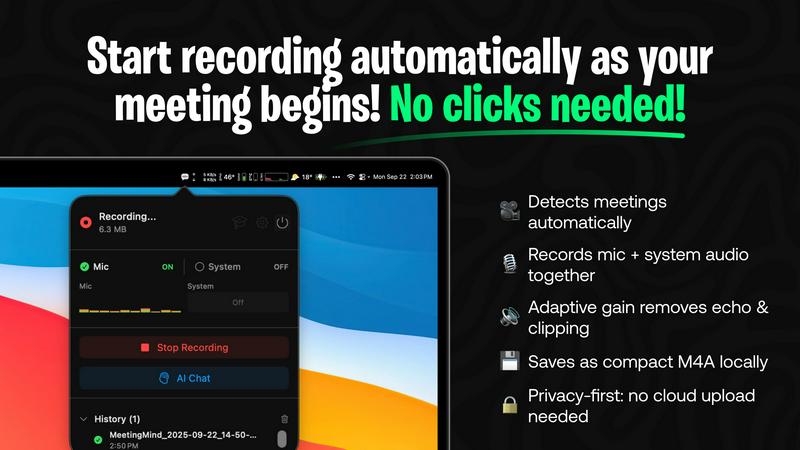
MeetingMind eliminates the need for manual recording controls by intelligently detecting when a user joins or starts a Zoom meeting. The application automatically initiates recording in the background, ensuring that every meeting is captured from the very beginning without any clicks or commands from the user. This hands-free operation is crucial for maintaining focus during meetings and guarantees that no part of the discussion is missed due to human error or delayed recording start.
Local AI Processing & Privacy
A cornerstone feature of MeetingMind is its commitment to user privacy through local on-device processing. All audio recording, transcription, and AI summarization occur directly on the user's Mac. This architecture ensures that sensitive meeting audio and transcripts are never uploaded to external servers, providing complete data sovereignty and security. Users can opt for a local AI model via Ollama or choose a cloud provider via OpenRouter, maintaining flexibility while prioritizing local processing for maximum confidentiality.
Intelligent Transcription & Markdown Export
The tool provides real-time, speaker-attributed transcripts that are formatted in clean, readable markdown. After the meeting concludes, users receive a comprehensive document that includes the full transcript, an AI-generated summary, and extracted action items. This markdown format is highly versatile, allowing for easy copying, sharing, and integration into note-taking apps, project management tools, or knowledge bases, thereby streamlining the workflow from discussion to documentation.
Menu Bar Integration & Adaptive Audio Capture
MeetingMind runs as a discreet menu bar application, remaining invisible and non-intrusive until needed. It features adaptive audio capture that simultaneously records both microphone audio (for participant voices) and system audio (for presentation sounds, shared media, or other participants' audio). This dual-channel recording ensures complete meeting context is preserved with clarity, capturing every spoken word and digital sound played during the session.
Zovo
BeLikeNative
BeLikeNative allows users to write like native speakers in just one keystroke, supporting an impressive 80 languages. This feature is particularly beneficial for non-native speakers looking to enhance their writing skills and communicate more effectively in various languages.
Tab Suspender Pro
Tab Suspender Pro intelligently manages your browser's memory by automatically suspending inactive tabs. This feature helps reduce memory usage, improve browser performance, and keep your workflow uninterrupted, making it ideal for users juggling multiple tabs.
Clipboard History Pro
Clipboard History Pro ensures that users never lose copied text again by maintaining a history of up to 10,000 clips. Users can instantly search their clipboard history and utilize smart paste functions, which significantly enhances productivity during tasks involving text management.
Form Filler Pro
Form Filler Pro simplifies the process of filling out online forms by allowing users to save multiple profiles and fill forms with a single click. This feature is particularly useful for those who frequently engage in online registrations or surveys, saving time and reducing repetitive tasks.
Use Cases
MeetingMind
Remote Team Stand-ups and Syncs
For distributed teams conducting daily stand-ups or weekly syncs via Zoom, MeetingMind automatically captures these frequent, often rapid-fire meetings. Team members can fully engage in the discussion without worrying about note-taking. Afterwards, the AI-generated summary and action items provide a clear, shareable record of updates, blockers, and next steps, ensuring alignment and accountability across the entire remote team.
Client Consultations and Discovery Calls
Professionals such as consultants, sales representatives, and freelancers can use MeetingMind to meticulously record client meetings. The accurate transcript ensures every client requirement, concern, and agreed-upon deliverable is documented verbatim. This creates a reliable single source of truth that prevents scope creep, builds trust through transparency, and serves as a valuable reference when crafting proposals or project plans.
Educational Lectures and Training Sessions
Educators and trainers delivering lectures or workshops over Zoom can employ MeetingMind to create automated lecture notes. The system captures the instructor's audio and any supporting audio from slides or videos. Students or trainees can then receive a formatted transcript and summary, which aids in study, revision, and accessibility, ensuring key concepts and instructions are not lost.
Project Planning and Brainstorming Sessions
During intensive project kickoff or creative brainstorming meetings, ideas flow quickly and decisions are made. MeetingMind acts as a reliable scribe, capturing all contributions and discussions. The resulting document, with its clear transcript and condensed summary, allows teams to revisit the creative process, confirm decisions, and extract concrete action items, effectively bridging the gap between ideation and execution.
Zovo
Enhanced Writing for Non-Native Speakers
Non-native speakers can benefit immensely from BeLikeNative, which provides instant rewrites to improve fluency and expression in writing. This use case is particularly valuable for students, professionals, and anyone looking to enhance their communication in a foreign language.
Memory Management for Power Users
Power users who often keep numerous tabs open can leverage Tab Suspender Pro to manage their browser's memory effectively. By suspending inactive tabs, users can ensure smoother performance and prevent crashes, making it essential for individuals who multitask.
Efficient Text Management for Professionals
Professionals who frequently copy and paste text can utilize Clipboard History Pro to maintain a well-organized clipboard. This tool allows for quick retrieval of previously copied content, streamlining workflows in tasks such as content creation or data entry.
Simplified Online Forms for Busy Individuals
Busy individuals can save time with Form Filler Pro, which allows for quick completion of repetitive online forms. This is particularly advantageous for users who need to fill out various forms for applications, registrations, or surveys, enabling them to focus on more critical tasks.
Overview
About MeetingMind
MeetingMind is a sophisticated, AI-powered meeting assistant application designed exclusively for macOS to revolutionize the productivity of professionals engaged in virtual meetings. Its primary function is to automatically detect, record, and transcribe Zoom meetings, transforming live discussions into actionable, searchable, and intelligently summarized notes. The tool's core value proposition lies in its seamless automation and robust privacy-first approach. It operates quietly from the macOS menu bar, requiring no manual intervention to start or stop recordings, thereby ensuring users can focus entirely on the meeting content. By leveraging advanced on-device AI processing, MeetingMind guarantees that all audio data, including both microphone input and system audio, is captured and processed locally. This means sensitive meeting conversations never leave the user's computer, offering a significant privacy advantage over cloud-based alternatives. It is ideally suited for business professionals, remote teams, educators, consultants, and anyone who participates in frequent virtual calls and needs to ensure no critical detail, decision, or action item is forgotten. The output is delivered in clean, formatted markdown, complete with speaker-attributed transcripts and AI-generated summaries, making post-meeting review and knowledge retention exceptionally efficient.
About Zovo
Zovo is an innovative suite of 20 Chrome extensions meticulously crafted by a solo developer with over a decade of experience in software development. With a stellar track record of earning more than $400,000 on Upwork and maintaining a perfect 100% success rate, Zovo stands out as a unique offering in the crowded landscape of browser tools. The flagship extension, BeLikeNative, has already empowered over 3,300 users to write like native speakers across 80 languages with a single keystroke. This suite includes a diverse range of tools, such as Tab Suspender Pro, JSON Formatter Pro, Clipboard History Pro, Form Filler Pro, and many others, all designed to enhance productivity and streamline web browsing. Zovo prioritizes user privacy, ensuring that no data leaves the user's device, and fosters a community-driven development model where users can vote on features and influence the product roadmap. With new extensions rolling out monthly and many tools available for free at zovo.one, Zovo is committed to delivering value without the interference of corporate interests or data harvesting.
Frequently Asked Questions
MeetingMind FAQ
How does MeetingMind ensure privacy during recording?
MeetingMind ensures privacy through a fundamental design principle: all audio processing occurs locally on your Mac. The application records microphone and system audio directly to your device and uses on-device AI (or a user-selected cloud API) to generate transcripts and summaries. This means the raw audio data from your meetings is never uploaded to or stored on external servers, giving you complete control and confidentiality over your sensitive conversations.
What is included in the free 60 minutes per day plan?
The free plan is a fully-featured tier that includes 60 minutes of recording time per calendar day. It encompasses all core functionalities: automatic Zoom meeting detection, live transcription, AI-generated summaries and action items, local on-device processing for privacy, and markdown export. This plan is designed to be perpetually free and is sufficient for many daily short meetings like stand-ups or one-on-one check-ins.
What are the benefits of the one-time Unlimited purchase?
The Unlimited version is a single, one-time purchase that removes the daily 60-minute recording limit, allowing for unrestricted recording duration. It includes all features from the Free plan, guarantees lifetime access to the application, and includes future updates at no additional cost. This model provides significant long-term value compared to subscription-based services, with no recurring fees.
Is there a way to use cloud-based AI instead of local processing?
Yes, MeetingMind offers flexibility in its AI processing backend. While it defaults to and highly recommends local processing via Ollama for maximum privacy, users have the option to configure the application to use OpenRouter. This service acts as a gateway to various cloud-based large language models (like GPT-4, Claude, etc.) for generating summaries and insights, allowing users to choose based on their preference for model power versus data privacy.
Zovo FAQ
What kind of user data does Zovo collect?
Zovo prioritizes user privacy and does not collect any personal data. All data remains on your device, ensuring that your browsing habits are not harvested or tracked.
How can I request new features for Zovo?
Users can submit feature requests directly through the Zovo platform. The developer actively reviews all requests, and the most popular features are prioritized for development.
Is there a community where I can engage with other Zovo users?
Yes, Zovo has a vibrant Discord community where users can connect, share their experiences, and provide feedback. This platform also allows for direct communication with the developer for any questions or suggestions.
Are there free tools available through Zovo?
Absolutely! Many tools from the Zovo suite are available for free online at zovo.one. Users can access these tools without installation, allowing for immediate use in their browsers.
Alternatives
MeetingMind Alternatives
MeetingMind is a specialized AI meeting assistant for macOS that automatically records and summarizes Zoom meetings into searchable notes. It falls within the productivity and meeting management software category, designed to help professionals capture and organize discussions without manual effort. Users often explore alternatives for various reasons, including budget constraints, the need for cross-platform compatibility beyond macOS, or requirements for different feature sets such as integration with other video conferencing tools or collaboration platforms. Specific organizational policies regarding data storage and processing can also drive the search for different solutions. When evaluating alternatives, key considerations should include the platform's supported operating systems, the depth of its AI summarization capabilities, its approach to user privacy and data security, and how well it integrates into your existing workflow. The ideal tool balances automated efficiency with reliable, accurate outputs that fit your specific meeting culture and technical environment.
Zovo Alternatives
Zovo is a collection of 20 privacy-first Chrome extensions tailored for developers and writers, designed to enhance productivity and streamline workflows. This suite encompasses tools for various tasks, such as formatting JSON data, managing tabs, and maintaining clipboard history, all created by a seasoned solo developer with a proven track record. Users often seek alternatives to Zovo for reasons such as pricing structures, the availability of specific features, or compatibility with different platforms and browsers. When searching for alternatives, it is essential to consider factors such as the range of features offered, user interface design, privacy policies, and overall performance. Additionally, evaluating customer feedback and the developer's responsiveness to user needs can significantly influence the decision-making process. Ultimately, the right alternative should align with the user’s unique requirements and enhance their productivity.