
NB2 Hub vs Shrinkpad
Side-by-side comparison to help you choose the right product.

NB2 Hub
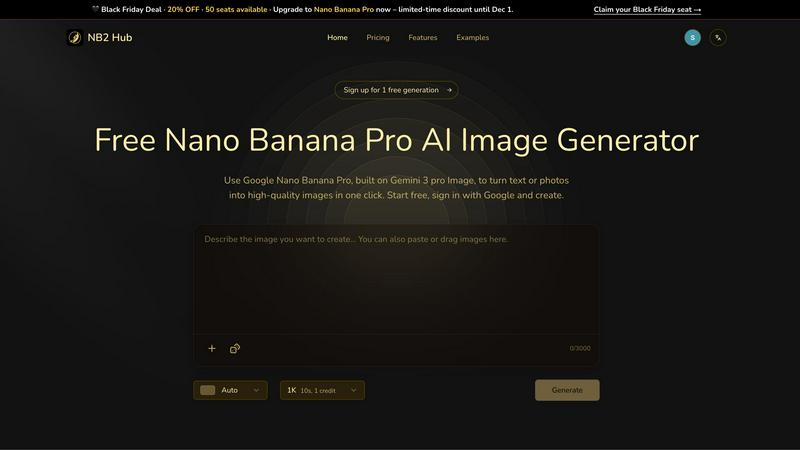
NB2 Hub's Nano Banana Pro AI instantly generates precise, production-ready 4K images from text or photos.
Last updated: March 1, 2026

Shrinkpad
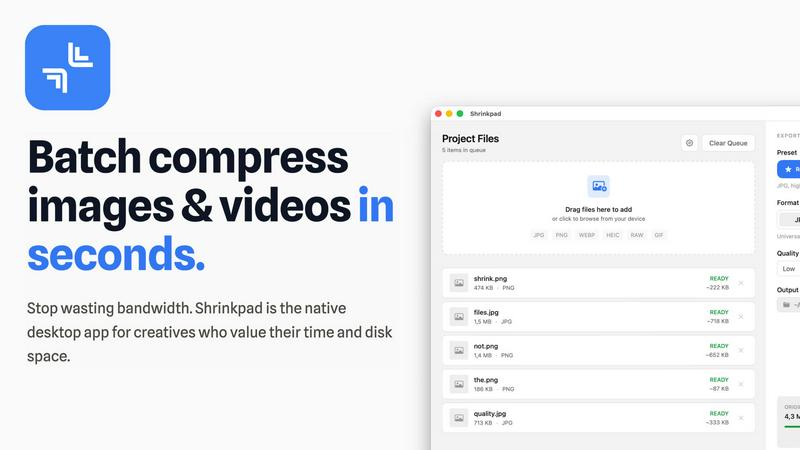
Effortlessly batch compress images and videos on your Mac to save time and optimize storage with Shrinkpad.
Last updated: February 28, 2026
Visual Comparison
NB2 Hub
Shrinkpad
Feature Comparison
NB2 Hub
Faithful Text + Image Remix
This feature allows users to upload a reference image alongside a short prompt, instructing the AI to intelligently reinterpret the scene. Nano Banana Pro excels at preserving the original layout, composition, and fundamental lighting while upgrading details, textures, and specific elements as directed. It is ideal for iterative design work, such as creating variations of UI mockups, refining product photography concepts, or generating new panels for a comic series while maintaining visual continuity.
Crisp Text Inside Images
A standout capability where the model generates clean, legible on-image text—from headlines to full paragraphs—with support for multilingual typography. It avoids common AI artifacts like blurring, halos, or garbled characters, producing text that is integrated seamlessly into the visual design. This makes it perfect for creating professional posters, advertisement creatives, social media covers, and any asset requiring clear, stylized textual elements directly within the image.
Multi-Reference Fusion & Identity Consistency
This advanced feature enables the fusion of visual information from multiple uploaded reference images into a single, coherent output. More importantly, it demonstrates exceptional proficiency in maintaining strict consistency for characters, products, logos, and other brand elements across a series of generated shots. This is invaluable for creating storyboards, multi-angle product sets, or campaign visuals where a unified identity is non-negotiable.
Pro-Level Lighting & Camera Control
Users gain fine-grained control over the cinematic qualities of generated images. This includes adjusting lens characteristics, framing, depth of field, color grading, and lighting direction. It allows for sophisticated local edits, such as transforming a daytime scene to night or applying dramatic chiaroscuro effects, empowering creators to achieve specific moods and professional, studio-quality results directly through prompt engineering.
Shrinkpad
Automatic Compression Ratio Adjustment
Shrinkpad utilizes advanced algorithms to automatically analyze the visual complexity of images and videos, applying the optimal compression ratio without introducing artifacts. This feature ensures that users achieve high-quality results, making it ideal for preserving visual integrity while significantly reducing file sizes.
Unlimited Batching Capability
With Shrinkpad, users can process thousands of media files simultaneously without crashing or slowing down. Unlike online tools that may limit batch sizes, Shrinkpad's robust architecture allows for massive queues, enabling users to handle extensive projects efficiently and effectively.
Folder Mode for Convenience
The Folder Mode feature allows users to drag and drop entire folders onto Shrinkpad, where the application automatically detects and processes all supported media files within. This removes the hassle of manually selecting files one by one, streamlining the workflow and saving time for busy professionals.
Privacy-Focused Local Processing
Shrinkpad prioritizes user privacy by ensuring that all processing occurs locally on the user's machine. This means that sensitive assets remain on the device, eliminating any concerns about cloud uploads or data breaches, which is especially crucial for creative professionals handling proprietary content.
Use Cases
NB2 Hub
Marketing & Advertising Creative Production
Marketing teams can rapidly generate high-quality ad creatives, social media visuals, and promotional posters. The platform's strength in embedding crisp text, maintaining brand consistency across an entire campaign, and applying logos to 3D product mockups streamlines the content creation pipeline, enabling quick iteration and A/B testing of visual concepts for different platforms and audiences.
Product Design & UI/UX Iteration
Designers can use the image-to-image remix capability to quickly generate variations of product shots, app interfaces, or website layouts. By uploading a base design and providing short prompts, they can explore different color schemes, textures, or stylistic elements while preserving the core layout and structure, significantly accelerating the prototyping and conceptualization phase.
Content Creation & Storyboarding
Writers, filmmakers, and content creators can visualize scenes, characters, and concepts consistently. The multi-reference fusion and identity consistency features are perfect for building a visual storyboard where characters retain their appearance across different shots and settings, ensuring narrative coherence in pitch decks, graphic novels, or video pre-production.
Educational & Informational Material Design
Educators and instructional designers can leverage the model's grounding in real-world facts to generate accurate, visually engaging infographics, diagrams, and illustrative content. The ability to produce clean text within complex layouts makes it an effective tool for creating compelling educational resources that explain data, processes, or concepts beautifully and truthfully.
Shrinkpad
Optimizing Digital Asset Management
Photographers and designers can utilize Shrinkpad to optimize their digital asset management workflows by batch compressing images and videos for use in portfolios and websites. By reducing file sizes, they can enhance loading times and overall user experience on their platforms.
Streamlining Social Media Content Creation
Content creators can leverage Shrinkpad to prepare images and videos for social media by quickly compressing media files to meet platform requirements without sacrificing quality. This allows for faster uploads and better engagement with audiences, enhancing their social media presence.
Enhancing Website Performance
Web developers can benefit from using Shrinkpad to compress images and videos before uploading them to websites. By reducing file sizes, developers can significantly decrease loading times, leading to improved Core Web Vitals and overall site performance, which is crucial for SEO.
Facilitating Efficient Team Collaboration
For teams working on design projects, Shrinkpad provides a way to compress shared media files for collaborative use. By allowing team members to quickly process and optimize assets, it fosters smoother collaboration and ensures that all members are working with the most efficient file versions available.
Overview
About NB2 Hub
NB2 Hub is a sophisticated, web-based AI image generation platform that provides direct, professional-grade access to Google's cutting-edge Nano Banana 2 model, which is built upon the powerful Gemini 3 Pro Image architecture. It is engineered as a comprehensive tool for transforming textual descriptions or existing reference images into high-quality, production-ready visual assets. The platform specializes in two core modalities: text-to-image generation for creating entirely new visuals from descriptive prompts, and image-to-image transformation for the intelligent remixing, enhancement, and iterative development of uploaded images. A primary and distinguishing value proposition of NB2 Hub is its exceptional strength in maintaining robust character and brand identity consistency across multiple image generations, a critical feature for cohesive marketing campaigns, product lines, and storytelling. It is designed for professional creators, marketers, designers, and businesses who require accurate, controllable, and fast visual content creation without compromising on fidelity, detail, or practical utility. With advanced capabilities like generating crisp, legible text within images, precise layout and aspect ratio control, multi-reference fusion, and pro-level lighting adjustments, NB2 Hub positions itself as an indispensable tool for real production work, offering outputs up to 4K resolution. The platform operates on a credit-based system and provides a free tier for experimentation, making advanced AI image generation accessible before scaling up to meet professional demands.
About Shrinkpad
Shrinkpad is a sophisticated batch compression tool meticulously crafted for macOS users who seek an efficient and reliable method to compress images and videos without sacrificing quality. Designed with photographers, designers, content creators, and everyday users in mind, Shrinkpad enables users to manage their media files more effectively by achieving file size reductions of up to 90%. The application processes files locally, guaranteeing user privacy by ensuring that no files are uploaded to the cloud. With a simple drag-and-drop interface, users can compress hundreds of files or entire folders in mere seconds. Shrinkpad supports over 50 file formats, making it a versatile solution for diverse media types, and its user-friendly interface includes both quick compression presets and detailed settings for advanced users. By utilizing Shrinkpad, users can reclaim valuable disk space, streamline their asset management processes, and improve their workflow efficiency, all while maintaining the highest standards of media quality.
Frequently Asked Questions
NB2 Hub FAQ
What is Nano Banana Pro?
Nano Banana Pro is the advanced AI image generation model powering NB2 Hub. It is built by Google on the Gemini 3 Pro Image architecture and is specifically fine-tuned for professional, production-oriented tasks. It distinguishes itself with superior capabilities in text rendering, layout fidelity, identity consistency, and detailed image control compared to many standard consumer-grade image AI models.
How does the credit system work?
NB2 Hub operates on a credit-based consumption model. Each image generation consumes a certain number of credits, which can vary based on parameters like resolution and complexity. The platform offers a free tier that provides a limited number of credits for users to experiment with, after which users can purchase additional credits or subscribe to a plan that provides a recurring monthly credit allowance.
Can I use NB2 Hub for commercial projects?
Yes, NB2 Hub is designed as a professional tool for commercial use. The images generated on the platform, including those created on paid plans, are typically intended for use in commercial projects such as advertising, product design, and content creation. Users should always review the platform's specific Terms of Service for the latest details regarding licensing and usage rights.
What image formats and resolutions are supported?
NB2 Hub is built for production-quality output. It supports high-resolution exports, including targets for 1K, 2K, and full 4K resolution, ensuring images are suitable for both digital and print media. The platform provides robust resampling for clean scaling. Generated images are commonly delivered in standard web formats like JPEG or PNG, suitable for immediate use in professional workflows.
Shrinkpad FAQ
Can I use Shrinkpad for free?
Yes, Shrinkpad offers a Free Starter plan that provides essential tools for casual users. This plan includes standard compression features with a limit of 10 files per batch, making it suitable for those who need basic functionality without a financial commitment.
What file formats does Shrinkpad support?
Shrinkpad supports over 50 file formats, including popular image formats such as JPG, PNG, WEBP, and AVIF, as well as video formats like MP4 and MOV. This extensive compatibility makes it a versatile tool for handling various media types.
Does Shrinkpad support video compression?
Absolutely, Shrinkpad includes robust video compression capabilities, allowing users to optimize video files alongside images. This feature ensures that both images and videos can be efficiently compressed, making it ideal for multimedia projects.
How many files can I process at once?
Shrinkpad's unlimited batching capability allows users to process thousands of files simultaneously. This feature is particularly advantageous for professionals who need to handle large volumes of media files without worrying about crashes or performance issues.
Alternatives
NB2 Hub Alternatives
NB2 Hub is a professional-grade, web-based AI image generation platform that operates within the text-to-image and image-to-image transformation category. It leverages Google's advanced Nano Banana 2 model to create high-fidelity, production-ready 4K visuals from text prompts or reference images, with a core strength in maintaining consistent character and brand identity across generations. Users may explore alternatives for various reasons, including budget constraints, specific feature requirements not covered by the platform, or a preference for different deployment models such as open-source software or locally-run applications. The search often stems from a need to compare pricing structures, output styles, control granularity, or integration capabilities with existing creative workflows. When evaluating an alternative, key considerations should include the model's core architecture and its proficiency in areas critical to your work, such as prompt adherence, image resolution, consistency tools, and specialized abilities like generating legible on-image text. The ideal platform should align with your technical requirements, creative demands, and operational scale, whether for individual artistry or enterprise-level content production.
Shrinkpad Alternatives
Shrinkpad is an advanced batch compression tool designed specifically for macOS users, enabling them to compress images and videos without sacrificing quality. It is particularly beneficial for photographers, designers, content creators, and everyday users who need an efficient way to manage large media files and optimize disk space. With its ability to reduce file sizes by up to 90%, Shrinkpad stands out in the image and video processing category. Users often seek alternatives to Shrinkpad for various reasons, including pricing, differing feature sets, or specific platform compatibility needs. Some may prefer options that cater to additional operating systems or offer unique functionalities that better fit their workflows. When choosing an alternative, users should consider factors such as batch processing capabilities, local versus cloud processing, supported file formats, and customization options to ensure they select a solution that meets their individual requirements.