
Looktara vs PhotoWeather
Side-by-side comparison to help you choose the right product.

Looktara
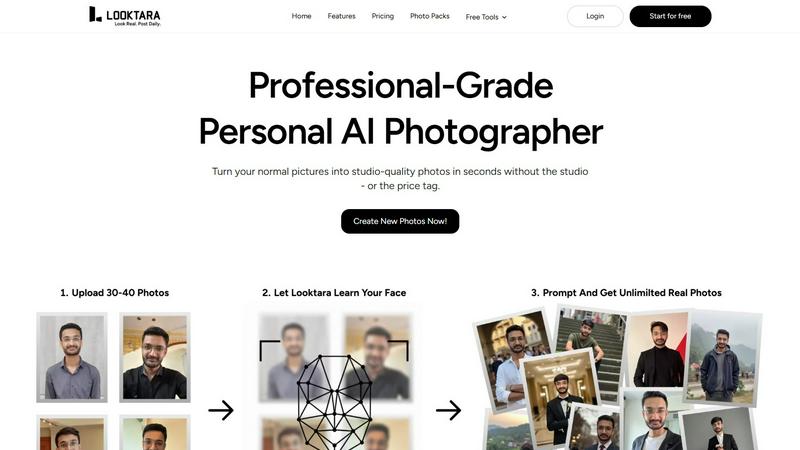
Looktara is your personal AI photographer creating professional, personalized headshots in minutes.
Last updated: February 28, 2026

PhotoWeather
Receive tailored weather alerts for optimal photography conditions, ensuring you never miss a perfect shot again.
Last updated: February 26, 2026
Visual Comparison
Looktara
PhotoWeather

Feature Comparison
Looktara
Personalized AI Model Training
Looktara's foundational feature is its ability to create a unique, encrypted AI model from approximately 30 user-uploaded photos. This training process captures the user's precise facial features, expressions, bone structure, and personal style nuances. The resulting model is not a generic filter but a dedicated digital twin capable of generating new images that maintain a consistent and authentic likeness across all outputs, ensuring every photo is distinctly recognizable as the user.
Context-Aware Style Generation
Unlike standard AI generators that apply random or mismatched aesthetics, Looktara intelligently adapts styling to suit specific contexts and platforms. The AI can generate images tailored for professional LinkedIn profiles, casual Instagram posts, engaging Twitter headers, or authentic dating app profiles. This ensures clothing, backgrounds, lighting, and overall vibe are appropriate for the intended use, enhancing brand consistency and personal narrative.
Rapid Studio-Grade Photo Production
After the initial model is trained, Looktara delivers high-quality, studio-grade photographs in approximately five seconds per prompt. This feature provides immense value by eliminating the need for costly and time-consuming professional photoshoots. Users can generate a diverse portfolio of images on demand, anytime and anywhere, making it an incredibly efficient solution for maintaining a fresh and dynamic online presence.
Integrated Free Editing Tools
Beyond AI photo generation, Looktara offers a suite of complimentary utility tools to handle common image editing tasks. This suite includes functionalities like background removal, face blurring, image cropping, resizing, compression, format conversion, and adding text behind images. This integrated ecosystem allows users to prepare source photos for training and perform final tweaks on generated images without needing separate software.
About PhotoWeather
Ready-Made Templates
PhotoWeather offers a variety of pre-made templates designed specifically for photographers, including conditions such as fog and mist, golden and blue hour, aurora visibility, and storm intensity. These templates simplify the setup process, allowing users to start receiving alerts tailored to their photographic interests right away.
Powerful Rule Builder
The platform includes a sophisticated rule builder with over 80 parameters, including cloud cover, visibility, wind speed, humidity, and more. Users can create custom alerts using logical operators like AND, OR, and NOT, enabling them to establish complex conditions for their photography needs, such as "Golden hour + 20-60% clouds + wind <7 m/s."
Smart Notifications
PhotoWeather provides a variety of smart notification options, including daily digests that summarize upcoming opportunities, reminders for important events, and real-time alerts when conditions change. This functionality is enhanced with calendar synchronization, allowing users to integrate their photo opportunities directly into their schedules.
Trusted Forecast Sources
PhotoWeather aggregates data from leading weather services like ECMWF, DWD, NOAA, and more, ensuring that users receive accurate and reliable forecasts. This integration helps photographers make informed decisions about when and where to shoot, based on trusted meteorological data.
Use Cases
Looktara
Professional Branding and LinkedIn Profiles
Professionals across industries use Looktara to create a consistent library of high-quality headshots and situational workplace images. This allows them to project authority, approachability, and industry relevance on platforms like LinkedIn. Users can generate photos in various professional attire and settings—from office environments to conference speaking scenarios—ensuring their profile remains current and engaging without recurring photoshoot costs.
Social Media Content Creation for Influencers
Influencers and content creators leverage Looktara to maintain a steady stream of authentic personal imagery for platforms like Instagram, Twitter, and TikTok. The tool enables them to generate photos in diverse outfits and locations that match their content calendar's theme, whether it's travel, fitness, fashion, or casual daily life, all while preserving their genuine likeness and saving substantial time on content production.
Dating Profile Optimization
Individuals on dating apps such as Tinder, Bumble, and Hinge use Looktara to create a variety of appealing, genuine, and context-appropriate photos. The AI can generate images that showcase different aspects of personality and lifestyle—from a smart casual look for a first impression to hobby-based action shots—helping users present a well-rounded and authentic profile that stands out while ensuring privacy and safety.
Personal Portfolio and Website Imagery
Freelancers, artists, consultants, and small business owners utilize Looktara to produce professional photos for their personal websites, portfolios, and marketing materials. This includes clean headshots for an "About Me" page, images that depict them in a work context, or relaxed photos that build rapport with potential clients, all contributing to a polished and trustworthy online presence.
PhotoWeather
Landscape Photography
For landscape photographers, PhotoWeather allows precise monitoring of weather conditions that can dramatically affect outdoor shots. By setting alerts for specific phenomena like fog or cloud cover, photographers can ensure they are in the right place at the right time to capture stunning landscapes.
Astrophotography
Astrophotographers benefit significantly from PhotoWeather's rule builder, which helps them track conditions such as moon phases, cloud cover, and atmospheric clarity. With alerts tailored to astronomical events, users can plan their shoots with confidence, knowing they will be notified of optimal conditions.
Wildlife Photography
Photographers focused on wildlife can utilize PhotoWeather to monitor environmental conditions that affect animal behavior, such as wind patterns and precipitation. By setting specific alerts, they can optimize their chances of capturing rare moments in nature.
Event Photography
For event photographers who need to capture outdoor events in changing weather conditions, PhotoWeather provides timely alerts that help them adapt their plans. Whether it's a wedding or a public gathering, users can ensure they are prepared for the best lighting and weather for their shoots.
Overview
About Looktara
Looktara is an advanced personal AI photography tool engineered to solve the pervasive problem of generic and unrealistic AI-generated imagery. It functions as an on-demand, professional-grade photographer that learns and replicates a user's unique likeness and style. The core technology involves users uploading approximately 30 photos of themselves, which the system uses to train a personalized, encrypted AI model. This model then generates studio-quality solo photographs in about five seconds based on user prompts. Looktara is specifically designed for professionals, influencers, and individuals seeking to elevate their personal or professional brand across digital platforms. Its primary value proposition lies in its commitment to authenticity and contextual appropriateness, ensuring generated photos feature natural expressions, realistic skin textures, and styling that aligns with the user's industry and desired vibe—be it authoritative, warm, or relaxed. By prioritizing user-specific realism over generic filters, Looktara has established itself as a trusted solution, having created over 18 million photos for more than 102,207 customers.
About PhotoWeather
PhotoWeather is a specialized weather alert service designed for outdoor photographers who want to optimize their shooting conditions. It provides real-time monitoring of weather forecasts, allowing users to set specific parameters that align with their photographic goals. By eliminating the need for incessant checks on standard weather apps, PhotoWeather ensures that photographers are alerted only when conditions are ideal for capturing breathtaking images — whether it's the enchanting fog at sunrise, the intensity of a storm, or the splendor of the golden hour. The service is tailored specifically for landscape, astrophotography, and wildlife photography enthusiasts, allowing them to focus on their craft without the distraction of irrelevant weather updates. The main value proposition of PhotoWeather lies in its ability to deliver timely and relevant notifications, ensuring that photographers never miss a perfect opportunity to capture the moment.
Frequently Asked Questions
Looktara FAQ
How many photos do I need to upload to train my Looktara AI model?
You need to upload approximately 30 photos of yourself to train your personalized Looktara AI model effectively. These photos should be clear, well-lit, and showcase your face from a variety of angles and with different expressions. This diversity helps the AI learn your unique features comprehensively, leading to more accurate and realistic generated images.
Is my data and likeness secure with Looktara?
Yes, Looktara places a high priority on user security and privacy. The personal AI model created from your uploaded photos is encrypted. The company emphasizes that your data and digital likeness are handled with strict confidentiality, ensuring that your personal information and generated images remain secure and under your control.
How realistic are the photos compared to other AI generators?
Looktara is specifically engineered to produce highly realistic and authentic images, which is its core differentiation from conventional AI photo generators. It avoids common pitfalls like overly smooth "plastic" skin, unnatural facial features, and awkward poses. By focusing on your unique likeness and context-aware styling, it delivers results that are coherent with real-world photography and your personal brand.
Can I control the style and setting of the generated photos?
Absolutely. Looktara provides significant control through user prompting. You can describe the desired setting (e.g., "coffee shop," "modern office"), style (e.g., "professional suit," "casual weekend wear"), and even the mood or vibe (e.g., "confident," "friendly," "relaxed"). The AI then generates photos tailored to these specific instructions, giving you creative say over the final output.
PhotoWeather FAQ
How do I get started?
To start using PhotoWeather, simply sign up for a free account on the website or download the mobile app from the App Store or Google Play. Once registered, you can begin adding your favorite shooting locations and creating custom alerts based on your preferred weather conditions.
How accurate are the forecasts?
PhotoWeather sources its forecasts from reputable meteorological services such as ECMWF, NOAA, and more, ensuring high accuracy and reliability. The platform also incorporates multiple models to provide users with confidence scores for various forecasts.
Can I create my own rules?
Yes, PhotoWeather features a powerful rule builder that allows users to create their own custom alerts using a wide array of weather parameters. This flexibility enables photographers to tailor the service to their unique shooting styles and preferences.
Do you support calendar sync?
Absolutely. PhotoWeather includes calendar synchronization features that allow users to add photo opportunities directly to their calendars. This ensures that users stay organized and are reminded of upcoming conditions that match their photography goals.
Alternatives
Looktara Alternatives
Looktara is a specialized personal AI photography tool within the generative art category. It distinguishes itself by creating a unique, encrypted AI model from user-uploaded photos to produce highly personalized and realistic studio-grade portraits in seconds. This focus on authenticity and professional-grade output caters to individuals seeking to enhance their digital presence with consistent, high-quality imagery. Users may explore alternatives for various reasons, including budget constraints, specific feature requirements not met by a single platform, or a desire for different artistic styles and generation capabilities. Some may seek tools with broader creative control, different pricing models, or platforms integrated into larger creative suites. The need can stem from both personal preference and professional necessity. When evaluating alternatives, key considerations include the quality and realism of the AI-generated output, the degree of personalization and model training offered, generation speed, cost structure, and the range of available styles and contexts. Security and data privacy practices are also paramount, as is the tool's ability to produce images that genuinely reflect one's unique likeness and professional brand across diverse scenarios.
PhotoWeather Alternatives
PhotoWeather is a specialized application designed for photographers, enabling them to receive alerts about ideal weather conditions for capturing stunning images. This tool simplifies the often tedious task of monitoring weather forecasts by providing timely notifications when conditions align with the photographer's goals, such as golden hour lighting, fog, or dramatic clouds. Users often seek alternatives to PhotoWeather due to various reasons, including pricing, the availability of features, or compatibility with different platforms. When selecting an alternative, it's essential to evaluate the breadth of features offered, the flexibility of rule creation, ease of use, and the reliability of notifications. Understanding individual photography needs and preferences will guide users toward the best choice for their specific requirements.