
PollQR vs Zovo
Side-by-side comparison to help you choose the right product.

PollQR creates QR code surveys for customer feedback and live polls for audience engagement.
Last updated: March 1, 2026

Unlock 20 privacy-first Chrome extensions for developers and writers with Zovo, built by a solo developer for your.
Last updated: February 26, 2026
Visual Comparison
PollQR
Zovo

Feature Comparison
PollQR
Dynamic QR Code Generation
PollQR provides a robust engine for creating customizable, long-lived QR codes that serve as gateways to interactive content. Users can generate codes for various purposes, from static feedback forms to dynamic live polls that update in real-time. These codes can be branded and placed on physical materials like receipts, table tents, posters, or embedded within digital presentations and live streams, offering a versatile bridge between the physical and digital worlds to capture audience input effortlessly.
AI-Powered Sentiment Analysis & Insights
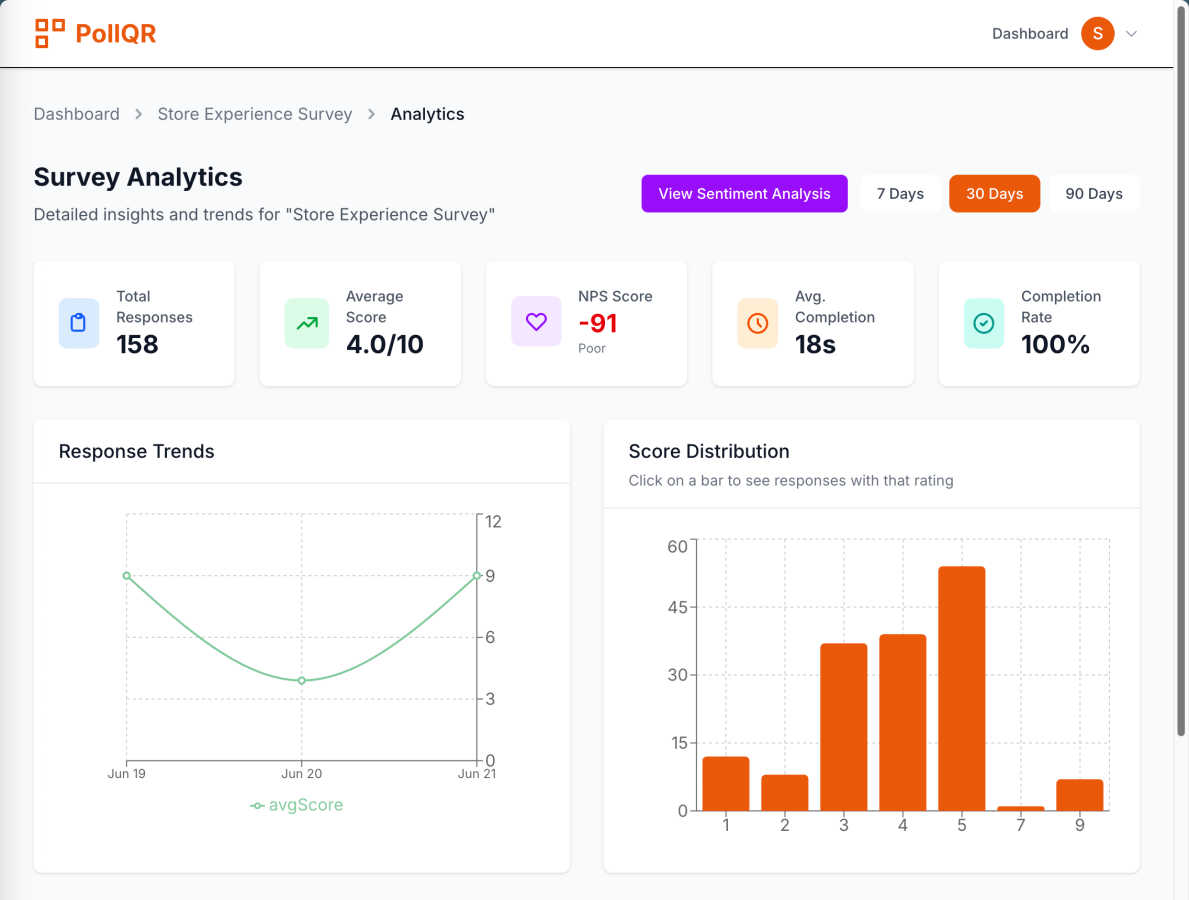
This advanced feature processes collected survey responses to deliver deep, actionable business intelligence. The AI analyzes open-ended feedback to perform sentiment analysis, categorizing responses as positive, negative, or neutral. It automatically identifies and surfaces key recurring themes and keywords from customer comments. The platform provides specific recommendations for improvement and allows users to click on any keyword to instantly view all associated feedback, transforming raw data into a clear roadmap for operational and service enhancements.
Real-Time Live Polling & Visualization
For live engagements, PollQR offers a suite of interactive poll types including multiple choice, word clouds, rankings, star ratings, and email collection. Presenters control the flow, choosing when to launch a poll and when to reveal results. Responses are aggregated and displayed live in visually engaging formats such as animated bar charts, pie charts, or tables, directly within the presentation screen. This creates a captivating, participatory experience and provides immediate insight into audience opinions and understanding.
Centralized Data Collection & Management
All responses from both surveys and live polls are securely stored in an organized, centralized database within the PollQR platform. Users receive real-time email notifications for new survey submissions. The system allows for easy management, filtering, and export of all collected data, including contact leads and poll results, into .CSV files for further analysis in external tools. This creates a single source of truth for all audience and customer feedback.
Zovo
BeLikeNative
BeLikeNative allows users to write like native speakers in just one keystroke, supporting an impressive 80 languages. This feature is particularly beneficial for non-native speakers looking to enhance their writing skills and communicate more effectively in various languages.
Tab Suspender Pro
Tab Suspender Pro intelligently manages your browser's memory by automatically suspending inactive tabs. This feature helps reduce memory usage, improve browser performance, and keep your workflow uninterrupted, making it ideal for users juggling multiple tabs.
Clipboard History Pro
Clipboard History Pro ensures that users never lose copied text again by maintaining a history of up to 10,000 clips. Users can instantly search their clipboard history and utilize smart paste functions, which significantly enhances productivity during tasks involving text management.
Form Filler Pro
Form Filler Pro simplifies the process of filling out online forms by allowing users to save multiple profiles and fill forms with a single click. This feature is particularly useful for those who frequently engage in online registrations or surveys, saving time and reducing repetitive tasks.
Use Cases
PollQR
Retail & Hospitality Customer Feedback
Restaurants, retail stores, and service businesses can place QR code surveys on receipts, tables, or storefronts to effortlessly gather continuous customer feedback. This passive collection method captures authentic sentiments post-experience. The platform's AI then analyzes this data to identify menu favorites, service pain points, and cleanliness mentions, while its "nudge" functionality can encourage satisfied customers to leave positive public reviews on platforms like Google, directly boosting online reputation and star ratings.
Interactive Conference & Workshop Presentations
Speakers and trainers at conferences, seminars, and corporate workshops use PollQR to break audience monotony and boost engagement. By displaying a QR code for live polls, word clouds, or Q&A sessions, presenters can gauge real-time understanding, gather opinions on topics, and make sessions more memorable. This interactivity provides valuable data on attendee perspectives and increases the overall impact and retention of the presented material.
Educational Classroom Engagement
Educators and professors utilize PollQR's live polling feature to transform lectures into interactive learning sessions. They can pose quick quiz questions to check comprehension, use word clouds to brainstorm ideas, or conduct live debates with ranking polls. This approach promotes active learning, provides immediate feedback on student understanding, and encourages participation from even the most reserved students, all without requiring them to download a separate app.
Lead Generation at Events & Points of Sale
Businesses at trade shows, exhibitions, or within their physical locations can use PollQR's email collection poll type or embed contact fields within surveys. By offering a quick scan to enter a raffle, access a digital resource, or provide feedback, companies can seamlessly build their marketing mailing lists with qualified leads. The data is instantly captured and organized, streamlining follow-up marketing efforts and customer relationship management.
Zovo
Enhanced Writing for Non-Native Speakers
Non-native speakers can benefit immensely from BeLikeNative, which provides instant rewrites to improve fluency and expression in writing. This use case is particularly valuable for students, professionals, and anyone looking to enhance their communication in a foreign language.
Memory Management for Power Users
Power users who often keep numerous tabs open can leverage Tab Suspender Pro to manage their browser's memory effectively. By suspending inactive tabs, users can ensure smoother performance and prevent crashes, making it essential for individuals who multitask.
Efficient Text Management for Professionals
Professionals who frequently copy and paste text can utilize Clipboard History Pro to maintain a well-organized clipboard. This tool allows for quick retrieval of previously copied content, streamlining workflows in tasks such as content creation or data entry.
Simplified Online Forms for Busy Individuals
Busy individuals can save time with Form Filler Pro, which allows for quick completion of repetitive online forms. This is particularly advantageous for users who need to fill out various forms for applications, registrations, or surveys, enabling them to focus on more critical tasks.
Overview
About PollQR
PollQR is a comprehensive, cloud-based platform engineered to transform audience and customer engagement through the strategic use of QR codes. It specializes in two distinct but powerful applications: generating long-term QR code surveys for business feedback and creating interactive, real-time QR code polls for live presentations. The product is designed for a diverse user base, including business owners, marketers, educators, trainers, conference speakers, and live streamers. Its core value proposition lies in replacing passive or cumbersome feedback methods with a seamless, mobile-first interactive experience. For businesses, PollQR facilitates the continuous collection of customer sentiment, driving online reputation management and lead generation. For presenters, it moves beyond the traditional show of hands to foster dynamic participation and gather instant audience insights. By integrating AI-powered analytics, the platform not only collects data but also distills it into actionable intelligence, helping users understand strengths, weaknesses, and audience emotions to make informed decisions that enhance service quality and presentation impact.
About Zovo
Zovo is an innovative suite of 20 Chrome extensions meticulously crafted by a solo developer with over a decade of experience in software development. With a stellar track record of earning more than $400,000 on Upwork and maintaining a perfect 100% success rate, Zovo stands out as a unique offering in the crowded landscape of browser tools. The flagship extension, BeLikeNative, has already empowered over 3,300 users to write like native speakers across 80 languages with a single keystroke. This suite includes a diverse range of tools, such as Tab Suspender Pro, JSON Formatter Pro, Clipboard History Pro, Form Filler Pro, and many others, all designed to enhance productivity and streamline web browsing. Zovo prioritizes user privacy, ensuring that no data leaves the user's device, and fosters a community-driven development model where users can vote on features and influence the product roadmap. With new extensions rolling out monthly and many tools available for free at zovo.one, Zovo is committed to delivering value without the interference of corporate interests or data harvesting.
Frequently Asked Questions
PollQR FAQ
Do attendees need to download an app to participate?
No, one of PollQR's primary advantages is its app-free participation model. Attendees or customers only need a smartphone with a standard camera app capable of scanning QR codes. Scanning the code opens a mobile-optimized web page where they can instantly submit feedback or vote in a live poll, ensuring maximum accessibility and a low barrier to entry for high participation rates.
What happens to the QR code survey data after collection?
All data from QR code surveys is securely stored in your private PollQR database. You can access it at any time through your account dashboard to view, filter, and analyze responses. The platform includes tools to download your complete dataset as a .CSV file for archival or advanced analysis. Furthermore, you can configure automatic email notifications to alert you immediately when new feedback is submitted.
How does the AI sentiment analysis work?
PollQR's AI sentiment analysis automatically processes the text from open-ended survey responses. It uses natural language processing (NLP) to assess the emotional tone behind the words, classifying feedback as positive, negative, or neutral. Simultaneously, it identifies and extracts frequently mentioned keywords and phrases, grouping them into key themes. This allows you to quickly see not just what customers are saying, but also how they feel about specific aspects of your service or product.
What is the difference between the Pro subscription and pay-per-poll pricing?
PollQR offers flexible pricing to suit different needs. The Pro subscription is ideal for frequent presenters or trainers, providing a monthly allowance of live polls (e.g., 100 polls/month) for a recurring fee. The pay-per-poll (a-la-carte) option, at a cost like $2.99 per poll, is designed for users who require live polling infrequently, such as for a single annual conference or a few special presentations, offering cost-effectiveness without a subscription commitment.
Zovo FAQ
What kind of user data does Zovo collect?
Zovo prioritizes user privacy and does not collect any personal data. All data remains on your device, ensuring that your browsing habits are not harvested or tracked.
How can I request new features for Zovo?
Users can submit feature requests directly through the Zovo platform. The developer actively reviews all requests, and the most popular features are prioritized for development.
Is there a community where I can engage with other Zovo users?
Yes, Zovo has a vibrant Discord community where users can connect, share their experiences, and provide feedback. This platform also allows for direct communication with the developer for any questions or suggestions.
Are there free tools available through Zovo?
Absolutely! Many tools from the Zovo suite are available for free online at zovo.one. Users can access these tools without installation, allowing for immediate use in their browsers.
Alternatives
PollQR Alternatives
PollQR is a productivity and management tool specializing in customer feedback and audience engagement through QR code surveys and live polling. It enables businesses to collect actionable insights and presenters to create interactive sessions, streamlining the process of understanding and responding to audience sentiment. Users may explore alternatives to PollQR for various reasons, including budget constraints, specific feature requirements not met by the platform, or the need for integration with other business systems. The search often stems from a desire for different pricing models, more advanced analytical capabilities, or a platform better suited for a particular industry or scale of operation. When evaluating an alternative, key considerations should include the core functionality for survey creation and live interaction, the depth and usability of analytics, data security and privacy compliance, and the overall cost relative to the value provided. The ideal solution should align with the user's primary objective, whether it's gathering customer feedback for service improvement or boosting engagement during live presentations and educational sessions.
Zovo Alternatives
Zovo is a collection of 20 privacy-first Chrome extensions tailored for developers and writers, designed to enhance productivity and streamline workflows. This suite encompasses tools for various tasks, such as formatting JSON data, managing tabs, and maintaining clipboard history, all created by a seasoned solo developer with a proven track record. Users often seek alternatives to Zovo for reasons such as pricing structures, the availability of specific features, or compatibility with different platforms and browsers. When searching for alternatives, it is essential to consider factors such as the range of features offered, user interface design, privacy policies, and overall performance. Additionally, evaluating customer feedback and the developer's responsiveness to user needs can significantly influence the decision-making process. Ultimately, the right alternative should align with the user’s unique requirements and enhance their productivity.