
MyImageUpscaler vs poseup
Side-by-side comparison to help you choose the right product.

MyImageUpscaler
MyImageUpscaler is an AI-powered tool that enhances images to 4K quality while preserving sharp details and text.
Last updated: February 26, 2026

poseup
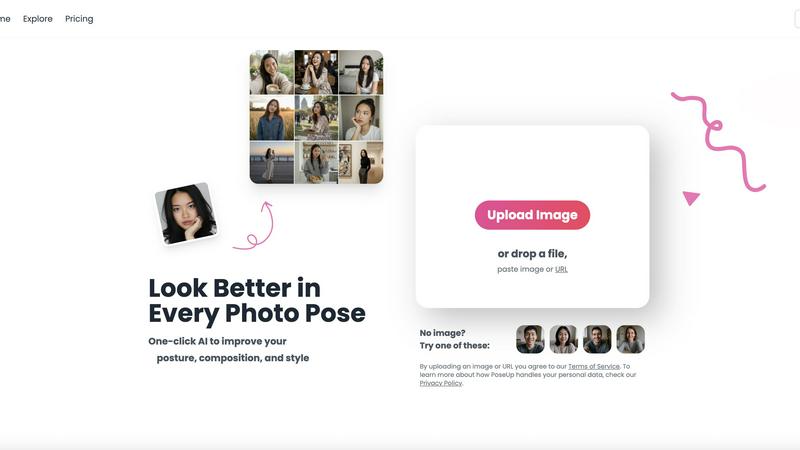
PoseUp uses AI to instantly correct posture and optimize composition for professional-quality photos.
Last updated: February 28, 2026
Visual Comparison
MyImageUpscaler

poseup
Feature Comparison
MyImageUpscaler
Advanced Detail Preservation
MyImageUpscaler employs cutting-edge AI algorithms that ensure every image retains its essential details during the upscaling process. Unlike traditional methods that may introduce blurriness or artifacts, our technology guarantees crisp, high-quality results that are faithful to the original image.
Rapid Processing Speed
With MyImageUpscaler, users can process images in under 10 seconds, making it an incredibly efficient tool for those needing quick results. This rapid turnaround is ideal for professionals who work under tight deadlines or need to handle bulk image processing without sacrificing quality.
Batch Processing Capability
The platform supports batch processing, allowing users to upscale and enhance up to 500 images simultaneously. This feature is particularly useful for businesses and content creators who need to manage large quantities of images, saving both time and effort while delivering consistent quality across multiple files.
Platform-Ready Presets
MyImageUpscaler provides platform-specific presets designed for popular social media and e-commerce platforms, including Amazon, Instagram, YouTube, and TikTok. These presets ensure that images are optimized for each platform's requirements, making it easier for users to produce content that looks great anywhere online.
About poseup
One-Click AI Pose Enhancement
This flagship feature allows users to instantly improve their photographs by simply uploading an image. The AI comprehensively analyzes the human subjects within the frame, evaluating their current posture and positioning. It then automatically suggests and applies adjustments to create a more natural, confident, and aesthetically pleasing pose. This process mimics the guidance a professional photographer would give during a shoot, effectively fixing common issues like stiff posture or unflattering angles without any manual intervention from the user.
Intelligent Posture Correction Technology
Beyond general posing, PoseUp employs specialized algorithms dedicated to correcting anatomical posture. The AI identifies subtle misalignments such as rounded shoulders, forward head posture, or asymmetrical stances that can make a subject appear less confident or uncomfortable. It then digitally adjusts the subject's silhouette to reflect a corrected, healthier, and more poised posture. This feature is particularly valuable for professional headshots and portraits where projecting an image of assurance and professionalism is paramount.
Automated Composition Optimization
PoseUp's AI extends its analysis to the entire image composition. It evaluates elements like the rule of thirds, subject placement within the frame, background balance, and overall visual flow. The tool can suggest subtle crops or digital adjustments to reposition the subject optimally, remove distracting empty spaces, and create a more balanced and engaging photograph that draws the viewer's eye to the intended focal point, thereby elevating the overall professional quality of the image.
Multi-Scene Adaptation
The platform is engineered to deliver reliable results across a diverse array of photography scenarios and genres. Whether the uploaded photo is a casual lifestyle snapshot, an outdoor adventure shot, a formal professional headshot, a fitness image, or a cozy coffee shop portrait, PoseUp's AI is trained to recognize the context and apply appropriate enhancement parameters. This ensures that the pose corrections and compositional advice are contextually relevant, maintaining the authentic feel of the original scene while significantly improving its visual appeal.
Use Cases
MyImageUpscaler
E-Commerce Sellers
E-commerce sellers can benefit immensely from MyImageUpscaler by enhancing product images to capture customer attention. High-quality visuals lead to better engagement and increased sales, making this tool essential for online retailers looking to improve their listings.
Content Creators
Content creators, including bloggers and social media influencers, can utilize MyImageUpscaler to resize and enhance images for their platforms. By producing sharp, professional-looking images, they can elevate their content and attract more followers, contributing to their overall brand growth.
Real Estate Agents
Real estate agents can prepare high-resolution images for MLS listings using MyImageUpscaler. Clear and detailed photos of properties can significantly impact a buyer's interest, making this tool crucial for agents needing to showcase homes effectively.
Photographers
Photographers can streamline their workflow by processing large batches of images with MyImageUpscaler. Whether it's for client projects or personal portfolios, the ability to enhance multiple images quickly allows photographers to focus more on their art and less on tedious editing tasks.
poseup
Social Media Content Creation
For influencers, bloggers, and regular social media users, presenting a polished image is crucial. PoseUp enables the rapid enhancement of selfies and lifestyle photos before posting. Users can ensure every photo showcases their best angle with perfect posture, leading to more engaging and professional-looking content for platforms like Instagram, TikTok, and LinkedIn without the need for a photographer or extensive editing sessions.
Professional Portrait and Headshot Photography
Photographers and individuals needing business headshots or professional portraits can use PoseUp as a powerful post-production tool. It can refine client photos by correcting subtle posture flaws and optimizing composition in bulk, saving significant editing time. Clients receive consistently excellent results, enhancing the photographer's service offering and ensuring subjects always appear confident and approachable in their professional imagery.
Personal Photography and Family Portraits
Families and individuals capturing personal memories can transform their casual photos into timeless portraits. PoseUp is ideal for fixing group photos where someone might be slouching or looking away, or for improving solo shots from vacations and events. It allows anyone to salvage and enhance precious moments, ensuring that family albums and personal galleries are filled with flattering, well-composed images worthy of framing.
Creative Projects and Couple Photography
Art directors, couples, or individuals working on creative projects can use PoseUp to experiment with pose ideas. The AI can provide inspiration and correction for couple poses, ensuring both subjects look harmonious and natural together. It serves as a virtual posing assistant, helping users visualize and achieve dynamic, romantic, or creative paired poses that they might not have been able to articulate or execute on their own.
Overview
About MyImageUpscaler
MyImageUpscaler is an innovative AI-driven image enhancement and upscaling platform tailored for businesses, content creators, and individuals seeking high-quality image processing solutions. Designed to deliver remarkable results, MyImageUpscaler allows users to upscale images by 2x to 4x while meticulously preserving sharpness and enhancing fine details. This technology is particularly beneficial for e-commerce sellers, real estate agents, and photographers who require high-resolution images without sacrificing quality. With a free tier offering 10 credits and no credit card required, users can immediately experience the capabilities of the platform. Paid plans start at an affordable $9 per month, making it an accessible option for those looking to elevate their visual content. The platform's advanced algorithms ensure that crucial aspects, such as text and logos, remain sharp and legible, allowing for professional-grade outputs suitable for marketing materials, branded content, and social media posts. Ultimately, MyImageUpscaler empowers users to upscale smarter, not harder, providing a seamless and efficient image enhancement experience.
About poseup
PoseUp is an advanced, AI-powered software platform engineered to democratize professional-grade photography by automatically enhancing photo poses, correcting posture, and optimizing image composition. At its core, PoseUp utilizes sophisticated artificial intelligence algorithms to analyze uploaded photographs across multiple critical dimensions, including subject posture, body positioning, lighting conditions, and overall compositional balance. The tool is designed for a broad spectrum of users, from casual smartphone photographers and social media enthusiasts to professional content creators and portrait photographers who seek to elevate their work efficiently. Its primary value proposition lies in delivering instant, expert-level photo corrections and enhancements with a single click, eliminating the need for extensive manual editing skills or in-depth photographic knowledge. By processing images to suggest and implement more flattering poses, rectify slouching or awkward stances, and improve the visual harmony of a scene, PoseUp ensures that every portrait, selfie, or group shot achieves its maximum aesthetic potential, making high-quality visual content accessible and effortless for everyone.
Frequently Asked Questions
MyImageUpscaler FAQ
How does MyImageUpscaler enhance images without losing quality?
MyImageUpscaler utilizes advanced neural network technology to intelligently upscale images while preserving essential details and clarity. Unlike traditional resizing methods that can result in pixelation or blurriness, our AI reconstructs realistic details based on a vast dataset of high-quality images, ensuring professional results.
What makes MyImageUpscaler different from other image enhancement tools?
MyImageUpscaler stands out due to its unique combination of ease of use, text preservation, and affordability. It offers a web-based solution that eliminates the need for expensive software installations, providing access to professional-grade enhancements without the steep learning curve often associated with desktop applications.
Can I process multiple images at once?
Yes, MyImageUpscaler enables batch processing of up to 500 images simultaneously. This feature is designed to save users time and effort, allowing for efficient handling of large projects while maintaining consistent quality across all images.
Is there a free trial available, and what does it include?
Yes, MyImageUpscaler offers a free tier that includes 10 credits for users to try the service without requiring a credit card. This allows potential customers to experience the platform's capabilities and determine if it meets their image enhancement needs before committing to a paid plan.
poseup FAQ
How does PoseUp's AI technology work?
PoseUp's technology is based on advanced computer vision and machine learning models trained on vast datasets of professional and amateur photographs. When you upload an image, the AI first detects human subjects and their key body points. It then analyzes this skeletal map against learned principles of flattering poses, ergonomic posture, and photographic composition. The system generates a set of digital adjustments to reposition limbs, straighten the spine, and reframe the subject within the image, all while preserving the individual's likeness and the photo's original context.
What image formats and file sizes does PoseUp support?
According to the provided information, PoseUp supports common image formats including JPG, PNG, WEBP, and HEIC. There is a file size limit of up to 5MB per uploaded image. This ensures broad compatibility with images from smartphones, digital cameras, and web downloads while maintaining processing efficiency on the platform's servers for fast enhancement results.
Is PoseUp suitable for complete beginners with no photography experience?
Absolutely. PoseUp is explicitly designed to be accessible to users with zero photography or editing knowledge. The entire process is automated: users only need to upload their photo and click to process. The AI handles all the complex analysis and adjustments internally, providing a professional result without the user needing to understand technical terms like composition rules, lighting ratios, or posture kinematics.
Can I use PoseUp for free?
Yes, PoseUp offers a free tier to get users started. The website context mentions that new users can "Get 50 free credits" upon joining, which allows for the enhancement of a number of images at no cost. This enables individuals to test the platform's core capabilities and see the transformation on their own photos before considering any paid subscription plans for higher volume usage.
Alternatives
MyImageUpscaler Alternatives
MyImageUpscaler is an AI-powered image enhancement platform that specializes in upscaling images while preserving their quality and fine details. It is primarily designed for businesses and content creators who need to enhance their photos quickly and efficiently. Users often seek alternatives to MyImageUpscaler for various reasons, including pricing structures, feature sets, and compatibility with different platforms. As they explore their options, it is essential to consider factors such as processing speed, image quality, batch processing capabilities, and the availability of free tiers or lower-cost plans to ensure that their needs are met effectively. When choosing an alternative to MyImageUpscaler, users should pay close attention to the specific features offered, such as the degree of image enhancement and the ability to preserve text and labels. Additionally, evaluating the user interface and ease of use can significantly impact the overall experience. Users should also consider the scalability of the solution, especially if they need to process large batches of images or require preset formats for various platforms like e-commerce or social media.
poseup Alternatives
PoseUp is an AI-powered tool in the image and photo enhancement category, specifically designed to automatically correct posture and optimize composition in photographs. It simplifies the process of achieving professional-looking results through one-click automation, making advanced photo correction accessible to a broad audience. Users may seek alternatives to PoseUp for various reasons, including specific budget constraints, the need for different or more advanced feature sets, or compatibility with particular operating systems or workflows. Some may require tools with greater manual control, integration with existing software suites, or different pricing models such as one-time purchases versus subscriptions. When evaluating an alternative, key considerations should include the core AI capabilities for pose and posture correction, the supported file formats and size limits, the overall ease of use, and the cost structure. It is also prudent to assess the tool's output quality, processing speed, and data privacy policies to ensure it aligns with both your creative needs and practical requirements.