
Proofapp vs SimpleDraw
Side-by-side comparison to help you choose the right product.

Proofapp
Proofapp enables visual feedback directly on websites to eliminate miscommunication and streamline design reviews.
Last updated: March 4, 2026

SimpleDraw
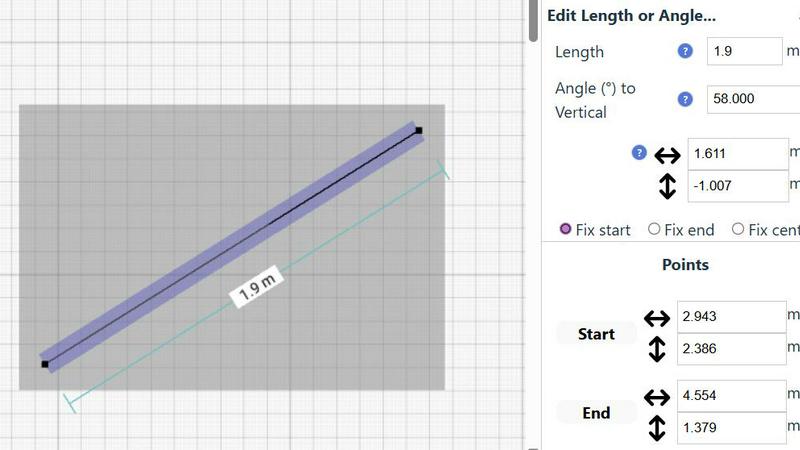
SimpleDraw is a free online tool for creating precise floor plans and scale drawings without any software installation.
Last updated: March 1, 2026
Visual Comparison
Proofapp

SimpleDraw
Feature Comparison
Proofapp
Visual Commenting
This foundational feature allows users to click directly on any area of a captured website screenshot to leave precise, contextual feedback. By pinning comments visually, it completely eliminates the guesswork and lengthy descriptions common in email or chat (e.g., "top left, under the navigation"). Each comment initiates a thread where team members and clients can reply, fostering clear and focused discussions tied directly to the design element in question, ensuring everyone is literally on the same page.
Multi-Breakpoint Testing
Proofapp automatically captures and presents screenshots of the submitted website at both desktop and mobile viewports simultaneously. This feature is critical for modern web development and design, allowing teams to review and collect feedback on a site's responsiveness and user experience across different devices within a single project. It ensures that visual and functional issues are caught and addressed for all breakpoints, not just a single screen size.
Secure, Account-Free Sharing
Project owners can generate secure, shareable links to send to clients and stakeholders for review. A significant advantage is that recipients can view the project and leave detailed feedback without the friction of creating a user account or remembering a password. These links can also be set to expire, providing control over access. This streamlines the client onboarding process and encourages faster, more direct participation in the feedback cycle.
Real-Time Collaboration & Notification
All activity within a Proofapp project is synchronized in real-time. When a new comment is pinned or a thread is updated, team members see the changes instantly without needing to refresh the page. Coupled with integrated real-time notifications and Slack integration, this feature ensures that feedback loops are tight and that no comment goes unnoticed, enabling dynamic, live collaboration that mimics an in-person review session.
About SimpleDraw
Accurate Measurements & Scale Drawing
SimpleDraw ensures precise measurements and smart alignment, allowing users to create drawings that are not only accurate but also to scale. This feature is essential for anyone looking to maintain fidelity in their designs, whether for personal projects or professional use.
Specialized Floor Plan Creator
With a dedicated Floor Plan Mode, users can create detailed floor plans with walls, doors, windows, and furniture using just a click. This mode provides real-time measurements as adjustments are made, making it easier to visualize spaces before committing to changes.
Smart Alignment System
The smart alignment system assists users in placing points and lines exactly where they want them. By using visual indicators, the tool helps ensure that each element is positioned accurately, which is particularly beneficial for intricate designs where precision is paramount.
Comprehensive Measurement System
SimpleDraw features a comprehensive measurement system that allows users to toggle between metric and standard US units. Dynamic contextual measurements are displayed as the user works on their drawings, providing immediate feedback to achieve the desired outcomes.
Use Cases
Proofapp
Freelancer-Client Website Approvals
Freelancers, such as web designers or developers, can use Proofapp to present their work professionally and collect clear, actionable feedback from clients. Instead of trading confusing emails and annotated screenshots, the freelancer shares a single link. Clients click directly on the design to leave comments, which are organized in one dashboard. This use case saves hours per project, reduces revision rounds, and presents a polished, efficient workflow that enhances client satisfaction and trust.
Agency Managing Multiple Client Projects
Digital and marketing agencies handling several client websites simultaneously benefit from Proofapp's project organization and multi-page support. They can manage all feedback for each client in a dedicated, visual workspace, avoiding the chaos of mixing feedback across email inboxes and chat channels. The platform's structure allows project managers to track progress, resolve comments, and ensure nothing falls through the cracks, scaling collaboration efficiently across their entire portfolio.
In-House Design & Development Team Sprints
Internal product teams, including UX/UI designers and front-end developers, can integrate Proofapp into their sprint cycles for internal reviews and QA. The visual commenting and real-time features facilitate quick, precise communication between departments, ensuring that feedback on new features or bug reports is contextual and clear. This leads to faster iteration, fewer misunderstandings, and a more streamlined path from staging to production.
Marketing Team Landing Page Reviews
Marketing teams launching campaigns can use Proofapp to collaboratively review landing pages, ad creatives, and email templates. Team members from copywriting, design, and analytics can all pin feedback on specific elements like headlines, call-to-action buttons, or imagery. The ability to attach files and have threaded discussions ensures all contextual information is preserved, leading to more cohesive and effective marketing assets that are approved faster.
SimpleDraw
Kitchen & Bathroom Floor Plans
Users planning renovations can utilize SimpleDraw to create accurate measurements and visualize layouts for kitchens and bathrooms before commencing work. This helps in making informed decisions about space utilization and design aesthetics.
Room Layouts & Furniture Planning
Whether designing a bedroom, living room, or office, SimpleDraw enables users to plan room layouts effectively. Users can ascertain whether furniture will fit in the designated spaces, preventing costly mistakes before purchases are made.
House & Apartment Plans
SimpleDraw is perfect for creating complete floor plans suitable for home projects, rental listings, or effective space planning. It allows for the detailed representation of various architectural features in a straightforward manner.
Community-Driven Development
SimpleDraw is evolving based on real user feedback, allowing the community to actively shape future features. This collaborative approach enhances the tool's functionality and ensures it meets the diverse needs of its user base.
Overview
About Proofapp
Proofapp is a sophisticated visual feedback and website review platform engineered to transform the collaborative workflow between designers, developers, and their clients. At its core, Proofapp addresses the chronic inefficiencies and miscommunications inherent in traditional feedback methods, such as endless email chains and vague textual notes. The platform operates by allowing users to upload any website URL, after which it automatically captures synchronized screenshots at both desktop and mobile breakpoints. Stakeholders can then pin comments directly onto the visual design, engage in threaded discussions, attach files, and mark feedback as resolved, all within a centralized, visual dashboard. A standout feature is that reviewers can participate without needing to create an account, significantly lowering the barrier to client collaboration. With capabilities like real-time notifications, Slack integration, multi-page project support, and customizable branding, Proofapp is designed for professionals ranging from solo freelancers to large agencies. Its primary value proposition is the elimination of scattered, ambiguous feedback by providing a structured, visual, and actionable environment that consolidates all project communication, thereby reducing revision cycles, saving significant time, and accelerating the path from review to launch.
About SimpleDraw
SimpleDraw is an innovative online tool designed for users seeking to create precise and accurate scale drawings effortlessly. This versatile platform caters to a broad audience, including amateur DIY enthusiasts, professional designers, and individuals looking to visualize home renovations. With its user-friendly interface, SimpleDraw allows anyone to produce detailed floor plans and technical drawings without the complexity often associated with traditional CAD software. Its main value proposition lies in simplicity and accessibility; the tool is completely free to use, requiring no registration or downloads. By focusing on providing powerful yet intuitive tools, SimpleDraw empowers users to achieve a level of precision that pen-and-paper methods cannot match. Whether you are designing a kitchen layout or planning a complete home renovation, SimpleDraw offers the ideal solution for accurate and functional design capabilities.
Frequently Asked Questions
Proofapp FAQ
How does Proofapp capture website screenshots?
Proofapp uses a secure, automated system to render and capture the webpage at the URL you provide. It processes the site to generate high-fidelity screenshots at predefined desktop and mobile breakpoints, ensuring an accurate visual representation for review. The process is typically completed within seconds, and the screenshots are stored securely within your project for your team and clients to annotate.
Do clients or reviewers need an account to give feedback?
No, one of Proofapp's key features is that reviewers do not need to create an account. Project owners simply generate a secure, shareable link and send it to their clients or stakeholders. Recipients can click the link, view the project, and immediately start leaving visual comments and participating in threads, making the feedback process incredibly frictionless and accessible.
Can I use Proofapp for websites that are not live or are behind a login?
The standard capture process requires a publicly accessible URL. For sites in development on localhost, staging servers, or behind authentication, Proofapp may not be able to capture them automatically. In such cases, users often manually upload full-page screenshots or use browser extensions to facilitate the review process, though native support for password-protected staging sites may be a feature under consideration.
What kind of integrations does Proofapp support?
Proofapp offers direct integration with Slack to send real-time notifications about new comments and project activity directly into your team's channels. This helps keep everyone informed without needing to constantly check the Proofapp dashboard. The platform is designed with an API-forward approach, suggesting potential for future expansions and custom integrations with other project management and development tools.
SimpleDraw FAQ
Is SimpleDraw really free to use?
Yes, SimpleDraw is completely free to use without any hidden fees. There is no need for registration or downloads, making it accessible to everyone.
Do I need any design experience to use SimpleDraw?
No prior design experience is necessary. SimpleDraw is designed for both beginners and experienced users, with an intuitive interface that makes drawing simple and accessible.
Can I save my drawings with SimpleDraw?
While SimpleDraw allows you to create and edit drawings easily, specific saving features may vary. Users are encouraged to check the platform for updates regarding saving or exporting options.
Does SimpleDraw support collaboration?
Currently, SimpleDraw focuses on individual use, but users can join the community via Discord to share feedback and request collaborative features in future updates.
Alternatives
Proofapp Alternatives
Proofapp is a specialized design tool in the visual feedback and website review category. It streamlines collaboration by allowing teams and clients to pin comments directly on live website screenshots, centralizing feedback to replace scattered emails and vague notes. Users explore alternatives for various reasons, including budget constraints, specific feature requirements like advanced video review or native app prototyping, integration needs with their existing project management stack, or different team structures and permission models. The search often stems from a need for a tool that aligns more precisely with a company's unique workflow or scale. When evaluating alternatives, key considerations include the core functionality of visual commenting, the ease of use for both creators and reviewers, the quality of real-time collaboration features, and the depth of integrations. Pricing transparency, security standards, and the availability of a free tier for testing are also critical factors in making an informed decision.
SimpleDraw Alternatives
SimpleDraw is a free, web-based tool that falls under the category of design software, specifically focused on creating accurate scale drawings and detailed floor plans. It is designed for a diverse range of users, from DIY enthusiasts to professional designers, allowing anyone to produce precise technical drawings without the steep learning curve often associated with complex CAD programs. Users commonly seek alternatives to SimpleDraw for various reasons, including the need for additional features, compatibility with different platforms, or specific pricing structures that align better with their requirements. When searching for an alternative, it's essential to consider factors such as ease of use, accessibility, the range of design tools offered, and whether the software meets your particular design needs without sacrificing functionality.