
RemoveTexts vs Seedream 4.0
Side-by-side comparison to help you choose the right product.

RemoveTexts
RemoveTexts is a free AI-powered online tool that instantly removes text and watermarks from images without requiring any design skills.
Last updated: March 11, 2026

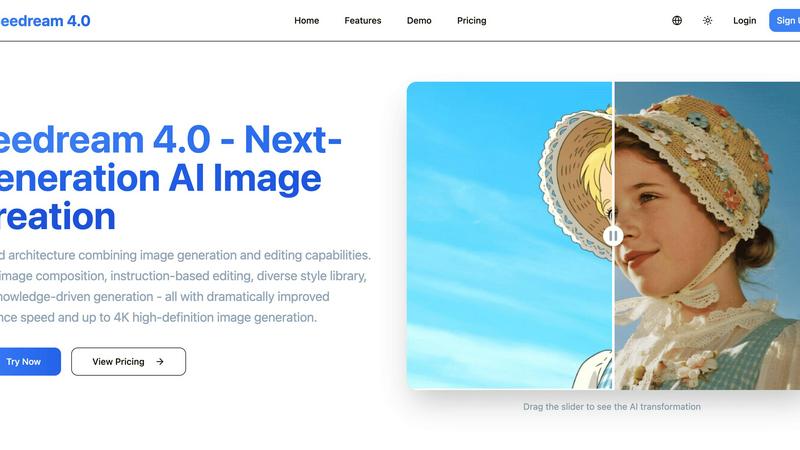
Seedream 4.0
Seedream 4.0 is an advanced AI image generator and editor that transforms ideas into stunning visuals with precision.
Last updated: March 1, 2026
Visual Comparison
RemoveTexts

Seedream 4.0
Feature Comparison
RemoveTexts
Paint to Remove
This feature provides granular, user-directed control over the text removal process. Users manually select a brush tool and paint directly over the specific text elements they wish to erase. The AI then processes only these painted areas, intelligently filling them in by analyzing the surrounding pixels. This is ideal for complex images where only certain words, watermarks, or captions need removal while preserving other text or intricate background details, offering precision that fully automated tools may lack.
Auto Remove All Text
For complete and effortless text cleansing, this one-click feature activates an advanced AI detection system that automatically scans the entire uploaded image to identify every text element, regardless of language or font. It then proceeds to erase all detected text simultaneously, seamlessly reconstructing each area in a single operation. This is perfect for quickly cleaning screenshots, memes with multiple captions, or images heavily overlaid with watermarks and subtitles, saving significant time and manual effort.
Edit & Replace Text
Going beyond simple deletion, this innovative feature allows users to modify existing text within an image. After the AI identifies and removes the original text, users can type new text to replace it. The system then employs font-matching algorithms to synthesize and insert the new text in a style that visually blends with the original image's aesthetics, including considerations for color, size, and texture, enabling realistic edits for mockups or corrections.
Remove Objects
Extending its capability beyond text, RemoveTexts can erase a wide variety of unwanted visual elements. Users can brush over objects, people, logos, blemishes, or other distracting items they wish to remove from a photograph. The AI's inpainting engine fills the space by generating plausible background content that matches the lighting, texture, and patterns of the surrounding area, making it a versatile tool for photo restoration and content cleanup.
About Seedream 4.0
Multi-Image Composition
This feature allows users to input multiple images and generate a cohesive composition through simple text prompts. It streamlines workflows by enabling batch outputs, making it ideal for complex visual narratives and brand asset creation.
Instruction-Based Editing
Seedream 4.0 excels in offering an intuitive editing experience where users can generate high-quality images or make precise modifications with just one sentence. This functionality embodies the principle of "what you say is what you get," simplifying the image creation process.
Diverse Style Library
With a rich collection of artistic styles at users' fingertips, Seedream 4.0 facilitates the creation of unique visual languages. Whether aiming for a watercolor effect or a cyberpunk aesthetic, users can effortlessly stylize their images or generate new ones in various artistic genres.
Knowledge-Driven Generation
This feature harnesses extensive knowledge and reasoning capabilities to produce accurate and beautiful educational illustrations, charts, and professional images. Users benefit from enhanced understanding and precision in their content creation endeavors.
Use Cases
RemoveTexts
Cleaning Product Photos for E-Commerce
Online sellers frequently use watermarked stock images or have product photos marred by promotional text, pricing, or logos. RemoveTexts allows them to quickly clean these images by removing all unwanted graphical and textual overlays, resulting in professional, brand-neutral product shots suitable for listings on Amazon, eBay, or their own web stores, thereby improving presentation and potentially increasing sales.
Preparing Professional Screenshots and Presentations
Professionals creating tutorials, documentation, or presentations often need clean screenshots free of irrelevant UI elements, personal data, watermarks, or system notifications. Using the "Paint to Remove" feature, they can selectively erase these sensitive or distracting text areas, ensuring the final image is clear, focused, and appropriate for public or client-facing materials without revealing private information.
Editing Memes and Social Media Content
Content creators and social media managers can repurpose existing memes or images by removing the original caption text and adding their own. Alternatively, they can clean images of all text to use as fresh templates. The "Edit & Replace Text" and "Auto Remove All" features make this process instantaneous, enabling rapid content iteration and customization for different platforms or campaigns.
Redacting Sensitive Information
Legal, real estate, and administrative professionals often need to share documents or images but must redact confidential information such as names, addresses, phone numbers, or identification details. RemoveTexts provides a secure, efficient method to permanently and seamlessly erase this sensitive text from image-based documents, ensuring privacy compliance while maintaining the document's overall visual integrity.
Seedream 4.0
Graphic Design
Graphic designers can utilize Seedream 4.0 to create compelling visuals tailored to specific projects. The tool's instruction-based editing and diverse style options allow for greater creativity and efficiency in design work.
Marketing Campaigns
Marketers can leverage Seedream 4.0 to generate eye-catching graphics for advertisements and social media campaigns. The multi-image composition feature helps create visually engaging content that tells a brand's story effectively.
Educational Content Creation
Educators can use Seedream 4.0 to produce informative illustrations and charts that enhance learning materials. The knowledge-driven generation allows for accurate representations of complex concepts in a visually appealing manner.
Content Creation for Social Media
Content creators can take advantage of Seedream 4.0 to generate unique and high-quality images for their social media platforms. The ease of use and fast generation speeds help maintain an active and engaging online presence.
Overview
About RemoveTexts
RemoveTexts is a sophisticated, AI-powered online image editing platform specifically engineered to remove, edit, and replace text and other unwanted elements from digital images with unprecedented ease and precision. It eliminates the traditional barrier of requiring advanced software like Adobe Photoshop or manual editing skills. At its core, the tool utilizes state-of-the-art deep learning inpainting technology, a class of neural network architecture pioneered by industry leaders, to intelligently analyze an image's context and seamlessly reconstruct the background after text removal. This process ensures professional-grade, traceless results where the edited area is virtually indistinguishable from the original, often achieving over 95% structural similarity as noted in contemporary research. The primary value proposition is delivering complex image manipulation capabilities in a simple, web-based interface where users can achieve clean results in under 30 seconds. It is designed for a broad audience including digital marketers needing clean product photos, social media creators and meme makers, graphic designers seeking rapid edits, e-commerce sellers, legal professionals redacting documents, and anyone who needs to declutter screenshots, remove watermarks, date stamps, subtitles, or branded overlays without compromising image quality.
About Seedream 4.0
Seedream 4.0 is a revolutionary AI image generator and editor that transforms the landscape of digital image creation and manipulation. Tailored for individual creators, professional teams, and organizations, Seedream 4.0 integrates advanced image generation and editing functionalities into a cohesive platform. By leveraging artificial intelligence, this tool allows users to produce visually stunning images and make precise edits using straightforward instructions. The multi-image composition feature enables the seamless integration of multiple visuals into a singular, complex image, enhancing storytelling and branding efforts. Designed for diverse users—including graphic designers, marketers, and educators—Seedream 4.0 provides high-quality image outputs that cater to specific visions and needs. Its extensive library of styles, knowledge-driven generation capabilities, and support for up to 4K high-definition images make it an invaluable asset for anyone seeking sophisticated visual content creation.
Frequently Asked Questions
RemoveTexts FAQ
What image formats does RemoveTexts support?
RemoveTexts supports common web and digital image formats including JPG, PNG, and WebP. Users can upload images in any of these formats for processing. The platform maintains the original quality and resolution during the editing process, and the final cleaned image can be downloaded in a high-quality format without any added watermarks.
How does the AI remove text without leaving a trace?
The tool employs advanced deep learning inpainting models, similar to technology developed by NVIDIA and Adobe. When text is designated for removal, the AI analyzes the pixels, textures, patterns, and colors surrounding the target area. It then intelligently generates new pixel data that plausibly continues the background, ensuring seamless edge blending and natural reconstruction. This results in a "traceless" fill where the removed section is visually consistent with the rest of the image.
Can RemoveTexts edit text in different languages?
Yes, RemoveTexts is designed with multilingual capability. Its text detection and processing algorithms work effectively with over 50 languages, including but not limited to English, Chinese, Japanese, Korean, and Arabic. This makes it a powerful tool for a global user base needing to edit or remove text from diverse sources.
Is there a file size limit for uploaded images?
Yes, to ensure optimal processing performance and server stability, RemoveTexts imposes a maximum file size limit for uploads. Users can upload images up to 10 megabytes (MB) in size. For best results, it is recommended to use images with clear resolution but compressed within this limit to facilitate fast uploading and AI processing.
Seedream 4.0 FAQ
Can I try it for free?
Yes, Seedream 4.0 offers a free trial that allows users to explore its features and capabilities before committing to a subscription plan.
How does Seedream 4.0 work?
Seedream 4.0 uses advanced AI algorithms to facilitate image generation and editing. Users input simple instructions or upload images for transformation, and the tool processes these commands to produce stunning visuals.
What makes Seedream 4.0 different?
Seedream 4.0 stands out due to its unified architecture that combines both image generation and editing capabilities. This integrated approach, along with its multi-image composition feature and diverse style library, enhances usability across various creative fields.
What image formats are supported?
Seedream 4.0 supports multiple image formats, including JPG, PNG, and WebP, ensuring versatility in how users can download and utilize their created content.
Alternatives
RemoveTexts Alternatives
RemoveTexts is an AI-powered image editing tool specializing in the removal of unwanted text, watermarks, and objects from any image. It belongs to the category of automated, AI-driven photo editing software designed to simplify complex tasks that traditionally required professional tools like Photoshop. Users can achieve clean, edited images in seconds through simple uploads and one-click actions. Users often explore alternatives to such tools for various reasons. Common factors include budget constraints and specific pricing model preferences, such as needing a one-time purchase versus a subscription. Others may seek different feature sets, like more advanced manual controls, integration with other software, or platform compatibility, such as a dedicated mobile app or offline functionality. The need for a different user experience or output quality can also drive this search. When evaluating an alternative, key considerations should include the core AI capability for clean, seamless object removal, the speed and simplicity of the workflow, and the output resolution. It's also wise to assess the range of supported file formats, the availability of both automatic and manual editing modes for precision, and the overall value proposition relative to the cost. Security and privacy policies regarding uploaded images are another critical factor for many users.
Seedream 4.0 Alternatives
Seedream 4.0 is an innovative AI image generator and editor that transforms the process of image creation and manipulation, catering to both individual creators and professional teams. As a powerful tool within the image and photo category, it enables users to produce high-quality visuals with ease, thanks to its advanced features such as multi-image composition and instruction-based editing. Users often seek alternatives to Seedream 4.0 for various reasons, including pricing, specific feature sets, or compatibility with different platforms. When evaluating alternative options, it’s essential to consider aspects such as usability, the range of styles available, output quality, and whether the tool aligns with your creative needs and workflow. The right alternative should enhance your image creation experience while meeting your unique requirements.