
Gleem.AI Studio vs SimpleDraw
Side-by-side comparison to help you choose the right product.

Gleem.AI Studio
Gleem.AI Studio is an intuitive all-in-one workspace for generating and editing images seamlessly without tool.
Last updated: February 26, 2026

SimpleDraw
SimpleDraw is a free online tool for creating precise floor plans and scale drawings without any software installation.
Last updated: March 1, 2026
Visual Comparison
Gleem.AI Studio

SimpleDraw
Feature Comparison
Gleem.AI Studio
Text to Image Generator
The Text to Image Generator feature allows users to transform their written ideas into captivating visuals effortlessly. By simply entering a text prompt, users can specify their desired image size and let Gleem's Prompt Enhance functionality refine their input for optimal results. This feature is designed to cater to both seasoned designers and novices, ensuring that anyone can create striking images that align with their vision.
AI Image Editing
The AI Image Editing tool offers a comprehensive suite of editing capabilities, enabling users to manipulate images directly within the platform. Users can add or remove objects, adjust poses, apply various filters, and even restore old images using simple and natural language prompts. This intuitive editor is built to enhance user experience by simplifying complex editing tasks into straightforward commands.
AI Avatars
Gleem.AI Studio's AI Avatars feature allows users to generate and personalize their own digital avatars. Users can integrate these avatars into any scene, adjusting poses and trying on different outfits without the need for a photoshoot. This feature provides a unique way for creators to showcase their personality or brand in various visual contexts, enhancing engagement and relatability.
Seamless Workflow Management
The platform's workflow management capability ensures that users can keep their creative process organized and efficient. Each project is housed in its dedicated space, complete with saved prompts, edits, and version history. This feature simplifies the process of reusing and iterating on designs, allowing creators to build upon their previous work without losing context or valuable insights.
About SimpleDraw
Accurate Measurements & Scale Drawing
SimpleDraw ensures precise measurements and smart alignment, allowing users to create drawings that are not only accurate but also to scale. This feature is essential for anyone looking to maintain fidelity in their designs, whether for personal projects or professional use.
Specialized Floor Plan Creator
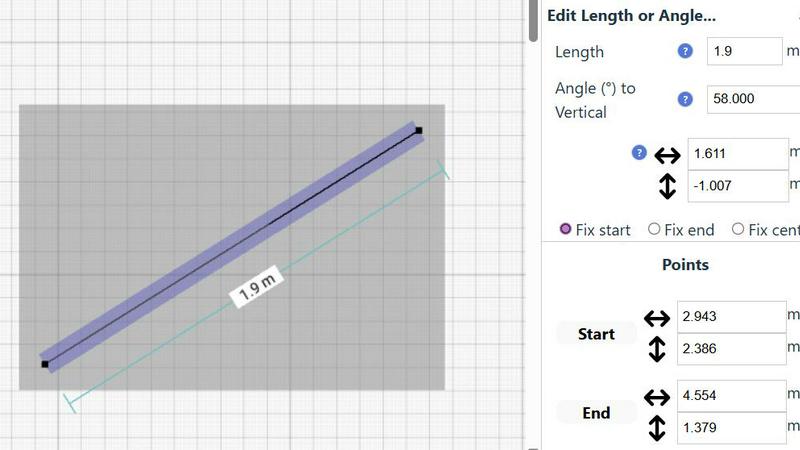
With a dedicated Floor Plan Mode, users can create detailed floor plans with walls, doors, windows, and furniture using just a click. This mode provides real-time measurements as adjustments are made, making it easier to visualize spaces before committing to changes.
Smart Alignment System
The smart alignment system assists users in placing points and lines exactly where they want them. By using visual indicators, the tool helps ensure that each element is positioned accurately, which is particularly beneficial for intricate designs where precision is paramount.
Comprehensive Measurement System
SimpleDraw features a comprehensive measurement system that allows users to toggle between metric and standard US units. Dynamic contextual measurements are displayed as the user works on their drawings, providing immediate feedback to achieve the desired outcomes.
Use Cases
Gleem.AI Studio
Marketing Campaigns
Gleem.AI Studio is ideal for marketing professionals looking to create visually compelling assets for campaigns. With its text-to-image generation and editing capabilities, teams can quickly produce graphics that resonate with their target audience, enabling rapid experimentation and iteration to refine marketing messages.
Social Media Content Creation
Content creators can leverage Gleem.AI Studio to generate and edit images specifically for social media platforms. The ability to create visually engaging posts in a single workspace allows for quick turnaround times, making it easier to keep up with the fast-paced nature of social media engagement.
Product Visualization
E-commerce businesses can utilize Gleem.AI Studio to create high-quality product images that enhance online listings. By generating visuals based on product descriptions and editing them directly within the platform, businesses can present their products in a more appealing manner, potentially increasing conversion rates.
Creative Experimentation
Artists and designers can use Gleem.AI Studio for creative experimentation, allowing them to generate various visual interpretations of their ideas. The platform's intuitive editing tools and version control enable artists to explore different styles and compositions without the hassle of switching between multiple applications.
SimpleDraw
Kitchen & Bathroom Floor Plans
Users planning renovations can utilize SimpleDraw to create accurate measurements and visualize layouts for kitchens and bathrooms before commencing work. This helps in making informed decisions about space utilization and design aesthetics.
Room Layouts & Furniture Planning
Whether designing a bedroom, living room, or office, SimpleDraw enables users to plan room layouts effectively. Users can ascertain whether furniture will fit in the designated spaces, preventing costly mistakes before purchases are made.
House & Apartment Plans
SimpleDraw is perfect for creating complete floor plans suitable for home projects, rental listings, or effective space planning. It allows for the detailed representation of various architectural features in a straightforward manner.
Community-Driven Development
SimpleDraw is evolving based on real user feedback, allowing the community to actively shape future features. This collaborative approach enhances the tool's functionality and ensures it meets the diverse needs of its user base.
Overview
About Gleem.AI Studio
Gleem.AI Studio is an innovative and integrated AI image workspace tailored for creators who prioritize creativity over technical complexities. This platform is designed to streamline the processes of image generation, editing, and remixing, all within a single, cohesive environment. Unlike traditional methods that require switching between multiple tools, Gleem.AI Studio offers a seamless workflow that enhances productivity and promotes creative flow. It caters primarily to marketers, content creators, and small teams who require quick and consistent visual outputs without the burden of advanced settings or fragmented interfaces. With features that allow users to generate stunning visuals from text prompts, edit images with intuitive controls, and create personalized AI avatars, Gleem.AI Studio empowers users to focus on their artistic vision. The platform's main value proposition is its ability to simplify the creative process, enabling faster iterations and allowing users to engage deeply with their visual projects.
About SimpleDraw
SimpleDraw is an innovative online tool designed for users seeking to create precise and accurate scale drawings effortlessly. This versatile platform caters to a broad audience, including amateur DIY enthusiasts, professional designers, and individuals looking to visualize home renovations. With its user-friendly interface, SimpleDraw allows anyone to produce detailed floor plans and technical drawings without the complexity often associated with traditional CAD software. Its main value proposition lies in simplicity and accessibility; the tool is completely free to use, requiring no registration or downloads. By focusing on providing powerful yet intuitive tools, SimpleDraw empowers users to achieve a level of precision that pen-and-paper methods cannot match. Whether you are designing a kitchen layout or planning a complete home renovation, SimpleDraw offers the ideal solution for accurate and functional design capabilities.
Frequently Asked Questions
Gleem.AI Studio FAQ
What is Gleem.AI Studio?
Gleem.AI Studio is an integrated AI image workspace that combines image generation, editing, and remixing capabilities in a single platform, designed for marketers, creators, and small teams.
How does the Text to Image Generator work?
The Text to Image Generator allows users to input a text prompt to create images. Users can specify dimensions and utilize the Prompt Enhance feature for refined outputs, making the process intuitive and accessible.
Can I edit images directly within Gleem.AI Studio?
Yes, the AI Image Editing feature enables users to edit images directly within the platform using simple prompts, allowing for operations such as adding or removing objects and applying filters.
Is there a way to manage multiple projects in Gleem.AI Studio?
Absolutely! The platform includes project management features that allow users to create dedicated spaces for each project, complete with version history and saved prompts, ensuring an organized workflow.
SimpleDraw FAQ
Is SimpleDraw really free to use?
Yes, SimpleDraw is completely free to use without any hidden fees. There is no need for registration or downloads, making it accessible to everyone.
Do I need any design experience to use SimpleDraw?
No prior design experience is necessary. SimpleDraw is designed for both beginners and experienced users, with an intuitive interface that makes drawing simple and accessible.
Can I save my drawings with SimpleDraw?
While SimpleDraw allows you to create and edit drawings easily, specific saving features may vary. Users are encouraged to check the platform for updates regarding saving or exporting options.
Does SimpleDraw support collaboration?
Currently, SimpleDraw focuses on individual use, but users can join the community via Discord to share feedback and request collaborative features in future updates.
Alternatives
Gleem.AI Studio Alternatives
Gleem.AI Studio is an all-in-one AI image workspace designed to streamline the creation and editing of visuals, allowing users to focus on creativity rather than technical complexity. It serves as a unified platform for marketers, creators, and small teams, enabling them to generate, edit, and refine images without the hassle of juggling multiple tools. As users seek alternatives to Gleem.AI Studio, they often consider factors like pricing, feature sets, and specific platform compatibility to ensure their needs are met in a seamless manner. When choosing an alternative, users should look for a solution that provides a cohesive workflow, minimizes complexity, and offers robust features that cater to their specific creative requirements. Additionally, evaluating customer support, usability, and the ability to integrate with existing tools can significantly enhance the overall user experience.
SimpleDraw Alternatives
SimpleDraw is a free, web-based tool that falls under the category of design software, specifically focused on creating accurate scale drawings and detailed floor plans. It is designed for a diverse range of users, from DIY enthusiasts to professional designers, allowing anyone to produce precise technical drawings without the steep learning curve often associated with complex CAD programs. Users commonly seek alternatives to SimpleDraw for various reasons, including the need for additional features, compatibility with different platforms, or specific pricing structures that align better with their requirements. When searching for an alternative, it's essential to consider factors such as ease of use, accessibility, the range of design tools offered, and whether the software meets your particular design needs without sacrificing functionality.