
Sketch To vs SparkPix
Side-by-side comparison to help you choose the right product.
Sketch To
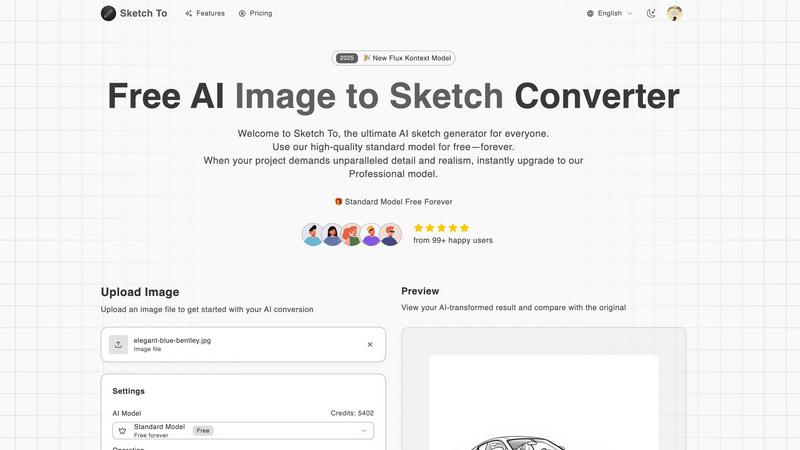
Sketch To uses advanced AI to instantly convert images into sketches or sketches into realistic images.
Last updated: March 2, 2026

SparkPix
SparkPix is a professional AI photo editor that transforms images through text commands for restoration, enhancement, and style conversion.
Last updated: March 11, 2026
Visual Comparison
Sketch To
SparkPix

Feature Comparison
Sketch To
Dual AI Model Architecture
Sketch To's foundational feature is its two-tiered AI system, designed to cater to different user needs and project requirements. The Standard Model is a powerful, credit-based engine perfect for personal projects, social media content, and educational purposes, offering users trial credits to begin exploration. The Professional Model represents the pinnacle of the platform's technology, utilizing advanced algorithms to deliver world-class realism, intricate detail, and superior accuracy, making it suitable for commercial artwork, professional portfolios, and any project where premium quality is non-negotiable.
Extensive Artistic Style Library
The platform provides users with a diverse and expanding selection of predefined artistic styles to apply during conversion. This library includes, but is not limited to, Pencil Sketch, Charcoal Sketch, Ink Sketch, Colored Pencil, Comic Sketch, Concept Art, Figure Sketch, Watercolor, and Digital Sketch styles. This variety allows for precise creative direction, enabling users to match the output to a specific aesthetic, whether aiming for a classic hand-drawn look or a modern digital illustration effect, without requiring manual artistic skill.
Instant High-Resolution Processing
Leveraging a powerful cloud-based AI processing engine, Sketch To delivers conversion results within seconds, irrespective of the model selected. This instant processing is coupled with the ability to output creations in high resolution. The generated sketches and images are suitable for both digital use and professional print applications, ensuring that users receive a final product that maintains quality and clarity across various mediums and sizes.
Intuitive Comparison and Preview Interface
A key operational feature is the interactive preview panel that allows users to directly compare the AI-transformed result with the original uploaded file. Utilizing a "drag to compare" slider mechanism, creators can meticulously evaluate the conversion's accuracy, detail preservation, and artistic effect. This immediate visual feedback loop is crucial for iterative creative work and ensures user satisfaction before downloading the final high-resolution file.
About SparkPix
AI Photo Editor with Text Commands
This flagship feature allows users to edit photos by typing descriptive instructions into a prompt box. The AI interprets commands ranging from simple object removal to complex scene transformations, applying changes contextually. Users can specify aspect ratios and utilize a reference image for style consistency, enabling precise control over the final output without manual use of brushes, layers, or selection tools. This natural language interface fundamentally changes the photo editing workflow, making it intuitive and accessible.
AI Background Remover
SparkPix provides a one-click solution for isolating subjects from their backgrounds. The AI is trained to handle complex scenes, including fine details like hair, fur, and transparent objects, producing clean cutouts with transparent backgrounds. This is essential for creating professional product listings, portrait photoshoots, and marketing materials. The tool serves as a direct, often more affordable, alternative to dedicated services like Remove.bg or PhotoRoom, with the added benefit of being integrated into a larger editing suite.
AI Photo Restoration & Enhancement
This dual-function feature addresses both historical and technical photo quality issues. The restoration AI can repair physical damage like scratches, tears, and fading, as well as colorize black-and-white images, breathing new life into old family archives. Simultaneously, the enhancement function improves modern digital photos by sharpening details, reducing noise and blur, enhancing colors, and upscaling resolution to HD standards. It consolidates the capabilities of tools like Remini and traditional upscalers into a single step.
AI Style Transfer & Image Generator
Beyond editing, SparkPix enables creative transformation. The Style Transfer feature can convert any photo into over 15 artistic styles, including anime, oil painting, and pencil sketch. Furthermore, its integrated AI Image Generator creates entirely new visuals from text prompts at resolutions up to 4K. This combines the creative functions of apps like Prisma with generative AI capabilities, allowing users to both modify existing images and generate original artwork for projects, all within the same platform.
Use Cases
Sketch To
Professional Design and Concept Art
Graphic designers, concept artists, and architects can use the Sketch to Image AI capability to rapidly visualize and render preliminary sketches into polished, realistic images or detailed scenes. This accelerates the concept development phase, provides compelling visuals for client presentations, and can serve as a base for further digital painting or 3D modeling, significantly enhancing workflow efficiency and creative communication.
Social Media and Content Creation
Content creators, marketers, and social media managers can utilize the Image to Sketch conversion to generate unique, eye-catching artwork from standard photographs. Transforming product photos, portraits, or travel images into elegant pencil or comic sketches can greatly increase engagement on platforms like Instagram, Pinterest, and Facebook, providing a consistent stream of original, artistic content that stands out in crowded feeds.
Educational and Artistic Development
Students, art enthusiasts, and hobbyists can employ the Standard Model as an educational tool to study the relationship between light, shadow, and form in different artistic mediums. By converting personal photos into various sketch styles, users can analyze artistic techniques, gain inspiration for traditional drawing, and experiment with their creative vision in a low-stakes, accessible digital environment, fostering artistic growth.
Personalized Gift and Merchandise Creation
Individuals and small businesses can create personalized gifts, custom illustrations, and merchandise by converting cherished photographs into stylized sketches. A family portrait can be transformed into a classic charcoal drawing, or a pet photo into a whimsical watercolor sketch, which can then be printed on canvases, mugs, or t-shirts, offering a unique and sentimental product for personal use or sale.
SparkPix
E-commerce & Product Photography
Online sellers can use SparkPix to generate professional product photos instantly. Key applications include removing backgrounds for clean white-backdrop listings, creating realistic product mockups in different settings via text prompts, and enhancing low-quality phone photos to look studio-shot. This eliminates the need for expensive photoshoots or complex software like Photoshop, enabling small businesses and dropshippers to maintain a high-quality, consistent storefront on platforms like Shopify and Amazon.
Personal Photo Restoration & Archiving
Individuals and genealogists can digitally preserve family history. SparkPix is used to restore damaged, faded, or scratched physical photographs from albums, colorize black-and-white portraits, and enhance the clarity of old group pictures. This provides a powerful and accessible alternative to specialized services like MyHeritage, allowing users to personally manage and restore their archival materials before sharing them digitally or reprinting them.
Social Media & Content Creation
Content creators, influencers, and social media managers can rapidly produce eye-catching visuals. Use cases include removing unwanted objects or photobombers from images, applying trendy artistic filters (like anime or painting styles), generating custom graphics from text prompts for posts, and creating perfect profile pictures or YouTube thumbnails with removed or replaced backgrounds. The speed and ease facilitate maintaining a consistent and engaging online aesthetic.
Professional & Formal Photography
Professionals and job seekers can create official photos without a studio visit. SparkPix can generate compliant passport, visa, or ID photos by adjusting attire and background based on text prompts. Similarly, it can be used to craft professional LinkedIn headshots or business profile pictures by enhancing a casual photo, refining details, and placing the subject in a formal setting. This offers a convenient and cost-effective solution compared to retail photo services.
Overview
About Sketch To
Sketch To is a sophisticated, cloud-based artificial intelligence platform engineered for bidirectional artistic transformation between photographs and sketches. It serves as a comprehensive digital atelier, enabling users to convert standard images into a wide array of sketched artistic styles and, uniquely, to transform rudimentary or detailed sketches into photorealistic images. The tool is architected for a broad spectrum of users, from casual hobbyists and students to professional illustrators, graphic designers, and architects, democratizing advanced artistic conversion technology. Its core value proposition lies in its dual AI model system: a robust Standard Model available with free trial credits for everyday creative exploration, and a high-fidelity Professional Model engineered for commercial-grade output requiring exceptional detail, texture, and realism. Operating entirely online, Sketch To eliminates the need for complex software installation or high-end hardware, providing instant, accessible processing powered by a powerful cloud infrastructure. By bridging the gap between photographic reality and artistic interpretation, and vice versa, Sketch To establishes itself as an essential, versatile resource for modern digital creativity and professional visual asset creation.
About SparkPix
SparkPix is a comprehensive, web-based artificial intelligence photo editing platform designed to democratize professional-grade image manipulation. Its core value proposition is the elimination of complex software like Adobe Photoshop, allowing users to perform sophisticated edits through simple text-based instructions. By leveraging advanced AI models, SparkPix interprets natural language commands—such as "remove the background" or "restore this damaged photo"—and executes the requested transformations in under 30 seconds. This makes it an ideal solution for a broad audience, including social media managers, e-commerce entrepreneurs, photographers, genealogists, and everyday users who lack technical editing skills but require high-quality visual content. The platform operates entirely online, ensuring accessibility from any desktop or mobile device without downloads. With a free tier offering initial credits and scalable paid plans, SparkPix positions itself as a versatile, cost-effective alternative to traditional subscription-based editing software and single-function online tools.
Frequently Asked Questions
Sketch To FAQ
What is the difference between the Standard and Professional models?
The Standard Model is designed for general use, offering high-quality conversions suitable for personal projects, social media, and hobbies. It operates on a credit system. The Professional Model utilizes more advanced AI algorithms to deliver superior detail, enhanced texture accuracy, and greater realism, making it the preferred choice for commercial work, professional art, and any application where the highest fidelity is required. The Pro model typically consumes more credits per conversion due to its increased computational complexity.
How do I get started with Sketch To for free?
New users can sign up for an account on the Sketch To platform to receive complimentary trial credits. These credits can be used to experience the Standard Model's Image to Sketch and Sketch to Image conversion capabilities. Simply upload a file, select your desired style, and generate a conversion to explore the tool's functionality without an initial financial commitment.
What file formats and sizes does Sketch To support?
Sketch To supports common image file formats for upload, including JPG, PNG, and others as indicated. There is a maximum file size limit for uploads, typically around 5MB for the initial input, to ensure swift processing. The final output is provided as a high-resolution image file suitable for download and use in various digital and print contexts.
Can I use Sketch To for commercial projects?
Yes, Sketch To can be used for commercial projects. It is explicitly recommended to use the Professional Model for commercial purposes due to its superior output quality and detail, which meets higher professional standards. Users should ensure they have the appropriate rights to the original images they are converting. Outputs from the Professional Model are designed to be of sufficient quality for inclusion in commercial artwork, marketing materials, and products.
SparkPix FAQ
Is SparkPix free to use?
Yes, SparkPix operates on a freemium model. New users can start immediately without a credit card and receive 5 free credits to test the platform's core features. Additionally, free accounts may receive 1 credit daily. For higher-volume usage, paid plans begin at $9.99, offering larger credit bundles for extensive editing and generation tasks.
What kind of edits can I make with text prompts?
You can instruct the AI to perform a vast array of edits. Common and effective prompts include commands to remove or replace backgrounds, erase specific objects or people, restore damaged areas, colorize images, change the artistic style (e.g., "make it look like a watercolor painting"), enhance resolution and sharpness, and even generate entirely new elements or scenes based on the uploaded photo.
Do I need to download any software?
No, SparkPix is entirely web-based. It runs in your internet browser on any device, including desktop computers, iPhones, and Android phones. There is no software to download or install, and all processing happens on secure cloud servers, ensuring you can access your projects and the full toolset from anywhere.
How does SparkPix compare to Photoshop?
SparkPix is designed for accessibility and speed, whereas Photoshop is a professional, complex toolkit. SparkPix uses AI to automate complex edits based on text, requiring no manual skill, and is significantly more affordable. Photoshop offers granular, manual control for experts but has a steep learning curve and higher cost. SparkPix is often sufficient for common editing tasks, making it a powerful alternative for non-professionals.
Alternatives
Sketch To Alternatives
Sketch To is an AI-powered online tool within the image and photo editing category, specializing in the bidirectional conversion between photographs and artistic sketches. Its core function leverages advanced artificial intelligence to provide users with a straightforward method for creative transformation without requiring installed software. Users may seek alternatives to Sketch To for various reasons, including specific budgetary constraints, the need for different artistic styles beyond photorealistic or sketch outputs, or a requirement for tools integrated into a larger creative suite. Platform dependency, such as needing a desktop application or a mobile app, and varying demands for output resolution and commercial licensing are also common factors driving the search for other options. When evaluating an alternative, key considerations should include the primary artistic direction of the tool—whether it focuses on sketches, paintings, or other effects—its pricing model and transparency, the quality and speed of AI processing, and the suitability of its license for intended use, be it personal, professional, or commercial. The availability of a free tier for testing and the overall user experience are also critical decision points.
SparkPix Alternatives
SparkPix is an AI-powered online photo editor that allows users to edit images through simple text commands. It falls into the category of web-based, automated image editing tools designed for accessibility and speed. Users can perform complex edits like background removal, photo restoration, and style transfer without needing traditional software expertise. Users often seek alternatives to SparkPix for various reasons. Common motivations include exploring different pricing models, such as subscription-free options or one-time purchases. Others may require specific advanced features not offered, need offline functionality, or prefer a tool integrated into a larger creative suite. Platform preferences, like dedicated mobile apps or desktop software, also drive the search for different solutions. When evaluating an alternative, consider your primary use case. Key factors include the core editing capabilities you need, the overall cost-effectiveness for your volume of work, and the platform's ease of use. Also, assess the quality of output for your specific tasks, the availability of free trials, and the tool's processing speed to ensure it aligns with your workflow and budget.