
LuxSign vs Updaytr
Side-by-side comparison to help you choose the right product.

LuxSign offers a secure, compliant platform for fast electronic signatures and document management across the EU.
Last updated: February 26, 2026
Updaytr
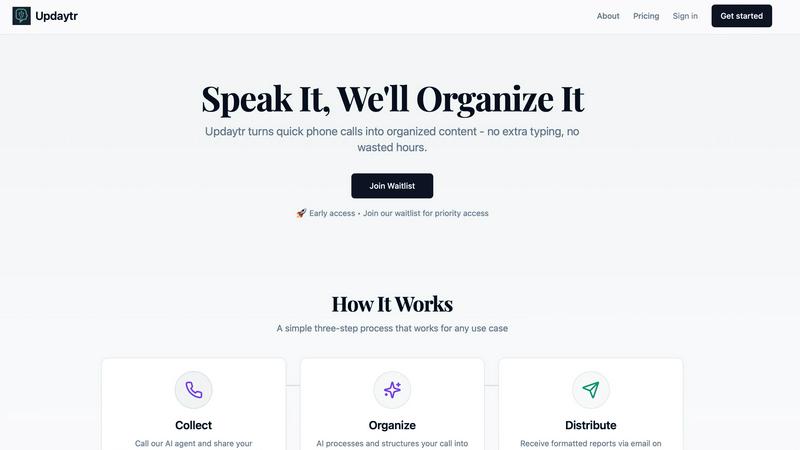
Updaytr transforms team phone calls into organized automated reports, eliminating status meetings.
Last updated: March 1, 2026
Visual Comparison
LuxSign

Updaytr
Feature Comparison
LuxSign
Multiple Signature Methods
LuxSign offers various signature methods to accommodate user preferences, allowing individuals to draw their signature, type their name, or upload an image. In addition, the platform supports custom initials for quick document signing, ensuring flexibility and convenience for all users.
Advanced Security
The platform prioritizes security through industry-standard encryption protocols that protect documents during upload, storage, and transmission. Furthermore, LuxSign guarantees that all data is securely hosted in Luxembourg, complying with stringent EU data protection regulations, thus instilling confidence in users about their document safety.
Collaboration Workspaces
LuxSign provides collaboration workspaces that facilitate teamwork and organization. Users can create shared environments for their teams, manage document folders, control member access, and work together seamlessly on signing workflows, making it easier to handle multiple documents and signers.
Complete Audit Trail
Every action taken within LuxSign is meticulously logged, providing a complete audit trail that includes timestamps, IP addresses, and signer information. This feature ensures transparency and is essential for compliance verification, allowing businesses to maintain detailed records of all signing activities.
Updaytr
Voice-to-Report Automation
The foundational feature of Updaytr is its seamless conversion of voice updates into structured text reports. Team members simply call a dedicated phone number and speak their update to an AI agent. The system then uses advanced speech recognition and natural language processing to transcribe, analyze, and format the spoken content into a clear, professional report. This automation completely removes the need for individuals to stop their work to type out emails or fill out digital forms, capturing information in the most natural and efficient way possible.
Intelligent Categorization and Routing
Updaytr's AI does not merely transcribe; it intelligently organizes information. The system automatically tags updates based on content, context, and predefined rules, categorizing them by project, client, team member, or job type. It then routes these categorized updates to the appropriate stakeholders. For instance, a project manager might receive all updates tagged with "Project Alpha," while a service manager gets reports tagged "Maintenance." This smart organization ensures the right information reaches the right people without manual intervention.
Scheduled and Automated Report Distribution
Stakeholders and managers are freed from constantly monitoring communication channels. Updaytr allows for the scheduling of automated report deliveries. Consolidated updates can be compiled and sent via email at daily, weekly, or custom intervals that suit the team's workflow. This feature guarantees that decision-makers receive a digest of all relevant information at a predictable time, enabling them to stay informed on their own schedule and eliminating the need for disruptive check-in meetings.
Context-Aware AI Memory
Updaytr's AI agents are designed to remember context from previous interactions with a team member. This memory allows for more natural and efficient conversations. For example, if a technician mentions "the client from yesterday," the AI can reference the prior report to understand the context, leading to more accurate tagging and report generation. This contextual awareness reduces the need for repetitive explanations and enhances the overall accuracy and usefulness of the compiled reports.
Use Cases
LuxSign
Contract Signatures
Businesses can utilize LuxSign for signing contracts securely and efficiently. By enabling multiple signers and offering both parallel and sequential signing workflows, organizations can expedite the approval process while ensuring compliance with legal standards.
Human Resources Documentation
HR departments can streamline the signing of employee contracts, offer letters, and other essential documents using LuxSign. The platform's ease of use allows for rapid document turnaround, enhancing the onboarding experience for new employees.
Financial Agreements
Financial institutions can leverage LuxSign for signing agreements related to loans, investment contracts, and other financial documents. The security measures in place ensure that sensitive information remains protected throughout the signing process.
Legal Document Management
Law firms and legal departments can adopt LuxSign for managing various legal documents, including client agreements and court filings. The comprehensive audit trails and secure storage facilitate compliance with legal standards and provide peace of mind during document handling.
Updaytr
Construction and Field Project Management
Construction supervisors, foremen, and contractors use Updaytr to provide daily progress reports, material delivery updates, and on-site issue logs. Instead of scrambling to write emails at the end of a long day, crew leads can call in updates immediately after an event occurs. The AI organizes these by project phase or specific site, delivering a consolidated daily report to project managers and clients, ensuring transparency and timely decision-making without requiring all parties to be on-site.
Field Sales and Client Service Reporting
Outside sales representatives and service professionals leverage Updaytr to log client visit outcomes, deal progress, and competitive intelligence immediately after an appointment. By calling in their debrief, they ensure details are captured while fresh. The AI categorizes updates by client name or opportunity stage, automatically generating reports for sales managers that provide a real-time pipeline view and actionable insights, streamlining sales operations and coaching.
Mobile Healthcare and Personal Care Visits
Home healthcare nurses, aides, and personal care workers can use Updaytr to efficiently document patient visit summaries, care provided, and observed conditions. The quick call-in method is far less intrusive than typing on a tablet during a visit. Important: Updaytr is explicitly noted as not being HIPAA compliant, so it must not be used for transmitting any Protected Health Information (PHI). It is suitable for general visit logging and scheduling updates where no PHI is disclosed.
Logistics and Transportation Status Updates
Delivery drivers, truck drivers, and logistics coordinators utilize Updaytr to report on route progress, delivery completions, delays, or vehicle issues. A driver can safely call in an update hands-free. The AI tags these updates by route number, driver, or vehicle, sending automated end-of-shift summaries to dispatch and operations managers. This provides real-time visibility into fleet operations and streamlines the documentation process for proof of delivery and service logs.
Overview
About LuxSign
LuxSign is a cutting-edge electronic signature platform designed specifically for businesses that prioritize security, compliance, and efficiency. Built in Luxembourg, it leverages the country's robust data protection laws to provide a cloud-based solution that ensures all documents are encrypted end-to-end and stored securely within EU borders, thereby guaranteeing full compliance with GDPR regulations. LuxSign is tailored for organizations of all sizes, from small businesses to large enterprises, that require legally valid signatures for their contracts across the European Union. The platform adheres to eIDAS SES standards, offering legal validity and a variety of features such as parallel and sequential signing workflows, customizable signature fields, and automated notifications. By streamlining document signing processes, LuxSign enhances productivity while maintaining the highest levels of security and compliance.
About Updaytr
Updaytr is a sophisticated, AI-powered communication platform engineered to revolutionize how teams, particularly those in field-based or mobile roles, share progress updates and report status. The core innovation of Updaytr lies in its ability to transform unstructured voice communications—specifically phone calls—into professionally formatted, organized written reports. This process effectively eliminates the dependency on disparate messaging apps, manual note-taking, and time-consuming status meetings. The platform is meticulously designed for businesses that require real-time situational awareness from distributed teams, including sectors such as construction, field services, sales, healthcare, real estate, and logistics. Its primary value proposition is a significant enhancement in operational efficiency: team members can relay information naturally via a quick phone call, while managers and stakeholders automatically receive consolidated, intelligently categorized reports via email on a predetermined schedule. By leveraging contextual AI that remembers details from previous interactions, Updaytr ensures information is not only captured but is also meaningfully structured and routed, allowing organizations to maintain seamless communication flow, reduce administrative overhead, and keep all parties informed without disruptive coordination.
Frequently Asked Questions
LuxSign FAQ
How does LuxSign ensure document security?
LuxSign employs industry-standard encryption methods for documents during upload, storage, and transmission. Additionally, all data is hosted on secure servers in Luxembourg, ensuring compliance with EU data protection laws.
Is LuxSign compliant with GDPR regulations?
Yes, LuxSign is fully compliant with GDPR and Luxembourg's data protection laws, guaranteeing that your documents are handled with the utmost security and privacy.
Can I use LuxSign for multiple signers?
Absolutely. LuxSign supports up to four signers per document, allowing for both parallel and sequential signing workflows to suit your needs.
What types of documents can I upload to LuxSign?
LuxSign supports a variety of document formats, including PDF, DOC, and DOCX files, with automatic conversion available to streamline your signing process. Users can upload files up to 10MB effortlessly.
Updaytr FAQ
How does Updaytr handle different team members and projects?
Updaytr is designed for multi-user, multi-project environments. During setup, administrators can add team members and associate them with specific phone numbers or access codes. The platform allows for the creation of projects, clients, or tags. The AI uses the caller's number for identification and applies intelligent rules to categorize the content based on keywords, context, and predefined settings, ensuring updates from different people are correctly sorted and routed to the appropriate report recipients.
Is there a free tier or trial available?
Yes, Updaytr offers a free tier to allow teams to evaluate the platform's core functionality. This free tier is available without requiring a credit card for sign-up, providing a risk-free way to test the voice-to-report automation, basic organization, and report distribution features. For ongoing use with larger teams or advanced capabilities, users can explore the paid pricing plans, the details of which are available on the Updaytr website.
What kind of AI agents are available, and can I choose one?
Updaytr provides distinct AI agent personas to interact with, such as Edgar, Dorothy, and Ruby, as referenced on their website. These agents are designed with different conversational styles or "personalities" to make the update process feel more natural and engaging for users. Teams or individuals can typically select their preferred agent based on which interaction style they find most comfortable and effective for their reporting needs.
Can I control when and how reports are delivered?
Absolutely. A central feature of Updaytr is customizable report distribution. Administrators and managers can set delivery schedules (e.g., daily at 5 PM, weekly every Monday morning) according to their operational rhythms. Reports are compiled automatically and sent via email to a designated list of stakeholders. This gives managers complete control over their information intake, allowing them to receive consolidated updates at predictable times rather than being interrupted by sporadic messages throughout the day.
Alternatives
LuxSign Alternatives
LuxSign is a sophisticated electronic signature platform developed in Luxembourg, designed to facilitate secure document signing for businesses. As part of the productivity and management category, it ensures compliance with eIDAS SES standards, making its electronic signatures legally valid across all EU member states. Users may seek alternatives to LuxSign due to various factors, including pricing, specific feature requirements, or the need for integrations with existing workflows and platforms. When searching for an alternative, it is crucial to consider aspects such as compliance with legal standards, security features, user interface, and the level of customer support offered by the platform.
Updaytr Alternatives
Updaytr is a productivity and management tool that transforms phone calls into organized, automated reports. It streamlines team communication, particularly for field-based operations, by eliminating manual note-taking and app-switching. Users often seek alternatives to Updaytr for various reasons, including budget constraints, a need for different core features beyond voice-to-report conversion, or a preference for text-based or video-based update systems over phone calls. When evaluating an alternative, key considerations should align with your primary use case. For teams, focus on core functionality like update capture, reporting automation, and delivery flexibility. For individual productivity, assess ease of use and integration with existing workflows. Security, pricing transparency, and the quality of customer support are also universal factors that warrant careful comparison to ensure the solution meets your operational and compliance needs. Ultimately, the right tool should solve the specific communication friction your team faces. Whether prioritizing cost, a unique feature set, or platform compatibility, a thorough assessment of your requirements against what each service offers is essential for finding a suitable fit that enhances efficiency without introducing new complexities.