
AI Photo Template vs Hush Touch | Voice-to-Text for MacOS
Side-by-side comparison to help you choose the right product.

AI Photo Template
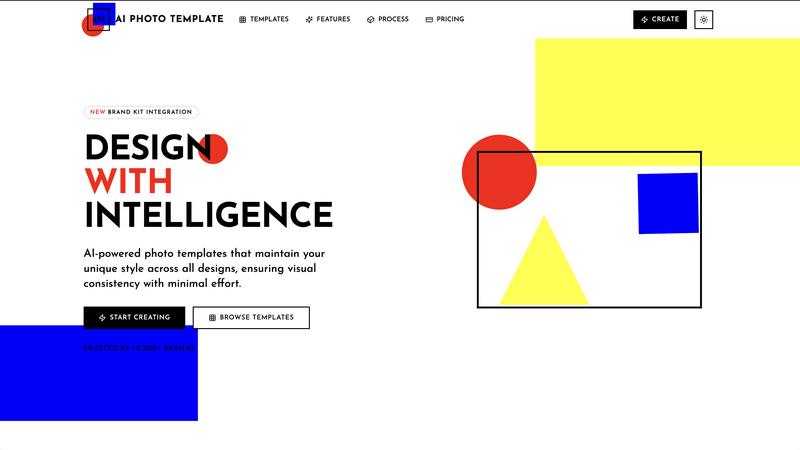
AI Photo Template generates brand-consistent photo designs instantly using artificial intelligence.
Last updated: February 28, 2026

Hush Touch | Voice-to-Text for MacOS
Hush Touch is an offline voice-to-text app for Mac that learns your vocabulary and ensures accurate transcription.
Last updated: February 26, 2026
Visual Comparison
AI Photo Template
Hush Touch | Voice-to-Text for MacOS

Feature Comparison
AI Photo Template
AI Style Analysis & Replication
This foundational feature involves a sophisticated AI engine that meticulously studies uploaded sample images, brand colors, and existing visual content. It deconstructs elements like color palettes, compositional styles, typography preferences, and mood to learn a user's unique aesthetic. The system then applies this learned intelligence to generate new templates that are not generic but are intrinsically aligned with the user's established visual identity, ensuring every creation feels authentically "on-brand" from the outset.
Brand Kit Integration
AI Photo Template offers a centralized Brand Kit storage system, allowing users to upload and permanently store key brand assets such as logos in various formats, official color hex codes, and approved font families. Once configured, these elements can be applied instantaneously to any template with a single click. This eliminates manual entry errors, accelerates the design workflow, and is crucial for maintaining absolute consistency, especially when multiple team members are creating content for the same organization.
Smart Layout Engine
Going beyond simple drag-and-drop, the platform incorporates a Smart Layout Engine built upon professional design principles, including the golden ratio and rule of thirds. When a user adds images or text blocks, the AI automatically suggests and arranges elements in a visually balanced and aesthetically pleasing manner. This ensures that every template maintains a professional composition, making high-quality design accessible to users regardless of their formal design training or innate artistic skill.
Team Collaboration Tools
Specifically tailored for organizational use, this feature enables seamless real-time collaboration. Team members can be invited to shared workspaces, where they can co-edit templates, leave feedback via comments, and manage a unified asset library. This streamlines the review and approval process, maintains version control, and ensures all team-generated content adheres to the same brand standards, which is vital for marketing departments and agencies managing multiple clients.
Hush Touch | Voice-to-Text for MacOS
Dual-Engine Recognition
Hush Touch employs a dual-engine recognition system that combines the capabilities of DictationTranscriber and SFSpeechRecognizer. This powerful blend ensures natural flow and accurate punctuation while boosting your custom vocabulary. The final text output benefits from an additional pass by Apple Intelligence, enhancing overall transcription accuracy.
Smart Text Processing
This feature allows Hush Touch to process your speech intelligently, removing filler words and correcting common mistakes in real time. The app can detect recurring phrases and format lists automatically, making dictation smoother and output more polished without requiring extensive manual editing.
Custom Vocabulary Learning
Hush Touch supports a custom vocabulary of up to 500 terms, which can learn from your corrections over time. This feature is especially beneficial for users who frequently utilize specialized terminology, including medical terms, technical jargon, or brand names, ensuring that the app recognizes your unique language.
Context Modes & Hands-Free Dictation
With four distinct context modes—General, Email, Code, and Notes—Hush Touch provides tailored dictation experiences for various writing tasks. It also supports hands-free operation, allowing users to initiate dictation using Siri or a hotkey, with automatic text insertion after a brief pause, enhancing convenience and workflow efficiency.
Use Cases
AI Photo Template
Social Media Content Management
Social media managers and influencers can utilize AI Photo Template to establish and maintain a cohesive visual identity across platforms like Instagram, Facebook, and LinkedIn. By creating a set of master templates for posts, stories, and cover photos that reflect their brand aesthetic, they can produce a high volume of visually consistent content rapidly. This consistency strengthens brand recognition, enhances feed aesthetics, and engages followers more effectively, all while drastically reducing the daily time investment required for content creation.
Small Business Marketing Material Creation
Small businesses and startups often lack the budget for a full-time designer or frequent agency work. AI Photo Template empowers them to independently produce professional marketing materials, including product photography frames, promotional flyers, email headers, and presentation slides. By ensuring these materials are visually consistent and polished, the tool helps small businesses project a credible, established, and trustworthy image to potential customers, competing effectively with larger counterparts.
Client-Facing Portfolio & Gallery Delivery
Professional photographers, videographers, and design freelancers can leverage the platform to create stunning, branded presentation templates for client deliverables. Instead of sending disjointed image sets, they can present work within a consistent, elegant template that includes their logo, color scheme, and typography. This elevates the perceived value of their service, provides a superior client experience, and reinforces their professional brand with every project delivery.
Marketing Agency Client Brand Management
Marketing and advertising agencies managing multiple client accounts can use AI Photo Template to build and store separate Brand Kits for each client. This allows teams to swiftly generate on-brand social media assets, ad creatives, and report templates tailored to each client's specific visual guidelines. It streamlines internal workflows, ensures flawless brand execution across all client work, and enables agencies to scale their services efficiently without compromising on quality or consistency.
Hush Touch | Voice-to-Text for MacOS
Drafting Emails
Hush Touch is ideal for busy professionals who need to draft emails quickly. By dictating their messages, users can maintain productivity and focus on their thoughts without the distraction of typing, all while enjoying the app's intelligent text processing features.
Creating Notes
Students and professionals can leverage Hush Touch to take notes during lectures or meetings. The app captures spoken information accurately, allowing users to concentrate on the content rather than the mechanics of writing, ultimately improving retention and understanding.
Writing Documents
Writers and content creators can use Hush Touch to compose articles, reports, or other lengthy documents. The adaptive learning and custom vocabulary features ensure that the output aligns with their unique style and terminology, making writing more efficient and enjoyable.
Transcribing Meetings
Hush Touch is an excellent tool for transcribing meetings or interviews. Users can simply dictate the conversation as it unfolds, with the app capturing key points, action items, and follow-up tasks accurately, thus streamlining communication and documentation processes.
Overview
About AI Photo Template
AI Photo Template (APT) is an advanced, AI-driven design platform engineered to automate and elevate the creation of professional-grade photo templates. At its core, the platform utilizes sophisticated artificial intelligence to analyze a user's existing visual assets and brand identity, subsequently generating fully customizable templates that faithfully replicate their unique aesthetic style. This process ensures visual consistency across all marketing materials, social media content, and client deliverables with minimal manual effort. The tool is meticulously designed for a diverse user base, including marketing teams requiring cohesive campaign assets, small to medium-sized businesses seeking agency-quality design without the associated costs, social media managers aiming for a harmonious and recognizable feed, and professional photographers needing consistent gallery presentations for clients. Its primary value proposition is a significant reduction in design time and resource expenditure while guaranteeing a high standard of visual coherence and professional polish across all digital and print platforms, effectively democratizing professional design through intelligent automation.
About Hush Touch | Voice-to-Text for MacOS
Hush Touch is an innovative voice-to-text application designed specifically for macOS users, offering a seamless and private dictation experience. This app distinguishes itself by operating entirely on-device, ensuring that your voice data remains secure and confidential. With a lightweight installation package of just 5.5 MB, Hush Touch integrates effortlessly into everyday writing workflows, whether you're drafting emails, creating notes, or composing documents. The application harnesses the power of two Apple transcription engines, enhancing accuracy and fluency in real-time transcription. Hush Touch is ideal for professionals, students, and anyone who values efficiency and privacy in their dictation processes. By learning your vocabulary and preferences over time, it delivers polished text output while eliminating filler words and improving punctuation. With a one-time purchase of $20 for a lifetime license, Hush Touch is an economically sensible choice for users seeking reliable voice dictation without recurring subscription costs.
Frequently Asked Questions
AI Photo Template FAQ
How does the AI understand my brand's visual style?
The AI Style Analysis feature requires you to upload a selection of your existing images, graphics, or marketing materials that you believe best represent your brand's look and feel. The AI engine performs a deep analysis of these samples, identifying patterns in color usage, compositional style, contrast, spacing, and overall mood. It creates a unique "style profile" based on this data, which it then references to generate new templates that align with your established aesthetic, ensuring consistency.
Can I edit the AI-generated templates?
Absolutely. While the AI provides a professionally composed starting point, all templates are fully customizable. The platform offers intuitive controls that allow you to adjust every element, including text (font, size, color), image placement and cropping, background colors, and layer positioning. This flexibility ensures you can make specific tweaks for different campaigns or messages while the underlying template structure maintains design integrity and brand consistency.
What file formats can I export my designs in?
Export options vary by subscription plan. The Basic plan typically supports standard web formats like JPG and PNG. The Professional and Business plans offer a wider range, including high-resolution PNGs, print-ready PDFs, and layered PSD (Photoshop) files for advanced editing in external software. The Business plan also includes batch export capabilities, allowing you to download multiple template variations or sizes simultaneously for efficiency.
Is AI Photo Template suitable for complete beginners with no design experience?
Yes, it is explicitly designed for users of all skill levels. The AI handles the complex aspects of design theory and composition, providing a strong, professional foundation. The interface is built to be intuitive, with drag-and-drop functionality and clear editing tools. Furthermore, the adherence to built-in design principles means that even users with no formal training can produce work that looks expert-level, making it an ideal tool for entrepreneurs, content creators, and small business owners.
Hush Touch | Voice-to-Text for MacOS FAQ
Is Hush Touch really a one-time purchase?
Yes, Hush Touch is available for a one-time fee of $20, which grants users a lifetime license. There are no hidden fees or subscription costs, making it a cost-effective choice for voice dictation software.
How does Hush Touch ensure my privacy?
Hush Touch processes all voice data entirely on your Mac, meaning there is no cloud dependency or data collection involved. This on-device processing ensures your dictation remains private and secure.
Can I customize the vocabulary in Hush Touch?
Absolutely! Hush Touch allows users to create a custom vocabulary of up to 500 terms and learns from corrections made during dictation. This feature is particularly useful for professionals who use specialized language.
What are the system requirements for Hush Touch?
Hush Touch is specifically designed for macOS, ensuring compatibility with the latest Apple hardware and software updates. Users should have a Mac capable of running the latest version of macOS to ensure optimal performance.
Alternatives
AI Photo Template Alternatives
AI Photo Template is a specialized AI assistant within the design software category, focused on generating consistent, brand-aligned photo templates. It uses artificial intelligence to analyze a user's visual style and automate the creation of professional templates, saving significant time and effort for content creators and businesses. Users may seek alternatives for various reasons, including budget constraints, specific feature requirements not met by the core offering, or a need for integration with different software ecosystems. Some may prefer a platform with a broader design scope beyond photo templates, or one with a different pricing model such as a one-time purchase versus a subscription. When evaluating alternatives, key considerations should include the depth of AI customization for brand consistency, the flexibility and quality of the template output, and the overall value relative to cost. The ideal tool should effectively balance automated intelligence with user control, ensuring the final designs meet both aesthetic standards and practical marketing needs.
Hush Touch | Voice-to-Text for MacOS Alternatives
Hush Touch | Voice-to-Text for MacOS is a sophisticated voice-to-text application designed specifically for the macOS platform. It belongs to the AI Assistants category, providing users with a seamless dictation experience that prioritizes privacy by operating entirely offline. Users often seek alternatives to Hush Touch due to varying needs such as pricing, feature sets, platform compatibility, or specific functionalities that may better suit their unique workflows. When searching for alternatives, it is essential to consider factors such as the application’s ease of use, accuracy of transcription, and whether it operates offline or requires cloud connectivity. Additionally, users may want to evaluate the pricing model, including whether a one-time purchase or subscription service is more advantageous for their dictation needs. Understanding these aspects will aid in selecting the most suitable voice-to-text solution.