
Avif2Png vs Img Editor
Side-by-side comparison to help you choose the right product.
Avif2Png
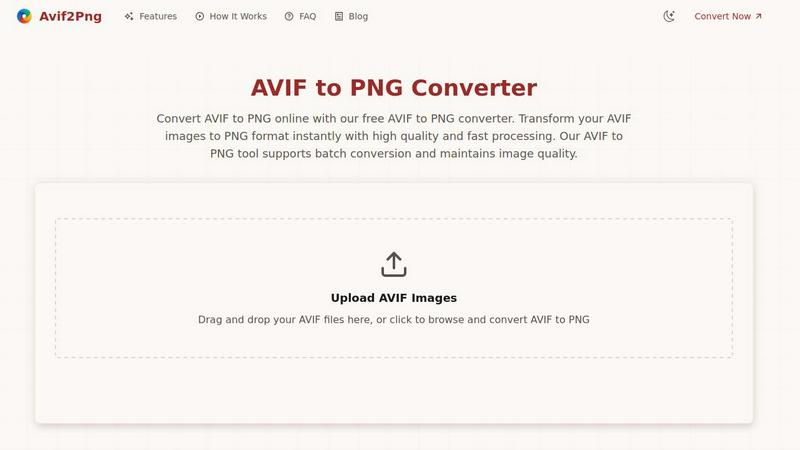
Convert AVIF images to high-quality PNG format online quickly and effortlessly with batch processing for maximum.
Last updated: March 1, 2026

Img Editor
Img Editor is an advanced AI image generator that transforms text prompts into professional quality digital art.
Last updated: February 28, 2026
Visual Comparison
Avif2Png
Img Editor

Feature Comparison
Avif2Png
Free Online Conversion
Avif2Png provides a completely free service for converting AVIF images to PNG format, eliminating the need for any registration or subscription. Users can access the tool instantly from any web browser, making it highly accessible.
Batch Conversion Support
With Avif2Png, users can convert multiple AVIF files to PNG in a single operation. This batch conversion feature enhances efficiency, allowing graphic designers and developers to process several images simultaneously without having to repeat the upload and conversion steps for each file.
High-Quality Image Preservation
The tool ensures that the quality of images is preserved throughout the conversion process. Avif2Png is committed to maintaining the visual integrity of your original AVIF files, delivering PNG images that are faithful to the source material.
Secure File Processing
Avif2Png prioritizes user privacy and data security. All files uploaded for conversion are processed securely, and once the conversion is complete, the files are deleted from the server, ensuring that no sensitive information is retained.
Img Editor
Advanced Text-to-Image Generation
This core feature allows users to input descriptive text prompts, which the platform's AI then interprets to create unique, high-quality images. The system supports complex and detailed descriptions, enabling the generation of everything from photorealistic landscapes to abstract digital art. Users have control over key parameters to fine-tune the output, ensuring the generated image closely matches their vision and intended use case.
Granular Image Customization Controls
Img Editor provides users with precise control over the generation process through adjustable settings. This includes selecting from multiple aspect ratios (such as 1:1, 16:9, and 9:16) for different platforms and choosing from various image quality tiers, including Standard, High Quality (2K), and Ultra Quality (4K) through its Nano Photo technology. This level of customization ensures the final image is optimized for its specific purpose, from social media posts to high-resolution prints.
Integrated Prompt Generator and Gallery
To assist users and inspire creativity, Img Editor features a built-in prompt generator and a public gallery. The prompt generator helps users craft effective descriptions, while the gallery showcases community creations. Users can click on any popular prompt from the gallery to instantly try it themselves, facilitating learning, inspiration, and the discovery of new artistic styles and techniques directly within the workflow.
Community-Driven Earning Model
A unique feature of Img Editor is its incentive system that rewards user participation. After generating an image, users can submit their creation to the public gallery for review. Upon approval, they earn 10 extra image generations for free. This model not only builds a rich, shared resource of ideas but also allows active users to significantly extend their free usage of the platform's powerful AI tools.
Use Cases
Avif2Png
Web Development
Web developers often face compatibility issues when using advanced image formats like AVIF. By converting AVIF to PNG, they ensure that images can be displayed correctly across all browsers and devices, including those that do not support the AVIF format.
Graphic Design
For graphic designers, converting AVIF images to PNG is essential when working with graphics that require transparency or high-quality outputs. PNG format maintains sharp edges and supports transparent backgrounds, making it ideal for logos and icons.
Social Media Sharing
Social media platforms typically favor the PNG format due to its broad compatibility and support for transparency. Converting AVIF images to PNG allows users to easily share their visuals on various social media channels without encountering format-related issues.
Print Media Production
In print media, using the PNG format is often a requirement for high-quality output. By converting AVIF images to PNG, users can ensure that their images meet the standards for print production, delivering clear and vibrant visuals in publications.
Img Editor
Digital Art and Concept Visualization
Artists and concept designers can use Img Editor to rapidly prototype ideas, visualize scenes, and create unique digital artwork. The AI can generate illustrations based on descriptive narratives, helping to overcome creative blocks and explore different artistic styles, color palettes, and compositions before committing to a final piece, dramatically speeding up the conceptual phase of projects.
Marketing and Social Media Content Creation
Marketers, social media managers, and content creators can leverage the platform to produce custom, eye-catching visuals for campaigns, blog posts, and social media feeds. The ability to generate images in specific aspect ratios (like 16:9 for YouTube thumbnails or 1:1 for Instagram) and the prompt gallery for trending ideas make it an efficient tool for maintaining a consistent and engaging visual brand identity.
Personalized Art and Entertainment
Individuals can use Img Editor for personal entertainment and creation, such as generating images of fictional characters, envisioning fantasy scenes from a book, or creating custom artwork for personal projects. The platform allows users to experiment with detailed prompts, like creating a festive scene with specific cultural elements, to produce personalized and meaningful imagery.
Professional Design and Mockup Prototyping
Graphic designers and product developers can utilize the AI to quickly generate background scenes, texture ideas, or product mockups. For instance, a designer could describe a "modern minimalist studio with dramatic natural lighting" to generate a base image for a website hero section or an advertisement, saving time on initial asset creation and stock photo searches.
Overview
About Avif2Png
Avif2Png is a robust online tool specifically designed to facilitate the conversion of AVIF images into the universally recognized PNG format. The AVIF format, or AV1 Image File Format, is a contemporary image format that excels in both compression efficiency and visual quality, making it a popular choice among photographers, web developers, and graphic designers. However, the relatively limited adoption of AVIF in certain contexts necessitates the conversion to PNG for enhanced compatibility across various devices and applications. Avif2Png addresses this need by offering a seamless, user-friendly interface that allows users to convert their images quickly and efficiently, without the need for complex software installations or extensive technical knowledge. Its main value proposition lies in delivering a fast, secure, and high-quality conversion experience, ensuring that users can easily adapt their image files for broader usability while preserving their original visual integrity.
About Img Editor
Img Editor is a comprehensive, AI-powered platform designed to democratize and streamline the process of digital image creation and editing. It serves as a multifaceted tool that goes beyond simple generation, offering a suite of features including text-to-image synthesis, image editing, and prompt generation. The platform is engineered for a broad spectrum of users, from professional digital artists, graphic designers, and marketers seeking high-quality visual assets, to hobbyists, writers, and casual creators looking to bring their imaginative concepts to life. Its core value proposition is rooted in powerful, accessible technology; users can generate up to 10 images per day for free, with opportunities to earn additional generations by contributing to the community gallery. By integrating advanced AI models with an intuitive interface and granular control over aspects like aspect ratio and quality, Img Editor empowers users to transform abstract ideas into stunning, professional-grade visuals efficiently, making it a formidable resource in the fast-paced world of digital content creation.
Frequently Asked Questions
Avif2Png FAQ
What is the AVIF format?
AVIF, or AV1 Image File Format, is a modern image format that offers advanced compression capabilities and superior image quality compared to traditional formats such as JPEG and PNG. It is designed for efficient storage and transmission of images.
Why should I convert AVIF to PNG?
Converting AVIF to PNG is essential for ensuring compatibility across a wider range of devices and applications. PNG remains one of the most universally supported image formats, making it ideal for web use, graphic design, and print media.
Is there a limit to the number of files I can convert at once?
No, Avif2Png supports batch conversion, allowing users to convert multiple AVIF files to PNG simultaneously. This feature enhances productivity, especially for users dealing with large volumes of images.
How secure is the file processing on Avif2Png?
Avif2Png emphasizes user privacy by securely processing all uploaded files and ensuring that they are deleted from the server once the conversion is completed. Users can confidently convert images without worrying about data retention.
Img Editor FAQ
How many free images can I generate per day?
Img Editor provides users with a generous free tier, allowing the generation of up to 10 images per day at no cost. This daily allowance refreshes, providing consistent access to the platform's core AI generation tools for regular users without any financial commitment.
How can I earn more free image generations?
You can earn additional free generations by actively participating in the community. After creating an image, use the "Submit to Gallery" option. Once your submission is reviewed and approved by the Img Editor team, you will be rewarded with 10 extra image generations, allowing you to extend your creative work without limit.
What is Nano Photo and the difference between 2K and 4K quality?
Nano Photo refers to Img Editor's advanced image processing technology that enables higher resolution outputs. The 2K (High Quality) and 4K (Ultra Quality) settings are available under this technology, producing images with significantly greater detail and clarity suitable for professional use or large-format printing, compared to the standard 1K resolution.
Can I use the images I create for commercial purposes?
While the provided context does not specify detailed licensing terms, users should review Img Editor's official Terms of Service or licensing policy for definitive information. Typically, AI-generated image platforms grant users rights to use their creations, but it is crucial to confirm any restrictions regarding commercial use, redistribution, or attribution requirements directly from the source.
Alternatives
Avif2Png Alternatives
Avif2Png is an online tool designed to convert AVIF images to PNG format, falling under the category of image and photo editing solutions. Its primary advantage lies in its ability to facilitate high-quality conversions without the need for complex software installations. Users often seek alternatives to Avif2Png due to various reasons, including pricing structures, feature sets, or specific platform compatibility that may not align with their needs. Additionally, some may desire more advanced functionalities or integrations that Avif2Png does not offer. When exploring alternatives to Avif2Png, it is essential to consider factors such as the ease of use, conversion speed, output quality, and batch processing capabilities. User privacy and security should also be top priorities, ensuring that any platform chosen is trustworthy and protects user data. Evaluating these elements can help users find a suitable replacement that meets their image conversion requirements effectively.
Img Editor Alternatives
Img Editor is a free AI image generation and editing platform within the digital art and photo manipulation category. It utilizes advanced machine learning to allow users to create and modify images through text prompts, making sophisticated visual creation accessible to a broad audience. Users may seek alternatives to Img Editor for various reasons. Common motivations include needing different pricing structures, such as subscription models with higher generation limits or one-time purchase software. Others may require more specialized features, advanced control over the AI process, integration with specific creative platforms, or simply desire to explore different AI models and artistic styles. When evaluating an alternative, key considerations should include the core AI capabilities and output quality, the cost relative to your usage volume, and the specific feature set, such as advanced editing tools, upscaling, or batch processing. The user interface and learning curve are also crucial, as is the platform's focus, whether on photorealism, specific art styles, or commercial licensing policies for generated images.