
Avif2Png vs Shrinkpad
Side-by-side comparison to help you choose the right product.

Avif2Png
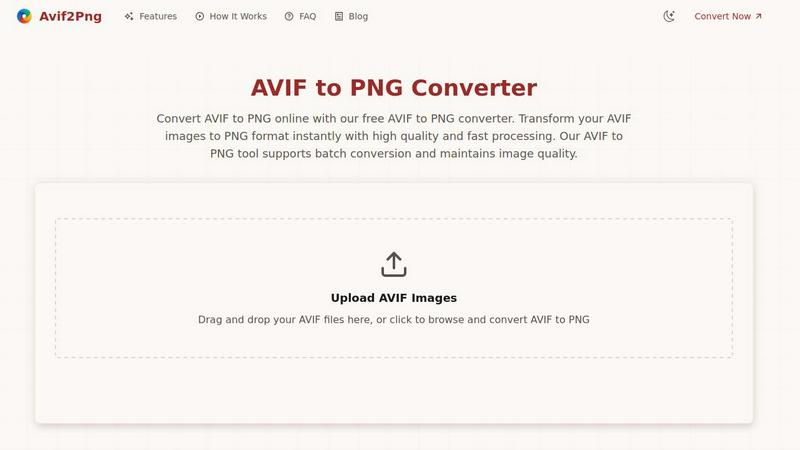
Convert AVIF images to high-quality PNG format online quickly and effortlessly with batch processing for maximum.
Last updated: March 1, 2026

Shrinkpad
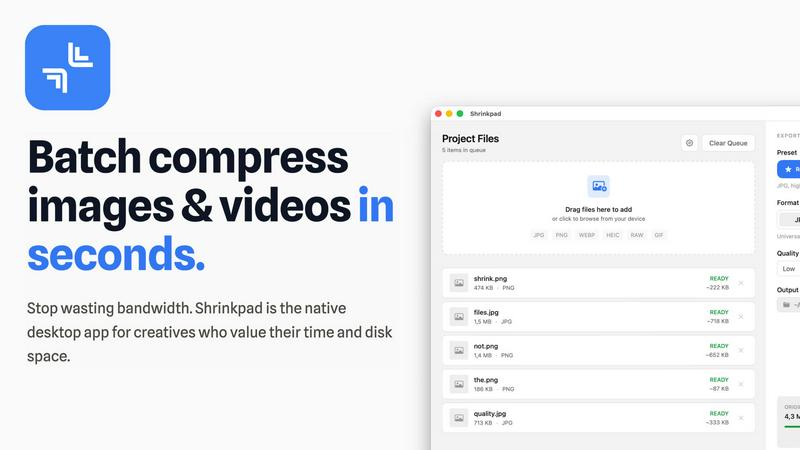
Effortlessly batch compress images and videos on your Mac to save time and optimize storage with Shrinkpad.
Last updated: February 28, 2026
Visual Comparison
Avif2Png
Shrinkpad
Feature Comparison
Avif2Png
Free Online Conversion
Avif2Png provides a completely free service for converting AVIF images to PNG format, eliminating the need for any registration or subscription. Users can access the tool instantly from any web browser, making it highly accessible.
Batch Conversion Support
With Avif2Png, users can convert multiple AVIF files to PNG in a single operation. This batch conversion feature enhances efficiency, allowing graphic designers and developers to process several images simultaneously without having to repeat the upload and conversion steps for each file.
High-Quality Image Preservation
The tool ensures that the quality of images is preserved throughout the conversion process. Avif2Png is committed to maintaining the visual integrity of your original AVIF files, delivering PNG images that are faithful to the source material.
Secure File Processing
Avif2Png prioritizes user privacy and data security. All files uploaded for conversion are processed securely, and once the conversion is complete, the files are deleted from the server, ensuring that no sensitive information is retained.
Shrinkpad
Automatic Compression Ratio Adjustment
Shrinkpad utilizes advanced algorithms to automatically analyze the visual complexity of images and videos, applying the optimal compression ratio without introducing artifacts. This feature ensures that users achieve high-quality results, making it ideal for preserving visual integrity while significantly reducing file sizes.
Unlimited Batching Capability
With Shrinkpad, users can process thousands of media files simultaneously without crashing or slowing down. Unlike online tools that may limit batch sizes, Shrinkpad's robust architecture allows for massive queues, enabling users to handle extensive projects efficiently and effectively.
Folder Mode for Convenience
The Folder Mode feature allows users to drag and drop entire folders onto Shrinkpad, where the application automatically detects and processes all supported media files within. This removes the hassle of manually selecting files one by one, streamlining the workflow and saving time for busy professionals.
Privacy-Focused Local Processing
Shrinkpad prioritizes user privacy by ensuring that all processing occurs locally on the user's machine. This means that sensitive assets remain on the device, eliminating any concerns about cloud uploads or data breaches, which is especially crucial for creative professionals handling proprietary content.
Use Cases
Avif2Png
Web Development
Web developers often face compatibility issues when using advanced image formats like AVIF. By converting AVIF to PNG, they ensure that images can be displayed correctly across all browsers and devices, including those that do not support the AVIF format.
Graphic Design
For graphic designers, converting AVIF images to PNG is essential when working with graphics that require transparency or high-quality outputs. PNG format maintains sharp edges and supports transparent backgrounds, making it ideal for logos and icons.
Social Media Sharing
Social media platforms typically favor the PNG format due to its broad compatibility and support for transparency. Converting AVIF images to PNG allows users to easily share their visuals on various social media channels without encountering format-related issues.
Print Media Production
In print media, using the PNG format is often a requirement for high-quality output. By converting AVIF images to PNG, users can ensure that their images meet the standards for print production, delivering clear and vibrant visuals in publications.
Shrinkpad
Optimizing Digital Asset Management
Photographers and designers can utilize Shrinkpad to optimize their digital asset management workflows by batch compressing images and videos for use in portfolios and websites. By reducing file sizes, they can enhance loading times and overall user experience on their platforms.
Streamlining Social Media Content Creation
Content creators can leverage Shrinkpad to prepare images and videos for social media by quickly compressing media files to meet platform requirements without sacrificing quality. This allows for faster uploads and better engagement with audiences, enhancing their social media presence.
Enhancing Website Performance
Web developers can benefit from using Shrinkpad to compress images and videos before uploading them to websites. By reducing file sizes, developers can significantly decrease loading times, leading to improved Core Web Vitals and overall site performance, which is crucial for SEO.
Facilitating Efficient Team Collaboration
For teams working on design projects, Shrinkpad provides a way to compress shared media files for collaborative use. By allowing team members to quickly process and optimize assets, it fosters smoother collaboration and ensures that all members are working with the most efficient file versions available.
Overview
About Avif2Png
Avif2Png is a robust online tool specifically designed to facilitate the conversion of AVIF images into the universally recognized PNG format. The AVIF format, or AV1 Image File Format, is a contemporary image format that excels in both compression efficiency and visual quality, making it a popular choice among photographers, web developers, and graphic designers. However, the relatively limited adoption of AVIF in certain contexts necessitates the conversion to PNG for enhanced compatibility across various devices and applications. Avif2Png addresses this need by offering a seamless, user-friendly interface that allows users to convert their images quickly and efficiently, without the need for complex software installations or extensive technical knowledge. Its main value proposition lies in delivering a fast, secure, and high-quality conversion experience, ensuring that users can easily adapt their image files for broader usability while preserving their original visual integrity.
About Shrinkpad
Shrinkpad is a sophisticated batch compression tool meticulously crafted for macOS users who seek an efficient and reliable method to compress images and videos without sacrificing quality. Designed with photographers, designers, content creators, and everyday users in mind, Shrinkpad enables users to manage their media files more effectively by achieving file size reductions of up to 90%. The application processes files locally, guaranteeing user privacy by ensuring that no files are uploaded to the cloud. With a simple drag-and-drop interface, users can compress hundreds of files or entire folders in mere seconds. Shrinkpad supports over 50 file formats, making it a versatile solution for diverse media types, and its user-friendly interface includes both quick compression presets and detailed settings for advanced users. By utilizing Shrinkpad, users can reclaim valuable disk space, streamline their asset management processes, and improve their workflow efficiency, all while maintaining the highest standards of media quality.
Frequently Asked Questions
Avif2Png FAQ
What is the AVIF format?
AVIF, or AV1 Image File Format, is a modern image format that offers advanced compression capabilities and superior image quality compared to traditional formats such as JPEG and PNG. It is designed for efficient storage and transmission of images.
Why should I convert AVIF to PNG?
Converting AVIF to PNG is essential for ensuring compatibility across a wider range of devices and applications. PNG remains one of the most universally supported image formats, making it ideal for web use, graphic design, and print media.
Is there a limit to the number of files I can convert at once?
No, Avif2Png supports batch conversion, allowing users to convert multiple AVIF files to PNG simultaneously. This feature enhances productivity, especially for users dealing with large volumes of images.
How secure is the file processing on Avif2Png?
Avif2Png emphasizes user privacy by securely processing all uploaded files and ensuring that they are deleted from the server once the conversion is completed. Users can confidently convert images without worrying about data retention.
Shrinkpad FAQ
Can I use Shrinkpad for free?
Yes, Shrinkpad offers a Free Starter plan that provides essential tools for casual users. This plan includes standard compression features with a limit of 10 files per batch, making it suitable for those who need basic functionality without a financial commitment.
What file formats does Shrinkpad support?
Shrinkpad supports over 50 file formats, including popular image formats such as JPG, PNG, WEBP, and AVIF, as well as video formats like MP4 and MOV. This extensive compatibility makes it a versatile tool for handling various media types.
Does Shrinkpad support video compression?
Absolutely, Shrinkpad includes robust video compression capabilities, allowing users to optimize video files alongside images. This feature ensures that both images and videos can be efficiently compressed, making it ideal for multimedia projects.
How many files can I process at once?
Shrinkpad's unlimited batching capability allows users to process thousands of files simultaneously. This feature is particularly advantageous for professionals who need to handle large volumes of media files without worrying about crashes or performance issues.
Alternatives
Avif2Png Alternatives
Avif2Png is an online tool designed to convert AVIF images to PNG format, falling under the category of image and photo editing solutions. Its primary advantage lies in its ability to facilitate high-quality conversions without the need for complex software installations. Users often seek alternatives to Avif2Png due to various reasons, including pricing structures, feature sets, or specific platform compatibility that may not align with their needs. Additionally, some may desire more advanced functionalities or integrations that Avif2Png does not offer. When exploring alternatives to Avif2Png, it is essential to consider factors such as the ease of use, conversion speed, output quality, and batch processing capabilities. User privacy and security should also be top priorities, ensuring that any platform chosen is trustworthy and protects user data. Evaluating these elements can help users find a suitable replacement that meets their image conversion requirements effectively.
Shrinkpad Alternatives
Shrinkpad is an advanced batch compression tool designed specifically for macOS users, enabling them to compress images and videos without sacrificing quality. It is particularly beneficial for photographers, designers, content creators, and everyday users who need an efficient way to manage large media files and optimize disk space. With its ability to reduce file sizes by up to 90%, Shrinkpad stands out in the image and video processing category. Users often seek alternatives to Shrinkpad for various reasons, including pricing, differing feature sets, or specific platform compatibility needs. Some may prefer options that cater to additional operating systems or offer unique functionalities that better fit their workflows. When choosing an alternative, users should consider factors such as batch processing capabilities, local versus cloud processing, supported file formats, and customization options to ensure they select a solution that meets their individual requirements.