
BlitzCut vs SeeDance Ai
Side-by-side comparison to help you choose the right product.

BlitzCut
BlitzCut is an AI video editor that quickly removes silences and adds captions, transforming clips into shareable.
Last updated: February 26, 2026

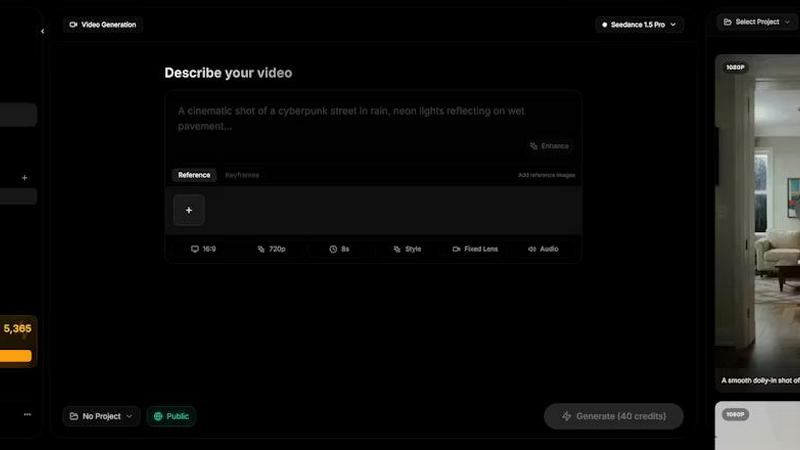
Seedance AI is a multimodal video generator that transforms text, images, audio, and video into polished, synchronized video clips with sound.
Last updated: April 13, 2026
Visual Comparison
BlitzCut

SeeDance Ai
Feature Comparison
BlitzCut
Automatic Silence Removal
This powerful feature utilizes advanced AI algorithms to detect and remove silent gaps in video content automatically. By eliminating all pauses instantly, creators save significant time that would otherwise be spent on manual edits. This means less frustration and more time for content creation.
AI Captions
BlitzCut generates captions with over 95% accuracy, allowing creators to add styled captions to their videos effortlessly. This feature includes various trending styles that enhance the aesthetic appeal of videos, making them more engaging for viewers while ensuring accessibility.
Text-Based Editing
With the text-based editing feature, users can easily edit their videos by removing sentences directly from the transcription. This intuitive method streamlines the editing process, enabling creators to make quick adjustments without needing to scrub through the video manually.
2-Minute Workflow
BlitzCut's streamlined workflow allows users to go from import to export in under two minutes. This remarkable feature means creators can efficiently produce and publish daily content without the lengthy delays typically associated with traditional video editing software.
About SeeDance Ai
Multimodal Reference System
SeeDance AI moves beyond simple text prompting with its innovative @ reference system. Users can upload up to 12 reference files, including images, videos, and audio clips, and tag them directly within the text prompt using symbols like @Image1 or @Video1. This allows for precise instruction, enabling the model to replicate specific elements such as a character's face from one image, a camera movement from a reference video, and the rhythm from an audio track. This system dramatically reduces guesswork and provides granular, compositional control over the final generated video, treating references as direct commands rather than vague inspiration.
Native Audio-Visual Synchronization
A defining feature of SeeDance AI is its native, simultaneous generation of video and audio. The model produces both elements in a single pass, which ensures perfect temporal alignment. This means lip-sync for dialogue is accurate, sound effects like footsteps or impacts land on the exact frame, and background music beats match the visual cuts and motion. This integrated approach transforms the platform from a simple video clip generator into a comprehensive production tool, making extensive post-production sound design optional and saving creators significant time and technical effort.
Consistent Character and Object Continuity
The platform tackles the pervasive issue of "character drift" through an advanced cross-attention reference system. This technology locks in specific details such as facial geometry, clothing, hairstyle, and even object attributes like logos or product text across different scenes and shots within a video. This ensures that a character or branded element remains visually consistent throughout a multi-shot sequence, making the tool highly effective for serialized content, advertising campaigns, and any project requiring reliable character or brand identity continuity.
Precise Motion and Camera Control
SeeDance AI offers exceptional control over cinematography and character movement by leveraging video references. Users can upload a clip containing a specific camera technique—such as a dolly zoom, tracking shot, or orbital movement—and the AI can replicate that exact cinematic behavior in the generated content. Similarly, complex human motions like dance choreography, martial arts, or athletic movements can be transferred from a reference video to AI-generated characters with high fidelity, respecting skeletal integrity and realistic physics for smooth, believable results.
Use Cases
BlitzCut
Social Media Influencers
Social media influencers can benefit immensely from BlitzCut’s rapid editing capabilities. With the ability to create and post daily videos seamlessly, influencers can maintain a consistent presence and engage more effectively with their audience.
Content Creators
For content creators who produce educational or entertaining videos, BlitzCut simplifies the editing process. The automatic silence removal and AI caption features allow creators to focus on content quality and narrative rather than getting bogged down by technical details.
Marketing Professionals
Marketing teams can leverage BlitzCut to create compelling promotional videos quickly. The app's user-friendly interface and fast editing capabilities enable teams to respond swiftly to trends and market demands, enhancing their overall content strategy.
Educators and Trainers
Educators can use BlitzCut to create instructional videos efficiently. With the ability to edit raw footage into polished lessons in minutes, teachers can enhance their digital content delivery and improve student engagement.
SeeDance Ai
Marketing and Advertisement Clips
Brands and marketing agencies can leverage SeeDance AI to rapidly produce high-quality promotional videos. By using product images, brand audio logos, and reference clips for desired style, teams can generate engaging ad content with consistent product shots, synchronized voiceovers or music, and professional camera work. This accelerates the production timeline from concept to final asset, enabling cost-effective A/B testing of different visual concepts and rapid deployment for digital marketing campaigns.
Social Media and Viral Content Creation
Content creators and social media managers can use the platform to produce a high volume of polished, attention-grabbing clips for platforms like TikTok, Instagram Reels, and YouTube Shorts. The ability to quickly turn trending audio, a single image, or a text idea into a multi-shot, cinematic video with perfect audio sync is invaluable for maintaining a consistent posting schedule and capitalizing on viral trends without needing complex editing software or filming setups.
Dance and Choreography Visualization
Dance studios, choreographers, and performers can utilize SeeDance AI's advanced motion transfer capabilities. By uploading a reference video of a dance routine, the AI can generate new videos applying that exact choreography to different characters, settings, or styles. This is perfect for pre-visualizing performances, creating instructional content, or producing innovative dance videos that would be logistically challenging or expensive to film in reality, all while maintaining the fluidity and precision of the original movements.
Narrative Storytelling and Short Films
Independent filmmakers and writers can use SeeDance AI as a pre-visualization tool or even to create final animated short films. The platform's ability to maintain character consistency across shots and generate sequences with logical shot progression allows for the telling of coherent visual stories. By providing a detailed script-like prompt and reference images for characters and settings, creators can produce multi-scene narratives with synchronized dialogue and sound design, effectively bringing written stories to life with cinematic quality.
Overview
About BlitzCut
BlitzCut is an innovative AI-powered video editing tool designed specifically for social media content creators. Its primary mission is to make professional video editing accessible to everyone, regardless of their technical skills. By focusing on speed rather than an overwhelming array of features, BlitzCut allows users to transform raw video clips into polished content for platforms like TikTok, Instagram Reels, and YouTube Shorts in mere minutes. The app is built with a mobile-first approach, ensuring it is optimized for iPhone, iPad, and Mac devices. Key functionalities include automatic silence removal and AI-generated captions, which drastically reduce the time spent on tedious editing tasks. BlitzCut empowers creators to focus on their craft while automating the mundane, thus supporting a sustainable posting routine.
About SeeDance Ai
SeeDance AI is a sophisticated multimodal AI video generation platform engineered to transform diverse creative inputs—including text prompts, images, audio clips, and video references—into high-quality, cinematic multi-shot videos. It distinguishes itself in the crowded generative AI space by offering director-level control over the final output, addressing common industry pain points such as anatomical inconsistencies, character drift, and poor audio-visual synchronization. The platform is built for professional creators, marketers, social media content teams, and storytellers who require reliable, high-fidelity video production without the need for extensive physical studio resources or post-production editing. Its core value proposition lies in its ability to function as an automated, end-to-end production pipeline. Unlike tools that treat video and audio as separate layers, SeeDance AI generates them simultaneously within a single model pass, ensuring native synchronization of dialogue, sound effects, and music with on-screen action. With specialized models like SeeDance 2.0, 1.5 Pro, and 1.0 Pro, the platform provides varying levels of capability focused on delivering realistic human motion, smooth physics, and exceptional adherence to user prompts and references. This makes it an indispensable hub for creating professional marketing clips, dynamic social content, complex dance sequences, and cohesive narrative storytelling.
Frequently Asked Questions
BlitzCut FAQ
What platforms is BlitzCut available on?
BlitzCut is available for free on iPhone, iPad, and Mac, making it accessible for mobile and desktop users alike. This ensures that creators can edit videos on their preferred devices with ease.
How accurate are the AI-generated captions?
BlitzCut boasts an impressive caption accuracy rate of over 95%. This high level of accuracy ensures that creators can rely on the AI to produce captions that contribute to the overall quality and engagement of their videos.
How long does it take to edit a video with BlitzCut?
The entire editing process from import to export can be completed in under two minutes with BlitzCut. This rapid workflow is designed to accommodate the fast-paced needs of content creators in today’s digital landscape.
Is there any cost associated with using BlitzCut?
BlitzCut is free to download and use, requiring no account creation. Users can access the app's powerful features without any financial barriers, making it an attractive option for creators of all levels.
SeeDance Ai FAQ
What is SeeDance AI?
SeeDance AI is a multimodal artificial intelligence video generation platform. It transforms user inputs—such as text descriptions, images, audio files, and video references—into cohesive, cinematic video clips. Its standout capability is generating video and synchronized audio simultaneously in one pass, offering professional-grade control over motion, character consistency, and cinematography, making it a powerful tool for various content creation needs.
How does SeeDance AI ensure character consistency?
SeeDance AI employs a cross-attention reference system within its models. When you provide a reference image of a character, the model locks onto specific facial features, clothing details, and other attributes. This data is then used as a constant guide during the generation of all subsequent shots in a sequence, ensuring the character's appearance remains stable and does not "drift" or morph unintentionally between different scenes or angles.
Can I control the camera movements in the generated video?
Yes, precise camera control is a core feature. The most effective method is to use a video reference. By uploading a short clip that contains the desired camera movement—such as a pan, zoom, or steady tracking shot—and tagging it in your prompt, SeeDance AI's model can analyze and replicate that specific cinematic motion in your newly generated video, providing director-level control over the visual framing and dynamics.
Is SeeDance AI affiliated with ByteDance or TikTok?
No, according to the official disclaimer, seedanceai.com is an independent website and is not affiliated with, associated with, or endorsed by ByteDance Ltd. (the parent company of TikTok) or any of its subsidiaries. The platform is a separate entity specializing in AI-powered video generation technology.
Alternatives
BlitzCut Alternatives
BlitzCut is an AI-powered video editor designed primarily for content creators seeking to streamline their video production process. It belongs to the category of video editing tools that leverage artificial intelligence to enhance efficiency and effectiveness in creating engaging content. Users often seek alternatives to BlitzCut for various reasons, including pricing structures, specific feature sets, or compatibility with different platforms and devices. As the landscape of video editing continues to evolve, it is essential to consider factors such as ease of use, speed, integration capabilities, and the level of automation offered when selecting an alternative. When exploring alternatives to BlitzCut, prioritize options that align with your content creation needs. Look for tools that provide robust features, including automatic silence removal and accurate captioning, while also maintaining a user-friendly interface. Additionally, ensure that the alternative can accommodate your preferred devices, whether you are editing on a desktop or mobile device, to achieve a seamless workflow that suits your style of content production.
SeeDance Ai Alternatives
SeeDance Ai is a specialized platform within the AI video generation category, designed to create cinematic, multi-shot videos from text, images, audio, and video inputs. It distinguishes itself with director-level control and a focus on high-fidelity motion, particularly for content like dance videos and marketing clips where anatomical accuracy is paramount. Users often explore alternatives for various practical reasons. These can include budget constraints, as premium AI tools may have pricing tiers that don't align with every user's needs. Others might seek different feature sets, such as simpler interfaces, alternative output styles, or integration with specific platforms that better suit their existing workflow. When evaluating an alternative, key considerations should include the core output quality, especially regarding motion smoothness and prompt adherence. The level of creative control offered, the types of media inputs accepted, and the overall reliability of the platform for professional use are also critical factors to ensure the tool meets your specific project requirements.