
Blueberry vs Mod
Side-by-side comparison to help you choose the right product.

Blueberry
Blueberry is an all-in-one Mac app that integrates your editor, terminal, and browser for seamless product development.
Last updated: February 26, 2026

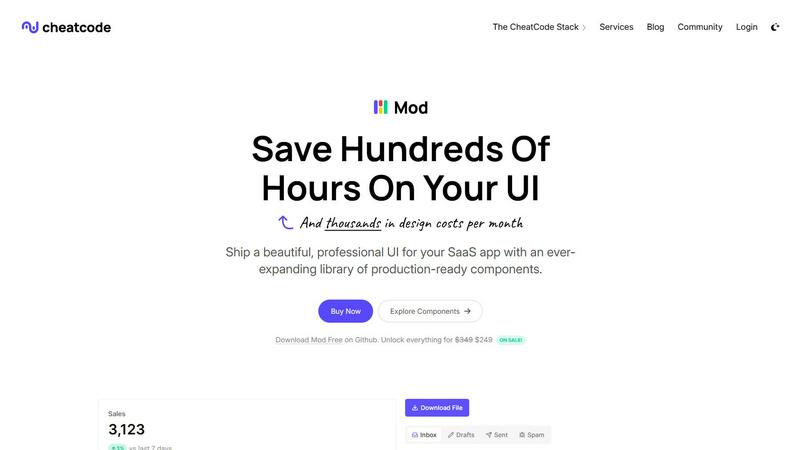
Mod is a CSS framework with a component library for rapidly building SaaS application user interfaces.
Visual Comparison
Blueberry

Mod
Feature Comparison
Blueberry
Integrated Workspace
Blueberry combines a code editor, terminal, and browser into a single workspace, allowing users to work on multiple aspects of their projects without needing to juggle between different applications. This integration promotes a seamless workflow, making it easier to build and ship web applications.
AI Contextual Awareness
With Blueberry's MCP server, your chosen AI models have full access to your entire workspace. This means they can interact with open files, preview the browser, and see terminal output in real-time, providing you with contextual assistance that traditional editors cannot offer.
Multi-Device Preview
Blueberry includes the capability to preview your application across various devices directly within the workspace. This feature allows developers to see how their web apps will look on desktops, tablets, and mobile devices, ensuring a consistent user experience without leaving the application.
Pinned Applications
Users can keep essential tools like GitHub, Linear, Figma, and PostHog docked within the Blueberry workspace. These pinned applications load with your project and share live context with your AI, further enhancing collaboration and efficiency.
About Mod
Extensive Component Library
Mod provides an extensive library of over 88 professionally designed, reusable UI components that are fundamental to SaaS applications. This includes complex compound components like data tables with sorting and filtering, interactive dashboards with charts and stats cards, multi-step forms, application shells with navigation, modals, and user profile menus. Each component is built with accessibility (a11y) best practices in mind, featuring proper ARIA attributes, keyboard navigation, and focus management. This depth ensures developers are not building common interfaces from scratch but are assembling them from proven, polished parts, guaranteeing a high standard of usability and a cohesive look and feel across the entire application.
Comprehensive Design System & Theming
Beyond individual components, Mod offers a complete and systematic design language with 168 distinct style utilities, two built-in themes (light and dark), and over 1,500 customizable icons. The design system encompasses a consistent scale for typography, a harmonious color palette with semantic meanings (primary, success, warning, error), a unified spacing scale, and shadow elevations. The built-in dark mode support is not an afterthought but a first-class feature, with all components styled appropriately for both themes. This systematic approach ensures visual consistency at scale, making it easy to maintain brand identity and update the look of an entire application by modifying a centralized set of design tokens.
Framework-Agnostic & Lightweight Integration
A defining technical feature of Mod is its complete agnosticism to any specific JavaScript framework or backend language. It is distributed as pure, well-structured CSS with clear HTML markup examples, allowing it to integrate seamlessly into projects using Next.js, Nuxt, Svelte, Vue, React, or even traditional server-rendered applications in Rails or Django. This eliminates vendor lock-in and provides long-term flexibility. The framework is built with a mobile-first, responsive approach, ensuring all components adapt flawlessly from desktop to tablet to mobile screens without requiring developers to write extensive custom media queries, thereby streamlining the development of truly responsive applications.
Production-Ready & Regularly Updated
Mod is engineered for real-world production environments, emphasizing performance, stability, and maintainability. The CSS is optimized and minified for fast loading times. Components are designed to be composable and customizable without breaking their core functionality. Furthermore, CheatCode commits to yearly updates for the library, ensuring that Mod evolves with modern web standards, browser capabilities, and design trends. This update policy provides users with peace of mind, knowing their UI foundation will receive ongoing improvements, security patches, and new components, protecting their investment and reducing the long-term maintenance burden.
Use Cases
Blueberry
Rapid Prototyping
Developers can use Blueberry to quickly prototype web applications by leveraging its integrated tools. The ability to see real-time changes in the browser as code is modified allows for swift iterations and faster feedback cycles.
Collaborative Development
With the ability to pin applications and share context with AI, teams can collaborate more effectively on projects. This feature is particularly beneficial for remote teams who need to stay aligned while working on complex web applications.
Educational Tool for Learning
Blueberry serves as an excellent educational platform for new developers. The integrated workspace allows learners to understand how code changes affect the application in real-time, facilitating a more engaging learning experience.
Debugging Made Easy
Blueberry's real-time terminal output and contextual awareness make it an ideal tool for debugging. Developers can quickly identify issues by running commands and seeing immediate feedback in the terminal and browser, streamlining the troubleshooting process.
Mod
Rapid Prototyping and MVP Development
For startups and entrepreneurs, speed to market is critical. Mod is an ideal tool for rapidly prototyping a SaaS idea or building a Minimum Viable Product (MVP). Developers can use the pre-designed components and layouts to assemble a fully functional, professional-looking interface in days rather than weeks. This allows teams to validate their business concept with real users quickly without incurring significant design costs or spending months on front-end development, enabling faster feedback loops and more agile product iteration.
Standardizing UI Across Large Development Teams
In larger organizations or distributed teams, maintaining a consistent UI can be challenging. Mod acts as an enforced design system, providing a single source of truth for all visual elements. By adopting Mod, engineering leads can ensure that every developer, regardless of their individual design skills, produces interfaces that align with the company's brand and usability standards. This reduces design debt, streamlines code reviews focused on logic rather than pixel-pushing, and accelerates onboarding for new team members who can immediately leverage the familiar component library.
Modernizing Legacy Application Interfaces
Many established SaaS products suffer from outdated, inconsistent, or non-responsive user interfaces that hinder user experience. Mod provides a strategic path for incremental UI modernization. Development teams can systematically replace old, custom CSS and components with Mod's modern, accessible equivalents one section or feature at a time. This framework-agnostic approach allows for a gradual refactor without requiring a risky, full-scale rewrite of the application's underlying technology stack, significantly reducing the risk and cost of a UI overhaul.
Building Internal Admin Dashboards and Tools
Companies frequently need to build robust internal tools for operations, customer support, or data analysis. These tools require functional, clear, and efficient interfaces but often do not justify a large design budget. Mod is perfectly suited for this use case, as it provides all the necessary components—data tables, charts, forms, filters, and navigation—to build powerful admin panels quickly. The result is an internal tool that is both highly usable and professionally presented, improving employee productivity without diverting significant design and development resources from customer-facing products.
Overview
About Blueberry
Blueberry is an innovative macOS application designed as a comprehensive workspace for modern product builders who want to streamline their development processes. This AI-native product development platform seamlessly integrates an editor, terminal, and browser into one focused environment, eliminating the need to switch between multiple applications. By connecting to various AI models such as Claude, Gemini, or Codex through its built-in MCP (Multi-Context Protocol) server, Blueberry enables developers to access their code, terminal output, and live previews simultaneously. This holistic approach not only enhances productivity but also reduces the friction caused by constant context switching. Whether you are a seasoned developer or a newcomer, Blueberry aims to simplify the product-building experience, allowing you to focus on crafting web applications that delight users. Its free beta version makes it an accessible tool for anyone looking to elevate their development workflow.
About Mod
Mod is a comprehensive, production-ready CSS framework and component library specifically engineered for building modern, polished Software-as-a-Service (SaaS) user interfaces. It functions as a core pillar of the CheatCode developer stack, designed to eliminate the traditional bottlenecks associated with UI design and front-end styling. The product delivers a vast, meticulously crafted design system that provides developers with a complete visual toolkit, enabling them to ship professional-grade applications with remarkable speed and consistency. Its primary value proposition lies in drastically reducing design costs, development time, and cognitive load for both solo developers and engineering teams. By offering a vast collection of pre-built, accessible, and responsive components, Mod allows developers to focus on application logic and unique features rather than wrestling with CSS intricacies or design system governance. Its framework-agnostic architecture ensures seamless integration with virtually any modern tech stack, making it a versatile and future-proof investment for projects built on Next.js, Nuxt, SvelteKit, Vite, Ruby on Rails, Django, and beyond.
Frequently Asked Questions
Blueberry FAQ
What platforms does Blueberry support?
Currently, Blueberry is exclusively available for macOS users. However, the developers may consider expanding to other platforms in the future based on user feedback.
Is there a cost for using Blueberry during the beta phase?
Blueberry is 100% free during its beta phase, allowing users to explore its features without any financial commitment. This offers a great opportunity for developers to test the platform.
How do I connect AI models to Blueberry?
Blueberry features a built-in MCP server that allows you to connect various AI models, such as Claude, Codex, or Gemini. Simply choose your preferred model, and it will have access to your workspace for improved contextual assistance.
Can I customize my workspace in Blueberry?
Yes, Blueberry allows users to save and restore their workspace configurations per project. You can manage terminal sessions, editor tabs, and browser URLs, making it easy to switch between different projects with predefined setups.
Mod FAQ
What makes Mod different from other CSS frameworks like Tailwind or Bootstrap?
While frameworks like Tailwind provide low-level utility classes and Bootstrap offers generic components, Mod is specifically hyper-focused on the needs of SaaS applications. It provides higher-level, complex components (like dashboards and data-rich tables) that are immediately useful for SaaS products, whereas others require significant composition. Mod also includes a complete, opinionated design system (themes, icons, dark mode) out of the box, reducing the need for additional design decisions. It is more comparable to a specialized SaaS design system than a general-purpose CSS utility framework.
Is Mod compatible with React/Vue/Svelte components?
Yes, absolutely. Mod is framework-agnostic, meaning it is written in standard CSS with plain HTML structure. You can seamlessly use its CSS classes and HTML patterns within any component architecture. For React, Vue, or Svelte, you would build your components using your framework's syntax and apply Mod's provided CSS class names to the elements to style them. This approach gives you the full power of your chosen JavaScript framework while leveraging Mod's pre-built styles and layouts.
How does dark mode implementation work with Mod?
Dark mode in Mod is implemented natively and seamlessly at the CSS level. The framework includes two fully realized themes—light and dark—as part of its core design system. Developers can trigger the dark theme by simply applying a specific CSS class (e.g., .theme-dark) to a top-level container, such as the <html> or <body> tag. All Mod components, with their 168+ styles, will automatically switch to their dark-themed variants. This eliminates the need to manually adjust colors or write custom theme-switching logic for each component.
What is included in the yearly updates for Mod?
The yearly updates are a commitment from CheatCode to continuously improve the Mod library. These updates typically include new components that reflect emerging SaaS UI patterns, enhancements to existing components for better accessibility or functionality, updates to the underlying CSS to support new browser features, and refinements to the design tokens (colors, spacing). This ensures that applications built with Mod remain modern, secure, and aligned with current best practices without requiring developers to manually manage and integrate these ongoing improvements themselves.