
CIOOffice: the CIO-Software vs Zovo
Side-by-side comparison to help you choose the right product.

CIOOffice: the CIO-Software
CIOOffice is a cloud platform empowering CIOs to manage IT strategy, budgets, projects, and vendor relationships.
Last updated: February 26, 2026

Unlock 20 privacy-first Chrome extensions for developers and writers with Zovo, built by a solo developer for your.
Last updated: February 26, 2026
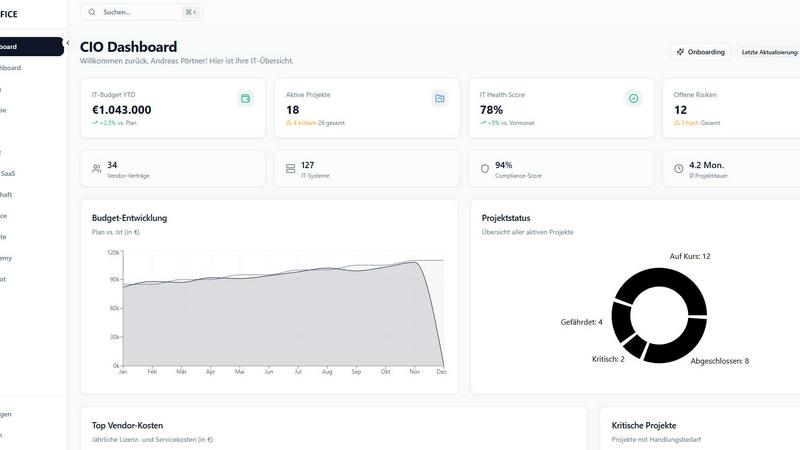
Visual Comparison
CIOOffice: the CIO-Software
Zovo

Feature Comparison
CIOOffice: the CIO-Software
IT Strategy Management
This feature allows CIOs to define strategic objectives, plan initiatives, and track progress transparently. The intuitive interface simplifies the management of strategic goals and facilitates alignment with overall business objectives.
Budget Control
CIOOffice provides tools for overseeing OPEX and CAPEX budgets, including forecasting capabilities and automatic alerts for budget deviations. This ensures that organizations maintain financial oversight and can respond promptly to any discrepancies.
Project Portfolio Management
The platform enables users to categorize, prioritize, and monitor projects effectively. With tools for visualizing project statuses and dependencies, CIOs can maintain a comprehensive overview of their portfolios and make informed resource allocation decisions.
Governance and Risk Management
CIOOffice allows organizations to identify IT risks, ensure compliance with relevant regulations, and prepare for audits. This feature includes risk registers and checklists for GDPR compliance, helping businesses manage their governance frameworks effectively.
Zovo
BeLikeNative
BeLikeNative allows users to write like native speakers in just one keystroke, supporting an impressive 80 languages. This feature is particularly beneficial for non-native speakers looking to enhance their writing skills and communicate more effectively in various languages.
Tab Suspender Pro
Tab Suspender Pro intelligently manages your browser's memory by automatically suspending inactive tabs. This feature helps reduce memory usage, improve browser performance, and keep your workflow uninterrupted, making it ideal for users juggling multiple tabs.
Clipboard History Pro
Clipboard History Pro ensures that users never lose copied text again by maintaining a history of up to 10,000 clips. Users can instantly search their clipboard history and utilize smart paste functions, which significantly enhances productivity during tasks involving text management.
Form Filler Pro
Form Filler Pro simplifies the process of filling out online forms by allowing users to save multiple profiles and fill forms with a single click. This feature is particularly useful for those who frequently engage in online registrations or surveys, saving time and reducing repetitive tasks.
Use Cases
CIOOffice: the CIO-Software
Streamlining IT Operations
Organizations can utilize CIOOffice to streamline their IT operations by consolidating various management functions into a single platform. This leads to improved efficiency and reduced operational complexities.
Enhancing Decision-Making
CIOs can leverage real-time analytics and reporting capabilities to make informed decisions quickly. By having access to critical performance indicators at their fingertips, decision-making becomes more agile and responsive to changing business needs.
Improving Vendor Management
With CIOOffice, businesses can centralize their vendor and contract management processes. This not only optimizes costs but also enhances supplier relationships by providing a clear view of contract terms and performance metrics.
Supporting Digital Transformation
CIOOffice is instrumental in driving digital transformation initiatives by standardizing governance practices. It fosters collaboration between IT and business teams, ensuring that technology investments align with strategic business goals.
Zovo
Enhanced Writing for Non-Native Speakers
Non-native speakers can benefit immensely from BeLikeNative, which provides instant rewrites to improve fluency and expression in writing. This use case is particularly valuable for students, professionals, and anyone looking to enhance their communication in a foreign language.
Memory Management for Power Users
Power users who often keep numerous tabs open can leverage Tab Suspender Pro to manage their browser's memory effectively. By suspending inactive tabs, users can ensure smoother performance and prevent crashes, making it essential for individuals who multitask.
Efficient Text Management for Professionals
Professionals who frequently copy and paste text can utilize Clipboard History Pro to maintain a well-organized clipboard. This tool allows for quick retrieval of previously copied content, streamlining workflows in tasks such as content creation or data entry.
Simplified Online Forms for Busy Individuals
Busy individuals can save time with Form Filler Pro, which allows for quick completion of repetitive online forms. This is particularly advantageous for users who need to fill out various forms for applications, registrations, or surveys, enabling them to focus on more critical tasks.
Overview
About CIOOffice: the CIO-Software
CIOOffice is an innovative cloud-based platform designed specifically for Chief Information Officers (CIOs), IT managers, and digital leaders in small to mid-sized enterprises. This comprehensive IT management solution integrates essential functions such as IT strategy management, project portfolio oversight, budget control, vendor management, and performance analytics into a cohesive, user-friendly interface. By leveraging CIOOffice, organizations can gain enhanced transparency in their IT operations, streamline workflows, and make data-driven decisions through real-time insights. The platform not only supports digital transformation initiatives but also standardizes governance practices, facilitating collaboration between IT and business units. With a strong emphasis on security and GDPR compliance, CIOOffice serves as a crucial tool for modernizing IT management, driving operational efficiency, and ultimately contributing to business growth.
About Zovo
Zovo is an innovative suite of 20 Chrome extensions meticulously crafted by a solo developer with over a decade of experience in software development. With a stellar track record of earning more than $400,000 on Upwork and maintaining a perfect 100% success rate, Zovo stands out as a unique offering in the crowded landscape of browser tools. The flagship extension, BeLikeNative, has already empowered over 3,300 users to write like native speakers across 80 languages with a single keystroke. This suite includes a diverse range of tools, such as Tab Suspender Pro, JSON Formatter Pro, Clipboard History Pro, Form Filler Pro, and many others, all designed to enhance productivity and streamline web browsing. Zovo prioritizes user privacy, ensuring that no data leaves the user's device, and fosters a community-driven development model where users can vote on features and influence the product roadmap. With new extensions rolling out monthly and many tools available for free at zovo.one, Zovo is committed to delivering value without the interference of corporate interests or data harvesting.
Frequently Asked Questions
CIOOffice: the CIO-Software FAQ
What types of organizations can benefit from CIOOffice?
CIOOffice is tailored for small to mid-sized enterprises looking to modernize their IT management practices. It is particularly beneficial for CIOs and IT leaders who need a comprehensive solution for strategic oversight.
How does CIOOffice ensure data security?
CIOOffice adheres to stringent security standards and GDPR compliance, ensuring that sensitive organizational data is protected. The platform employs robust security measures to safeguard data integrity and privacy.
Can CIOOffice support remote teams?
Yes, CIOOffice is a cloud-based platform, which means it can be accessed from anywhere with an internet connection. This makes it ideal for remote teams and organizations with distributed workforces.
What kind of support is available for users of CIOOffice?
CIOOffice offers various support options, including email support for starter plans and priority support for business and professional plans. Additionally, users have access to dedicated support and onboarding workshops in higher-tier plans.
Zovo FAQ
What kind of user data does Zovo collect?
Zovo prioritizes user privacy and does not collect any personal data. All data remains on your device, ensuring that your browsing habits are not harvested or tracked.
How can I request new features for Zovo?
Users can submit feature requests directly through the Zovo platform. The developer actively reviews all requests, and the most popular features are prioritized for development.
Is there a community where I can engage with other Zovo users?
Yes, Zovo has a vibrant Discord community where users can connect, share their experiences, and provide feedback. This platform also allows for direct communication with the developer for any questions or suggestions.
Are there free tools available through Zovo?
Absolutely! Many tools from the Zovo suite are available for free online at zovo.one. Users can access these tools without installation, allowing for immediate use in their browsers.
Alternatives
CIOOffice: the CIO-Software Alternatives
CIOOffice: the CIO-Software is a centralized cloud platform specifically designed for CIOs, IT managers, and digital leaders in enterprises and mid-sized companies. It falls under the category of productivity and management tools, offering a comprehensive solution to manage IT strategy, budgets, projects, and vendor relationships. By consolidating these critical functions into a single interface, CIOOffice aims to enhance operational efficiency and support digital transformation initiatives. Users often seek alternatives to CIOOffice for various reasons, including pricing concerns, specific feature requirements, or compatibility with existing platforms. When exploring alternatives, it is essential to assess factors such as ease of use, integration capabilities, scalability, and the ability to meet unique organizational needs. An ideal alternative should provide similar functionalities while aligning with the strategic goals and budgetary constraints of the organization.
Zovo Alternatives
Zovo is a collection of 20 privacy-first Chrome extensions tailored for developers and writers, designed to enhance productivity and streamline workflows. This suite encompasses tools for various tasks, such as formatting JSON data, managing tabs, and maintaining clipboard history, all created by a seasoned solo developer with a proven track record. Users often seek alternatives to Zovo for reasons such as pricing structures, the availability of specific features, or compatibility with different platforms and browsers. When searching for alternatives, it is essential to consider factors such as the range of features offered, user interface design, privacy policies, and overall performance. Additionally, evaluating customer feedback and the developer's responsiveness to user needs can significantly influence the decision-making process. Ultimately, the right alternative should align with the user’s unique requirements and enhance their productivity.