
Cosy vs Perkoon
Side-by-side comparison to help you choose the right product.

Cosy automates Slack member onboarding and introductions to save community managers time.
Last updated: February 28, 2026

Perkoon provides unlimited, free peer-to-peer file transfers directly between browsers with no signup required.
Last updated: March 4, 2026
Visual Comparison
Cosy
Perkoon

Feature Comparison
Cosy
Automated Onboarding Sequences
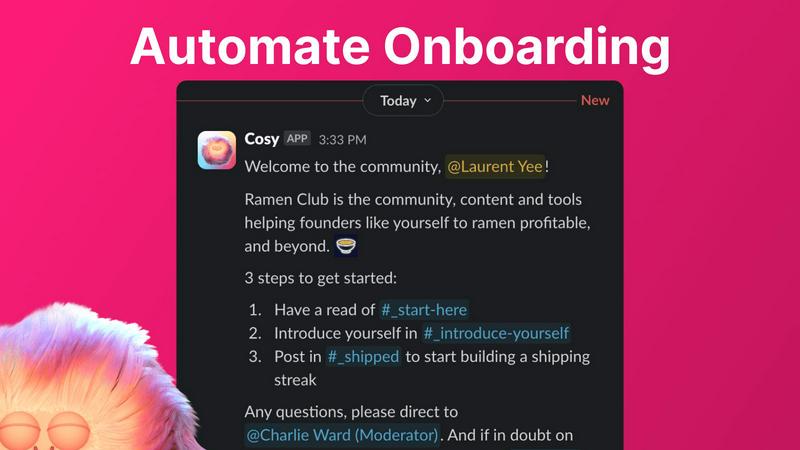
Cosy automates the initial welcome and integration process for new community members through fully customizable Direct Message (DM) sequences. Community managers can create up to ten distinct onboarding flows, which can be triggered immediately upon a member joining or on a configurable delay. Messages can be personalized with the member's name, include links and emojis, and are sent from either a human team member's account or the Cosy bot. This ensures every new member receives a consistent, warm welcome at any hour, significantly reducing the manual burden on community leaders and preventing any newcomer from being overlooked.
Automated Member Introductions
To foster connections and serendipitous networking, Cosy automatically introduces opted-in community members to each other via DMs on a regular, customizable schedule. Introductions occur in a three-person DM involving the two members and the Cosy bot, with a template message that can be tailored by the admin. The system intelligently pairs members randomly while avoiding recent matches, similar to platforms like Donut. Administrators control the frequency (every 1-4 weeks) and the specific weekday and time (in UTC) for these introductions, systematically driving engagement and relationship-building on autopilot.
Searchable Member Directory
Cosy provides a fully integrated, searchable member directory that operates entirely within Slack, requiring no external apps or logins. Admins can create custom profile fields (up to ten), including text entry and multiple-choice options. Members can be prompted to fill out their profiles via a one-click notification, and new joiners automatically receive a prompt 24 hours after entering the workspace. Members can then search this directory by keyword or filter for completed profiles using a slash command (/member-directory), making it easy to find relevant peers and expertise without leaving the Slack interface.
Content Highlights & Moderation Tools
This feature empowers community managers to surface valuable content and monitor conversations efficiently. Using slash commands, admins can instantly retrieve the top 10 most engaged posts within a specific channel (/most-engaged-messages) or across all public channels (/most-engaged-messages-all). Additionally, the tool can list public messages that have received no replies (/unreplied-messages), helping to identify discussions that may need a boost. Cosy also includes instant flagging for abusive or spam messages, providing essential moderation capabilities to maintain a healthy and respectful community environment.
About Perkoon
Unlimited Free Peer-to-Peer (P2P) Transfers
Perkoon's flagship feature is its unlimited, free file transfer service using WebRTC-based peer-to-peer technology. When both the sender and recipient are online simultaneously, files are transmitted directly between their web browsers. This method imposes no file size limits, requires no user accounts, and ensures high privacy as the data never traverses Perkoon's servers. The operational cost of this direct streaming is negligible for the company, which allows them to offer it as a permanent free service, fundamentally distinguishing it from competitors that use "freemium" models with strict caps.
Encrypted Cloud Storage for Offline Recipients
To address the common scenario where a recipient is not immediately available, Perkoon offers encrypted cloud storage as a paid feature. Files are securely uploaded to Perkoon's servers, encrypted, and held until the recipient is ready to download them. The company is transparent that this is the only paid component of its service, as it honestly reflects the real costs of maintaining server infrastructure, data storage, and bandwidth, creating a sustainable business model without hidden fees or data monetization.
Native AI and Automation Integration
A defining and forward-thinking feature of Perkoon is its built-in support for AI agents and automation scripts. The service exposes a client-side JavaScript object (window.__perkoon) that provides a structured API, allowing automated tools to interface with the file transfer process programmatically. This eliminates the need for unreliable DOM scraping, making Perkoon a first-class citizen in automated workflows, data pipelines, and AI-assisted operations where manual browser interaction is impractical.
Privacy-First Design and Transparent Operations
Perkoon is architected with a privacy-first philosophy. For P2P transfers, the company has zero access to file content or metadata. For cloud storage, files are encrypted on the client side or on Perkoon's servers. The service explicitly does not scan, analyze, or sell user data. This commitment is coupled with radical transparency about its business model, browser compatibility (noting limitations in Firefox and Safari), and the clear rationale behind what is free versus what is paid, fostering user trust.
Use Cases
Cosy
Scaling Professional Networks and Alumni Groups
For professional networks or alumni associations hosted on Slack, Cosy automates the critical "first touch" and continuous networking that defines their value. Automated onboarding ensures new members feel immediately welcomed and informed. The automated introductions feature continuously fosters new professional connections among members, mimicking the serendipity of in-person events. The searchable member directory allows members to easily find colleagues by skills, industry, or location, turning the Slack community into a powerful, always-active networking hub without constant manual facilitation from organizers.
Managing Customer Success and Support Communities
Companies that host customer communities on Slack can use Cosy to enhance customer experience and product engagement. Automated onboarding DMs can guide new users to key resources, support channels, and best practices. The content highlights feature allows community managers to quickly identify and amplify successful case studies or helpful support answers posted by other customers. Furthermore, the ability to flag spam or abusive messages instantly helps maintain a professional and helpful environment, crucial for customer-facing spaces.
Running Membership-Based Organizations and Clubs
Membership organizations, such as paid clubs or subscription-based communities, require high engagement to justify their value. Cosy helps maintain this by ensuring no member joins unnoticed through its automated welcome sequences. The member directory builds a sense of belonging and helps members connect based on shared interests defined in custom profile fields. Regularly scheduled introductions keep the community dynamic and encourage ongoing dialogue, directly contributing to higher retention rates and perceived member value.
Facilitating Large-Scale Event or Cohort Engagement
For organizations running cohorts, bootcamps, or large virtual events, Cosy streamlines participant integration. Onboarding sequences can deliver crucial logistical information, schedules, and cohort-specific details to all participants simultaneously. As the event progresses, automated introductions can help break the ice among attendees, fostering peer learning and networking. After the event, the member directory serves as a lasting roster, allowing connections made during the event to continue and deepen, thereby extending the lifecycle and impact of the gathering.
Perkoon
Sending Large Media Files to Clients
Freelance videographers, photographers, and designers can use Perkoon's unlimited P2P transfer to send multi-gigabyte project files, raw footage, or high-resolution image sets directly to clients. This bypasses the restrictive file size limits of email attachments or free tiers of other services, and the direct transfer ensures fast speeds and privacy without the files being stored on an intermediate server.
Asynchronous File Sharing for Distributed Teams
Remote teams and collaborators across different time zones can utilize Perkoon's encrypted cloud storage. A team member can upload a file to the cloud, and recipients can download it at their convenience, regardless of the sender's online status. This is ideal for sharing daily build files, documentation, or reports without requiring real-time coordination.
Automated Data Pipeline and Backup Scripts
Developers and system administrators can leverage Perkoon's native API for automation. Scripts can be written to automatically upload log files, database dumps, or backup archives to Perkoon's cloud storage as part of a cron job or CI/CD pipeline. The CLI tool and window.__perkoon API enable these transfers without manual browser interaction, making it a robust component in IT infrastructure.
Privacy-Conscious Personal File Sharing
Individuals who are wary of large tech companies profiling their data can use Perkoon for personal file sharing. Whether sending sensitive documents, personal videos, or a collection of files to family and friends, the P2P option guarantees that the data is only seen by the intended recipient, aligning with a strong personal privacy ethos.
Overview
About Cosy
Cosy is a sophisticated, Slack-native application engineered to transform standard Slack workspaces into dynamic, self-sustaining communities. It is specifically designed for community managers, leaders, and organizations that host their communities on Slack and seek to elevate member engagement without proportional increases in manual administrative effort. The core value proposition of Cosy lies in its automation of critical yet repetitive community management tasks, such as member onboarding, facilitating introductions, and content curation, thereby freeing leaders to focus on strategic relationship-building and fostering a collaborative culture. By operating seamlessly within the Slack environment, it eliminates the need for members to navigate external platforms, ensuring a smooth and integrated user experience. Cosy is particularly beneficial for professional networks, alumni groups, customer communities, and any organization that prioritizes creating a supportive, interconnected, and vibrant member ecosystem. Its comprehensive toolset addresses the full lifecycle of community interaction, from a new member's first welcome to ongoing engagement and content discovery, making it an indispensable platform for scaling community efforts efficiently.
About Perkoon
Perkoon is a modern, privacy-centric file transfer service designed to provide a straightforward and honest alternative to traditional cloud-based platforms. It operates on a foundational principle of eliminating artificial barriers, mandatory account creation, and the commodification of user data. The service is engineered for individuals and professionals who are frustrated with upload limits, complex pricing tiers, and opaque data practices common in the industry. Its core value proposition is a dual-mode transfer system: a genuinely free, unlimited peer-to-peer (P2P) service for direct browser-to-browser transfers when both parties are online, and an optional encrypted cloud storage service for asynchronous transfers, which is offered as a paid feature to transparently cover server costs. Uniquely, Perkoon is architected for interoperability in the age of automation, featuring native APIs that allow AI agents and scripts to interact with the service directly without inefficient screen-scraping. With its commitment to privacy, transparent business model, and tools for both human and machine users, Perkoon positions itself as a powerful, no-nonsense solution for secure and efficient file sharing.
Frequently Asked Questions
Cosy FAQ
How does the automated onboarding work?
When a new member joins your Slack workspace, Cosy triggers a pre-configured sequence of welcome DMs. You can create up to 10 unique sequences with fully customizable messages that can include the member's name, links, and emojis. These messages can be sent immediately or on a delay (minutes, hours, or even months later) and can appear to come from your account, a team member's account, or the Cosy bot. This ensures every new member is properly welcomed and onboarded without any manual effort, even outside of business hours.
Can members reply to automated messages?
Yes, but it depends on the sender configuration. If the onboarding or introduction messages are sent from a human team member's Slack account, recipients can reply directly as they would in a normal DM conversation. However, if the messages are configured to be sent from the Cosy bot, the bot is currently designed not to respond to replies. This allows for human-like interaction when desired while maintaining clarity when communication is purely automated.
How does the member directory get populated?
Community managers can notify all existing members to create their profiles with a single click, sending a DM prompt via the Cosy bot. Additionally, Cosy automatically sends a profile-editing prompt to every new member 24 hours after they join the Slack workspace. Members simply click 'Edit Profile' in the DM to fill out the custom fields you have set up, which can include text, single-select, or multi-select options. This dual-trigger system ensures high directory participation with minimal administrative effort.
Is there a free plan available?
Yes, Cosy offers a free plan that supports communities with up to 250 members. This allows smaller groups or teams to access core features and evaluate the tool's impact. For communities requiring unlimited members, Cosy provides a 30-day free trial of its paid plans, allowing full access to all features before any commitment is required. This tiered approach makes it accessible for communities of all sizes to begin enhancing their Slack engagement.
Perkoon FAQ
Is the peer-to-peer transfer really free forever?
Yes, Perkoon's peer-to-peer (P2P) file transfer service is completely free with no file size limits and is intended to remain free indefinitely. The company's rationale is that the direct browser-to-browser streaming technology incurs negligible infrastructure costs for them, as they do not host or relay the file data. This allows them to offer it as a sustainable free service, distinct from their paid cloud storage feature.
What happens if the recipient is not online when I send a file?
If the recipient is offline at the time of transfer, the P2P connection cannot be established. For this scenario, Perkoon offers its encrypted cloud storage service, which is a paid feature. You can upload the file to Perkoon's servers, where it is encrypted and held securely. The recipient then receives a link to download the file at their convenience, once they are online.
How does Perkoon ensure my privacy?
Perkoon ensures privacy through its architecture. For P2P transfers, files are streamed directly between users' browsers using WebRTC, meaning the data never passes through Perkoon's servers and is inaccessible to them. For cloud storage, files are encrypted on their servers. The company has a strict policy of not scanning, analyzing, or selling user data or metadata, making privacy a core operational tenet.
Can I use Perkoon with automation tools or AI agents?
Absolutely. Perkoon is uniquely designed for automation. It provides a client-side JavaScript API (window.__perkoon) that allows AI agents, bots, and custom scripts to interact with the file transfer service programmatically. This means these tools can initiate and manage transfers directly through the API without the need for visually scraping the website, enabling seamless integration into automated workflows.
Alternatives
Cosy Alternatives
Cosy is a specialized productivity and community management tool designed for Slack workspaces. It automates key administrative tasks like onboarding new members and facilitating introductions, aiming to enhance engagement and save time for community managers and team leaders. Users may explore alternatives to Cosy for various reasons, including budget constraints, the need for different feature sets, or a requirement for a platform that integrates with tools beyond Slack. Some may seek more advanced analytics, different automation capabilities, or a solution that serves a multi-platform community strategy. When evaluating an alternative, key considerations include the depth of automation for onboarding and engagement, the quality and scope of member directory features, and the flexibility of integration with your existing tech stack. It is also crucial to assess the tool's ability to scale with your community's growth and the overall value relative to its cost.
Perkoon Alternatives
Perkoon is a file transfer service operating within the productivity and management software category. It distinguishes itself by offering a core, free peer-to-peer transfer service with no file size limits or mandatory user accounts, emphasizing privacy and straightforward utility. Users may seek alternatives to Perkoon for various reasons. Some require permanent cloud storage solutions rather than primarily peer-to-peer transfers, while others might need specific integrations, different pricing models, or guaranteed platform support beyond web browsers. Feature sets, security protocols, and the need for corporate administrative controls also drive the search for different tools. When evaluating alternatives, key considerations include the fundamental transfer method (peer-to-peer versus server-based), privacy policies and encryption standards, any file size or bandwidth limitations, and cost structure. It is also crucial to assess the required platform availability, such as dedicated desktop or mobile apps, and any unique automation or API capabilities that align with specific workflow needs.