
Coursebricks vs documentorium
Side-by-side comparison to help you choose the right product.

Coursebricks
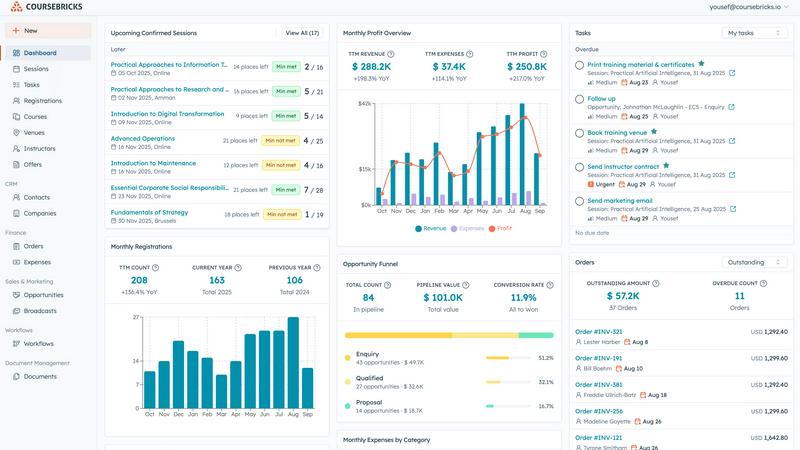
Coursebricks is the all-in-one platform for managing training courses, registrations, payments, and marketing.
Last updated: March 1, 2026

documentorium
Documentorium is a specialized platform that generates professional contractor documents and PDFs through guided, trade-specific forms.
Last updated: March 26, 2026
Visual Comparison
Coursebricks
documentorium

Feature Comparison
Coursebricks
Unified Course Scheduling
This feature provides a single, centralized calendar and dashboard for managing an entire training schedule. Administrators can assign instructors, book physical or virtual venues, and attach training materials to each course instance from one unified interface. The system intelligently tracks resource availability, helps prevent scheduling conflicts, and ensures all team members are synchronized without the need to juggle multiple spreadsheets or disparate software tools, thereby optimizing resource utilization and operational planning.
Integrated Website & Checkout
Coursebricks allows organizations to seamlessly display and sell their courses through a fully integrated, professional storefront on their own website. This eliminates dependency on third-party marketplaces. The platform provides customizable course pages and a secure checkout process that can accept immediate credit card payments via Stripe or facilitate invoice-based bookings. All customer and order information captured during registration is automatically populated into the built-in CRM, creating a seamless flow from marketing to sales to customer management.
Advanced Email Marketing & Broadcasts
This suite of tools is designed to increase course enrollment and engagement through targeted, data-driven communication. Users can create and send personalized email campaigns and promotions by leveraging advanced filtering based on customer data, past course attendance, or lead status. This capability enables highly segmented broadcasts to the most relevant audience, helping to boost fill rates, generate qualified leads, and drive revenue growth through automated, yet personalized, marketing workflows.
Comprehensive Workflow Automation
Coursebricks automates the entire student journey and key administrative processes to save time and ensure consistency. Users can create custom automation rules to trigger actions such as sending enrollment confirmations, sharing pre-course materials, dispatching payment reminders, distributing post-training surveys, and automatically generating and emailing certificates upon completion. Each automated step is fully tracked, providing complete visibility into communication logs and task completion status.
About documentorium
Trade-Specific Template Library
Documentorium's foundation is its extensive catalog of over 200 pre-built document templates, meticulously organized across 26 trade categories. Unlike generic form builders, each template—whether for a plumbing invoice, an electrical service report, or a roofing proposal—contains fields, sections, and language specifically tailored to the practices, materials, and regulatory considerations of that particular trade. This specificity ensures that professionals capture all necessary information correctly the first time, reducing errors and omissions that can occur with blank-slate or off-the-shelf document creation.
Guided Form Interface
The platform utilizes an intuitive, step-by-step guided form interface for every document. This structured approach breaks down complex documents into manageable sections, prompting the user for specific information such as client details, scope of work, materials, labor rates, terms, and conditions. This guidance is invaluable for ensuring completeness and professionalism, effectively holding the user's hand through the creation process to produce a comprehensive document without the cognitive load of designing the layout or remembering every required field.
Instant PDF Generation and Professional Formatting
Upon completing a guided form, Documentorium automatically compiles the entered data into a clean, professionally formatted, and print-ready PDF document within seconds. This feature completely removes the burden of manual formatting, font selection, alignment, and layout design. The resulting PDFs are polished and branded, ready to be emailed directly to clients, printed for on-site use, or archived. This instant transformation from data entry to final product is a core time-saving benefit.
Document History and Prefill Capabilities
Every document created is saved within the user's account, creating a complete, searchable history of all business interactions. This archive is crucial for record-keeping, reference, and audit purposes. Furthermore, the system intelligently uses this history to prefill information in new documents. For repeat clients or similar projects, details like client name, address, and standard service descriptions can auto-populate, dramatically speeding up the creation of subsequent quotes, invoices, or work orders.
Use Cases
Coursebricks
For Independent Training Providers & Coaching Businesses
Solo entrepreneurs and small training companies utilize Coursebricks to establish a professional, automated business operation without a large administrative team. They leverage the platform to build a branded website, schedule sessions, handle registrations and payments autonomously, and automate client communications and certification. This allows them to focus on content delivery and business growth while the system manages the operational backend efficiently and cost-effectively.
For Corporate Learning & Development Departments
Internal L&D teams within organizations use Coursebricks to manage employee training programs, from mandatory compliance courses to professional development workshops. The system streamlines the enrollment process, manages internal invoicing or chargebacks, assigns instructors, tracks attendance and completion, and automatically issues certificates. The reporting features provide crucial data on training ROI, employee skill development, and program effectiveness to stakeholders.
For Multi-Instructor Training Academies & Institutions
Larger training organizations with multiple instructors and a diverse course catalog benefit from Coursebricks' centralized resource management. The platform allows administrators to coordinate schedules across several instructors, manage bookings for various physical venues or webinar links, and handle a high volume of registrants. Role-based access control ensures instructors only see relevant information, while leadership gains a unified view of all operations, finances, and performance metrics.
For Organizations Scaling Online & Hybrid Learning
Companies transitioning to or expanding their virtual and hybrid training offerings find Coursebricks essential for managing the complexity of blended learning formats. The platform seamlessly handles schedules for both classroom and live webinar sessions within the same system. It automates the distribution of digital materials and Zoom links for online participants, provides a unified registration portal for all course types, and delivers consistent automated communication regardless of delivery method.
documentorium
Creating Detailed Service Proposals and Bids
For contractors and installers, such as solar panel companies or roofing contractors, winning new projects often hinges on a professional, detailed proposal. Documentorium allows these professionals to quickly generate comprehensive bids that itemize materials, labor, timelines, and terms. Using a trade-specific proposal template ensures all technical and cost components are clearly presented, enhancing credibility and improving the chances of client acceptance compared to a handwritten quote or a poorly formatted Word document.
Streamlining Daily Work Orders and Service Reports
HVAC technicians, electricians, and plumbers on service calls can use Documentorium to generate precise work orders and service reports on the spot, either from a mobile device or back at the office. The guided forms ensure all diagnostic findings, parts used, labor performed, and recommendations are recorded accurately. The instant PDF can then be presented to the customer for signature upon job completion, providing immediate documentation and facilitating faster invoicing.
Managing Project Changes with Change Orders
During construction or renovation projects, changes to the original scope are common. Documentorium's change order templates provide a formal, clear mechanism for contractors to document any alterations, associated costs, and revised timelines. This formalizes client approval, protects the business from disputes about additional charges, and maintains a clear paper trail for the project's evolution, which is essential for contract management and financial clarity.
Issuing Professional Invoices and Warranties
After job completion, professionals need to issue clear invoices for payment and provide warranty documentation for their work. Documentorium automates this process, pulling data from the original quote or work order to quickly generate an accurate invoice with line-item details. Similarly, generating a standardized warranty document ensures clients receive consistent, legally-sound coverage information, reinforcing the professionalism and reliability of the service business.
Overview
About Coursebricks
Coursebricks is a comprehensive, all-in-one training management software platform engineered to consolidate and streamline the entire lifecycle of organizing, delivering, and scaling professional training programs. It serves as a centralized operational hub, integrating critical functionalities such as course scheduling, student registrations, payment processing, customer relationship management (CRM), email marketing, and detailed reporting. This solution is meticulously designed for training providers, corporate learning and development departments, coaching businesses, and educational institutions that seek to eliminate administrative complexity, reduce operational costs, and enhance both the learner and administrator experience. Its core value proposition lies in granting organizations complete control and ownership over their training business. Unlike marketplace platforms, Coursebricks enables users to publish and sell courses directly through their own branded websites while retaining 100% of their revenue, as the platform does not impose transaction fees. By automating repetitive tasks like confirmations, reminders, and certificate issuance, it significantly reduces manual workload. The platform's flexibility to manage both in-person classroom sessions and live virtual webinars, coupled with powerful integrations and actionable business insights, positions Coursebricks as an indispensable ecosystem for any entity aiming to professionalize and grow its training operations efficiently.
About documentorium
Documentorium is a specialized, no-nonsense document generation engine meticulously crafted for the unique demands of skilled trades and service professionals. It serves as a comprehensive solution for electricians, plumbers, general contractors, HVAC technicians, roofers, solar installers, and a wide array of other field service experts who require professional, accurate, and legally sound business documentation. The platform's core value proposition is the elimination of time-consuming document creation from scratch or the use of generic, ill-fitting templates. Instead, Documentorium provides a vast, trade-specific library of over 200 guided templates across 26 distinct categories. This includes essential documents such as quotes, estimates, invoices, work orders, bids, contracts, service reports, inspection reports, proposals, warranties, and change orders. Each template is engineered with fields and terminology specific to the user's trade, ensuring relevance and professionalism. The process is streamlined: a user fills out a structured, guided form, and the system instantly generates a clean, print-ready PDF document. This approach not only saves significant administrative time but also enhances a business's credibility with clients through consistent, high-quality documentation, all managed within a single, centralized platform.
Frequently Asked Questions
Coursebricks FAQ
What is a training management system?
A training management system (TMS) is a specialized software platform designed to automate and streamline the administrative, operational, and financial processes involved in running a training business or department. Unlike a Learning Management System (LMS), which focuses primarily on delivering and tracking online learning content, a TMS like Coursebricks handles the broader business operations, including course scheduling, instructor and venue management, registrations, payments, invoicing, CRM, email marketing, and reporting, all within a single integrated system.
Do I need technical knowledge to use Coursebricks?
No, Coursebricks is built to be user-friendly and does not require advanced technical knowledge. The platform features an intuitive interface for managing day-to-day operations. For website integration, it offers simple copy-and-paste embed codes or a dedicated WordPress plugin to sync course data automatically, eliminating the need for manual coding or double data entry. The setup and configuration are designed to be guided and straightforward.
Can I showcase my courses directly on my own website?
Yes, absolutely. A core functionality of Coursebricks is enabling you to publish and sell your courses directly through your existing branded website. You can embed course listings, details, and a secure checkout process seamlessly into your site's pages. This gives you complete control over the customer experience and brand identity, while Coursebricks powers the backend functionality, including the shopping cart, payment gateway, and registration management.
Is my data secure?
Coursebricks employs robust security measures to protect customer data. This includes industry-standard encryption for data in transit and at rest, secure cloud infrastructure, and regular security audits. The platform is designed to be compliant with major data protection regulations. For specific details on data handling, security protocols, and compliance certifications, you should refer to the platform's detailed Privacy Policy, Data Processing Agreement (DPA), and Sub-processors documentation.
documentorium FAQ
Can I cancel my subscription anytime?
Yes, you can cancel your Documentorium subscription at any time directly from your account settings. There are no long-term contracts or penalties for cancellation. Your access to the platform's features will remain active until the end of your current billing period, after which your account will revert to a free state. This policy ensures there is no vendor lock-in, providing complete flexibility for the user.
What happens to my documents when the free trial ends?
When your one-month free trial concludes, all documents you created during the trial period are preserved and remain accessible in your account history. You can view and download these existing PDFs at any time. To continue creating new documents or editing templates, you will need to activate a paid subscription. No user data or document history is deleted upon trial expiration.
Do I lose access to my old documents if I don't subscribe?
No, you do not lose access to your previously created documents. Even without an active subscription, you retain the ability to log into your account to view, download, and print all documents you generated while your subscription was active or during your trial period. The subscription is required for creating and editing new documents, but your historical data remains your property and is always accessible.
Does Documentorium provide legal advice for contracts?
No, Documentorium does not provide legal advice. The platform is a document generation tool that provides templates and forms designed for common trade-specific business scenarios. While these templates are professionally crafted, users are responsible for ensuring that any document, especially contracts, warranties, and agreements, meets their specific legal requirements and complies with local, state, and federal regulations. Consulting with a legal professional for critical documents is recommended.
Alternatives
Coursebricks Alternatives
Coursebricks is a comprehensive training management software solution, categorized within the productivity and management sector. It serves as an all-in-one platform for organizations to handle course scheduling, payments, customer relationship management, and logistical operations. This integrated approach is designed to streamline administrative burdens for training providers and corporate departments. Users may explore alternatives to Coursebricks for various reasons. Common considerations include specific budget constraints and pricing models, the need for different feature sets or integrations, or a requirement for a platform better suited to a particular scale or type of training delivery. The search often stems from a desire to find the optimal balance between functionality, cost, and ease of use for a unique organizational context. When evaluating alternatives, it is crucial to assess core capabilities against your primary needs. Key factors to compare include the depth of scheduling and automation tools, the flexibility of payment processing and checkout integration, the robustness of built-in CRM and marketing features, and the overall scalability of the platform. The goal is to identify a system that not only manages logistics but also actively supports business growth and enhances the learner experience.
documentorium Alternatives
documentorium is a specialized document generation platform within the broader contractor management and productivity software category. It focuses on providing trade-specific templates for creating professional PDF documents like quotes, invoices, and work orders. Users may explore alternatives for various reasons, such as seeking different pricing models, requiring more extensive business management features like scheduling or CRM, needing mobile-specific functionality, or preferring a different user interface. The decision often hinges on the specific needs and scale of a contracting business. When evaluating alternatives, key considerations include the depth and relevance of trade-specific templates, the efficiency of the document creation workflow, output quality, integration capabilities with other tools, overall cost, and the platform's focus on mobile versus desktop use. The ideal solution should streamline paperwork without adding complexity.