
Customer Connect CRM vs Prompt Builder
Side-by-side comparison to help you choose the right product.

Customer Connect CRM
Customer Connect CRM centralizes inquiries to enhance follow-ups and sales efficiency with intelligent AI features.
Last updated: February 28, 2026

Prompt Builder
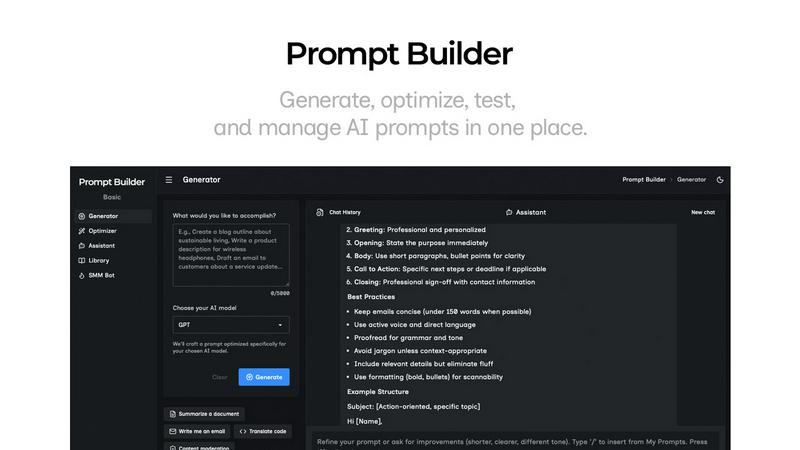
Generate, optimize, test, and manage AI prompts in one place. Turn an idea into a ready-to-use prompt in seconds.
Visual Comparison
Customer Connect CRM

Prompt Builder
Overview
About Customer Connect CRM
Customer Connect CRM is a sophisticated yet user-friendly customer relationship management system tailored specifically for small to medium-sized businesses. Designed to optimize the management of incoming customer inquiries and sales opportunities, it centralizes communications from various channels, including emails, website forms, and direct messages. This centralization allows users to act promptly on leads, significantly enhancing the likelihood of closing deals. The platform's primary value proposition lies in its simplicity and ease of use, enabling businesses to concentrate on sales rather than getting overwhelmed by intricate admin tasks. With innovative AI features, customizable sales boards, and a competitive pricing structure, Customer Connect serves as an ideal solution for freelancers, consultants, and small teams aiming to refine their sales processes without the complexities associated with traditional CRM systems.
About Prompt Builder
Prompt Builder is a prompt engineering workspace for writing, testing, and saving prompts. Describe the task in plain English, and it helps you create a prompt that matches the model you choose. Start with a draft, refine it in chat, save or pin versions, then run them when you are ready. It works with GPT, Claude, Gemini, Llama, Mistral, DeepSeek, Grok, Perplexity, and more. You also get an Optimizer, an assistant for quick tests, and a library of reusable prompts and templates from the community. Turn an idea into a ready-to-use prompt in seconds. Refine it in chat, save it to your Library, and run it anytime.