
Daily vs SupaSidebar
Side-by-side comparison to help you choose the right product.

Daily is a straightforward planner that helps you clarify your thoughts and prioritize what truly matters each day.

SupaSidebar
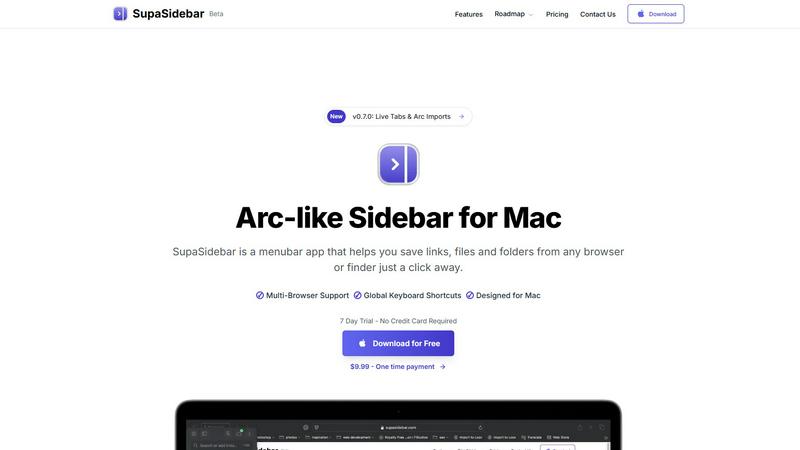
SupaSidebar is a Mac menubar app that provides instant keyboard-driven access to your saved links, files, and folders.
Last updated: February 28, 2026
Visual Comparison
Daily

SupaSidebar
Feature Comparison
Daily
Intuitive Today View
Daily's Today view is designed to showcase only the tasks and reminders that require immediate attention, helping users maintain focus and avoid distractions. This feature highlights what is most important, allowing for a clear understanding of daily priorities without overwhelming the user with a long list of tasks.
Task Unloading
One of Daily's standout features is its ability to allow users to unload their tasks and thoughts as they arise. This means that users can jot down ideas, reminders, or tasks in real-time without the need for immediate categorization. This flexibility helps to reduce anxiety and clutter in the mind.
Gentle Task Management
Daily emphasizes a gentle approach to task management, where users can choose to carry forward tasks that are still relevant while letting go of those that are no longer important. This process encourages users to reflect on their priorities and helps them declutter their mental space.
Minimalist Design
The design philosophy of Daily is rooted in simplicity, ensuring that the interface remains user-friendly and accessible. This minimalist approach provides just enough structure to support users in their planning without introducing unnecessary complexity that can lead to stress or confusion.
About SupaSidebar
Universal Browser Integration & Tab Syncing
SupaSidebar seamlessly integrates with all major web browsers, including Safari, Google Chrome, Arc, Firefox, and Brave. It aggregates your open tabs, browsing history, and bookmarks from every browser into a single, unified view. This real-time syncing feature eliminates the need to manually switch between browser windows to find a specific tab, effectively breaking down browser silos and providing a holistic overview of your web activity directly from the menu bar.
Global Keyboard Shortcuts & Command Panel
The application is built for efficiency with system-wide keyboard shortcuts that work instantly from any app. Users can save or copy the current website URL with dedicated shortcuts (Cmd+Ctrl+S / Cmd+Ctrl+C). The cornerstone is the powerful Command Panel (activated via Cmd+Ctrl+K), a spotlight-like interface that allows for rapid searching and launching of any item within the sidebar—be it a file, folder, website, or application—dramatically speeding up workflow navigation.
Native macOS Design & Local-Only Data
SupaSidebar is not a web wrapper or an electron app; it is built as a true native macOS application. This ensures exceptional performance, low system resource usage, and deep integration with macOS aesthetics and behaviors, such as natural swipe gestures. Crucially, all user data—links, files, and organizational structures—is stored exclusively on the user's local machine. Nothing is transmitted to external servers, guaranteeing complete privacy and data security.
Intelligent Organization with Spaces & Recents
The sidebar offers sophisticated organization through a system of "Spaces," allowing users to categorically separate work, personal, or project-specific resources. The "Recents" feature automatically tracks and surfaces every website visited across all browsers within the last 48 hours, acting as a powerful short-term memory aid. Users can also pin favorite items to the top of any list for instant access, ensuring critical resources are always immediately available.
Use Cases
Daily
Student Task Management
Students can utilize Daily to manage their academic responsibilities effectively. By unloading assignments, deadlines, and study reminders into Daily, they can prioritize their tasks based on immediate needs, ensuring they stay on top of their coursework without feeling overwhelmed.
Professional Project Tracking
Busy professionals can benefit from Daily by using it to track various projects and tasks. The Today view helps them focus on urgent deadlines while the task unloading feature allows them to capture new responsibilities as they arise, ensuring nothing slips through the cracks.
Personal Life Organization
Individuals seeking to manage both personal and professional tasks can use Daily to create a balanced approach to their daily life. By categorizing personal errands, appointments, and responsibilities, users can maintain a clear overview of their commitments and prioritize effectively.
Mental Health and Wellbeing
Daily can also serve as a tool for mental health management by allowing users to unload their thoughts and worries. This practice of writing down concerns can lead to decreased anxiety, providing users with a sense of calm and clarity that promotes overall wellbeing.
SupaSidebar
Cross-Browser Research and Academic Work
Researchers, students, and analysts often work with dozens of open tabs across multiple browsers for literature review, data collection, and citation management. SupaSidebar consolidates all these disparate tabs and bookmarks into one searchable sidebar. This allows for instant retrieval of any source material without hunting through separate browser windows, significantly streamlining the research process and maintaining a coherent workflow.
Creative and Development Workflow Management
Developers, designers, and content creators juggle project files, design briefs, documentation, and communication tools. SupaSidebar acts as a project dashboard, where users can organize links to Figma files, GitHub repos, documentation, and local project folders into dedicated Spaces. The global command panel allows for launching apps or opening project assets mid-task without leaving the creative flow, enhancing productivity.
Power User and Multitasking Efficiency
For power users, consultants, and managers who multitask extensively across communication apps, web tools, and internal systems, constant app-switching is a major productivity drain. SupaSidebar mitigates this by providing a persistent, always-accessible hub. Keyboard shortcuts enable saving important links on-the-fly, and the unified view allows for quick context recovery, making it ideal for handling rapid-fire tasks and information requests.
Focused Work and Context Preservation
Professionals engaged in deep work sessions, such as writers or programmers, require minimal distractions. SupaSidebar supports this by allowing users to save relevant reference links, documents, or tools to the sidebar for later access without keeping distracting browser tabs open. When needed, the resource can be retrieved instantly via the menu bar or keyboard, helping to maintain a clean desktop and a focused mental state.
Overview
About Daily
Daily is a thoughtfully designed productivity tool that serves as a simple to-do list and daily planner, tailored for individuals who often find themselves overwhelmed by their responsibilities and tasks. The core philosophy behind Daily is to provide users with a tranquil space to unload their thoughts, tasks, and reminders without the immediate pressure to organize them. This feature allows users to free their minds and gain clarity, enabling them to focus on what truly matters each day. Daily is ideal for busy professionals, students, and anyone seeking to enhance their daily organization without the added stress of complicated systems. By simplifying task management, Daily empowers users to approach their day with a sense of calm and purpose, ensuring that they can prioritize effectively without feeling burdened.
About SupaSidebar
SupaSidebar is a meticulously engineered, native macOS application designed to fundamentally transform digital workspace organization and access. It functions as a universal, Arc-inspired sidebar that resides in your Mac's menu bar, serving as a centralized command hub for your entire digital environment. The core purpose of SupaSidebar is to dismantle the silos between different applications and web browsers, thereby drastically reducing disruptive context-switching and preserving user focus. It achieves this by aggregating and providing instantaneous, keyboard-driven access to a user's most critical resources, including open and saved browser tabs, bookmarks, local files, folders, and applications from across the system. Engineered specifically for professionals, researchers, creators, and power users who navigate complex workflows across multiple tasks and browsers, SupaSidebar's primary value proposition lies in its seamless integration and performance. It emphasizes uncompromising user privacy by ensuring all data remains stored locally on the user's Mac, never on external servers. Built as a lightweight native application, it delivers superior performance and a deeply integrated macOS experience. Its intelligent features, such as real-time tab syncing across all major browsers (Safari, Chrome, Arc, Firefox, Brave) and a powerful universal command panel, position it as an indispensable tool for achieving a faster, more organized, and distraction-free workflow.
Frequently Asked Questions
Daily FAQ
How does Daily help with task overload?
Daily provides a user-friendly platform where tasks and reminders can be unloaded quickly, reducing mental clutter and allowing users to focus on what is truly important for the day.
Is Daily suitable for team collaboration?
While Daily is primarily designed for individual use, users can share their tasks and priorities with team members through simple sharing features, making it a useful tool for personal organization in collaborative environments.
Can I access Daily on multiple devices?
Yes, Daily is designed to be accessible across various devices, allowing users to keep their tasks and reminders synchronized regardless of whether they are using a smartphone, tablet, or computer.
How does Daily support mental clarity?
By enabling users to unload their thoughts and tasks without immediate organization, Daily fosters a sense of calm and clarity. This approach allows users to approach their day with focus and intentionality, reducing feelings of being overwhelmed.
SupaSidebar FAQ
Is SupaSidebar a browser extension?
No, SupaSidebar is not a browser extension. It is a standalone, native macOS application that installs directly on your Mac and runs independently from your menu bar. It integrates with your browsers at a system level to read tab and bookmark data (with your permission) but operates as its own dedicated productivity tool, offering features and accessibility that extend far beyond the capabilities of a simple browser plugin.
Which browsers does SupaSidebar work with?
SupaSidebar offers comprehensive support for all major web browsers on macOS. This includes Safari, Google Chrome, Arc, Mozilla Firefox, and Brave. The application is designed to sync tabs, history, and bookmarks from all these browsers simultaneously, providing a truly universal overview and control panel for your web activity regardless of your browser preferences for different tasks.
Where is my data stored?
All data managed by SupaSidebar is stored exclusively on your local Mac. This includes every saved link, file reference, folder location, and organizational structure you create within the app. No personal data, browsing history, or file information is ever sent to external servers or the cloud. This local-first architecture is a core tenet of SupaSidebar's design, prioritizing user privacy and security.
What macOS version do I need?
SupaSidebar requires macOS 13 (Ventura) or a later version to function. This requirement ensures the application can utilize the latest macOS frameworks and security features to deliver a stable, performant, and deeply integrated user experience. Users should check their Mac's software version in System Settings > General > About before downloading.