
Decode This Text vs Refbox
Side-by-side comparison to help you choose the right product.

Decode This Text
Decode This Text provides instant, human-like analysis of confusing conversations in just thirty seconds.
Last updated: February 28, 2026

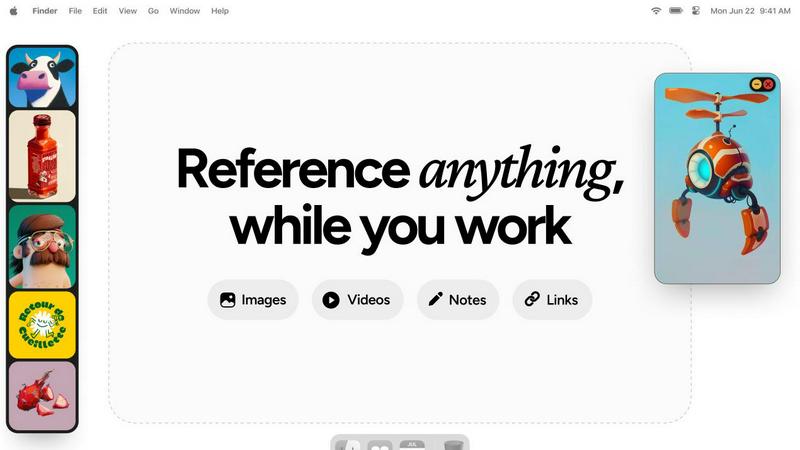
Refbox is a desktop app that keeps your reference images, videos, and notes instantly accessible above your workspace.
Last updated: February 28, 2026
Visual Comparison
Decode This Text

Refbox
Feature Comparison
Decode This Text
Multi-Format Input and Contextual Analysis
The platform accepts user input in three flexible formats: direct text pasting, screenshot uploads, or a descriptive narrative of the event. This versatility ensures that any conversational context can be captured and analyzed, whether it's a direct quote, a visual of a chat history, or a user's recollection of an interaction. The AI then performs a deep contextual analysis, examining not just the words but also timing, response patterns, and linguistic cues to construct a holistic understanding of the subtext and underlying dynamics at play.
Tone, Effort, and Intent Metrics
A cornerstone feature is the presentation of clear, quantified metrics for each analyzed message or conversation. The tool evaluates and displays percentages for Tone (the emotional temperature, e.g., friendly, cold, sarcastic), Effort (the level of engagement and investment shown by the other party), and Intent (their underlying motives or interest level). This data-driven breakdown moves users beyond gut feelings to an evidence-based assessment of the communication's true nature.
Pattern Detection and Behavioral Insights
Decode This Text's AI is trained to identify subtle behavioral patterns that individuals might overlook in the heat of the moment. This includes detecting if a contact only messages late at night, consistently avoids answering direct questions, or if their messages are becoming progressively shorter and less engaged. By highlighting these trends, the tool provides crucial "reality check" insights into the other person's communication habits and potential intentions.
AI-Generated Response Suggestions
To bridge analysis into action, the tool provides practical, AI-crafted response options. Users are presented with multiple tailored suggestions for how to reply, categorized by approach—such as calm, direct, or firm. This feature eliminates the paralysis of not knowing what to say next, equipping users with confident, context-appropriate language to navigate the conversation forward effectively.
Refbox
Always-on-Top Floating Frames
The cornerstone feature of Refbox is its ability to create resizable, transparent frames that float above all other desktop applications. Users can pin any reference media—be it an image, a video clip, or a text note—into these frames, ensuring critical inspiration or guidelines are perpetually in view without obstructing the main workspace. This eliminates window management clutter and the need to constantly switch contexts, allowing for direct visual comparison and continuous workflow.
Infinite Canvas and Collections
Refbox provides an expansive, infinite canvas where users can organize their references into distinct Collections. This spatial organization allows for mood boarding, project-based grouping, or categorizing by theme. Users can swiftly switch between entire sets of references with a single click, and view all items in a collection simultaneously for a holistic overview or flip through them in a slideshow mode for rapid comparison and iteration.
Advanced Media Handling and Tools
Beyond simple display, Refbox includes a suite of powerful tools for interacting with reference media. This includes stepping through GIFs frame-by-frame for detailed animation study, a built-in color picker to sample and copy hex codes from any image, and the ability to crop images directly within the app. It also supports unique media types like SVG files and can generate website screenshots simply by pasting a URL, making it an incredibly versatile reference hub.
Intuitive Shortcuts and Workflow Optimizations
Designed for efficiency, Refbox is packed with keyboard shortcuts and smart behaviors that save countless clicks. Users can navigate between references using arrow keys, instantly minimize frames to access underlying applications, and auto-hide their entire Refbox workspace, summoning it only when needed. Additional touches like lockable frames (to prevent accidental clicks) and pixel-perfect rendering modes for pixel artists demonstrate a deep understanding of professional creative needs.
Use Cases
Decode This Text
Deciphering Romantic and Dating Ambiguity
This is a primary use case, addressing the common anxieties of modern dating. Users can analyze texts from potential partners to understand mixed signals, gauge genuine interest after a date, interpret sudden changes in communication frequency, or decode the meaning behind vague phrases like "I'll let you know." It helps answer pressing questions such as whether someone is truly busy or is losing interest, providing clarity that prevents over-analysis and regretful messages.
Interpreting Professional and Workplace Communication
The tool is invaluable for navigating office politics and professional etiquette. Employees can use it to parse the meaning behind a terse, one-word email from a manager, understand the real implication behind phrases like "we'll keep your resume on file," or craft a polite but firm way to say "no" to a request. It aids in understanding power dynamics and unspoken expectations in professional correspondence.
Navigating Friendships and Family Dynamics
Decode This Text helps users manage complex social relationships within their inner circle. It can be used to understand why a group chat went silent after a specific message, interpret a family member's passive-aggressive comment, or determine if a friend's distant behavior is a sign of a problem or simply a reflection of their own stress. It acts as an impartial mediator for social friction.
Preventing Regret and Providing Emotional Validation
A critical use case is serving as a preventative "second opinion" before sending an emotionally charged message. By analyzing the situation first, users can avoid sending texts they might "regret forever." Furthermore, for many users, the tool's analysis provides essential emotional validation—confirming their perceptions or offering a wiser, more objective perspective that friends, who may be biased, cannot.
Refbox
Digital Illustration and Concept Art
Illustrators and concept artists can pin multiple character sketches, environment photos, and color palettes in floating frames around their drawing software. This allows for constant visual feedback without leaving the canvas, enabling them to accurately translate proportions, lighting, and textures from their references directly into their original artwork, significantly speeding up the ideation and rendering process.
UI/UX and Graphic Design
Designers can use Refbox to keep brand guidelines, mood boards, competitor screenshots, and component libraries visible at all times. While working in Figma or Adobe XD, having these critical references just a glance away ensures design consistency and informed decision-making. The ability to take instant website screenshots and reference them side-by-side with a work-in-progress design is invaluable.
3D Modeling and Animation
3D artists and animators can pin orthographic reference sheets, texture maps, and video clips of motion studies directly over their 3D viewport in software like Blender or Maya. The GIF frame-stepping feature is particularly useful for animators to meticulously study movement cycles frame-by-frame while replicating them in their own scenes, enhancing the accuracy and realism of their work.
Motion Graphics and Video Editing
Motion designers and video editors can keep style frames, storyboards, and inspirational video clips floating above their timeline in After Effects or Premiere Pro. This provides a persistent creative compass throughout the editing process, ensuring the final product aligns with the initial vision. Notes with checklists can also be pinned to track complex project requirements and deliverables.
Overview
About Decode This Text
Decode This Text is a sophisticated AI-powered communication analysis tool engineered to demystify the complex subtext of digital conversations. It functions as a personal communication consultant, providing users with a clear, objective breakdown of the underlying intentions, emotional tone, and social dynamics present in text-based exchanges. The tool is designed for anyone navigating the often ambiguous world of modern messaging, from deciphering a partner's vague texts and a friend's sudden silence to interpreting a boss's terse email or a client's non-committal response. Its core value proposition lies in transforming subjective anxiety into objective clarity. By pasting a conversation, uploading a screenshot, or describing a scenario, users receive a comprehensive, human-like analysis in approximately 30 seconds. This process not only decodes what is being said but, more importantly, what is meant, thereby empowering users to respond with confidence, improve interpersonal relationships, and avoid costly misunderstandings. With a staunch commitment to privacy—ensuring no human ever reads the submitted texts—Decode This Text offers a secure, anonymous, and invaluable service for enhancing emotional intelligence and communication efficacy in both personal and professional spheres.
About Refbox
Refbox is a revolutionary desktop application engineered to fundamentally transform how creative professionals access and interact with their reference materials. It serves as a dynamic, floating workspace that pins images, GIFs, videos, and notes in "always-on-top" frames that hover above any other application window. This core functionality eliminates the disruptive and time-consuming cycle of alt-tabbing between folders, browser tabs, and creative software, allowing users to maintain an uninterrupted state of deep focus. Designed explicitly for artists, designers, animators, illustrators, and 3D artists, Refbox addresses the universal need for constant visual inspiration and technical reference. Its value proposition lies in creating a seamless bridge between a user's source material and their primary work canvas, thereby streamlining complex workflows, accelerating decision-making, and fostering a more intuitive and productive creative environment. By keeping references persistently visible and instantly accessible, Refbox empowers professionals to work faster and with greater accuracy, turning a fragmented process into a fluid and integrated experience.
Frequently Asked Questions
Decode This Text FAQ
How does Decode This Text protect my privacy?
Privacy is a fundamental principle of the service. The platform is designed to be 100% anonymous, and the company explicitly states that "no human reads your texts." All analysis is performed by automated AI systems. Users are encouraged to review the platform's Terms of Service and Privacy Policy for detailed information on data handling, security measures, and anonymity guarantees.
What kind of input does the tool accept for analysis?
The tool offers three primary input methods for maximum convenience. You can directly paste the text of the conversation, upload a screenshot or photo of your chat (which the AI will read), or simply provide a written description of what happened. This flexibility ensures you can get an analysis regardless of how the conversation is stored or remembered.
What specific elements does the analysis cover?
The comprehensive analysis examines multiple layers of communication. It assesses the emotional tone (e.g., warmth, sarcasm, hostility), measures the apparent effort and engagement level of the participants, and deduces the underlying intent or motivation. It also detects behavioral patterns, such as avoidance or inconsistent messaging, and synthesizes these elements into a clear explanation of "what's really going on."
How is this tool better than asking a friend for advice?
While friends can offer support, their advice is often biased by their personal relationship with you and their own experiences. Decode This Text provides a completely objective, data-informed analysis focused solely on the communication patterns present in the text. It acts as an impartial, "wise older sibling" figure, offering consistent, pattern-based insights without emotional baggage, and is available instantly without the social burden of asking "for the hundredth time."
Refbox FAQ
What types of files and media does Refbox support?
Refbox supports a wide array of media formats crucial for creatives. You can directly import and display images (JPG, PNG, SVG, etc.), animated GIFs (with frame-by-frame control), and video files. It also supports rich text notes for checklists and instructions. Furthermore, you can paste image data from your clipboard or simply paste a website URL to automatically generate and import a screenshot.
How does Refbox impact my computer's performance?
Refbox is engineered to be lightweight and efficient. It uses minimal system resources when idle and is optimized to handle media display without significant impact on CPU or GPU performance, allowing your primary creative applications like Photoshop, Blender, or Figma to run smoothly alongside it. The auto-hide feature also ensures it's not rendering anything when not in active use.
Can I use Refbox with multiple monitors?
Yes, Refbox is fully compatible with multi-monitor setups. You can drag your floating reference frames and the main Refbox canvas onto any connected display. This allows you to dedicate one screen entirely to your references using the infinite canvas while using another screen for your primary creative application, creating an expansive and organized digital workspace.
Is there a way to organize a large number of references?
Absolutely. Refbox's core organizational system is based on Collections. You can create unlimited collections for different projects, clients, or themes (e.g., "Character Design," "Landscape Project," "Brand Colors"). Within each collection, you can spatially arrange references on the infinite canvas. You can switch between these collections instantly, keeping your workspace clean and context-specific.
Alternatives
Decode This Text Alternatives
Decode This Text is a productivity tool designed to analyze and clarify ambiguous or confusing written communication. It falls within the broader category of communication enhancement and text analysis software, helping users interpret the subtext, tone, and intent behind messages from colleagues, friends, or clients. Users often seek alternatives to such tools for various practical reasons. These can include budget constraints, as pricing models vary widely, or a need for specific features not offered, such as integration with other platforms, support for different languages, or more advanced analytical capabilities. Some may also require a solution that works on a specific operating system or within a particular workflow. When evaluating an alternative, key considerations should include the accuracy and depth of the analysis provided, the tool's ease of use and speed, and its commitment to data privacy and security. It's also wise to assess the cost relative to the value delivered and whether the tool can handle the specific types of communication challenges you face most frequently in your personal or professional life.
Refbox Alternatives
Refbox is a specialized productivity application designed for creative professionals. It functions as a floating reference manager, allowing users to pin images, videos, and notes in always-on-top windows above their primary workspace. This tool is essential for artists, designers, and animators who require constant visual inspiration without disrupting their workflow through constant application switching. Users may seek alternatives to Refbox for various practical reasons. Common considerations include budget constraints, as some may prefer a free or more affordable solution. Others might require specific features not present in Refbox, such as advanced collaboration tools or integration with particular software suites. Platform compatibility is another key factor, with users needing applications that run on different operating systems like Linux or older versions of macOS and Windows. When evaluating an alternative, it is crucial to assess several core functionalities. The ability to create and manage floating, resizable windows is paramount. Equally important are robust media import options from the web, clipboard, and local files. A clean, intuitive interface for organizing references and a reliable note-taking feature are also significant factors that contribute to an efficient and streamlined creative process.