
Refbox
Refbox is a desktop app that keeps your reference images, videos, and notes instantly accessible above your workspace.
Visit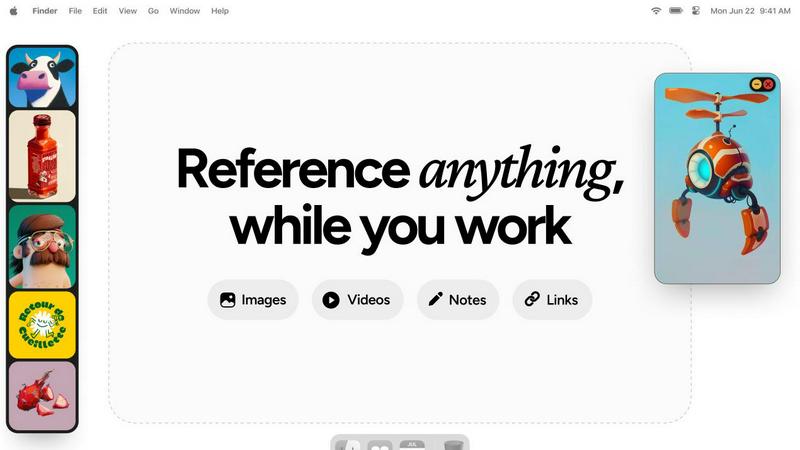
About Refbox
Refbox is a revolutionary desktop application engineered to fundamentally transform how creative professionals access and interact with their reference materials. It serves as a dynamic, floating workspace that pins images, GIFs, videos, and notes in "always-on-top" frames that hover above any other application window. This core functionality eliminates the disruptive and time-consuming cycle of alt-tabbing between folders, browser tabs, and creative software, allowing users to maintain an uninterrupted state of deep focus. Designed explicitly for artists, designers, animators, illustrators, and 3D artists, Refbox addresses the universal need for constant visual inspiration and technical reference. Its value proposition lies in creating a seamless bridge between a user's source material and their primary work canvas, thereby streamlining complex workflows, accelerating decision-making, and fostering a more intuitive and productive creative environment. By keeping references persistently visible and instantly accessible, Refbox empowers professionals to work faster and with greater accuracy, turning a fragmented process into a fluid and integrated experience.
Features of Refbox
Always-on-Top Floating Frames
The cornerstone feature of Refbox is its ability to create resizable, transparent frames that float above all other desktop applications. Users can pin any reference media—be it an image, a video clip, or a text note—into these frames, ensuring critical inspiration or guidelines are perpetually in view without obstructing the main workspace. This eliminates window management clutter and the need to constantly switch contexts, allowing for direct visual comparison and continuous workflow.
Infinite Canvas and Collections
Refbox provides an expansive, infinite canvas where users can organize their references into distinct Collections. This spatial organization allows for mood boarding, project-based grouping, or categorizing by theme. Users can swiftly switch between entire sets of references with a single click, and view all items in a collection simultaneously for a holistic overview or flip through them in a slideshow mode for rapid comparison and iteration.
Advanced Media Handling and Tools
Beyond simple display, Refbox includes a suite of powerful tools for interacting with reference media. This includes stepping through GIFs frame-by-frame for detailed animation study, a built-in color picker to sample and copy hex codes from any image, and the ability to crop images directly within the app. It also supports unique media types like SVG files and can generate website screenshots simply by pasting a URL, making it an incredibly versatile reference hub.
Intuitive Shortcuts and Workflow Optimizations
Designed for efficiency, Refbox is packed with keyboard shortcuts and smart behaviors that save countless clicks. Users can navigate between references using arrow keys, instantly minimize frames to access underlying applications, and auto-hide their entire Refbox workspace, summoning it only when needed. Additional touches like lockable frames (to prevent accidental clicks) and pixel-perfect rendering modes for pixel artists demonstrate a deep understanding of professional creative needs.
Use Cases of Refbox
Digital Illustration and Concept Art
Illustrators and concept artists can pin multiple character sketches, environment photos, and color palettes in floating frames around their drawing software. This allows for constant visual feedback without leaving the canvas, enabling them to accurately translate proportions, lighting, and textures from their references directly into their original artwork, significantly speeding up the ideation and rendering process.
UI/UX and Graphic Design
Designers can use Refbox to keep brand guidelines, mood boards, competitor screenshots, and component libraries visible at all times. While working in Figma or Adobe XD, having these critical references just a glance away ensures design consistency and informed decision-making. The ability to take instant website screenshots and reference them side-by-side with a work-in-progress design is invaluable.
3D Modeling and Animation
3D artists and animators can pin orthographic reference sheets, texture maps, and video clips of motion studies directly over their 3D viewport in software like Blender or Maya. The GIF frame-stepping feature is particularly useful for animators to meticulously study movement cycles frame-by-frame while replicating them in their own scenes, enhancing the accuracy and realism of their work.
Motion Graphics and Video Editing
Motion designers and video editors can keep style frames, storyboards, and inspirational video clips floating above their timeline in After Effects or Premiere Pro. This provides a persistent creative compass throughout the editing process, ensuring the final product aligns with the initial vision. Notes with checklists can also be pinned to track complex project requirements and deliverables.
Frequently Asked Questions
What types of files and media does Refbox support?
Refbox supports a wide array of media formats crucial for creatives. You can directly import and display images (JPG, PNG, SVG, etc.), animated GIFs (with frame-by-frame control), and video files. It also supports rich text notes for checklists and instructions. Furthermore, you can paste image data from your clipboard or simply paste a website URL to automatically generate and import a screenshot.
How does Refbox impact my computer's performance?
Refbox is engineered to be lightweight and efficient. It uses minimal system resources when idle and is optimized to handle media display without significant impact on CPU or GPU performance, allowing your primary creative applications like Photoshop, Blender, or Figma to run smoothly alongside it. The auto-hide feature also ensures it's not rendering anything when not in active use.
Can I use Refbox with multiple monitors?
Yes, Refbox is fully compatible with multi-monitor setups. You can drag your floating reference frames and the main Refbox canvas onto any connected display. This allows you to dedicate one screen entirely to your references using the infinite canvas while using another screen for your primary creative application, creating an expansive and organized digital workspace.
Is there a way to organize a large number of references?
Absolutely. Refbox's core organizational system is based on Collections. You can create unlimited collections for different projects, clients, or themes (e.g., "Character Design," "Landscape Project," "Brand Colors"). Within each collection, you can spatially arrange references on the infinite canvas. You can switch between these collections instantly, keeping your workspace clean and context-specific.
Explore more in this category:
Similar to Refbox

MagicShot.ai is where creators, job seekers & businesses make visual content with AI, photoshoots, image generation, videos & edits from a single upl


AgencyFlo is the AI-native operating system for agencies - one platform for projects, time, CRM, proposals, contracts and invoicing.

AI-powered Upwork job feed. Every new job is scored against your profile and strategy in real time, and you get an instant notification


Inkfox AI is a free unlimited AI image generator requiring no sign-up, featuring Nano Banana 2.0, GPT Image 2.0, Flux, and Seedream models