
documentorium vs Vibrantsnap
Side-by-side comparison to help you choose the right product.

documentorium
Documentorium is a specialized platform that generates professional contractor documents and PDFs through guided, trade-specific forms.
Last updated: March 26, 2026

Vibrantsnap
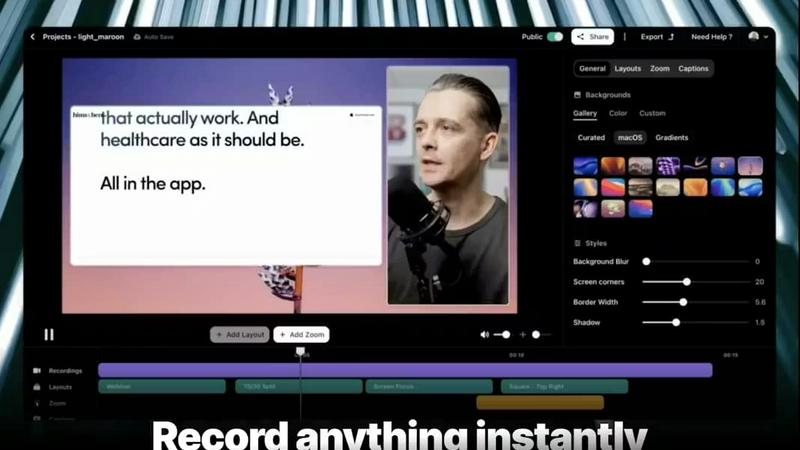
Vibrantsnap transforms your screen recordings into polished, high-converting videos with AI-powered editing in minutes.
Last updated: February 26, 2026
Visual Comparison
documentorium

Vibrantsnap
Feature Comparison
documentorium
Trade-Specific Template Library
Documentorium's foundation is its extensive catalog of over 200 pre-built document templates, meticulously organized across 26 trade categories. Unlike generic form builders, each template—whether for a plumbing invoice, an electrical service report, or a roofing proposal—contains fields, sections, and language specifically tailored to the practices, materials, and regulatory considerations of that particular trade. This specificity ensures that professionals capture all necessary information correctly the first time, reducing errors and omissions that can occur with blank-slate or off-the-shelf document creation.
Guided Form Interface
The platform utilizes an intuitive, step-by-step guided form interface for every document. This structured approach breaks down complex documents into manageable sections, prompting the user for specific information such as client details, scope of work, materials, labor rates, terms, and conditions. This guidance is invaluable for ensuring completeness and professionalism, effectively holding the user's hand through the creation process to produce a comprehensive document without the cognitive load of designing the layout or remembering every required field.
Instant PDF Generation and Professional Formatting
Upon completing a guided form, Documentorium automatically compiles the entered data into a clean, professionally formatted, and print-ready PDF document within seconds. This feature completely removes the burden of manual formatting, font selection, alignment, and layout design. The resulting PDFs are polished and branded, ready to be emailed directly to clients, printed for on-site use, or archived. This instant transformation from data entry to final product is a core time-saving benefit.
Document History and Prefill Capabilities
Every document created is saved within the user's account, creating a complete, searchable history of all business interactions. This archive is crucial for record-keeping, reference, and audit purposes. Furthermore, the system intelligently uses this history to prefill information in new documents. For repeat clients or similar projects, details like client name, address, and standard service descriptions can auto-populate, dramatically speeding up the creation of subsequent quotes, invoices, or work orders.
About Vibrantsnap
Built-in Video Analytics
Vibrantsnap provides robust video analytics that allow users to track viewer engagement seamlessly. This feature informs you who watched your videos, how many times, and identifies points where viewers lose interest. By harnessing these insights, you can refine your content strategy to enhance viewer retention and drive conversions.
Auto-Cut + Auto-Layout
With Vibrantsnap's auto-cut and auto-layout features, users can save precious time during the editing process. Silences and filler words are automatically trimmed, while professional layouts are applied with just two clicks. This capability ensures that users can produce polished videos quickly, without requiring any prior editing experience.
AI Voiceover
The AI voiceover feature enhances videos with professional-quality narration, making your product demos more engaging. By applying natural-sounding voiceovers, users can effectively convey their message and keep viewers interested, ensuring that the essence of the product is communicated clearly.
Call-to-Action Integration
Easily add call-to-action buttons like "Buy Now" or "Book a Call" directly into your videos. This feature not only makes it simple for viewers to take action but also helps track engagement metrics in real time, allowing for better optimization of your marketing strategies.
Use Cases
documentorium
Creating Detailed Service Proposals and Bids
For contractors and installers, such as solar panel companies or roofing contractors, winning new projects often hinges on a professional, detailed proposal. Documentorium allows these professionals to quickly generate comprehensive bids that itemize materials, labor, timelines, and terms. Using a trade-specific proposal template ensures all technical and cost components are clearly presented, enhancing credibility and improving the chances of client acceptance compared to a handwritten quote or a poorly formatted Word document.
Streamlining Daily Work Orders and Service Reports
HVAC technicians, electricians, and plumbers on service calls can use Documentorium to generate precise work orders and service reports on the spot, either from a mobile device or back at the office. The guided forms ensure all diagnostic findings, parts used, labor performed, and recommendations are recorded accurately. The instant PDF can then be presented to the customer for signature upon job completion, providing immediate documentation and facilitating faster invoicing.
Managing Project Changes with Change Orders
During construction or renovation projects, changes to the original scope are common. Documentorium's change order templates provide a formal, clear mechanism for contractors to document any alterations, associated costs, and revised timelines. This formalizes client approval, protects the business from disputes about additional charges, and maintains a clear paper trail for the project's evolution, which is essential for contract management and financial clarity.
Issuing Professional Invoices and Warranties
After job completion, professionals need to issue clear invoices for payment and provide warranty documentation for their work. Documentorium automates this process, pulling data from the original quote or work order to quickly generate an accurate invoice with line-item details. Similarly, generating a standardized warranty document ensures clients receive consistent, legally-sound coverage information, reinforcing the professionalism and reliability of the service business.
Vibrantsnap
Product Demos
Founders can utilize Vibrantsnap to create compelling product demo videos that showcase features and benefits efficiently. These videos help potential customers understand the product quickly, leading to higher conversion rates.
Online Tutorials
Educators and content creators can develop engaging tutorials that guide viewers through complex topics. By using Vibrantsnap, they can produce high-quality instructional videos that enhance learning and retention.
Sales Presentations
Sales teams can leverage Vibrantsnap to craft persuasive presentations that capture and retain audience attention. The ability to integrate analytics allows them to measure the effectiveness of their pitch strategies and make necessary adjustments.
Marketing Campaigns
Digital marketers can create promotional videos for social media campaigns that are visually appealing and informative. Vibrantsnap's features ensure that these videos are produced quickly while maintaining a professional standard that attracts viewers.
Overview
About documentorium
Documentorium is a specialized, no-nonsense document generation engine meticulously crafted for the unique demands of skilled trades and service professionals. It serves as a comprehensive solution for electricians, plumbers, general contractors, HVAC technicians, roofers, solar installers, and a wide array of other field service experts who require professional, accurate, and legally sound business documentation. The platform's core value proposition is the elimination of time-consuming document creation from scratch or the use of generic, ill-fitting templates. Instead, Documentorium provides a vast, trade-specific library of over 200 guided templates across 26 distinct categories. This includes essential documents such as quotes, estimates, invoices, work orders, bids, contracts, service reports, inspection reports, proposals, warranties, and change orders. Each template is engineered with fields and terminology specific to the user's trade, ensuring relevance and professionalism. The process is streamlined: a user fills out a structured, guided form, and the system instantly generates a clean, print-ready PDF document. This approach not only saves significant administrative time but also enhances a business's credibility with clients through consistent, high-quality documentation, all managed within a single, centralized platform.
About Vibrantsnap
Vibrantsnap is an innovative AI-powered tool designed to transform screen recordings into polished, high-converting videos. Targeting founders, marketers, and creators, it addresses a common challenge: potential customers often struggle to grasp a product quickly when presented with lengthy descriptions or static images. Vibrantsnap streamlines this process by enabling users to create engaging product videos in just minutes. By incorporating features like auto-editing, professional voiceovers, and real-time analytics, the platform empowers users to convert viewers into customers effectively. With Vibrantsnap, you can enhance credibility and user experience, making it a vital asset for any business looking to showcase its offerings dynamically and efficiently.
Frequently Asked Questions
documentorium FAQ
Can I cancel my subscription anytime?
Yes, you can cancel your Documentorium subscription at any time directly from your account settings. There are no long-term contracts or penalties for cancellation. Your access to the platform's features will remain active until the end of your current billing period, after which your account will revert to a free state. This policy ensures there is no vendor lock-in, providing complete flexibility for the user.
What happens to my documents when the free trial ends?
When your one-month free trial concludes, all documents you created during the trial period are preserved and remain accessible in your account history. You can view and download these existing PDFs at any time. To continue creating new documents or editing templates, you will need to activate a paid subscription. No user data or document history is deleted upon trial expiration.
Do I lose access to my old documents if I don't subscribe?
No, you do not lose access to your previously created documents. Even without an active subscription, you retain the ability to log into your account to view, download, and print all documents you generated while your subscription was active or during your trial period. The subscription is required for creating and editing new documents, but your historical data remains your property and is always accessible.
Does Documentorium provide legal advice for contracts?
No, Documentorium does not provide legal advice. The platform is a document generation tool that provides templates and forms designed for common trade-specific business scenarios. While these templates are professionally crafted, users are responsible for ensuring that any document, especially contracts, warranties, and agreements, meets their specific legal requirements and complies with local, state, and federal regulations. Consulting with a legal professional for critical documents is recommended.
Vibrantsnap FAQ
What types of videos can I create with Vibrantsnap?
You can create a variety of videos, including product demos, tutorials, sales presentations, and promotional content. The platform is designed to cater to diverse needs, ensuring high-quality output for any purpose.
Is any prior editing experience required to use Vibrantsnap?
No, Vibrantsnap is designed to be user-friendly and intuitive. Its auto-editing features and simple interface mean that users can produce polished videos without any prior editing experience.
How does the video analytics feature work?
The built-in video analytics provide insights into viewer behavior, showing who watched your video, how many times it was viewed, and where viewer attention drops off. This information is invaluable for refining your video content and strategy.
Can I add my branding to the videos created with Vibrantsnap?
Yes, Vibrantsnap allows users to customize their videos with branding elements, ensuring that your content remains consistent with your brand identity while promoting professionalism and trustworthiness.
Alternatives
documentorium Alternatives
documentorium is a specialized document generation platform within the broader contractor management and productivity software category. It focuses on providing trade-specific templates for creating professional PDF documents like quotes, invoices, and work orders. Users may explore alternatives for various reasons, such as seeking different pricing models, requiring more extensive business management features like scheduling or CRM, needing mobile-specific functionality, or preferring a different user interface. The decision often hinges on the specific needs and scale of a contracting business. When evaluating alternatives, key considerations include the depth and relevance of trade-specific templates, the efficiency of the document creation workflow, output quality, integration capabilities with other tools, overall cost, and the platform's focus on mobile versus desktop use. The ideal solution should streamline paperwork without adding complexity.
Vibrantsnap Alternatives
Vibrantsnap is a cutting-edge screen recording tool that allows users to create polished product demos quickly and efficiently. It falls within the productivity and management category, helping businesses convey their offerings through engaging video content. Users often seek alternatives to Vibrantsnap for various reasons, including pricing structures, specific feature sets, or compatibility with different operating systems. As companies evolve, their needs may change, prompting the search for a solution that better fits their budget or functionality requirements. When exploring alternatives, it’s essential to consider factors such as the ease of use, built-in functionalities like video analytics, and automation features for editing. Users should also evaluate the level of customer support available, as well as how well the alternative integrates with existing workflows or other tools they may be using. A thorough comparison based on these aspects will help ensure that the selected tool meets the user's specific requirements.