
Dokie AI vs Image3D AI
Side-by-side comparison to help you choose the right product.

Dokie AI
Dokie AI empowers users to effortlessly create professional PPT presentations in minutes using advanced AI technology.
Last updated: March 19, 2026

Image3D AI
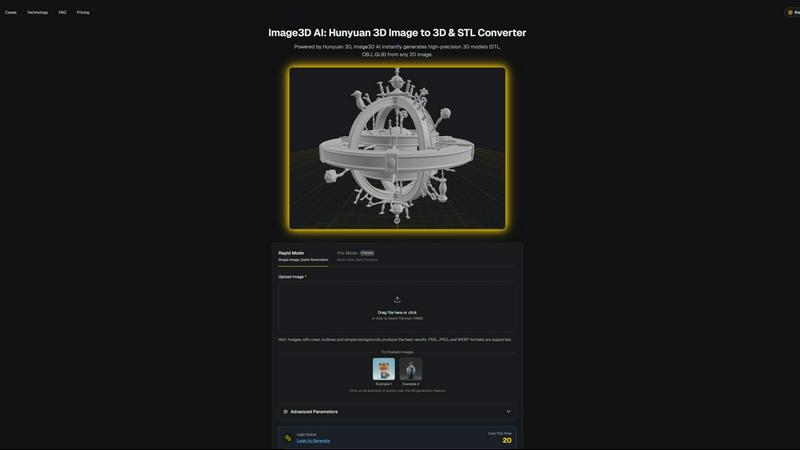
Image3D AI effortlessly converts 2D images into high-quality 3D models for printing and game development in minutes.
Last updated: March 1, 2026
Visual Comparison
Dokie AI

Image3D AI
Feature Comparison
Dokie AI
AI Generate PPT
This innovative feature allows users to input a topic in plain text, and Dokie AI will automatically generate a complete slide deck. The AI carefully curates professional layouts, charts, and engaging content, ensuring that each presentation is visually appealing and informative.
AI Beautify PPT
Dokie AI offers the ability to upload existing presentations and enhance them significantly. The AI analyzes the original slides, improves design elements, fixes layouts, and applies a professional style, transforming ordinary presentations into polished works of art without altering the original content.
Speech Notes Generation
To facilitate effective delivery, Dokie AI automatically generates detailed speaker notes for each slide. These notes provide users with comprehensive talking points, helping presenters maintain confidence and clarity during their presentations.
Document-to-PPT Conversion
Dokie AI supports seamless document-to-PPT conversions, allowing users to transform various formats such as PDF, Word, and HTML into fully editable PowerPoint presentations. This feature streamlines the process of creating slides from existing content, enhancing productivity.
About Image3D AI
Rapid Mode
Rapid Mode allows users to generate 3D models quickly from a single image. This feature is particularly useful for those needing immediate results, making it ideal for quick iterations during the design process. Users can upload images and receive a 3D model in about 60 seconds, streamlining workflows.
Pro Mode
For users requiring higher precision and detail, Pro Mode supports multi-view inputs to create intricate 3D models. This feature is essential for accurately capturing the dimensions and textures of real-world objects, providing a more comprehensive representation suitable for professional applications.
Multi-Format Exports
Image3D AI offers the flexibility to export generated 3D models in various formats, including STL, OBJ, and GLB. This multi-format export capability ensures that users can seamlessly integrate their 3D assets into different platforms, whether for 3D printing, game development, or web applications.
PBR Material Generation
The platform includes PBR (Physically Based Rendering) material generation, which enhances the realism of 3D models by simulating how materials interact with light. This feature is crucial for users in gaming and e-commerce, where visual fidelity is paramount for user engagement.
Use Cases
Dokie AI
Business Presentations
Professionals can utilize Dokie AI to create impactful business presentations that convey their ideas clearly and effectively. The AI's ability to generate polished slides allows users to focus on their message rather than design intricacies.
Educational Lectures
Educators can leverage Dokie AI to develop engaging lecture presentations quickly. By transforming lecture notes or topics into visually appealing slides, teachers can enhance student engagement and understanding.
Marketing Proposals
Marketers can create compelling proposals and pitch decks using Dokie AI. The tool's capability to beautify existing presentations ensures that marketing materials are both professional and persuasive, aiding in successful client communications.
Startup Pitches
Startup founders can use Dokie AI to generate captivating pitch decks that succinctly convey their ideas and business models. The AI's focus on layout and design helps founders make a strong impression on potential investors.
Image3D AI
Game Development
Game developers can utilize Image3D AI to generate high-quality, game-ready 3D assets from concept art and sketches. By streamlining the modeling process, developers can focus on creating immersive experiences without getting bogged down in the intricacies of traditional modeling.
E-commerce
E-commerce professionals can convert product images into interactive 3D models that can be showcased in online stores. This capability allows customers to engage with products in a more dynamic way, enhancing the shopping experience and potentially increasing conversion rates.
3D Printing
Image3D AI serves as an effective image to STL converter, producing high-precision files suitable for 3D printing. This feature is beneficial for designers and makers who need ready-to-print models without extensive manual intervention, saving time and resources.
Architecture and Design
Architects and designers can rapidly generate architectural models from concept sketches or images, significantly reducing the time required to create models from scratch. This efficiency allows for quicker iterations and more effective collaboration with clients and stakeholders.
Overview
About Dokie AI
Dokie AI is a pioneering AI-powered presentation maker that enables users to create stunning and professional PowerPoint presentations effortlessly. Tailored for business professionals, educators, marketers, and startup founders, Dokie AI eliminates the need for design skills, allowing anyone to produce high-quality presentations in minutes. Leveraging the advanced capabilities of Claude Opus 4.6, Dokie AI automates content structuring, layout selection, typography, and visual design. Whether you are generating a new presentation from scratch, enhancing existing slides, or converting documents into PowerPoint format, Dokie AI's versatile features cater to diverse needs. It uniquely combines ease of use with advanced AI technology, making it an indispensable tool for anyone looking to communicate ideas effectively and visually.
About Image3D AI
Image3D AI is a groundbreaking AI-powered tool designed to transform the way users create 3D models from 2D images. By harnessing the advanced capabilities of Tencent's Hunyuan 3D engine, this innovative platform allows users to convert static images into high-quality, production-ready 3D assets in mere seconds. Catering to a diverse audience, including 3D printing aficionados, game developers, architects, and e-commerce professionals, Image3D AI effectively simplifies the intricate process of 3D modeling. Users can generate high-fidelity models from single images or multiple view inputs, ensuring flexibility in their creative endeavors. With functionalities such as multi-format exports and PBR material generation, Image3D AI is tailored to meet various application demands, making it an essential tool for anyone looking to produce customized 3D assets efficiently.
Frequently Asked Questions
Dokie AI FAQ
What types of presentations can I create with Dokie AI?
Dokie AI allows users to create a wide range of presentations including business proposals, educational lectures, marketing materials, and startup pitches. The AI's versatility ensures that it meets diverse presentation needs.
How does Dokie AI enhance existing presentations?
By using the AI Beautify PPT feature, users can upload their existing slides for enhancement. The AI analyzes the presentation, improves design elements, and applies professional styling while preserving the original content.
Can I generate speaker notes for my presentations?
Yes, Dokie AI automatically generates detailed speaker notes for each slide, helping users to deliver their presentations confidently. This feature enhances the overall presentation experience by providing comprehensive talking points.
Is Dokie AI suitable for non-designers?
Absolutely. Dokie AI is specifically designed for users without design skills, enabling anyone to create professional presentations easily. Its AI-driven capabilities ensure that high-quality designs are achievable for all users.
Image3D AI FAQ
What types of images work best for generating 3D models?
Images with clear outlines and simple backgrounds produce the best results. High-contrast images are preferable, while blurry or low-light images should be avoided.
How long does it take to generate a 3D model?
In Rapid Mode, a single image can be processed and converted into a 3D model in approximately 60 seconds. The time may vary based on the complexity of the input and the selected generation mode.
Can I use Image3D AI for professional projects?
Yes, Image3D AI is designed for a variety of professional applications, including game development, e-commerce, 3D printing, and architectural design, making it a versatile tool for professionals across industries.
What file formats can I export my 3D models in?
Users can export their 3D models in several formats, including STL for 3D printing, OBJ for traditional 3D editing, and GLB for modern web and augmented reality applications, ensuring compatibility with various software.
Alternatives
Dokie AI Alternatives
Dokie AI is a cutting-edge AI presentation maker designed to help users create professional-grade slides quickly and effortlessly. It belongs to the design tools category, leveraging advanced artificial intelligence to automate the content structure, layout, and design elements of presentations. Users often seek alternatives to Dokie AI for various reasons, including pricing considerations, specific feature requirements, or compatibility with different platforms. As you explore potential alternatives, it is important to assess factors such as ease of use, the range of features offered, customer support, and whether the tool aligns with your specific presentation needs. When choosing an alternative to Dokie AI, consider what functionalities are most critical for your projects. Look for tools that provide intuitive design options, robust customization capabilities, and the ability to generate content effectively. Additionally, evaluating user reviews and trial options can help ensure you select a solution that meets your expectations and enhances your presentation-making experience.
Image3D AI Alternatives
Image3D AI is a groundbreaking software tool that belongs to the design tools category, specifically focusing on transforming 2D images into high-quality 3D models suitable for various applications like 3D printing and game development. Users who seek alternatives to Image3D AI often do so due to a variety of reasons, including pricing constraints, specific feature requirements, or compatibility with different platforms. As the landscape of 3D modeling tools continues to evolve, users may also seek solutions that better align with their unique workflows and project demands. When considering alternatives, it is essential to evaluate factors such as the range of supported export formats, the quality of generated models, ease of use, and the availability of additional features like material generation and operational modes. Furthermore, understanding the target user demographic and specific use cases can help in identifying a tool that meets both current and future needs.