
Image3D AI
Image3D AI effortlessly converts 2D images into high-quality 3D models for printing and game development in minutes.
Visit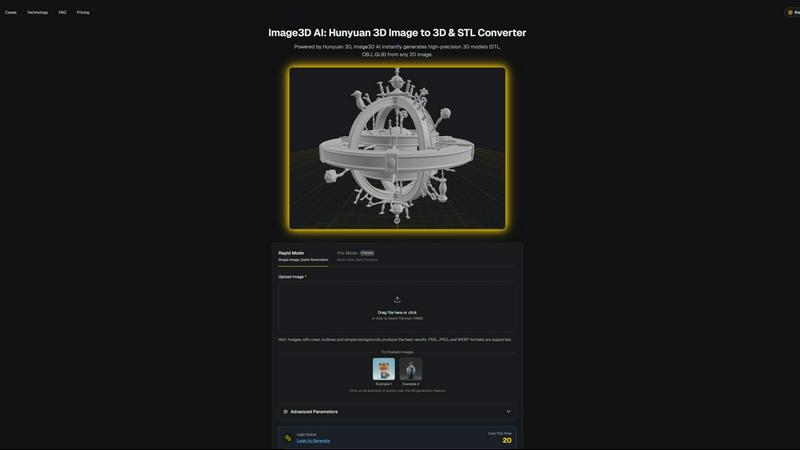
About Image3D AI
Image3D AI is a groundbreaking AI-powered tool designed to transform the way users create 3D models from 2D images. By harnessing the advanced capabilities of Tencent's Hunyuan 3D engine, this innovative platform allows users to convert static images into high-quality, production-ready 3D assets in mere seconds. Catering to a diverse audience, including 3D printing aficionados, game developers, architects, and e-commerce professionals, Image3D AI effectively simplifies the intricate process of 3D modeling. Users can generate high-fidelity models from single images or multiple view inputs, ensuring flexibility in their creative endeavors. With functionalities such as multi-format exports and PBR material generation, Image3D AI is tailored to meet various application demands, making it an essential tool for anyone looking to produce customized 3D assets efficiently.
Features of Image3D AI
Rapid Mode
Rapid Mode allows users to generate 3D models quickly from a single image. This feature is particularly useful for those needing immediate results, making it ideal for quick iterations during the design process. Users can upload images and receive a 3D model in about 60 seconds, streamlining workflows.
Pro Mode
For users requiring higher precision and detail, Pro Mode supports multi-view inputs to create intricate 3D models. This feature is essential for accurately capturing the dimensions and textures of real-world objects, providing a more comprehensive representation suitable for professional applications.
Multi-Format Exports
Image3D AI offers the flexibility to export generated 3D models in various formats, including STL, OBJ, and GLB. This multi-format export capability ensures that users can seamlessly integrate their 3D assets into different platforms, whether for 3D printing, game development, or web applications.
PBR Material Generation
The platform includes PBR (Physically Based Rendering) material generation, which enhances the realism of 3D models by simulating how materials interact with light. This feature is crucial for users in gaming and e-commerce, where visual fidelity is paramount for user engagement.
Use Cases of Image3D AI
Game Development
Game developers can utilize Image3D AI to generate high-quality, game-ready 3D assets from concept art and sketches. By streamlining the modeling process, developers can focus on creating immersive experiences without getting bogged down in the intricacies of traditional modeling.
E-commerce
E-commerce professionals can convert product images into interactive 3D models that can be showcased in online stores. This capability allows customers to engage with products in a more dynamic way, enhancing the shopping experience and potentially increasing conversion rates.
3D Printing
Image3D AI serves as an effective image to STL converter, producing high-precision files suitable for 3D printing. This feature is beneficial for designers and makers who need ready-to-print models without extensive manual intervention, saving time and resources.
Architecture and Design
Architects and designers can rapidly generate architectural models from concept sketches or images, significantly reducing the time required to create models from scratch. This efficiency allows for quicker iterations and more effective collaboration with clients and stakeholders.
Frequently Asked Questions
What types of images work best for generating 3D models?
Images with clear outlines and simple backgrounds produce the best results. High-contrast images are preferable, while blurry or low-light images should be avoided.
How long does it take to generate a 3D model?
In Rapid Mode, a single image can be processed and converted into a 3D model in approximately 60 seconds. The time may vary based on the complexity of the input and the selected generation mode.
Can I use Image3D AI for professional projects?
Yes, Image3D AI is designed for a variety of professional applications, including game development, e-commerce, 3D printing, and architectural design, making it a versatile tool for professionals across industries.
What file formats can I export my 3D models in?
Users can export their 3D models in several formats, including STL for 3D printing, OBJ for traditional 3D editing, and GLB for modern web and augmented reality applications, ensuring compatibility with various software.
Similar to Image3D AI

MagicShot.ai is where creators, job seekers & businesses make visual content with AI, photoshoots, image generation, videos & edits from a single upl


Inkfox AI is a free unlimited AI image generator requiring no sign-up, featuring Nano Banana 2.0, GPT Image 2.0, Flux, and Seedream models

AI motion graphics and map animation generator for content creators, editors, founders and marketers.

Receiptum allows you to create fully customizable, professional receipts in seconds without any design skills required.

Sprite-AI transforms text descriptions into pixel-perfect game sprites instantly, offering intuitive editing tools and seamless integration with.

Doodle Magic instantly transforms your simple sketches into over thirty unique art styles, from watercolors to 3D figurines, with just a tap.

dMaya is an AI design platform for agencies that generates client-ready UI and exports to code.