
Easymotion - AI Motion Graphic Generator
Easymotion is an AI-powered tool that transforms static images, data, and maps into professional motion graphics and social media videos in minutes.
Visit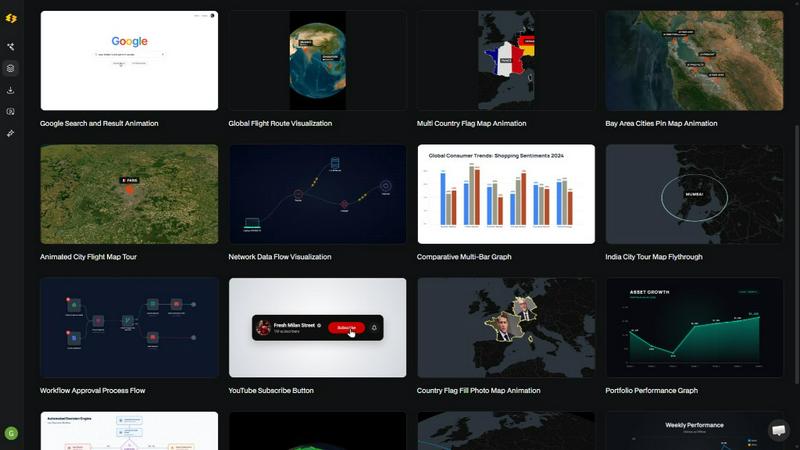
About Easymotion - AI Motion Graphic Generator
Easymotion is an AI-powered motion graphics generator and map animation platform designed for content creators, editors, marketers, founders, and data storytellers who need to produce professional animated videos quickly without mastering complex timeline-based editing software like Adobe After Effects. The platform enables users to transform ideas, static images, spreadsheets, and PDFs into polished animated videos through a conversational AI interface, dramatically reducing production time from hours to minutes. Easymotion supports a wide variety of motion graphics formats, including SaaS product promos, flowcharts, animated charts, UI explainers, quizzes, and map animations such as flight routes, location pins, and geographic storytelling visuals. Users can start by typing a prompt in plain English, uploading an image for AI-driven animation, importing CSV or XLSX data files for automated chart visualization, or selecting from a premium template library. After generation, users can refine every aspect of their animation by chatting with the AI to adjust colors, pacing, labels, layout, and visual style. The platform offers flexible export options including MP4 and MOV files with transparent backgrounds, supporting aspect ratios of 16:9 for YouTube and landscape content, 9:16 for TikTok and Instagram Reels, 1:1 for square social posts, and 4:5 for feed-friendly vertical formats. With over 10,000 creators already using the service and an average production time of under five minutes per video, Easymotion positions itself as a faster, more accessible alternative to traditional motion graphics workflows, enabling users to create more content, post more frequently, and grow their audience or business presence without needing design skills or expensive freelancers.
Features of Easymotion - AI Motion Graphic Generator
Static Design into Animation
Easymotion allows users to upload a static image and let the AI bring it to life with stunning motion effects. This feature eliminates the need for manual keyframing or complex animation curves by automatically analyzing the image content and applying appropriate motion, transitions, and visual enhancements. Users can animate logos, product shots, infographics, or any static visual asset, transforming them into engaging video content suitable for social media, presentations, or client deliverables in a matter of minutes.
Map Animations Made Easy
The platform enables users to create professional map animations effortlessly and faster than traditional methods. This feature supports generating flight route visualizations, location pin animations, country or region flag fill highlights, and geographic storytelling sequences. Users can describe their desired map animation in plain English, and the AI handles the complex geographic rendering, camera movements, and timing. This capability is particularly valuable for travel content creators, logistics companies, and data journalists who need to present location-based information dynamically.
Boring Sheets into Visuals
Easymotion can transform raw data from CSV or XLSX files into beautiful animated data visualizations. Users simply upload their spreadsheet, and the AI automatically parses the data, selects appropriate chart types such as bar charts, line graphs, or pie charts, and generates an animated sequence that brings the numbers to life. This feature allows data storytellers, analysts, and marketers to create compelling video content that stops the scroll on social media, with studies showing that video posts achieve up to five times more engagement than static images.
Customize Everything with AI Chat
After generating an initial animation, users can refine every aspect by chatting with the AI. This feature allows for granular control over text, logos, colors, timing, map styles, labels, layout, and overall visual style without needing to touch a traditional editing timeline. Users can make iterative changes through natural language commands, such as "make the background darker," "speed up the animation," or "change the chart colors to match my brand," enabling rapid customization and brand consistency across multiple videos.
Use Cases of Easymotion - AI Motion Graphic Generator
Social Media Content Creation for Creators and YouTubers
Content creators and YouTubers can use Easymotion to produce high-quality motion graphics and map animations for their channels without spending hours in After Effects. They can create animated travel route maps, channel milestone celebrations, subscriber count animations, and promotional videos for their content. The platform supports the 9:16 aspect ratio for TikTok and Instagram Reels, 16:9 for YouTube, and 4:5 for Instagram feed posts, allowing creators to repurpose one animation across multiple platforms. With an average production time of under five minutes per video, creators can produce more content, post more frequently, and accelerate their channel growth.
Marketing Campaigns for Brand and Agency Teams
Marketing professionals can leverage Easymotion to ship campaigns on the same day instead of waiting days for design teams or freelancers. They can create animated product promos, explainer videos, data-driven infographics, and social media ads directly in the browser. The ability to customize colors, logos, and assets ensures brand consistency across all video content. Marketing teams can iterate rapidly on campaign concepts by chatting with the AI to adjust messaging, pacing, and visual elements, enabling them to respond quickly to market trends and launch campaigns without bottlenecks.
Data Visualization for Analysts and Storytellers
Data analysts, researchers, and journalists can transform static charts and spreadsheets into animated data stories that capture audience attention. By uploading CSV or XLSX files, users can generate animated bar charts, line graphs, and flowcharts that illustrate trends, comparisons, and processes over time. These animated visuals are ideal for reports, presentations, social media posts, and client deliverables. The platform helps data storytellers achieve higher engagement rates, as animated content consistently outperforms static images on social platforms, making complex information more accessible and memorable.
Startup and Founder Social Media Growth
Founders and startup teams can use Easymotion to build their social media presence without hiring expensive freelancers or learning complex editing software. They can create professional-looking product demos, explainer videos, company milestone animations, and thought leadership content quickly and affordably. The platform enables startups to maintain a consistent posting schedule across LinkedIn, Twitter, Instagram, and TikTok, helping them attract investors, customers, and talent. By producing videos in-house, startups can save significant costs while maintaining creative control over their brand narrative.
Frequently Asked Questions
What is Easymotion and who is it for?
Easymotion is an AI-powered motion graphics generator that allows users to create professional animated videos simply by chatting with AI. It is designed for content creators, YouTubers, video editors, marketers, founders, startups, and data storytellers who need to produce motion graphics, map animations, and data visualizations without using complex software like Adobe After Effects. The platform serves over 10,000 creators and enables video production in under five minutes on average.
How does the AI motion graphics generation process work?
The process works in three simple steps. First, users describe the animation they want in plain English, upload an image or spreadsheet, or select a template. Second, the AI generates the animation, and users can refine the result using chat commands to adjust colors, timing, map styles, labels, layout, or assets. Finally, users export their completed video as an MP4 or MOV file with a transparent background for use in editing workflows, social media, presentations, or client deliverables.
What types of videos can I create with Easymotion?
Easymotion supports a wide variety of motion graphics formats including SaaS product promos, flowcharts, animated charts and graphs, UI explainers, quizzes, and social media videos. It also functions as a dedicated map animation maker for flight routes, location pins, flag fill highlights, and geographic storytelling visuals. Users can start from a text prompt, upload images for animation, import spreadsheets for data visualization, or choose from a premium template library covering maps, charts, interfaces, and social media content.
What export formats and aspect ratios are supported?
Easymotion allows users to export videos as MP4 or MOV files, including videos with transparent backgrounds (alpha channel) that can be dropped directly into editing software like Premiere Pro or Final Cut Pro. The platform supports multiple aspect ratios: 16:9 for YouTube and landscape content, 9:16 for TikTok and Instagram Reels, 1:1 for square social posts, and 4:5 for feed-friendly vertical formats. This flexibility ensures that users can create content optimized for any platform without additional editing.
Similar to Easymotion - AI Motion Graphic Generator


AI English for classrooms, built by a teacher.


Turn table photos and screenshots into editable Excel files. Merge images, remove duplicates, preview free.


AIQualityHQ is a free browser tool that instantly evaluates your AI prompts for structure, safety, and privacy, providing actionable optimization.