
FilexHost vs Vibrantsnap
Side-by-side comparison to help you choose the right product.

FilexHost
FilexHost simplifies file hosting and sharing with instant URLs and built-in viewers for various file types.
Last updated: February 26, 2026

Vibrantsnap
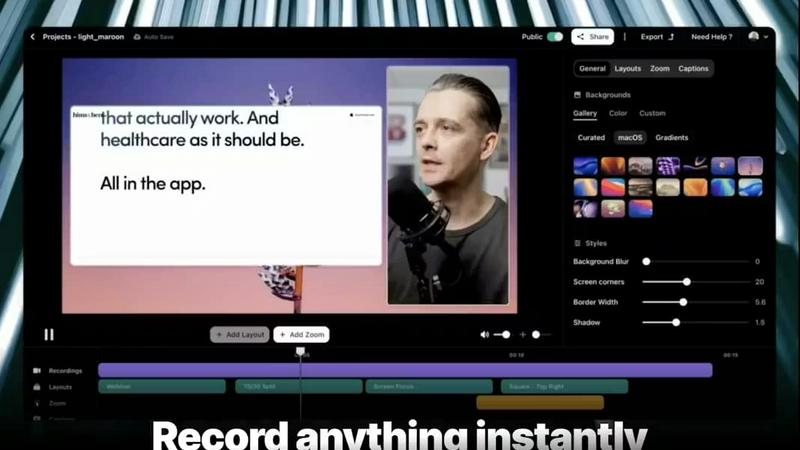
Vibrantsnap transforms your screen recordings into polished, high-converting videos with AI-powered editing in minutes.
Last updated: February 26, 2026
Visual Comparison
FilexHost

Vibrantsnap
Feature Comparison
FilexHost
Instant Subdomains
FileXHost provides users with instant subdomains for their uploaded files, formatted as your-file.filex.host. This feature eliminates the hassles of domain setup, allowing for immediate sharing of files right after upload.
Free SSL Encryption
Every link generated by FileXHost is secured with free SSL encryption. This ensures that all file transfers are secure, protecting sensitive information from unauthorized access and enhancing user trust in the platform.
Smart View Modes
FileXHost's smart view modes allow users to choose between direct rendering of files or a download page. This flexibility ensures that recipients can either view files inline or download them for offline access, catering to different user preferences.
Optional Password Protection
To enhance security, FileXHost offers optional password protection for shared links. Users can set expiry settings for their files ranging from 24 hours to an indefinite period, allowing them to control access and ensure privacy.
Vibrantsnap
Built-in Video Analytics
Vibrantsnap provides robust video analytics that allow users to track viewer engagement seamlessly. This feature informs you who watched your videos, how many times, and identifies points where viewers lose interest. By harnessing these insights, you can refine your content strategy to enhance viewer retention and drive conversions.
Auto-Cut + Auto-Layout
With Vibrantsnap's auto-cut and auto-layout features, users can save precious time during the editing process. Silences and filler words are automatically trimmed, while professional layouts are applied with just two clicks. This capability ensures that users can produce polished videos quickly, without requiring any prior editing experience.
AI Voiceover
The AI voiceover feature enhances videos with professional-quality narration, making your product demos more engaging. By applying natural-sounding voiceovers, users can effectively convey their message and keep viewers interested, ensuring that the essence of the product is communicated clearly.
Call-to-Action Integration
Easily add call-to-action buttons like "Buy Now" or "Book a Call" directly into your videos. This feature not only makes it simple for viewers to take action but also helps track engagement metrics in real time, allowing for better optimization of your marketing strategies.
Use Cases
FilexHost
Professional Report Sharing
Professionals can utilize FileXHost to share client reports or presentations quickly. The drag-and-drop feature allows for instant uploads, while the secure, shareable links streamline the distribution process, eliminating the need for lengthy email attachments.
Web Development Hosting
Developers can host landing pages or mock APIs effortlessly on FileXHost. The platform's ability to render HTML files as live websites simplifies the testing and demonstration of web projects to clients or stakeholders.
Digital Product Distribution
Creators can distribute digital products such as eBooks, music, or art files without the hassle of email attachment limits. The built-in support for various media types ensures that products are presented professionally and can be accessed easily.
Team Collaboration
FileXHost serves as a valuable tool for teams needing to collaborate on projects. By providing a central repository for files, team members can upload, share, and access necessary documents without complicated permission requests or delays.
Vibrantsnap
Product Demos
Founders can utilize Vibrantsnap to create compelling product demo videos that showcase features and benefits efficiently. These videos help potential customers understand the product quickly, leading to higher conversion rates.
Online Tutorials
Educators and content creators can develop engaging tutorials that guide viewers through complex topics. By using Vibrantsnap, they can produce high-quality instructional videos that enhance learning and retention.
Sales Presentations
Sales teams can leverage Vibrantsnap to craft persuasive presentations that capture and retain audience attention. The ability to integrate analytics allows them to measure the effectiveness of their pitch strategies and make necessary adjustments.
Marketing Campaigns
Digital marketers can create promotional videos for social media campaigns that are visually appealing and informative. Vibrantsnap's features ensure that these videos are produced quickly while maintaining a professional standard that attracts viewers.
Overview
About FilexHost
FileXHost is an innovative file hosting and sharing solution designed to simplify the way users manage and distribute files online. With its intuitive "Drop & Share" functionality, FileXHost allows users to upload a wide range of file types—from documents and images to entire websites—without the need for cumbersome setups or configurations. It caters to professionals, developers, and creators alike, enabling them to share files quickly and securely. The platform's core value proposition lies in its speed and ease of use, allowing users to generate instant secure URLs for sharing files without requiring recipients to navigate complex access requests. With built-in security features like free SSL encryption and customizable sharing settings, FileXHost ensures that users can deliver their files confidently, knowing they are protected and presented beautifully.
About Vibrantsnap
Vibrantsnap is an innovative AI-powered tool designed to transform screen recordings into polished, high-converting videos. Targeting founders, marketers, and creators, it addresses a common challenge: potential customers often struggle to grasp a product quickly when presented with lengthy descriptions or static images. Vibrantsnap streamlines this process by enabling users to create engaging product videos in just minutes. By incorporating features like auto-editing, professional voiceovers, and real-time analytics, the platform empowers users to convert viewers into customers effectively. With Vibrantsnap, you can enhance credibility and user experience, making it a vital asset for any business looking to showcase its offerings dynamically and efficiently.
Frequently Asked Questions
FilexHost FAQ
What is FileXHost?
FileXHost is a file hosting and sharing platform that allows users to upload various file types and generate secure, shareable links instantly. Ideal for professionals, developers, and creators, it emphasizes ease of use and security.
Is it really free?
Yes, FileXHost offers a free plan that allows users to host up to 1,000 files, with a maximum size of 25MB per file. However, this plan includes ads and has a 7-day expiry for hosted files.
What file types are supported?
FileXHost supports a wide range of file types, including PDFs, Excel sheets, images, audio and video files, ZIP archives, and HTML projects, ensuring versatility for various user needs.
How do I update my site?
To update your site, simply upload the new version of your file or website ZIP. FileXHost will generate a new secure link while maintaining the original format and accessibility for recipients.
Vibrantsnap FAQ
What types of videos can I create with Vibrantsnap?
You can create a variety of videos, including product demos, tutorials, sales presentations, and promotional content. The platform is designed to cater to diverse needs, ensuring high-quality output for any purpose.
Is any prior editing experience required to use Vibrantsnap?
No, Vibrantsnap is designed to be user-friendly and intuitive. Its auto-editing features and simple interface mean that users can produce polished videos without any prior editing experience.
How does the video analytics feature work?
The built-in video analytics provide insights into viewer behavior, showing who watched your video, how many times it was viewed, and where viewer attention drops off. This information is invaluable for refining your video content and strategy.
Can I add my branding to the videos created with Vibrantsnap?
Yes, Vibrantsnap allows users to customize their videos with branding elements, ensuring that your content remains consistent with your brand identity while promoting professionalism and trustworthiness.
Alternatives
FilexHost Alternatives
FilexHost is a user-friendly file hosting and sharing platform designed to simplify the process of sharing various file types, including documents, media, and websites. By employing a drag-and-drop interface, users can quickly upload files and generate secure, shareable URLs without the need for complex configurations or user accounts. This service falls under the category of productivity and management tools, catering to individuals and professionals alike. Despite its advantages, users often seek alternatives to FilexHost for several reasons, including pricing structures, specific feature sets, and compatibility with different platforms. When exploring alternatives, it is essential to consider factors such as storage capacity, file size limits, security features, and user experience. Additionally, evaluating whether the service offers essential functionalities like password protection, analytics, and ease of access for recipients can aid in making an informed decision.
Vibrantsnap Alternatives
Vibrantsnap is a cutting-edge screen recording tool that allows users to create polished product demos quickly and efficiently. It falls within the productivity and management category, helping businesses convey their offerings through engaging video content. Users often seek alternatives to Vibrantsnap for various reasons, including pricing structures, specific feature sets, or compatibility with different operating systems. As companies evolve, their needs may change, prompting the search for a solution that better fits their budget or functionality requirements. When exploring alternatives, it’s essential to consider factors such as the ease of use, built-in functionalities like video analytics, and automation features for editing. Users should also evaluate the level of customer support available, as well as how well the alternative integrates with existing workflows or other tools they may be using. A thorough comparison based on these aspects will help ensure that the selected tool meets the user's specific requirements.