
HeyVid vs Updaytr
Side-by-side comparison to help you choose the right product.

HeyVid is an all-in-one AI tool that effortlessly generates high-quality videos and images from text or images, streamlining your creative process.
Last updated: April 4, 2026
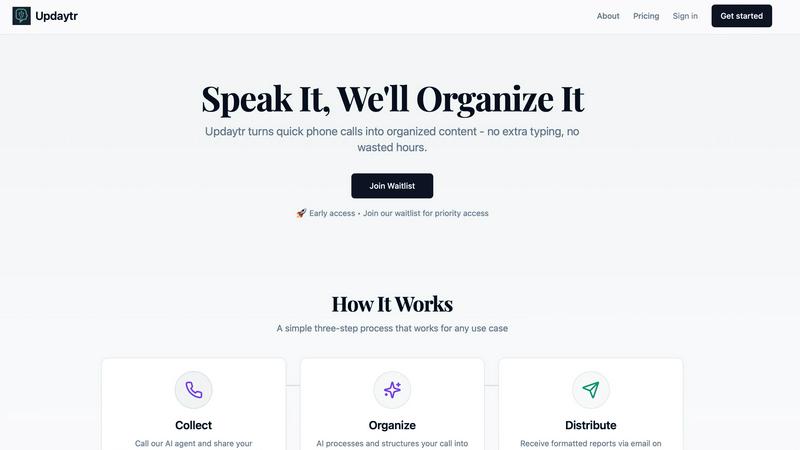
Updaytr transforms team phone calls into organized automated reports, eliminating status meetings.
Last updated: March 1, 2026
Visual Comparison
HeyVid

Updaytr
Feature Comparison
HeyVid
Text to Video
The Text to Video feature allows users to convert written content into engaging video formats seamlessly. By integrating AI technology, HeyVid simplifies the video creation process, enabling users to input text and receive a polished video that captures their message effectively. This feature is particularly useful for content creators looking to enhance their storytelling capabilities.
Image to Video
With the Image to Video functionality, users can transform static images into dynamic video presentations. This feature utilizes advanced animation techniques to bring still visuals to life, making it perfect for marketers and educators who want to create compelling visual narratives from existing imagery.
AI Image Refinement
The AI Image to Image Refiner & Stylizer feature allows users to enhance and stylize their images using various AI models. This capability ensures that visuals can be tailored to match specific aesthetics or brand guidelines, making it ideal for businesses seeking to maintain a consistent visual identity across all platforms.
AI Music Integration
HeyVid's AI Music feature enables users to add custom soundtracks to their videos effortlessly. Users can select from an array of music options or even generate original compositions, ensuring that their videos not only look great but also sound professional, enhancing the overall viewing experience.
About Updaytr
Voice-to-Report Automation
The foundational feature of Updaytr is its seamless conversion of voice updates into structured text reports. Team members simply call a dedicated phone number and speak their update to an AI agent. The system then uses advanced speech recognition and natural language processing to transcribe, analyze, and format the spoken content into a clear, professional report. This automation completely removes the need for individuals to stop their work to type out emails or fill out digital forms, capturing information in the most natural and efficient way possible.
Intelligent Categorization and Routing
Updaytr's AI does not merely transcribe; it intelligently organizes information. The system automatically tags updates based on content, context, and predefined rules, categorizing them by project, client, team member, or job type. It then routes these categorized updates to the appropriate stakeholders. For instance, a project manager might receive all updates tagged with "Project Alpha," while a service manager gets reports tagged "Maintenance." This smart organization ensures the right information reaches the right people without manual intervention.
Scheduled and Automated Report Distribution
Stakeholders and managers are freed from constantly monitoring communication channels. Updaytr allows for the scheduling of automated report deliveries. Consolidated updates can be compiled and sent via email at daily, weekly, or custom intervals that suit the team's workflow. This feature guarantees that decision-makers receive a digest of all relevant information at a predictable time, enabling them to stay informed on their own schedule and eliminating the need for disruptive check-in meetings.
Context-Aware AI Memory
Updaytr's AI agents are designed to remember context from previous interactions with a team member. This memory allows for more natural and efficient conversations. For example, if a technician mentions "the client from yesterday," the AI can reference the prior report to understand the context, leading to more accurate tagging and report generation. This contextual awareness reduces the need for repetitive explanations and enhances the overall accuracy and usefulness of the compiled reports.
Use Cases
HeyVid
Marketing Campaigns
HeyVid can be leveraged to create compelling marketing videos that engage audiences and drive conversions. By utilizing the platform's video generation capabilities, marketers can quickly produce promotional content tailored to specific campaigns, enhancing their outreach efforts.
Educational Content
Educators can utilize HeyVid to develop dynamic lesson materials, tutorials, and presentations. The platform's ability to generate both videos and images allows for the creation of engaging educational content that can capture the attention of students and facilitate better learning experiences.
Social Media Content Creation
Content creators can use HeyVid to produce eye-catching videos and images for social media platforms. With the ease of generating high-quality visuals, users can maintain a consistent posting schedule and enhance their online presence, making their profiles more attractive to followers.
Business Presentations
HeyVid is an excellent tool for professionals needing to create impactful business presentations. Users can generate pitch videos, product launch materials, and client presentations that effectively communicate their ideas, helping them to stand out in competitive environments.
Updaytr
Construction and Field Project Management
Construction supervisors, foremen, and contractors use Updaytr to provide daily progress reports, material delivery updates, and on-site issue logs. Instead of scrambling to write emails at the end of a long day, crew leads can call in updates immediately after an event occurs. The AI organizes these by project phase or specific site, delivering a consolidated daily report to project managers and clients, ensuring transparency and timely decision-making without requiring all parties to be on-site.
Field Sales and Client Service Reporting
Outside sales representatives and service professionals leverage Updaytr to log client visit outcomes, deal progress, and competitive intelligence immediately after an appointment. By calling in their debrief, they ensure details are captured while fresh. The AI categorizes updates by client name or opportunity stage, automatically generating reports for sales managers that provide a real-time pipeline view and actionable insights, streamlining sales operations and coaching.
Mobile Healthcare and Personal Care Visits
Home healthcare nurses, aides, and personal care workers can use Updaytr to efficiently document patient visit summaries, care provided, and observed conditions. The quick call-in method is far less intrusive than typing on a tablet during a visit. Important: Updaytr is explicitly noted as not being HIPAA compliant, so it must not be used for transmitting any Protected Health Information (PHI). It is suitable for general visit logging and scheduling updates where no PHI is disclosed.
Logistics and Transportation Status Updates
Delivery drivers, truck drivers, and logistics coordinators utilize Updaytr to report on route progress, delivery completions, delays, or vehicle issues. A driver can safely call in an update hands-free. The AI tags these updates by route number, driver, or vehicle, sending automated end-of-shift summaries to dispatch and operations managers. This provides real-time visibility into fleet operations and streamlines the documentation process for proof of delivery and service logs.
Overview
About HeyVid
HeyVid is an innovative all-in-one AI video and image generation platform designed to empower users with the ability to create high-quality multimedia content effortlessly. The platform is ideal for a diverse range of users, including entrepreneurs, marketers, educators, and content creators, enabling them to transform ideas into dynamic visuals with just a few clicks. With HeyVid, users can generate professional-grade videos and images through advanced AI models, making it a valuable tool for anyone looking to enhance their digital presence. The main value proposition of HeyVid lies in its simplicity and speed, allowing users to produce stunning videos and images without needing extensive editing skills or prior experience, thus streamlining the creative workflow from concept to execution.
About Updaytr
Updaytr is a sophisticated, AI-powered communication platform engineered to revolutionize how teams, particularly those in field-based or mobile roles, share progress updates and report status. The core innovation of Updaytr lies in its ability to transform unstructured voice communications—specifically phone calls—into professionally formatted, organized written reports. This process effectively eliminates the dependency on disparate messaging apps, manual note-taking, and time-consuming status meetings. The platform is meticulously designed for businesses that require real-time situational awareness from distributed teams, including sectors such as construction, field services, sales, healthcare, real estate, and logistics. Its primary value proposition is a significant enhancement in operational efficiency: team members can relay information naturally via a quick phone call, while managers and stakeholders automatically receive consolidated, intelligently categorized reports via email on a predetermined schedule. By leveraging contextual AI that remembers details from previous interactions, Updaytr ensures information is not only captured but is also meaningfully structured and routed, allowing organizations to maintain seamless communication flow, reduce administrative overhead, and keep all parties informed without disruptive coordination.
Frequently Asked Questions
HeyVid FAQ
What types of content can I create with HeyVid?
HeyVid allows users to create a wide range of content, including videos from text and images, as well as stylized images. Users can also add custom music to enhance their videos, making it a versatile tool for various multimedia needs.
Is HeyVid suitable for beginners?
Yes, HeyVid is designed with user-friendliness in mind, making it accessible to beginners and professionals alike. The intuitive interface and straightforward processes allow anyone to create high-quality content without extensive technical skills.
Can I customize the videos and images I create with HeyVid?
Absolutely. HeyVid offers various customization options, including different AI models for video and image generation, as well as the ability to refine and stylize images to align with your unique brand identity.
What industries can benefit from using HeyVid?
HeyVid is beneficial across multiple industries, including marketing, education, entertainment, and corporate sectors. It serves a variety of users, from entrepreneurs and marketers to educators and content creators, enhancing their creative capabilities.
Updaytr FAQ
How does Updaytr handle different team members and projects?
Updaytr is designed for multi-user, multi-project environments. During setup, administrators can add team members and associate them with specific phone numbers or access codes. The platform allows for the creation of projects, clients, or tags. The AI uses the caller's number for identification and applies intelligent rules to categorize the content based on keywords, context, and predefined settings, ensuring updates from different people are correctly sorted and routed to the appropriate report recipients.
Is there a free tier or trial available?
Yes, Updaytr offers a free tier to allow teams to evaluate the platform's core functionality. This free tier is available without requiring a credit card for sign-up, providing a risk-free way to test the voice-to-report automation, basic organization, and report distribution features. For ongoing use with larger teams or advanced capabilities, users can explore the paid pricing plans, the details of which are available on the Updaytr website.
What kind of AI agents are available, and can I choose one?
Updaytr provides distinct AI agent personas to interact with, such as Edgar, Dorothy, and Ruby, as referenced on their website. These agents are designed with different conversational styles or "personalities" to make the update process feel more natural and engaging for users. Teams or individuals can typically select their preferred agent based on which interaction style they find most comfortable and effective for their reporting needs.
Can I control when and how reports are delivered?
Absolutely. A central feature of Updaytr is customizable report distribution. Administrators and managers can set delivery schedules (e.g., daily at 5 PM, weekly every Monday morning) according to their operational rhythms. Reports are compiled automatically and sent via email to a designated list of stakeholders. This gives managers complete control over their information intake, allowing them to receive consolidated updates at predictable times rather than being interrupted by sporadic messages throughout the day.
Alternatives
HeyVid Alternatives
HeyVid is an all-in-one AI video and image generator designed to streamline the creation of high-quality visual content. It belongs to the productivity and management category, appealing to users who require efficient and professional tools for multimedia generation. However, users often seek alternatives due to various reasons such as pricing structures, feature sets that may not align with their specific needs, or compatibility issues with different platforms. When searching for an alternative, it is essential to consider factors such as ease of use, the range of features offered, the quality of output, customer support, and pricing plans. A well-rounded alternative should meet the specific requirements of the user while providing a seamless experience across various devices and platforms.
Updaytr Alternatives
Updaytr is a productivity and management tool that transforms phone calls into organized, automated reports. It streamlines team communication, particularly for field-based operations, by eliminating manual note-taking and app-switching. Users often seek alternatives to Updaytr for various reasons, including budget constraints, a need for different core features beyond voice-to-report conversion, or a preference for text-based or video-based update systems over phone calls. When evaluating an alternative, key considerations should align with your primary use case. For teams, focus on core functionality like update capture, reporting automation, and delivery flexibility. For individual productivity, assess ease of use and integration with existing workflows. Security, pricing transparency, and the quality of customer support are also universal factors that warrant careful comparison to ensure the solution meets your operational and compliance needs. Ultimately, the right tool should solve the specific communication friction your team faces. Whether prioritizing cost, a unique feature set, or platform compatibility, a thorough assessment of your requirements against what each service offers is essential for finding a suitable fit that enhances efficiency without introducing new complexities.