
Coloring Book Engine vs Image3D AI
Side-by-side comparison to help you choose the right product.

Coloring Book Engine
Coloring Book Engine creates professional coloring books and videos locally using your own AI keys or GPU.
Last updated: February 28, 2026

Image3D AI
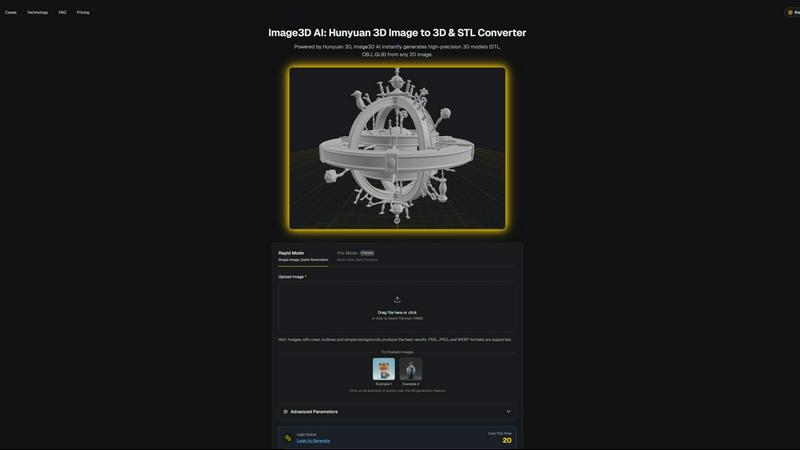
Image3D AI effortlessly converts 2D images into high-quality 3D models for printing and game development in minutes.
Last updated: March 1, 2026
Visual Comparison
Coloring Book Engine

Image3D AI
Feature Comparison
Coloring Book Engine
Bring Your Own Key (BYOK) AI Integration
Coloring Book Engine operates on a revolutionary pay-as-you-go model where users integrate their own API keys from preferred AI services like OpenAI or Google Gemini. This feature grants unparalleled control, allowing creators to select specific AI models for ideation and sketching that best suit their style and budget. It completely removes monthly software subscription fees tied to AI usage, ensuring you only pay for the AI compute you directly consume. Furthermore, this architecture guarantees that your prompts and generated concepts remain private, as they are sent directly to your chosen AI provider, not stored or processed by CBE's servers.
GPU-Accelerated Local Production Workflow
The engine leverages your computer's local GPU power to handle the core, resource-intensive production tasks without requiring cloud processing. Features such as converting sketches to clean line art, applying real-world color palettes for previews, generating coloring videos, and assembling print-ready page layouts are all executed on your local hardware. This not only provides faster processing for batch operations but also ensures that your final artwork and project files never leave your machine, offering maximum security and privacy for commercial projects.
KDP-Ready Export and Batch Processing
Coloring Book Engine automates the technical complexities of publishing. It includes predefined and customizable templates for Amazon KDP (Kindle Direct Publishing) that correctly handle critical specifications like trim sizes, bleed areas, and margins. The batch processing capability allows users to generate, refine, and format dozens of coloring book pages simultaneously, transforming a single idea into a complete, coherent book or even a series with consistent quality and formatting. This eliminates tedious manual layout work in external software.
Integrated Marketing Asset Creation
Beyond book creation, CBE functions as a complete marketing suite. It can automatically generate engaging time-lapse coloring videos from your finished pages. These videos are formatted and optimized for platforms like YouTube Shorts, TikTok, and Instagram Reels, providing ready-made promotional content to drive audience engagement and sales. This integrated feature saves creators significant time and effort that would otherwise be spent learning and using separate video editing software.
About Image3D AI
Rapid Mode
Rapid Mode allows users to generate 3D models quickly from a single image. This feature is particularly useful for those needing immediate results, making it ideal for quick iterations during the design process. Users can upload images and receive a 3D model in about 60 seconds, streamlining workflows.
Pro Mode
For users requiring higher precision and detail, Pro Mode supports multi-view inputs to create intricate 3D models. This feature is essential for accurately capturing the dimensions and textures of real-world objects, providing a more comprehensive representation suitable for professional applications.
Multi-Format Exports
Image3D AI offers the flexibility to export generated 3D models in various formats, including STL, OBJ, and GLB. This multi-format export capability ensures that users can seamlessly integrate their 3D assets into different platforms, whether for 3D printing, game development, or web applications.
PBR Material Generation
The platform includes PBR (Physically Based Rendering) material generation, which enhances the realism of 3D models by simulating how materials interact with light. This feature is crucial for users in gaming and e-commerce, where visual fidelity is paramount for user engagement.
Use Cases
Coloring Book Engine
The Independent Artist and Self-Publisher
An individual artist can use CBE to transform their hand-drawn sketches or AI-generated concepts into a professionally formatted coloring book. They maintain full ownership of their art, use the BYOK model to cost-effectively brainstorm themes, and leverage the local GPU to prepare print-ready PDFs and marketing videos, enabling them to launch a product on Amazon KDP or their own storefront without outsourcing design or layout work.
The Small Publishing Studio or Creative Team
A small studio managing multiple artists or a series of coloring books benefits from the Organization license and batch workflow features. The team can standardize the production process, ensure consistent file specifications across all projects, and efficiently manage assets. The local processing keeps all proprietary artwork secure within the studio's infrastructure, while the BYOK model allows for centralized or individual management of AI costs.
The Educator or Therapist Creating Custom Materials
Educators, art therapists, or coaches can create custom coloring books tailored to specific lessons, therapeutic exercises, or client needs. The optional AI-free workflow allows them to import their own hand-crafted, meaningful artwork. They can then use CBE to quickly assemble these images into a polished book, add instructional pages, and create demonstrative coloring videos for their students or clients, all without any AI involvement if desired.
The Content Creator and Digital Marketer
A social media influencer or content creator focused on the coloring niche can use CBE to rapidly produce a high volume of content. They can generate new coloring pages weekly, create captivating time-lapse coloring videos for Shorts and Reels to grow their audience, and compile their most popular designs into themed digital or physical books to monetize their following, all within a single, streamlined production pipeline.
Image3D AI
Game Development
Game developers can utilize Image3D AI to generate high-quality, game-ready 3D assets from concept art and sketches. By streamlining the modeling process, developers can focus on creating immersive experiences without getting bogged down in the intricacies of traditional modeling.
E-commerce
E-commerce professionals can convert product images into interactive 3D models that can be showcased in online stores. This capability allows customers to engage with products in a more dynamic way, enhancing the shopping experience and potentially increasing conversion rates.
3D Printing
Image3D AI serves as an effective image to STL converter, producing high-precision files suitable for 3D printing. This feature is beneficial for designers and makers who need ready-to-print models without extensive manual intervention, saving time and resources.
Architecture and Design
Architects and designers can rapidly generate architectural models from concept sketches or images, significantly reducing the time required to create models from scratch. This efficiency allows for quicker iterations and more effective collaboration with clients and stakeholders.
Overview
About Coloring Book Engine
Coloring Book Engine (CBE) is a sophisticated, standalone desktop application engineered specifically for the end-to-end creation and production of commercial-quality coloring books. It transcends the capabilities of basic PDF generators by providing a comprehensive, integrated toolkit that guides creators from initial concept to final, publish-ready assets. This platform is meticulously designed for independent artists, self-publishers, creative entrepreneurs, and small studios seeking to establish or scale a professional coloring book business while maintaining complete creative and financial control. Its core value proposition lies in its unique hybrid architecture: it intelligently combines the power of user-provided AI (via a Bring Your Own Key model) for ideation and sketching with robust, GPU-accelerated local processing for production tasks like line art refinement, page layout, and video generation. This approach ensures data privacy, eliminates forced subscriptions, and allows creators to manage AI costs directly. By consolidating the entire workflow—including batch processing, KDP-ready file export, and social media video creation—into a single, focused environment, Coloring Book Engine dramatically streamlines production, reduces reliance on multiple disparate tools, and empowers users to publish with confidence in a competitive market.
About Image3D AI
Image3D AI is a groundbreaking AI-powered tool designed to transform the way users create 3D models from 2D images. By harnessing the advanced capabilities of Tencent's Hunyuan 3D engine, this innovative platform allows users to convert static images into high-quality, production-ready 3D assets in mere seconds. Catering to a diverse audience, including 3D printing aficionados, game developers, architects, and e-commerce professionals, Image3D AI effectively simplifies the intricate process of 3D modeling. Users can generate high-fidelity models from single images or multiple view inputs, ensuring flexibility in their creative endeavors. With functionalities such as multi-format exports and PBR material generation, Image3D AI is tailored to meet various application demands, making it an essential tool for anyone looking to produce customized 3D assets efficiently.
Frequently Asked Questions
Coloring Book Engine FAQ
Is Coloring Book Engine a desktop app or a cloud service?
Coloring Book Engine is a standalone desktop application for Windows. The majority of its processing, including line art generation, coloring, video creation, and layout, runs locally on your computer using your GPU and CPU. It only connects to the cloud when you choose to use AI features, and then it connects directly to your chosen AI service provider using your own API keys.
Is this a subscription?
No, Coloring Book Engine is not a subscription service. It is offered via a one-time, lifetime license purchase (Personal or Organization). There are no recurring fees for the software itself. The only potential ongoing cost is for AI usage, which is pay-as-you-go via your own API keys, giving you complete control over that expense.
Can I use this tool without AI?
Absolutely. Coloring Book Engine supports a complete AI-free workflow. You can import your own hand-drawn or digitally created artwork directly into the engine. From there, you can use all the local production features to clean up lines, arrange pages into a book, apply color previews, generate coloring videos, and export print-ready files, all without ever using an AI service.
Do I need to understand KDP trim sizes, bleed, and margins?
No, one of the core features of Coloring Book Engine is to handle these technical publishing requirements for you. The software includes built-in, properly configured templates for standard Amazon KDP sizes. It automatically sets up the correct bleed areas and safe margins, ensuring your final exported PDF files meet all of Amazon's specifications for paperback coloring books, allowing you to publish with confidence.
Image3D AI FAQ
What types of images work best for generating 3D models?
Images with clear outlines and simple backgrounds produce the best results. High-contrast images are preferable, while blurry or low-light images should be avoided.
How long does it take to generate a 3D model?
In Rapid Mode, a single image can be processed and converted into a 3D model in approximately 60 seconds. The time may vary based on the complexity of the input and the selected generation mode.
Can I use Image3D AI for professional projects?
Yes, Image3D AI is designed for a variety of professional applications, including game development, e-commerce, 3D printing, and architectural design, making it a versatile tool for professionals across industries.
What file formats can I export my 3D models in?
Users can export their 3D models in several formats, including STL for 3D printing, OBJ for traditional 3D editing, and GLB for modern web and augmented reality applications, ensuring compatibility with various software.
Alternatives
Coloring Book Engine Alternatives
Coloring Book Engine is a specialized desktop design tool focused on the end-to-end production of commercial coloring books. It belongs to the niche category of software that streamlines the creation, formatting, and marketing assets for printable and publishable coloring book products. This tool is engineered to manage the entire workflow from concept to KDP-ready files and promotional videos. Users may explore alternatives for various reasons, including budget constraints, different feature requirements, or a preference for cloud-based platforms over desktop software. Some creators might seek more general-purpose graphic design suites, while others could prioritize different AI model integrations or require tools with specific collaboration or distribution capabilities. When evaluating an alternative, key considerations include the software's ability to produce print-ready exports with proper bleed and margins, batch processing efficiency for scaling production, and the level of control over AI costs and data privacy. The ideal tool should align with the creator's technical skill, business model, and specific output requirements for platforms like Amazon KDP.
Image3D AI Alternatives
Image3D AI is a groundbreaking software tool that belongs to the design tools category, specifically focusing on transforming 2D images into high-quality 3D models suitable for various applications like 3D printing and game development. Users who seek alternatives to Image3D AI often do so due to a variety of reasons, including pricing constraints, specific feature requirements, or compatibility with different platforms. As the landscape of 3D modeling tools continues to evolve, users may also seek solutions that better align with their unique workflows and project demands. When considering alternatives, it is essential to evaluate factors such as the range of supported export formats, the quality of generated models, ease of use, and the availability of additional features like material generation and operational modes. Furthermore, understanding the target user demographic and specific use cases can help in identifying a tool that meets both current and future needs.