
Interhubz vs Onthen
Side-by-side comparison to help you choose the right product.

Interhubz
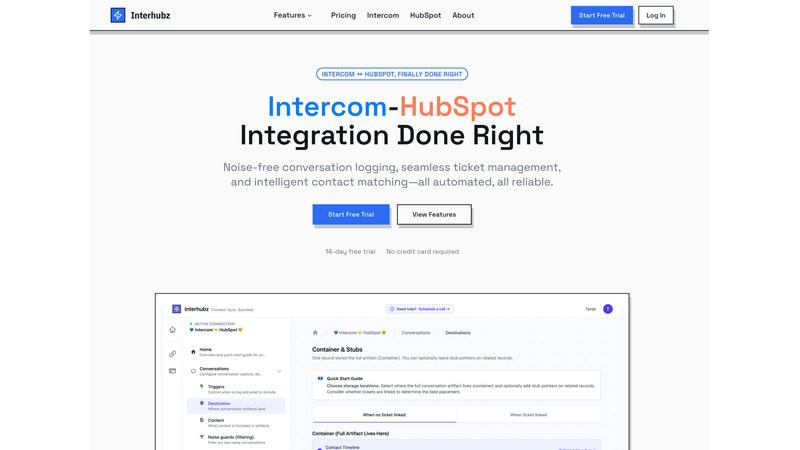
Interhubz seamlessly syncs Intercom chats to HubSpot as organized entries with intelligent matching and automated.
Last updated: February 26, 2026

Onthen
Onthen is a centralized platform that automates and streamlines client onboarding with branded task pages and CRM integration.
Last updated: April 4, 2026
Visual Comparison
Interhubz
Onthen
Feature Comparison
Interhubz
One Note Per Conversation
Interhubz offers a unique feature that consolidates every Intercom conversation into a single, well-structured note within HubSpot. This eliminates the frustration of multiple fragmented entries, presenting a clean, readable summary that includes the full transcript and any attachments, enhancing the clarity of communication.
Intelligent Contact Matching
This feature employs advanced algorithms to ensure accurate matching of contacts and companies by utilizing various parameters such as email, phone numbers, and custom properties. The result is a seamless integration experience, free from duplicates, which streamlines data management.
One-Click Ticket Creation
Interhubz simplifies ticket management by allowing users to create HubSpot tickets directly from Intercom with just one click. This feature includes bi-directional syncing of ticket statuses, ensuring that any updates are reflected across both platforms without requiring manual intervention.
Noise Guards
To maintain a clean and efficient CRM, Interhubz includes smart noise guards that automatically filter out bot conversations and spam. Users can configure settings to block low-value interactions, ensuring that only meaningful conversations are logged in HubSpot.
About Onthen
Branded Onboarding Pages
Onthen allows organizations to fully customize their onboarding portals with their logo and primary brand colors, creating a seamless and professional extension of their identity. This branding extends beyond the task page itself to all automated emails and communications sent by the platform. The result is a completely frictionless and cohesive experience for the participant, which builds trust and reinforces brand consistency from the very first interaction, eliminating the generic feel of standard form tools.
Flexible Task Actions & Integrations
The platform moves beyond simple checklists with a powerful library of configurable task actions. Users can build processes that include data collection forms, secure document uploads, identity verification (KYC, proof of address), photo requests, and integrations with third-party applications. This flexibility enables the automation of complex, multi-step workflows within a single page, allowing tasks to be set in a strict sequence or completed in any order, with dynamic due dates to accommodate various process timelines.
Built-in Collaboration & Communication
Onthen is designed as a collaborative workspace. Participants can delegate tasks to colleagues directly within the page, and all parties can use inline comments to ask questions, provide updates, and clarify requirements. This centralizes all communication related to the onboarding process on the task page itself, eliminating scattered emails and ensuring context is never lost. Internal teams see exactly what the participant sees, creating full transparency and alignment.
Automated Workflow & CRM Sync
The platform automates the tedious aspects of process management. It sends automatic, branded reminder nudges for overdue tasks and provides weekly digest emails to keep all stakeholders informed. Crucially, every action taken on the Onthen page—form submissions, uploads, verifications—can be automatically synced to the organization's CRM. This bridges the gap between operations and sales, ensuring customer records are always up-to-date without manual data entry.
Use Cases
Interhubz
Support Teams
Support teams using Intercom can benefit from Interhubz by having all customer conversations logged as single, cohesive notes in HubSpot. This allows sales and customer success teams to view complete discussions without sifting through cluttered timelines.
Sales Teams
Sales representatives can leverage Interhubz to create tickets directly from relevant Intercom conversations. This streamlines their workflow and ensures they have real-time updates on customer interactions, improving their ability to follow up efficiently.
Customer Success Managers
Customer success managers can utilize Interhubz to access detailed conversation histories with clients directly from the HubSpot interface. This enables them to better understand customer needs and proactively address any issues or concerns.
Integration Specialists
For teams focused on integrating different tools, Interhubz offers a hassle-free setup process that minimizes the time spent on configuration. Integration specialists can quickly connect Intercom and HubSpot, allowing for immediate syncing of important data without extensive technical knowledge.
Onthen
Financial Services & KYC Onboarding
Financial institutions, fintech companies, and wealth managers use Onthen to streamline client onboarding with integrated identity verification. The platform can sequence tasks to collect personal information, securely upload required documents like passports and bank statements, and run automated KYC and anti-money laundering checks through integrated services. All collected data and verification statuses are then synced directly to the client's CRM record, ensuring compliance and audit readiness.
Professional Services Client Intake
Law firms, consulting agencies, and accounting practices leverage Onthen to manage new client engagements. They create branded onboarding pages to collect engagement letters, conflict check information, project questionnaires, and initial documentation. The ability to comment directly on tasks allows for efficient Q&A, while automated reminders ensure clients submit necessary materials promptly, accelerating the time to billable work.
Employee Onboarding & Pre-boarding
HR departments utilize Onthen to provide a structured and welcoming experience for new hires before their first day. The platform can guide them through completing digital paperwork (I-9, W-4), submitting payroll information, selecting benefits, reading company policies, and even requesting equipment. This reduces administrative burden on HR, ensures compliance, and allows new employees to start their role focused and prepared.
Property Management & Tenant Screening
Real estate and property management companies employ Onthen to standardize the rental application and move-in process. They can create a flow for prospective tenants to submit applications, provide proof of income, undergo background checks, sign leases digitally, and set up utility transfers—all through a single, guided link. This simplifies a traditionally paper-heavy process for both managers and tenants.
Overview
About Interhubz
Interhubz is a powerful integration tool designed to bridge the gap between Intercom and HubSpot, addressing the most significant challenges organizations face when synchronizing these two platforms. By consolidating and streamlining communication data, Interhubz transforms the chaotic experience of managing customer interactions. It is ideal for teams where customer support is conducted through Intercom, while sales and customer success operations reside within HubSpot. The primary value proposition of Interhubz lies in its ability to create a clean, organized timeline in HubSpot from Intercom conversations, eliminating the clutter of multiple entries and reducing manual work. With intelligent contact matching and automated ticket management, Interhubz ensures that all relevant information is accurately captured and synced, allowing teams to focus on what matters most—delivering exceptional customer service and driving sales.
About Onthen
Onthen is a sophisticated client onboarding and process automation platform designed to eliminate the administrative friction inherent in traditional onboarding workflows. It serves as a centralized hub, replacing disjointed email chains, manual follow-ups, and scattered documents with a single, branded task page accessible via a unique link. The core value proposition of Onthen is its ability to transform chaotic, multi-stakeholder processes into streamlined, trackable, and automated sequences. It is engineered for businesses across sectors such as finance, professional services, real estate, and HR that require structured client or employee onboarding, KYC (Know Your Customer) verification, data collection, and document submission. By providing a unified collaboration space for both internal teams and external participants, Onthen ensures clarity of responsibilities, enforces process adherence, and automatically syncs critical data to CRM systems like Salesforce or HubSpot. This results in significantly reduced operational overhead, faster turnaround times, improved compliance, and a markedly more professional client experience, all while requiring no passwords or technical expertise from the end-user.
Frequently Asked Questions
Interhubz FAQ
How does Interhubz reduce timeline pollution?
Interhubz reduces timeline pollution by consolidating multiple entries from Intercom conversations into a single, formatted note in HubSpot. This organization allows teams to quickly access relevant information without the clutter of numerous entries.
What kind of noise does Interhubz filter out?
Interhubz is equipped with configurable noise guards that automatically block low-value conversations, such as spam or bot chats. Users can set specific thresholds to ensure only meaningful interactions reach their HubSpot CRM.
How quickly can I set up Interhubz?
Setting up Interhubz is remarkably quick, with a simple four-step process that takes approximately five minutes. Users can connect their Intercom and HubSpot accounts, configure matching strategies, set noise filters, and start syncing automatically.
Is there support available for Interhubz users?
Yes, Interhubz offers dedicated support for its users, ensuring that any questions or issues can be promptly addressed. This level of support is a key differentiator from other standard integrations, which often rely on community forums.
Onthen FAQ
How does Onthen improve the client onboarding experience?
Onthen dramatically improves the client experience by consolidating all requests, forms, and communications into one intuitive, branded page accessible via a simple link—no account creation or passwords required for participants. It provides clear, visual to-do lists with ownership and deadlines, reducing confusion. Automated reminders prevent tasks from being forgotten, and built-in commenting keeps communication centralized and actionable, making the entire process transparent, efficient, and professional.
Can Onthen integrate with our existing CRM software?
Yes, CRM integration is a core functionality of Onthen. The platform is designed to bridge the gap between onboarding operations and customer relationship management. It can sync data collected through forms, document uploads, and task completions directly to your CRM's timeline and into custom fields. This ensures that all client information gathered during onboarding is automatically and accurately reflected in your primary customer database without manual data transfer.
What kind of tasks and actions can I create in Onthen?
Onthen offers a versatile library of task actions to build comprehensive workflows. Core actions include customizable data collection forms, secure file uploads, identity verification (KYC/age/address), and photo capture requests. Furthermore, Onthen supports a growing ecosystem of third-party app integrations, allowing you to connect actions from other tools into your onboarding sequence, creating a truly unified and automated process from start to finish.
How does Onthen handle security and data privacy for sensitive documents?
Security is paramount for Onthen, especially when handling sensitive client data and documents. The platform facilitates secure, encrypted file uploads directly within the branded task page, eliminating the need for unsecured email attachments. For highly regulated industries, its integrated identity verification tasks are performed by specialized, compliant third-party providers. Onthen itself adheres to strict data protection standards, as outlined in its Privacy Policy, ensuring all data is handled responsibly.
Alternatives
Interhubz Alternatives
Interhubz is a sophisticated integration tool designed to streamline the connection between Intercom and HubSpot, primarily used by customer support teams. It offers features such as clean timeline entries, intelligent contact matching, and automated ticket creation, helping to enhance the efficiency of communication without the clutter typically associated with multiple entries. Users often seek alternatives to Interhubz for various reasons, including budget constraints, specific feature requirements, or compatibility with other platforms. When selecting an alternative, it is essential to consider the integration's ease of use, the quality of data synchronization, and how well it aligns with your team's workflow and operational needs.
Onthen Alternatives
Onthen is a customer support and client onboarding platform designed to streamline the initial stages of customer integration. It operates by replacing disjointed communication methods like email chains with a centralized, automated checklist system. This category of software focuses on reducing administrative friction, ensuring tasks are completed on time, and improving the overall new customer experience. Businesses explore alternatives to Onthen for various practical reasons. Common drivers include budget constraints and specific pricing model needs, such as preferring a per-user fee over a per-client charge. Others may seek more extensive feature sets, like deeper native integrations with their existing tech stack, advanced customization for complex workflows, or a platform that better serves a particular industry's unique onboarding requirements. When evaluating an alternative solution, key considerations should guide the decision. Prioritize tools that offer the core automation and checklist functionality to eliminate manual follow-ups. Assess the platform's ability to integrate seamlessly with your critical business systems, like your CRM. Finally, consider the user experience for both your internal team and the external clients or customers completing the tasks, ensuring the process remains simple and branded.