
LuxSign vs Refbox
Side-by-side comparison to help you choose the right product.

LuxSign offers a secure, compliant platform for fast electronic signatures and document management across the EU.
Last updated: February 26, 2026

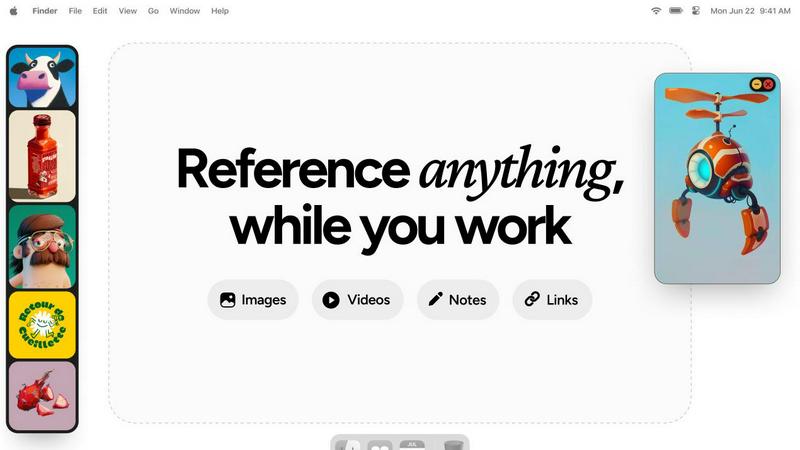
Refbox is a desktop app that keeps your reference images, videos, and notes instantly accessible above your workspace.
Last updated: February 28, 2026
Visual Comparison
LuxSign

Refbox
Feature Comparison
LuxSign
Multiple Signature Methods
LuxSign offers various signature methods to accommodate user preferences, allowing individuals to draw their signature, type their name, or upload an image. In addition, the platform supports custom initials for quick document signing, ensuring flexibility and convenience for all users.
Advanced Security
The platform prioritizes security through industry-standard encryption protocols that protect documents during upload, storage, and transmission. Furthermore, LuxSign guarantees that all data is securely hosted in Luxembourg, complying with stringent EU data protection regulations, thus instilling confidence in users about their document safety.
Collaboration Workspaces
LuxSign provides collaboration workspaces that facilitate teamwork and organization. Users can create shared environments for their teams, manage document folders, control member access, and work together seamlessly on signing workflows, making it easier to handle multiple documents and signers.
Complete Audit Trail
Every action taken within LuxSign is meticulously logged, providing a complete audit trail that includes timestamps, IP addresses, and signer information. This feature ensures transparency and is essential for compliance verification, allowing businesses to maintain detailed records of all signing activities.
Refbox
Always-on-Top Floating Frames
The cornerstone feature of Refbox is its ability to create resizable, transparent frames that float above all other desktop applications. Users can pin any reference media—be it an image, a video clip, or a text note—into these frames, ensuring critical inspiration or guidelines are perpetually in view without obstructing the main workspace. This eliminates window management clutter and the need to constantly switch contexts, allowing for direct visual comparison and continuous workflow.
Infinite Canvas and Collections
Refbox provides an expansive, infinite canvas where users can organize their references into distinct Collections. This spatial organization allows for mood boarding, project-based grouping, or categorizing by theme. Users can swiftly switch between entire sets of references with a single click, and view all items in a collection simultaneously for a holistic overview or flip through them in a slideshow mode for rapid comparison and iteration.
Advanced Media Handling and Tools
Beyond simple display, Refbox includes a suite of powerful tools for interacting with reference media. This includes stepping through GIFs frame-by-frame for detailed animation study, a built-in color picker to sample and copy hex codes from any image, and the ability to crop images directly within the app. It also supports unique media types like SVG files and can generate website screenshots simply by pasting a URL, making it an incredibly versatile reference hub.
Intuitive Shortcuts and Workflow Optimizations
Designed for efficiency, Refbox is packed with keyboard shortcuts and smart behaviors that save countless clicks. Users can navigate between references using arrow keys, instantly minimize frames to access underlying applications, and auto-hide their entire Refbox workspace, summoning it only when needed. Additional touches like lockable frames (to prevent accidental clicks) and pixel-perfect rendering modes for pixel artists demonstrate a deep understanding of professional creative needs.
Use Cases
LuxSign
Contract Signatures
Businesses can utilize LuxSign for signing contracts securely and efficiently. By enabling multiple signers and offering both parallel and sequential signing workflows, organizations can expedite the approval process while ensuring compliance with legal standards.
Human Resources Documentation
HR departments can streamline the signing of employee contracts, offer letters, and other essential documents using LuxSign. The platform's ease of use allows for rapid document turnaround, enhancing the onboarding experience for new employees.
Financial Agreements
Financial institutions can leverage LuxSign for signing agreements related to loans, investment contracts, and other financial documents. The security measures in place ensure that sensitive information remains protected throughout the signing process.
Legal Document Management
Law firms and legal departments can adopt LuxSign for managing various legal documents, including client agreements and court filings. The comprehensive audit trails and secure storage facilitate compliance with legal standards and provide peace of mind during document handling.
Refbox
Digital Illustration and Concept Art
Illustrators and concept artists can pin multiple character sketches, environment photos, and color palettes in floating frames around their drawing software. This allows for constant visual feedback without leaving the canvas, enabling them to accurately translate proportions, lighting, and textures from their references directly into their original artwork, significantly speeding up the ideation and rendering process.
UI/UX and Graphic Design
Designers can use Refbox to keep brand guidelines, mood boards, competitor screenshots, and component libraries visible at all times. While working in Figma or Adobe XD, having these critical references just a glance away ensures design consistency and informed decision-making. The ability to take instant website screenshots and reference them side-by-side with a work-in-progress design is invaluable.
3D Modeling and Animation
3D artists and animators can pin orthographic reference sheets, texture maps, and video clips of motion studies directly over their 3D viewport in software like Blender or Maya. The GIF frame-stepping feature is particularly useful for animators to meticulously study movement cycles frame-by-frame while replicating them in their own scenes, enhancing the accuracy and realism of their work.
Motion Graphics and Video Editing
Motion designers and video editors can keep style frames, storyboards, and inspirational video clips floating above their timeline in After Effects or Premiere Pro. This provides a persistent creative compass throughout the editing process, ensuring the final product aligns with the initial vision. Notes with checklists can also be pinned to track complex project requirements and deliverables.
Overview
About LuxSign
LuxSign is a cutting-edge electronic signature platform designed specifically for businesses that prioritize security, compliance, and efficiency. Built in Luxembourg, it leverages the country's robust data protection laws to provide a cloud-based solution that ensures all documents are encrypted end-to-end and stored securely within EU borders, thereby guaranteeing full compliance with GDPR regulations. LuxSign is tailored for organizations of all sizes, from small businesses to large enterprises, that require legally valid signatures for their contracts across the European Union. The platform adheres to eIDAS SES standards, offering legal validity and a variety of features such as parallel and sequential signing workflows, customizable signature fields, and automated notifications. By streamlining document signing processes, LuxSign enhances productivity while maintaining the highest levels of security and compliance.
About Refbox
Refbox is a revolutionary desktop application engineered to fundamentally transform how creative professionals access and interact with their reference materials. It serves as a dynamic, floating workspace that pins images, GIFs, videos, and notes in "always-on-top" frames that hover above any other application window. This core functionality eliminates the disruptive and time-consuming cycle of alt-tabbing between folders, browser tabs, and creative software, allowing users to maintain an uninterrupted state of deep focus. Designed explicitly for artists, designers, animators, illustrators, and 3D artists, Refbox addresses the universal need for constant visual inspiration and technical reference. Its value proposition lies in creating a seamless bridge between a user's source material and their primary work canvas, thereby streamlining complex workflows, accelerating decision-making, and fostering a more intuitive and productive creative environment. By keeping references persistently visible and instantly accessible, Refbox empowers professionals to work faster and with greater accuracy, turning a fragmented process into a fluid and integrated experience.
Frequently Asked Questions
LuxSign FAQ
How does LuxSign ensure document security?
LuxSign employs industry-standard encryption methods for documents during upload, storage, and transmission. Additionally, all data is hosted on secure servers in Luxembourg, ensuring compliance with EU data protection laws.
Is LuxSign compliant with GDPR regulations?
Yes, LuxSign is fully compliant with GDPR and Luxembourg's data protection laws, guaranteeing that your documents are handled with the utmost security and privacy.
Can I use LuxSign for multiple signers?
Absolutely. LuxSign supports up to four signers per document, allowing for both parallel and sequential signing workflows to suit your needs.
What types of documents can I upload to LuxSign?
LuxSign supports a variety of document formats, including PDF, DOC, and DOCX files, with automatic conversion available to streamline your signing process. Users can upload files up to 10MB effortlessly.
Refbox FAQ
What types of files and media does Refbox support?
Refbox supports a wide array of media formats crucial for creatives. You can directly import and display images (JPG, PNG, SVG, etc.), animated GIFs (with frame-by-frame control), and video files. It also supports rich text notes for checklists and instructions. Furthermore, you can paste image data from your clipboard or simply paste a website URL to automatically generate and import a screenshot.
How does Refbox impact my computer's performance?
Refbox is engineered to be lightweight and efficient. It uses minimal system resources when idle and is optimized to handle media display without significant impact on CPU or GPU performance, allowing your primary creative applications like Photoshop, Blender, or Figma to run smoothly alongside it. The auto-hide feature also ensures it's not rendering anything when not in active use.
Can I use Refbox with multiple monitors?
Yes, Refbox is fully compatible with multi-monitor setups. You can drag your floating reference frames and the main Refbox canvas onto any connected display. This allows you to dedicate one screen entirely to your references using the infinite canvas while using another screen for your primary creative application, creating an expansive and organized digital workspace.
Is there a way to organize a large number of references?
Absolutely. Refbox's core organizational system is based on Collections. You can create unlimited collections for different projects, clients, or themes (e.g., "Character Design," "Landscape Project," "Brand Colors"). Within each collection, you can spatially arrange references on the infinite canvas. You can switch between these collections instantly, keeping your workspace clean and context-specific.
Alternatives
LuxSign Alternatives
LuxSign is a sophisticated electronic signature platform developed in Luxembourg, designed to facilitate secure document signing for businesses. As part of the productivity and management category, it ensures compliance with eIDAS SES standards, making its electronic signatures legally valid across all EU member states. Users may seek alternatives to LuxSign due to various factors, including pricing, specific feature requirements, or the need for integrations with existing workflows and platforms. When searching for an alternative, it is crucial to consider aspects such as compliance with legal standards, security features, user interface, and the level of customer support offered by the platform.
Refbox Alternatives
Refbox is a specialized productivity application designed for creative professionals. It functions as a floating reference manager, allowing users to pin images, videos, and notes in always-on-top windows above their primary workspace. This tool is essential for artists, designers, and animators who require constant visual inspiration without disrupting their workflow through constant application switching. Users may seek alternatives to Refbox for various practical reasons. Common considerations include budget constraints, as some may prefer a free or more affordable solution. Others might require specific features not present in Refbox, such as advanced collaboration tools or integration with particular software suites. Platform compatibility is another key factor, with users needing applications that run on different operating systems like Linux or older versions of macOS and Windows. When evaluating an alternative, it is crucial to assess several core functionalities. The ability to create and manage floating, resizable windows is paramount. Equally important are robust media import options from the web, clipboard, and local files. A clean, intuitive interface for organizing references and a reliable note-taking feature are also significant factors that contribute to an efficient and streamlined creative process.