
MemberYOYO vs TemplateFox
Side-by-side comparison to help you choose the right product.

MemberYOYO
Melograph is a specialized music visualizer that instantly transforms audio tracks into professional, platform-ready.
Last updated: February 28, 2026

TemplateFox
Effortlessly create and automate stunning PDF documents with customizable templates and no-code integrations.
Last updated: February 28, 2026
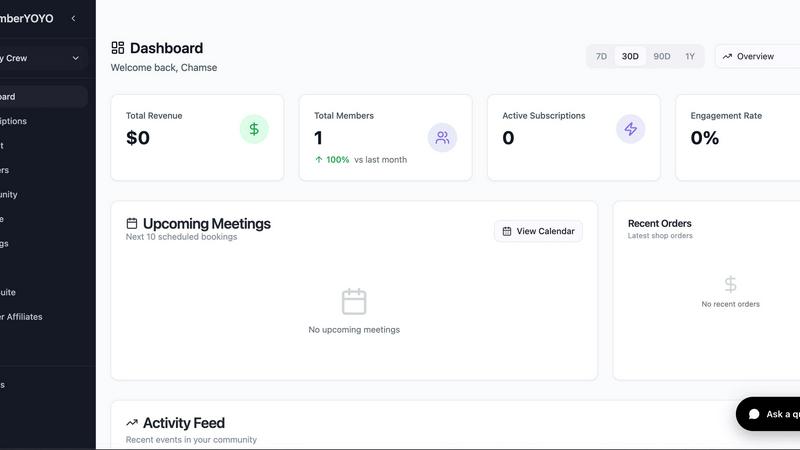
Visual Comparison
MemberYOYO
TemplateFox

Feature Comparison
MemberYOYO
Integrated Course Creation & Hosting
MemberYOYO provides a robust suite of tools for creating, hosting, and selling online courses directly within the platform. This includes the ability to structure course content with modules and lessons, upload various media types, and implement crucial engagement features like student progress tracking. This eliminates the need for a separate, dedicated course platform (such as Teachable or Thinkific), allowing creators to manage their educational content seamlessly alongside their community and other business operations, ensuring a cohesive learning experience for members.
Community Hub with Channels & Messaging
The platform features a built-in community space designed to foster engagement and connection among members. Creators can organize discussions into specific channels or topics, facilitating focused conversations. Integrated direct messaging enables private communication between members and between members and the host. This functionality replaces the need for external community tools like Discord or Circle, keeping all member interactions contained within the branded portal, which enhances retention and simplifies moderation and management for the community builder.
Unified Booking & Calendar Management
MemberYOYO simplifies the process of scheduling and conducting one-on-one sessions, such as coaching calls or consultations. The system includes a native booking calendar that allows members to schedule appointments based on the host's availability. Crucially, it features seamless integrations with popular video conferencing tools like Zoom and Google Meet, automatically generating and attaching meeting links to bookings. This consolidates the functionality of tools like Calendly and a video conferencing service into a single, streamlined workflow within the membership ecosystem.
Native Email Marketing & Automation
Beyond community posts, MemberYOYO empowers users to execute targeted email marketing campaigns directly from the platform. This includes sending broadcast announcements to all or segments of the membership and, more importantly, setting up automated email sequences based on member actions or triggers, such as signing up for a course or a subscription renewal. This built-in capability removes the dependency on a third-party email service provider (like Mailchimp or ConvertKit) for core member communication, centralizing data and streamlining audience management.
About TemplateFox
Intuitive Drag-and-Drop Editor
TemplateFox offers a user-friendly drag-and-drop editor that allows users to create and customize templates with ease. This feature enables individuals without any coding background to design professional documents quickly and efficiently, streamlining the entire document creation process.
Dynamic Data Binding
With dynamic data binding, users can seamlessly inject various data types into their templates. Whether it is names, addresses, or prices, this feature ensures that all information updates automatically, providing an efficient way to manage and generate personalized documents.
Built-in QR Codes and Barcodes
TemplateFox supports the generation of QR codes and barcodes on the fly, directly from user data. This feature is particularly useful for businesses that require scanner-ready codes, as it supports different formats, including Code128 and EAN-13, enhancing the functionality of generated documents.
Automated Document Generation
The platform's powerful API enables users to automate the PDF generation process, allowing for rapid creation of documents at scale. By integrating with tools like Zapier and Make, users can trigger document generation with minimal input, ensuring efficiency and consistency across all workflows.
Use Cases
MemberYOYO
Online Course Creators & Educators
For individuals who sell educational content, MemberYOYO serves as a complete solution. They can host their video courses, track student progress, and provide supplementary materials all in one place. The integrated community feature allows for creating a student support or discussion group, while email sequences can be used to onboard new students or deliver course-related updates, creating a seamless educational journey without requiring students to navigate multiple websites or logins.
Executive Coaches & Consultants
Coaches who offer personalized services benefit immensely from MemberYOYO's consolidated approach. They can manage their recurring client membership subscriptions, schedule and host one-on-one coaching sessions via integrated video calls, and share exclusive resources or worksheets within a private client portal. The community channels can be used for group coaching cohorts, and automated emails can remind clients of upcoming sessions or deliver follow-up materials, professionalizing the entire client management process.
Niche Community Builders & Influencers
Creators looking to build a subscription-based community around a shared interest or expertise can use MemberYOYO as their foundational platform. They can offer tiered membership levels, gate exclusive content or discussions behind a paywall using the Stripe integration, and foster daily engagement through the community forums and direct messages. The platform becomes the central hub for all member activity, content, and communication, strengthening community bonds and increasing the perceived value of the membership.
Wellness Professionals & Fitness Trainers
Yoga instructors, nutritionists, or personal trainers can utilize MemberYOYO to offer hybrid membership models. They can host on-demand workout or recipe video courses, use the booking system for private consultation sessions, and create a supportive community where members can share progress and ask questions. Monthly subscription payments for access to new content can be managed effortlessly, and broadcast emails are perfect for announcing new program launches or live class schedules.
TemplateFox
Invoice Generation for Small Businesses
Small business owners can utilize TemplateFox to create and automate professional invoices. By using the platform’s customizable templates, they can ensure that their branding is consistent across all invoices and streamline the billing process, saving time and reducing errors.
Certificate Creation for Educational Institutions
Educational institutions can leverage TemplateFox to generate certificates for students, such as achievement or participation awards. The ability to design templates that incorporate institutional branding and dynamic data binding makes it easy to produce personalized certificates quickly.
E-commerce Order Fulfillment
E-commerce businesses can use TemplateFox to generate packing slips and shipping labels automatically. With features that adapt to varying amounts of data, users can ensure that each document reflects the specifics of individual orders, enhancing the customer experience.
Automated Reports for Agencies
Marketing and consulting agencies can take advantage of TemplateFox to create detailed reports for clients. The platform’s flexibility allows for the incorporation of charts, tables, and dynamic data, ensuring that reports are not only professional but also tailored to client needs.
Overview
About MemberYOYO
MemberYOYO is a comprehensive, all-in-one membership platform engineered to streamline the complex operations of digital entrepreneurs, specifically creators, coaches, and community builders. It directly addresses the prevalent pain point of juggling multiple disparate tools—such as separate course platforms, community forums, booking schedulers, and email marketing software—by consolidating these essential functionalities into a single, unified dashboard. The platform's core value proposition lies in its ability to significantly reduce operational overhead, both in terms of financial cost from multiple subscriptions and the time investment required to manage fragmented workflows. Users can launch a fully branded membership portal where they can sell online courses with integrated progress tracking, foster interaction through dedicated community channels and direct messaging, and manage appointments with built-in video conferencing for Zoom and Google Meet. Furthermore, MemberYOYO incorporates native email marketing capabilities for broadcasts and automations, alongside integrated payment processing via Stripe for recurring subscriptions, notably without charging additional platform fees on transactions. With a free starting tier that requires no credit card, the platform is designed to scale alongside a user's business, offering a polished, professional, and centralized hub for both the business owner and their members.
About TemplateFox
TemplateFox is an advanced Software as a Service (SaaS) platform that simplifies the process of generating professional-grade PDFs from WYSIWYG templates through a robust API. Designed for a diverse range of users, including indie hackers, developers, and businesses, TemplateFox enables the creation of visually appealing and highly customizable templates without the need for HTML or CSS expertise. This innovative tool streamlines document workflows, allowing users to efficiently automate the generation of various documents such as invoices, certificates, and reports. With its intuitive drag-and-drop editor, users can design templates effortlessly, while the platform's powerful capabilities enable the generation of thousands of PDFs with a single API call or automation through tools like Zapier, achieving results in just 1 to 3 seconds. The free tier allows users to generate 100 PDFs per month, making it accessible for those looking to explore its features without financial commitment. As needs grow, users can transition to affordable paid plans tailored to accommodate increased demands.
Frequently Asked Questions
MemberYOYO FAQ
Who is MemberYOYO designed for?
MemberYOYO is specifically designed for creators, coaches, consultants, and community builders who are currently using or considering multiple separate tools to run their membership or online business. It is ideal for entrepreneurs who feel overwhelmed by managing a course platform, community software, booking calendar, and email marketing service independently and seek a unified, cost-effective solution to consolidate their operations and provide a better experience for their paying members.
How does the pricing work? Are there platform fees on transactions?
MemberYOYO operates on a software-as-a-service (SaaS) subscription model, with plans scaling based on features and the number of active members. A key differentiator highlighted is that the platform does not charge additional percentage-based platform fees on top of transactions processed through its integrated Stripe payment gateway. Users pay Stripe's standard processing fees, but MemberYOYO does not take a cut of the revenue, which can lead to significant savings as sales volume grows.
Can I customize the look of my member portal?
Yes, a core feature of MemberYOYO is the ability to create a fully branded member portal. Users can apply their own branding elements, such as logos, color schemes, and fonts, to match their business identity. Furthermore, the platform supports using a custom domain (e.g., members.yourbusiness.com), allowing creators to offer a seamless and professional experience that appears as a native extension of their main website, rather than a generic third-party service.
Is there a free plan or trial available?
Yes, MemberYOYO offers a free starting plan that allows users to explore the platform's core functionalities without requiring a credit card. This plan typically includes basic features with limitations, such as a cap on the number of members or courses. It is designed to let entrepreneurs launch and test their membership concept. As their community and needs grow, they can upgrade to a paid plan to access advanced features, remove limitations, and support more members.
TemplateFox FAQ
What types of documents can I create with TemplateFox?
TemplateFox allows users to create a wide array of documents, including invoices, certificates, reports, packing slips, and shipping labels, all through customizable templates.
Is coding knowledge required to use TemplateFox?
No, TemplateFox is designed to be user-friendly and does not require any coding knowledge. The drag-and-drop editor allows users to create and customize templates easily, making it accessible for everyone.
Can I integrate TemplateFox with other applications?
Yes, TemplateFox supports integration with popular no-code platforms like Zapier and Make, allowing users to automate PDF generation and streamline workflows without any coding.
What is the pricing structure for TemplateFox?
TemplateFox offers a free tier that allows users to generate up to 100 PDFs per month. As users scale their needs, they can choose from various affordable paid plans designed to accommodate increasing document generation demands.
Alternatives
MemberYOYO Alternatives
MemberYOYO is a comprehensive, all-in-one membership platform within the no-code and low-code category, designed to help creators, coaches, and community builders manage and monetize their digital businesses from a single interface. It consolidates tools for courses, community, bookings, and payments to simplify operations and reduce costs. Users may explore alternatives for various reasons, such as specific budget constraints, the need for different feature integrations, or a preference for a platform with a different user experience or scalability model. The search often stems from unique business requirements that may not align perfectly with a single solution's offerings. When evaluating an alternative, key considerations include the platform's core functionality alignment with your business model, the total cost of ownership including transaction fees, the ease of use and learning curve, and the quality of customer support. It is also crucial to assess the platform's ability to scale with your growing community and its integration capabilities with your existing tech stack.
TemplateFox Alternatives
TemplateFox is a robust Software as a Service (SaaS) platform tailored for the creation of high-quality PDF documents from customizable templates. It caters to a diverse user base, including indie hackers, developers, and businesses seeking to streamline their document workflows through an intuitive drag-and-drop interface and powerful automation features. Users often seek alternatives to TemplateFox for various reasons, including pricing models that better fit their budget, feature sets that align more closely with their specific needs, or compatibility with other platforms they are already using. When evaluating alternatives, it is essential to consider factors such as ease of use, scalability, customer support, and overall functionality to ensure the chosen solution meets both current and future requirements.