
MindMap AI vs SubtitlesFast
Side-by-side comparison to help you choose the right product.

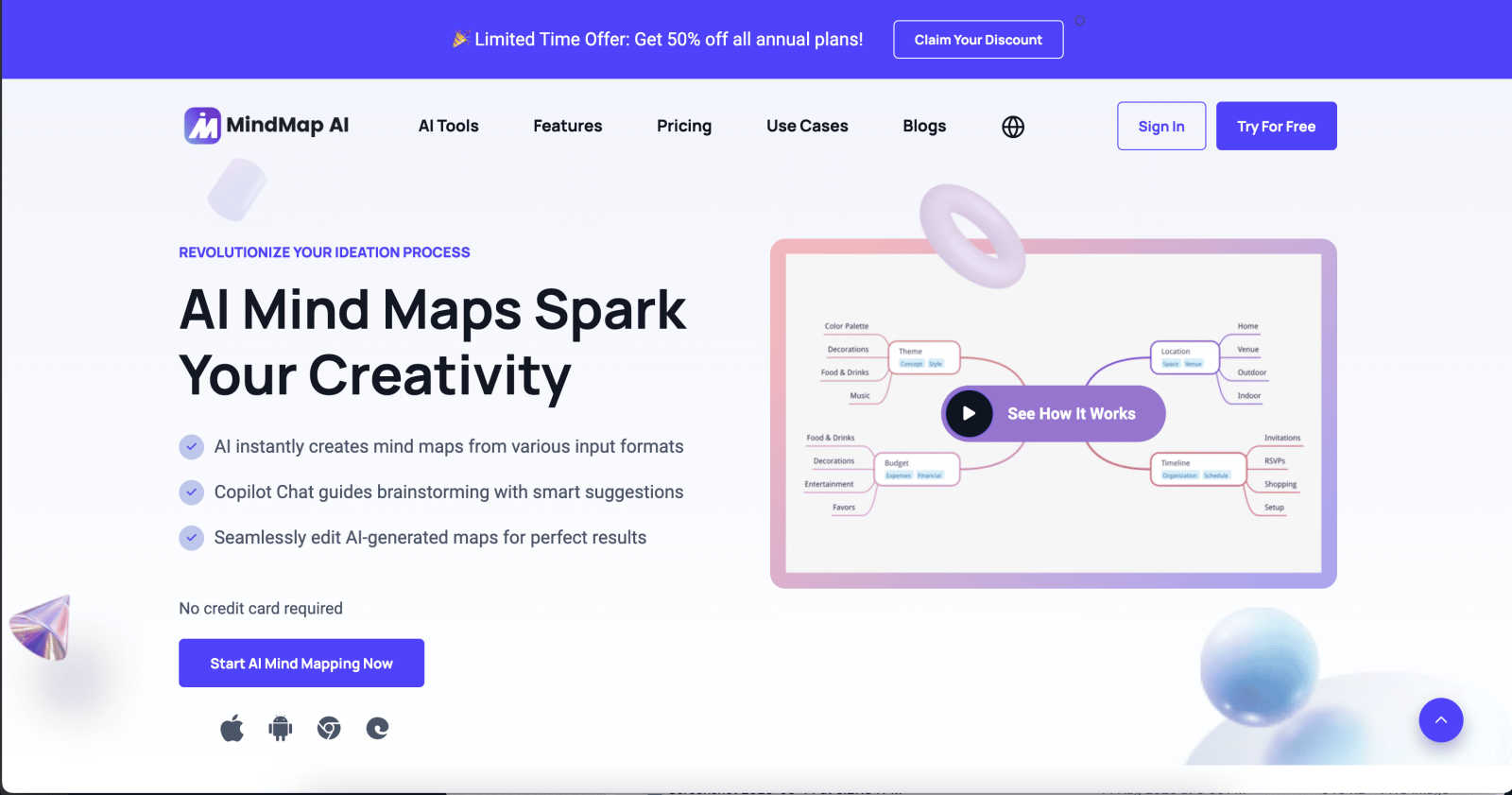
MindMap AI converts ideas and documents into interactive mind maps, enhancing creativity and collaboration effortlessly.
Last updated: March 1, 2026

SubtitlesFast
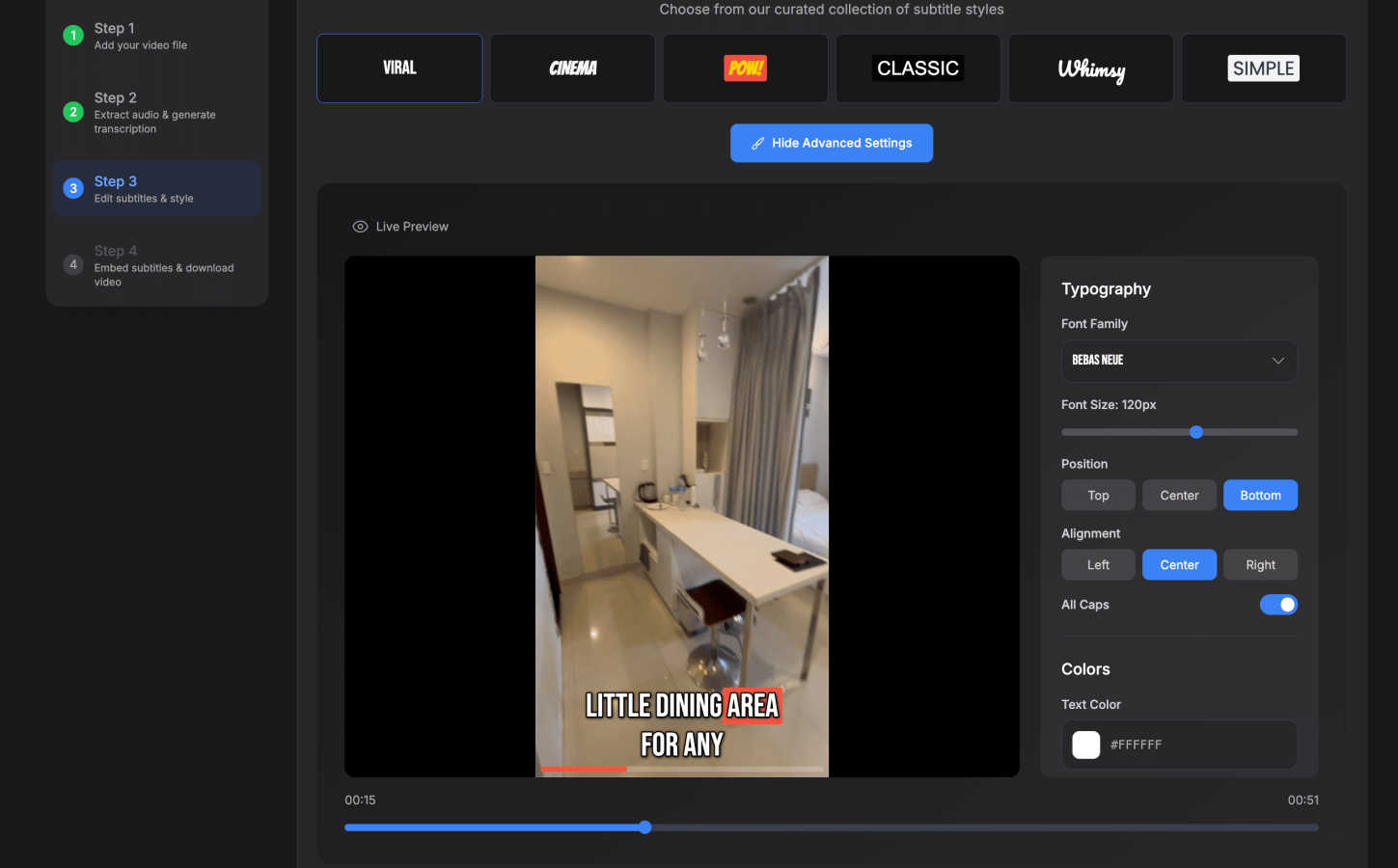
SubtitlesFast is the fastest all-in-one app to add and style animated subtitles for your daily videos.
Last updated: March 1, 2026
Visual Comparison
MindMap AI
SubtitlesFast
Feature Comparison
MindMap AI
AI Thinking Mode for Accuracy
MindMap AI employs a sophisticated step-by-step reasoning engine that comprehensively understands context, hierarchy, and relationships. This ensures every mind map generated is structured, meaningful, and accurate from the outset, rather than a random assortment of branches.
File-to-Map Conversion
This feature allows users to transform any content, whether text, PDFs, images, audio, video, or CSV files, into a beautifully organized mind map instantly. Rather than starting from scratch, users can dive straight into the creative process, saving time and effort.
Continuous Editing
MindMap AI offers reliable co-editing capabilities, allowing users to develop their mind maps manually or with AI assistance. Users can expand, summarize, reorganize, and style their maps quickly, while maintaining full control over their content and layout at any time.
Flexible Layouts
Users can seamlessly switch between Mind Map, Org Chart, and Logic Chart views without losing the structure of their work. This flexibility enables users to explore and present their ideas from multiple perspectives, enhancing understanding and collaboration.
About SubtitlesFast
AI-Powered Auto-Transcription
SubtitlesFast utilizes advanced artificial intelligence to automatically transcribe spoken audio from uploaded videos into accurate, time-synced text. This feature supports over 50 languages, making it a powerful tool for global content creators. The transcription engine is designed for high accuracy, providing a solid foundation for subtitles that can be quickly reviewed and edited within the platform's intuitive interface, significantly reducing manual typing and timing work.
Customizable Subtitle Styling and Animation
Beyond basic text, the platform offers extensive customization for subtitle appearance. Users can choose from over 30 animated styles and apply word-level highlighting to enhance visual engagement and viewer retention. The editor allows for adjustments to font, size, color, and positioning, enabling creators to maintain brand consistency and create subtitles that are not only readable but also visually compelling and aligned with their video's aesthetic.
Integrated Browser-Based Video Editor
SubtitlesFast includes a simple yet capable video editor that operates entirely within a web browser, requiring no software installation. This editor features a timeline for precise subtitle placement and trimming, and allows users to add supplemental elements like text overlays, images, and background music to their projects. The interface is designed with a minimal learning curve, focusing on the essential tools needed for rapid, daily video production.
One-Click Export with Burned-In Subtitles
The export process is streamlined into a single click. Once editing is complete, SubtitlesFast renders a final video file with the subtitles permanently burned into the video track. This ensures compatibility across all major social platforms like X, TikTok, YouTube, and Instagram. Notably, even the free trial allows for exports without any watermarks, providing a fully usable end product ready for immediate publication.
Use Cases
MindMap AI
Team Brainstorming Sessions
MindMap AI is perfect for team brainstorming sessions, enabling participants to visually map out ideas in real time. The collaborative features ensure that all contributions are respected and integrated into a cohesive mind map.
Project Planning and Management
Teams can leverage MindMap AI for project planning and management. By visually organizing tasks, timelines, and responsibilities, teams can enhance clarity and ensure alignment on project objectives.
Academic Research Organization
Researchers can utilize MindMap AI to organize their findings and literature reviews. The tool allows for easy categorization and visualization of complex data, facilitating a clearer understanding of research themes and gaps.
Language Learning and Translation
With support for over 25 languages, MindMap AI can assist language learners in organizing vocabulary and concepts effectively. This feature helps learners visualize relationships between words and phrases, enhancing retention and comprehension.
SubtitlesFast
Daily Social Media Content Creation
For influencers, vloggers, and marketers who publish content daily on platforms like TikTok, Instagram Reels, or X, speed is paramount. SubtitlesFast is built specifically for this workflow, enabling creators to record, transcribe, style, and export subtitled videos in under five minutes. This rapid turnaround is essential for capitalizing on trends and maintaining a consistent posting schedule without sacrificing accessibility or production quality.
Enhancing Video Accessibility and Reach
Adding subtitles is a critical practice for making video content accessible to viewers who are deaf or hard of hearing, as well as those who watch videos in sound-sensitive environments. By using SubtitlesFast to generate accurate captions, creators and businesses can comply with accessibility standards, improve SEO through indexable text, and increase their potential audience by catering to non-native speakers and viewers in noisy settings.
Streamlining Professional Workflows for Small Teams
Freelancers, small agencies, and solo entrepreneurs can integrate SubtitlesFast into their professional video production pipeline. It serves as a dedicated, efficient tool for the subtitle-specific segment of editing, freeing up resources from more complex, full-featured editing software. This specialization allows for faster client turnarounds and a more focused use of comprehensive editing suites for other tasks.
Creating Engaging Educational and Explainer Content
Educators, coaches, and businesses producing tutorial or explainer videos benefit greatly from clear, animated subtitles. SubtitlesFast helps emphasize key terms through word-level highlighting and keeps viewers engaged with dynamic text. The clarity provided by subtitles aids in comprehension and knowledge retention, making instructional content more effective and shareable across digital learning platforms.
Overview
About MindMap AI
MindMap AI is an advanced mind mapping software that leverages artificial intelligence to support professionals and teams in enhancing their creativity, organization, and productivity. This innovative solution allows users to convert diverse content, including ideas, documents (such as PDFs, Word files, and slides), and recordings (like meetings and lectures), into dynamic, interactive visual maps. The core value of MindMap AI lies in its ability to streamline the brainstorming process through instant mind map generation, providing a comprehensive visual representation of thoughts and concepts. With features such as the Co-Pilot Chat, which offers intelligent suggestions, users can easily collaborate and refine their ideas. MindMap AI effectively transforms complex information into actionable workflows and strategies, empowering teams to work smarter and faster. Available on both web and mobile platforms, it supports multi-format exports, making it an ideal tool for various organizational needs, from planning and strategy alignment to research analysis.
About SubtitlesFast
SubtitlesFast is a specialized, browser-based video editing application engineered for the modern content creator who prioritizes speed, simplicity, and engagement. Its core function is to automate the process of adding professional, stylized subtitles to videos, transforming a traditionally time-consuming task into a workflow that takes mere minutes. The platform is built on a philosophy of minimalism and efficiency, offering "everything you need, nothing you don't" for creators who post daily content to platforms like TikTok, YouTube, Instagram, and X (formerly Twitter). At its heart, SubtitlesFast provides AI-powered auto-transcription in over 50 languages, a user-friendly editor for customization, and one-click export with subtitles burned directly into the video file. Its primary value proposition is delivering a faster, cleaner, and more private alternative to bulky desktop software or expensive online platforms, enabling creators to boost accessibility, enhance viewer retention, and maintain brand consistency without a steep learning curve or hidden costs. It is designed to be a no-fuss tool that works directly in your browser, ensuring full privacy and eliminating the need for app downloads, making it an ideal solution for creators, marketers, and accessibility advocates worldwide.
Frequently Asked Questions
MindMap AI FAQ
What types of content can be converted into mind maps using MindMap AI?
MindMap AI can convert a wide range of content types, including text documents, PDFs, images, audio recordings, videos, Markdown files, and CSV data into interactive mind maps, enhancing the brainstorming and planning process.
Is MindMap AI suitable for individual users or just for teams?
MindMap AI is designed for both individual users and teams. It provides tools that cater to personal creativity as well as collaborative features that support teamwork, making it versatile for various user needs.
Can I customize the appearance of my mind maps in MindMap AI?
Yes, MindMap AI offers extensive customization options. Users can select colors, fonts, shapes, and themes to ensure their mind maps align with their personal or organizational branding, creating visually appealing presentations.
How does the Co-Pilot Chat feature enhance the brainstorming process?
The Co-Pilot Chat feature provides intelligent suggestions and ideas during the mind mapping process. It acts as a collaborative assistant, helping users refine their thoughts and generate new ideas based on the context of their work.
SubtitlesFast FAQ
What makes SubtitlesFast different from other subtitle tools like CapCut or Veed?
SubtitlesFast distinguishes itself through a dedicated focus on speed, simplicity, and privacy. It is a browser-based tool that requires no app download, operates with a minimalist interface designed for daily use, and processes videos locally for user privacy. Compared to more bloated editors, it offers a streamlined workflow specifically for subtitling, often resulting in a faster and cleaner user experience without unnecessary features that can complicate the process.
Do I need to download any software to use SubtitlesFast?
No, SubtitlesFast is entirely browser-based. You can access all its features, including video upload, AI transcription, editing, and export, directly through your web browser on both desktop and mobile devices. This eliminates installation hassles, saves storage space, and allows for a seamless workflow from any location with an internet connection.
Is there a watermark on videos exported with the free trial?
No. A key advantage of SubtitlesFast is that its free trial does not impose any watermarks on exported videos. You can create, style, and download your subtitled videos for publication without any branding from the platform, allowing you to fully evaluate the tool's capabilities with production-ready output.
Which social media platforms are the exported videos optimized for?
Videos exported from SubtitlesFast are rendered as standard MP4 files with burned-in subtitles, making them universally compatible with all major social media and video platforms. This includes, but is not limited to, YouTube, TikTok, Instagram (Reels and Stories), X (formerly Twitter), Facebook, and LinkedIn. The platform is built to meet the common resolution and format requirements for these channels.
Alternatives
MindMap AI Alternatives
MindMap AI is a cutting-edge AI-powered mind mapping software tailored for professionals and teams looking to enhance their creativity, organization, and productivity. It falls within the productivity and management category, offering innovative features that convert various input formats into interactive mind maps. Users often seek alternatives to MindMap AI due to factors such as pricing, unique feature sets, platform compatibility, or specific organizational needs that may not be fully addressed by this tool. When selecting an alternative, it is essential to consider the software's functionality, ease of use, and the ability to integrate with existing workflows. Users should also evaluate the level of AI assistance available, collaborative features, and whether the tool supports diverse file formats. Lastly, assessing customer support and security measures can help ensure that the chosen solution meets all necessary requirements for a productive mind mapping experience.
SubtitlesFast Alternatives
SubtitlesFast is a specialized browser-based video editing application designed for content creators who need to add animated subtitles quickly and efficiently. It falls into the categories of marketing and productivity tools, focusing on automating subtitle creation to enhance video accessibility and viewer engagement on social media platforms. Users may seek alternatives to SubtitlesFast for various reasons, including budget constraints, specific feature requirements not covered by the platform, or a need for software that integrates with a different ecosystem, such as desktop applications or more comprehensive video editing suites. The search often stems from a desire for different pricing models, advanced editing capabilities, or offline functionality. When evaluating an alternative, key considerations should include the accuracy and language support of auto-transcription, the depth of subtitle styling and animation options, overall ease of use, export quality, and data privacy policies. The ideal tool should align with your specific workflow, content volume, and technical requirements without unnecessary complexity or cost.