
Octopods vs Playwriter
Side-by-side comparison to help you choose the right product.

Octopods
Octopods unifies over 15 messaging channels into Intercom and HubSpot for seamless customer communication management.
Last updated: February 26, 2026

Playwriter
Playwriter empowers agents to control your existing Chrome browser seamlessly via CLI, ensuring full access to sessions, extensions, and cookies.
Last updated: March 18, 2026
Visual Comparison
Octopods
Playwriter

Feature Comparison
Octopods
Native Conversations
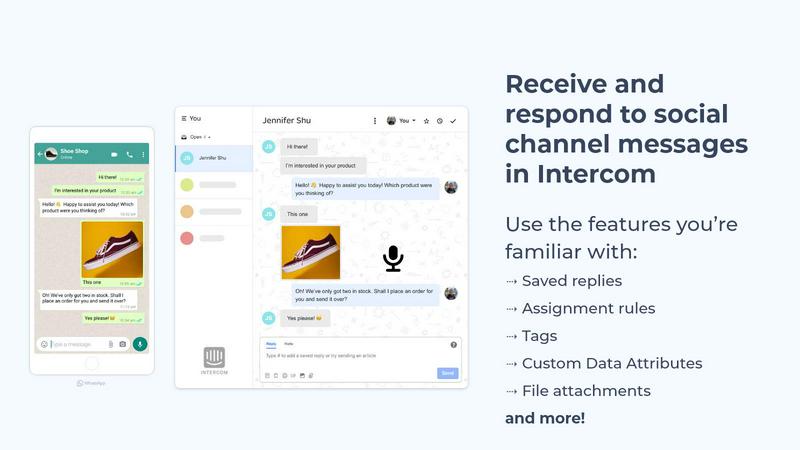
Octopods facilitates native conversations directly within Intercom and HubSpot, ensuring that all messaging channels operate seamlessly without requiring teams to switch to a separate app. This native integration enhances productivity and maintains workflow efficiency.
Rich Media Support
The platform supports various rich media formats, allowing users to send images, videos, audio, documents, and GIFs through messaging channels. This feature enriches conversations, making customer interactions more engaging and informative.
Proactive Outbound Messaging
With proactive outbound messaging capabilities, teams can utilize templates to reach out to customers effectively. This feature helps in initiating conversations and following up with leads on their preferred channels, enhancing engagement.
Custom Data Attributes
Octopods offers Custom Data Attributes, enabling businesses to filter and segment their customer data effectively. This facilitates better targeting in communication strategies, allowing teams to personalize interactions based on customer preferences and behaviors.
About Playwriter
Real Browser Integration
Playwriter allows agents to operate within your actual Chrome browser session, preserving logins, extensions, and cookies. This real-browser integration eliminates the issues associated with headless browsing, such as immediate bot detection and the need for additional memory, ensuring a smooth and consistent user experience.
Full Playwright API Access
With Playwriter, agents have access to the complete Playwright API through a single execute tool. This means users can run any Playwright code without dealing with wrappers or excessive schema definitions. The tool's design promotes low context usage, making it efficient and easy to use for developers.
Collaborative Browsing Experience
Playwriter fosters a collaborative environment where users can see everything their agents do in real time. When the agent encounters obstacles, such as captchas or consent walls, users can step in to resolve issues quickly, ensuring a seamless workflow and reducing the need for repetitive manual tasks.
Enhanced Debugging and Snapshot Capabilities
The platform includes a sophisticated debugger with breakpoints, live code editing, and network interception features. Additionally, Playwriter provides accessibility snapshots that are significantly smaller in size compared to traditional screenshots, enabling faster loading times and efficient debugging.
Use Cases
Octopods
Customer Support
Support teams can use Octopods to manage inquiries across various messaging platforms without leaving their primary support tools. This ensures that customer service is consistent, efficient, and responsive, regardless of the channel.
Sales Engagement
Sales teams can engage with leads through their preferred messaging apps while maintaining a synchronized conversation history within Intercom or HubSpot. This enables effective follow-ups and personalized interactions that drive sales conversions.
Omnichannel Strategy
Businesses can implement an omnichannel messaging strategy by consolidating all communication into Intercom or HubSpot. This allows for a cohesive approach to customer engagement, reducing the complexity of managing multiple channels.
Workflow Automation
Octopods enables teams to automate workflows and leverage AI capabilities across all messaging channels. This includes utilizing bots and predefined workflows, which streamline operations and improve response times, enhancing overall customer experience.
Playwriter
Automated Testing and Quality Assurance
Playwriter can be utilized in automated testing scenarios, allowing QA teams to simulate user interactions with web applications. By leveraging the full browser capabilities, teams can ensure thorough testing coverage while identifying issues in a more realistic environment.
Web Scraping and Data Extraction
Data analysts and developers can use Playwriter for web scraping tasks, easily navigating through complex web pages. With access to actual sessions, the tool can bypass common anti-scraping measures, making data extraction more efficient and reliable.
Real-Time Collaboration on Web Tasks
Team members can collaboratively work on web tasks by using Playwriter. Whether it's debugging a web application or solving a captcha that an AI agent encounters, real-time sharing of the browser allows for enhanced teamwork and productivity.
Educational Purposes and Learning
Playwriter serves as an excellent resource for educational institutions and individuals who want to learn web automation and browser interactions. By providing hands-on experience with a real browser environment, learners can better understand web technologies and automated processes.
Overview
About Octopods
Octopods is an innovative integration tool designed to streamline communication by connecting over 18 popular messaging channels—including WhatsApp, Telegram, Instagram, LINE, Viber, SMS, and WeChat—directly to your Intercom or HubSpot inbox. This powerful solution is tailored for customer service, sales, and operations teams that require a unified platform to interact with customers across various messaging apps without the hassle of switching between different applications. By creating native conversations within Intercom and HubSpot, Octopods eliminates context switching, allowing teams to harness the full capabilities of these platforms. Key features such as rich media support, proactive outbound messaging, automatic contact matching, and advanced segmentation through Custom Data Attributes enhance the effectiveness of customer interactions. With a quick setup process and a commitment to data privacy, Octopods is trusted by over 5000 teams worldwide, making it a crucial asset for businesses aiming to enhance customer engagement and support.
About Playwriter
Playwriter is an advanced tool designed for enhancing the capabilities of AI agents by providing them with direct control over actual browser sessions. Unlike traditional AI agents that operate within isolated or headless environments, Playwriter leverages a Chrome extension and a command-line interface (CLI) to grant agents access to your existing browser setup, complete with logged-in accounts, active extensions, and stored cookies. This seamless integration significantly mitigates challenges such as bot detection and session management, which are common in conventional setups. With Playwriter, users can automate web interactions while maintaining real-time visibility and control over the process, making it an invaluable asset for developers, testers, and anyone looking to streamline web browsing tasks. The tool is open-source and MIT licensed, fostering a collaborative and innovative environment for users.
Frequently Asked Questions
Octopods FAQ
How does Octopods integrate with Intercom and HubSpot?
Octopods integrates natively with both Intercom and HubSpot, allowing messages from various channels to flow seamlessly into your existing workflows without the need for additional apps or inboxes.
Is customer data retained when using Octopods?
No, Octopods does not retain conversation data. The platform prioritizes user privacy and compliance, ensuring that all messaging is conducted securely without storing sensitive information.
What types of messaging channels does Octopods support?
Octopods supports over 18 messaging channels, including popular platforms such as WhatsApp, Telegram, Instagram, SMS, WeChat, Viber, and many more, allowing businesses to reach customers wherever they are.
How quickly can I set up Octopods?
Setup is designed to be completed in just a few minutes. The user-friendly interface and intuitive process make it easy for teams to start integrating their messaging channels without extensive technical knowledge.
Playwriter FAQ
How does Playwriter improve browser automation?
Playwriter enhances browser automation by providing agents with direct access to your actual browser session, eliminating the challenges of headless browsing and allowing for seamless user interactions.
Is Playwriter suitable for all types of web applications?
Yes, Playwriter is versatile enough to work with various web applications, including those with complex user interfaces, authentication requirements, and dynamic content.
What programming languages does Playwriter support?
Playwriter is primarily designed to work with JavaScript and the Playwright API, making it ideal for developers familiar with these technologies. The CLI can be easily integrated into existing JavaScript projects.
How does the debugging feature work in Playwriter?
The debugging feature allows users to set breakpoints, perform live code editing, and intercept network requests. This functionality enables developers to troubleshoot issues effectively within their actual browser context, enhancing the overall debugging process.
Alternatives
Octopods Alternatives
Octopods is an innovative communication tool that connects a variety of messaging platforms, including WhatsApp, Telegram, and Instagram, directly to your Intercom or HubSpot inbox. As a prominent player in the customer support category, it enables businesses to manage customer conversations seamlessly across 18+ channels, enhancing engagement and response efficiency. With features that allow for rich media interaction and automated workflows, Octopods serves as a comprehensive solution for support, sales, and operations teams. Users often seek alternatives to Octopods for various reasons, including considerations around pricing, specific feature sets, or the need for integrations that align more closely with their existing platforms. When evaluating alternatives, it is crucial to consider factors such as ease of setup, the breadth of channel support, the ability to maintain conversation continuity, and the overall user experience. A well-rounded alternative should not only meet the basic requirements of messaging integration but also offer advanced capabilities that enhance team productivity and customer satisfaction.
Playwriter Alternatives
Playwriter is a powerful automation tool designed to enhance the capabilities of Chrome browsers through the use of AI via Command Line Interface (CLI) or Multi-Channel Protocol (MCP). By providing AI agents with access to a user's actual browser session, Playwriter addresses common challenges faced in web automation, such as bot detection and lack of saved sessions. Users often seek alternatives to Playwriter due to various factors, including pricing, specific feature sets, compatibility with different platforms, and personal preferences for user interfaces. When searching for an alternative to Playwriter, it is essential to consider several key aspects. Users should evaluate the range of features offered, such as automation capabilities, ease of use, and integration with existing tools. Additionally, assessing the pricing structure, support options, and community or developer engagement can significantly impact the overall experience. The right alternative will effectively meet individual needs while providing a seamless browsing and automation experience.