
Changeflow vs Phishly
Side-by-side comparison to help you choose the right product.

Changeflow
Changeflow provides AI-driven insights on critical market changes, ensuring you stay informed without manual tracking.
Last updated: March 4, 2026

Phishly
Phishly uses AI to detect phishing emails instantly via a Chrome extension for Gmail and a web tool for enhanced secu...
Visual Comparison
Changeflow

Phishly
Feature Comparison
Changeflow
AI-Powered Intelligence
Changeflow's AI-driven technology intelligently filters web changes to provide users with only the most relevant updates. It eliminates false positives and noise, ensuring that users receive concise notifications that matter, thereby saving valuable time and resources.
Natural Language Setup
Users can effortlessly describe what they want to track using plain English. This user-friendly approach eliminates the need for complex configurations or technical setups, making it accessible to anyone without a technical background.
Customized Summaries
Changeflow generates tailored summaries of web page changes, allowing users to quickly grasp what has changed and why it is significant to their business. This feature streamlines the monitoring process and enhances decision-making by providing clear, actionable insights.
Advanced Anti-Blocking Technology
With sophisticated anti-blocking capabilities, Changeflow effectively navigates challenging websites that may restrict access to other monitoring tools. This ensures reliable and consistent tracking of web pages, even when competitors face obstacles in their monitoring efforts.
About Phishly
AI-Powered Detection
Phishly utilizes cutting-edge artificial intelligence to analyze email content for common phishing indicators. This feature allows users to gain insights into potentially malicious emails quickly and accurately, increasing their ability to identify threats.
Risk Assessment Categories
After scanning an email, Phishly assigns a risk level of Safe, Medium Risk, or High Risk, providing users with a straightforward understanding of the email's safety. This feature helps users make informed decisions about whether to engage with the email content.
Detailed Explanations
Phishly goes beyond simple risk scoring by offering detailed explanations for each assessment. Users receive insights into why an email was categorized a certain way, equipping them with knowledge to recognize potential threats in the future.
User Privacy Protection
Phishly prioritizes user privacy by only analyzing emails that users explicitly choose to scan. This feature ensures that personal and sensitive information remains secure while still benefiting from the platform's powerful detection capabilities.
Use Cases
Changeflow
Competitor Pricing Monitoring
Business teams can utilize Changeflow to keep a close eye on competitor pricing strategies. By tracking changes in competitors' pricing structures, companies can adjust their own strategies to remain competitive in the market.
Regulatory Compliance Tracking
Legal professionals and compliance teams use Changeflow to monitor important regulatory changes. This ensures that they remain informed about shifts in legislation, compliance requirements, and legal precedents that could affect their operations.
News Mentions and Market Movements
Changeflow enables businesses to follow news mentions and market movements. By tracking relevant news articles and updates, organizations can stay ahead of trends and make informed strategic decisions.
Court Docket Monitoring
Legal librarians at prestigious law firms leverage Changeflow to monitor court dockets and legal citations. This allows them to stay updated on case developments and relevant legal changes that impact their practice areas.
Phishly
Individual Email Verification
Individuals can use Phishly to verify the legitimacy of emails received from unknown senders or those that appear suspicious. This ensures that users can protect themselves against phishing attacks and identity theft.
Small Business Email Security
Small businesses can implement Phishly to safeguard their employees from phishing threats. By providing a simple scanning tool, businesses can enhance their email security protocols without the need for complex solutions.
Education and Training
Phishly can be used as an educational tool for training employees about phishing threats. By regularly scanning emails and reviewing risk assessments, users can improve their awareness and understanding of phishing tactics.
Quick Threat Analysis
For users who frequently encounter suspicious emails, Phishly offers a quick method for threat analysis. The instant feedback allows users to act promptly, whether that means deleting a potentially harmful email or reporting it to IT.
Overview
About Changeflow
Changeflow is an innovative web monitoring tool designed to keep businesses informed about critical changes on web pages that matter to them. By leveraging advanced artificial intelligence, Changeflow goes beyond simple notifications of updates; it tracks specific changes, interprets their context, and summarizes their significance, thus delivering only the most relevant information to users. This makes it an invaluable resource for various professionals, including business analysts, legal teams, compliance officers, and marketing specialists, who require timely insights into competitors, regulatory updates, and market trends. With a simple setup process that allows users to describe what they want to track in plain English, Changeflow efficiently handles complex tasks like bypassing login walls and JavaScript barriers, ensuring a 99.9% success rate in monitoring web pages. By consolidating vast amounts of web data, Changeflow empowers users to focus on actionable insights rather than sifting through irrelevant information.
About Phishly
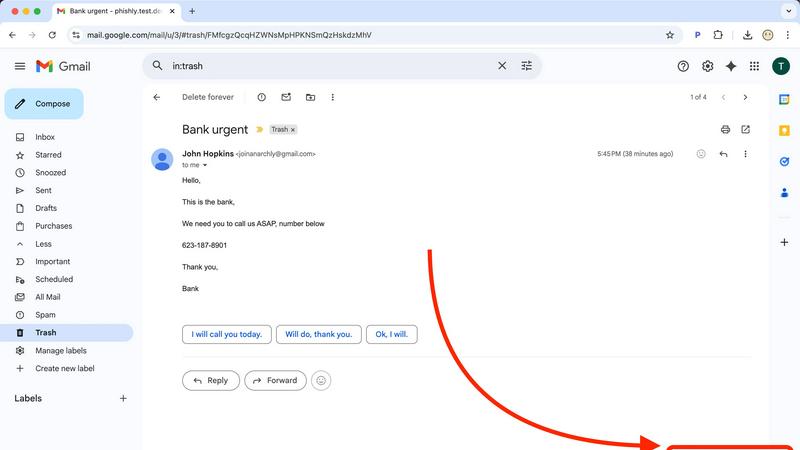
Phishly is an innovative AI-powered phishing detection platform designed to enhance email security for both individuals and small businesses. Available as a Chrome extension for Gmail and a user-friendly web tool, Phishly simplifies the process of identifying phishing threats. Users can easily analyze any email by clicking "Scan with Phishly" within Gmail or by pasting suspicious emails on the Phishly website for immediate assessment. The platform leverages advanced AI algorithms to detect key phishing indicators such as suspicious domains, urgent language, spoofed sender identities, and common social engineering tactics. Each analysis results in a clear risk assessment categorized as Safe, Medium Risk, or High Risk, accompanied by detailed explanations to help users understand the potential threats they face. Phishly is particularly valuable for users who seek straightforward phishing protection without the complexities often associated with enterprise solutions. The platform is designed with user privacy in mind, as it only analyzes emails that users explicitly choose to scan. With no technical expertise required, Phishly offers a free and accessible solution for anyone who needs to verify the legitimacy of their emails.
Frequently Asked Questions
Changeflow FAQ
How does Changeflow ensure accuracy in tracking changes?
Changeflow employs advanced AI algorithms to analyze web pages for updates. It evaluates the relevance of changes based on user-defined criteria, ensuring that only significant updates are reported, which enhances accuracy.
Can I track multiple web pages simultaneously?
Yes, Changeflow allows users to monitor multiple web pages at once. Users simply provide a list of URLs and specify what changes they want to track, making it easy to manage numerous sources.
Is Changeflow suitable for small businesses?
Absolutely. Changeflow is designed for businesses of all sizes, including small businesses. Its intuitive setup and powerful features can benefit organizations looking to streamline their web monitoring processes.
What kind of support does Changeflow offer to its users?
Changeflow provides robust support to its users, including email and chat support, onboarding assistance, and fast troubleshooting. This ensures that users can maximize the effectiveness of the tool and resolve any issues promptly.
Phishly FAQ
How does Phishly work?
Phishly works by analyzing the content of emails for specific indicators of phishing, such as suspicious domains and urgent language. Users can scan emails directly in Gmail or through the website for instant analysis.
Is Phishly free to use?
Yes, Phishly is free to use, making it accessible for individuals and small businesses seeking to improve their email security without incurring costs.
Do I need technical knowledge to use Phishly?
No, Phishly is designed to be user-friendly and requires no technical knowledge. Users can easily scan emails and understand the results without needing prior expertise in cybersecurity.
How does Phishly protect my privacy?
Phishly protects user privacy by only analyzing emails that users explicitly choose to scan. This ensures that personal information contained in other emails remains confidential and secure.