
Never Drop vs Phishly
Side-by-side comparison to help you choose the right product.

Never Drop
NeverDrop instantly captures event contacts and drafts personalized follow-ups to secure leads.
Last updated: February 28, 2026

Phishly
Phishly uses AI to detect phishing emails instantly via a Chrome extension for Gmail and a web tool for enhanced secu...
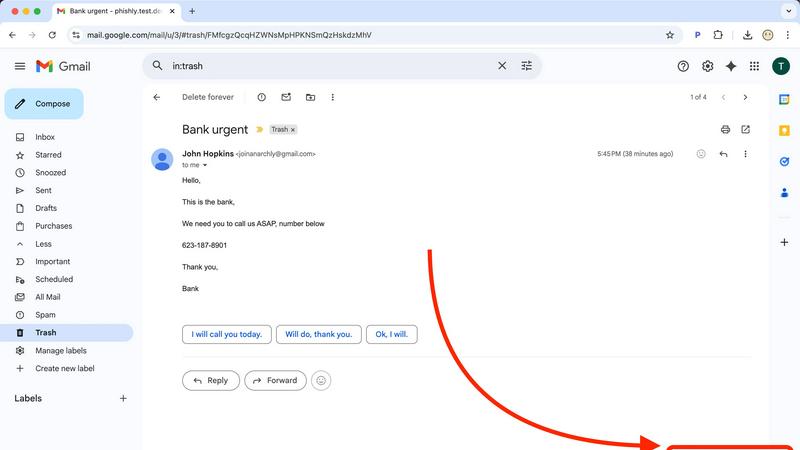
Visual Comparison
Never Drop

Phishly
Feature Comparison
Never Drop
AI-Powered Business Card OCR
Never Drop utilizes advanced Optical Character Recognition (OCR) technology, powered by artificial intelligence, to instantly and accurately extract contact details from any business card. Users simply take a photograph of a card within the mobile app, and the AI engine parses the information to capture the individual's name, company, title, phone number, and email address. This eliminates the tedious, error-prone manual data entry that often follows an event, ensuring contact records are digitized correctly in a matter of seconds without the risk of typos or lost physical cards.
Intelligent Contact Enrichment & Email Finding
A common flaw with business cards is the inclusion of generic front-desk emails or the absence of a direct address. Never Drop addresses this by automatically enriching scanned profiles. The system cross-references the extracted name and company data to locate and verify the contact's professional work email. This feature removes the need for sales reps to conduct manual LinkedIn searches or guess email formats, delivering a complete, sales-ready contact profile that is primed for immediate outreach and seamless integration into a Customer Relationship Management system.
Context-Aware AI Follow-Up Drafting
The application's cornerstone feature is its ability to generate personalized follow-up communications. By synthesizing the scanned contact details with the user's recorded voice notes or typed context about the conversation, Never Drop's AI drafts a unique, relevant email. This draft is not a generic template but is tailored to reference specific discussion points, ensuring the follow-up feels authentic and personal. Users can review, edit, and send this drafted email directly from their phone, enabling a meaningful touchpoint often before leaving the event venue.
Centralized Team Workspace & CRM Integration
Never Drop provides a unified dashboard for team management and activity tracking. Leads can be organized by specific events and reassigned between sales representatives, ensuring clear ownership and preventing leads from being overlooked. The platform offers seamless integration with popular CRMs, notably HubSpot, to automatically push enriched contact records and activity notes into the company's primary sales pipeline. This creates a clean, organized, and actionable workflow from the initial handshake to the final deal closure within existing sales infrastructure.
Phishly
AI-Powered Detection
Phishly utilizes cutting-edge artificial intelligence to analyze email content for common phishing indicators. This feature allows users to gain insights into potentially malicious emails quickly and accurately, increasing their ability to identify threats.
Risk Assessment Categories
After scanning an email, Phishly assigns a risk level of Safe, Medium Risk, or High Risk, providing users with a straightforward understanding of the email's safety. This feature helps users make informed decisions about whether to engage with the email content.
Detailed Explanations
Phishly goes beyond simple risk scoring by offering detailed explanations for each assessment. Users receive insights into why an email was categorized a certain way, equipping them with knowledge to recognize potential threats in the future.
User Privacy Protection
Phishly prioritizes user privacy by only analyzing emails that users explicitly choose to scan. This feature ensures that personal and sensitive information remains secure while still benefiting from the platform's powerful detection capabilities.
Use Cases
Never Drop
High-Volume Trade Show Lead Capture
For sales teams exhibiting at or attending large trade shows, Never Drop is indispensable. The environment is fast-paced, with reps engaging dozens of prospects daily. The app allows them to quickly scan a card, dictate a quick note about key interests or next steps while the conversation is fresh, and move to the next booth. This ensures no lead is forgotten and enables the team to send personalized, timely follow-ups while their brand is top-of-mind for the prospect, dramatically increasing conversion rates from event investment.
Conference and Networking Event Follow-Up
Attendees of industry conferences and networking mixers often collect a pocketful of cards with vague intentions to "connect later." Never Drop provides structure to this process. By scanning cards immediately after a conversation and adding contextual notes, professionals can ensure they remember who promised an introduction, who was interested in a specific service, or who requested a whitepaper. The AI-drafted email provides a perfect starting point for re-engaging, turning casual connections into valuable business relationships.
Streamlining Sales Team Coordination
Sales managers can leverage Never Drop's team workspace to oversee event performance and lead distribution. By creating a shared event in the app, managers can see in real-time which reps are capturing leads and reassign contacts as needed based on territory or expertise. This centralized view prevents duplicate outreach, ensures even workload distribution, and provides valuable data on team activity and event ROI, all while keeping the entire pipeline synchronized in the company's CRM.
Enhancing Prospect Memory and Personalization
For any professional who meets numerous contacts, recalling specific conversation details days later is challenging. Never Drop acts as an external memory aid. The voice note feature allows users to capture nuances like a prospect's specific pain point, a shared personal interest, or an agreed-upon action item. This rich context is then woven into the follow-up communication by the AI, resulting in emails that demonstrate genuine attentiveness and significantly higher engagement rates compared to generic, bulk follow-ups.
Phishly
Individual Email Verification
Individuals can use Phishly to verify the legitimacy of emails received from unknown senders or those that appear suspicious. This ensures that users can protect themselves against phishing attacks and identity theft.
Small Business Email Security
Small businesses can implement Phishly to safeguard their employees from phishing threats. By providing a simple scanning tool, businesses can enhance their email security protocols without the need for complex solutions.
Education and Training
Phishly can be used as an educational tool for training employees about phishing threats. By regularly scanning emails and reviewing risk assessments, users can improve their awareness and understanding of phishing tactics.
Quick Threat Analysis
For users who frequently encounter suspicious emails, Phishly offers a quick method for threat analysis. The instant feedback allows users to act promptly, whether that means deleting a potentially harmful email or reporting it to IT.
Overview
About Never Drop
Never Drop is a sophisticated, AI-powered lead capture and management application engineered explicitly for sales professionals and business development teams who operate in high-velocity, in-person environments. Its core mission is to eliminate the chronic problem of lead decay that plagues events like trade shows, conferences, and networking meetings. The product transforms the traditional, error-prone process of collecting business cards and manually entering data into a seamless, intelligent workflow. By simply scanning a business card with a smartphone, users instantly digitize contact information. The application's true innovation lies in its immediate context capture, allowing users to append voice notes or text annotations about the conversation in real-time. This contextual data then fuels its advanced artificial intelligence to generate a personalized, conversation-specific follow-up email draft within two minutes. Furthermore, Never Drop enhances data quality by finding verified work emails and integrates directly with core sales tools like HubSpot and Gmail, ensuring captured leads are enriched, organized, and actionable within the existing sales pipeline. Ultimately, Never Drop is not merely a scanner; it is an end-to-end system designed to compress the sales cycle, increase response rates by capitalizing on the "warm lead" window, and directly convert more handshakes into closed revenue.
About Phishly
Phishly is an innovative AI-powered phishing detection platform designed to enhance email security for both individuals and small businesses. Available as a Chrome extension for Gmail and a user-friendly web tool, Phishly simplifies the process of identifying phishing threats. Users can easily analyze any email by clicking "Scan with Phishly" within Gmail or by pasting suspicious emails on the Phishly website for immediate assessment. The platform leverages advanced AI algorithms to detect key phishing indicators such as suspicious domains, urgent language, spoofed sender identities, and common social engineering tactics. Each analysis results in a clear risk assessment categorized as Safe, Medium Risk, or High Risk, accompanied by detailed explanations to help users understand the potential threats they face. Phishly is particularly valuable for users who seek straightforward phishing protection without the complexities often associated with enterprise solutions. The platform is designed with user privacy in mind, as it only analyzes emails that users explicitly choose to scan. With no technical expertise required, Phishly offers a free and accessible solution for anyone who needs to verify the legitimacy of their emails.
Frequently Asked Questions
Never Drop FAQ
What is Never Drop and how does it work?
Never Drop is a comprehensive lead-capture application designed for sales teams at in-person events. The workflow involves three key steps: First, scan a business card using the mobile app's camera for instant AI-powered contact extraction. Second, enrich the lead by adding voice or text notes about your conversation for context. Third, utilize the AI to generate a personalized follow-up email draft based on that context, which can be reviewed and sent in under two minutes. The system also enriches profiles with verified emails and syncs all data to integrated CRMs like HubSpot.
How does the business card scanning and OCR feature work?
The scanning process is straightforward: open the Never Drop mobile app and use your smartphone's camera to take a clear photo of any standard or creative business card. The built-in, AI-powered Optical Character Recognition (OCR) technology then automatically analyzes the image, identifies text fields, and accurately extracts key details including the contact's full name, company name, job title, phone number, and email address. This data is instantly populated into a digital contact card within the app, eliminating all manual data entry.
What types of CRM and email integrations does Never Drop support?
Never Drop currently offers direct integrations with HubSpot for CRM synchronization and Gmail for email sending. The HubSpot integration allows enriched contact profiles, along with any attached context notes, to be automatically pushed into your designated sales pipeline, ensuring a seamless handoff from event capture to sales execution. The Gmail integration enables users to send the AI-drafted follow-up emails directly from their own professional email address within the Never Drop app, maintaining sender authenticity and keeping all communication within a familiar thread.
Is my data secure with Never Drop, and where is it processed?
Yes, data security and privacy are paramount. Never Drop is developed by SCOPEO, a company based in France. Consequently, all user data is hosted on servers within the European Union and is processed in strict compliance with the General Data Protection Regulation (GDPR). Data is encrypted both during transmission (in transit) and while stored on servers (at rest). Importantly, the images of business cards are used solely for the purpose of contact extraction by the OCR system and are not shared with or sold to any third parties.
Phishly FAQ
How does Phishly work?
Phishly works by analyzing the content of emails for specific indicators of phishing, such as suspicious domains and urgent language. Users can scan emails directly in Gmail or through the website for instant analysis.
Is Phishly free to use?
Yes, Phishly is free to use, making it accessible for individuals and small businesses seeking to improve their email security without incurring costs.
Do I need technical knowledge to use Phishly?
No, Phishly is designed to be user-friendly and requires no technical knowledge. Users can easily scan emails and understand the results without needing prior expertise in cybersecurity.
How does Phishly protect my privacy?
Phishly protects user privacy by only analyzing emails that users explicitly choose to scan. This ensures that personal information contained in other emails remains confidential and secure.