
Phishly vs Zovo
Side-by-side comparison to help you choose the right product.

Phishly
Phishly uses AI to detect phishing emails instantly via a Chrome extension for Gmail and a web tool for enhanced secu...

Unlock 20 privacy-first Chrome extensions for developers and writers with Zovo, built by a solo developer for your.
Last updated: February 26, 2026
Visual Comparison
Phishly
Zovo

Feature Comparison
Phishly
AI-Powered Detection
Phishly utilizes cutting-edge artificial intelligence to analyze email content for common phishing indicators. This feature allows users to gain insights into potentially malicious emails quickly and accurately, increasing their ability to identify threats.
Risk Assessment Categories
After scanning an email, Phishly assigns a risk level of Safe, Medium Risk, or High Risk, providing users with a straightforward understanding of the email's safety. This feature helps users make informed decisions about whether to engage with the email content.
Detailed Explanations
Phishly goes beyond simple risk scoring by offering detailed explanations for each assessment. Users receive insights into why an email was categorized a certain way, equipping them with knowledge to recognize potential threats in the future.
User Privacy Protection
Phishly prioritizes user privacy by only analyzing emails that users explicitly choose to scan. This feature ensures that personal and sensitive information remains secure while still benefiting from the platform's powerful detection capabilities.
Zovo
BeLikeNative
BeLikeNative allows users to write like native speakers in just one keystroke, supporting an impressive 80 languages. This feature is particularly beneficial for non-native speakers looking to enhance their writing skills and communicate more effectively in various languages.
Tab Suspender Pro
Tab Suspender Pro intelligently manages your browser's memory by automatically suspending inactive tabs. This feature helps reduce memory usage, improve browser performance, and keep your workflow uninterrupted, making it ideal for users juggling multiple tabs.
Clipboard History Pro
Clipboard History Pro ensures that users never lose copied text again by maintaining a history of up to 10,000 clips. Users can instantly search their clipboard history and utilize smart paste functions, which significantly enhances productivity during tasks involving text management.
Form Filler Pro
Form Filler Pro simplifies the process of filling out online forms by allowing users to save multiple profiles and fill forms with a single click. This feature is particularly useful for those who frequently engage in online registrations or surveys, saving time and reducing repetitive tasks.
Use Cases
Phishly
Individual Email Verification
Individuals can use Phishly to verify the legitimacy of emails received from unknown senders or those that appear suspicious. This ensures that users can protect themselves against phishing attacks and identity theft.
Small Business Email Security
Small businesses can implement Phishly to safeguard their employees from phishing threats. By providing a simple scanning tool, businesses can enhance their email security protocols without the need for complex solutions.
Education and Training
Phishly can be used as an educational tool for training employees about phishing threats. By regularly scanning emails and reviewing risk assessments, users can improve their awareness and understanding of phishing tactics.
Quick Threat Analysis
For users who frequently encounter suspicious emails, Phishly offers a quick method for threat analysis. The instant feedback allows users to act promptly, whether that means deleting a potentially harmful email or reporting it to IT.
Zovo
Enhanced Writing for Non-Native Speakers
Non-native speakers can benefit immensely from BeLikeNative, which provides instant rewrites to improve fluency and expression in writing. This use case is particularly valuable for students, professionals, and anyone looking to enhance their communication in a foreign language.
Memory Management for Power Users
Power users who often keep numerous tabs open can leverage Tab Suspender Pro to manage their browser's memory effectively. By suspending inactive tabs, users can ensure smoother performance and prevent crashes, making it essential for individuals who multitask.
Efficient Text Management for Professionals
Professionals who frequently copy and paste text can utilize Clipboard History Pro to maintain a well-organized clipboard. This tool allows for quick retrieval of previously copied content, streamlining workflows in tasks such as content creation or data entry.
Simplified Online Forms for Busy Individuals
Busy individuals can save time with Form Filler Pro, which allows for quick completion of repetitive online forms. This is particularly advantageous for users who need to fill out various forms for applications, registrations, or surveys, enabling them to focus on more critical tasks.
Overview
About Phishly
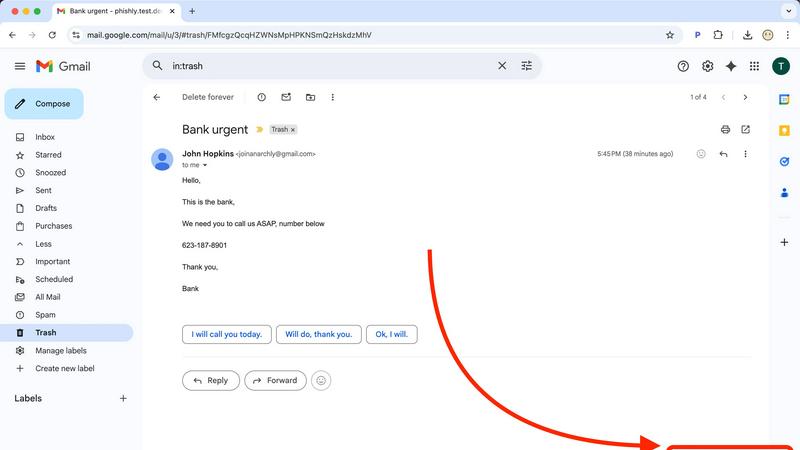
Phishly is an innovative AI-powered phishing detection platform designed to enhance email security for both individuals and small businesses. Available as a Chrome extension for Gmail and a user-friendly web tool, Phishly simplifies the process of identifying phishing threats. Users can easily analyze any email by clicking "Scan with Phishly" within Gmail or by pasting suspicious emails on the Phishly website for immediate assessment. The platform leverages advanced AI algorithms to detect key phishing indicators such as suspicious domains, urgent language, spoofed sender identities, and common social engineering tactics. Each analysis results in a clear risk assessment categorized as Safe, Medium Risk, or High Risk, accompanied by detailed explanations to help users understand the potential threats they face. Phishly is particularly valuable for users who seek straightforward phishing protection without the complexities often associated with enterprise solutions. The platform is designed with user privacy in mind, as it only analyzes emails that users explicitly choose to scan. With no technical expertise required, Phishly offers a free and accessible solution for anyone who needs to verify the legitimacy of their emails.
About Zovo
Zovo is an innovative suite of 20 Chrome extensions meticulously crafted by a solo developer with over a decade of experience in software development. With a stellar track record of earning more than $400,000 on Upwork and maintaining a perfect 100% success rate, Zovo stands out as a unique offering in the crowded landscape of browser tools. The flagship extension, BeLikeNative, has already empowered over 3,300 users to write like native speakers across 80 languages with a single keystroke. This suite includes a diverse range of tools, such as Tab Suspender Pro, JSON Formatter Pro, Clipboard History Pro, Form Filler Pro, and many others, all designed to enhance productivity and streamline web browsing. Zovo prioritizes user privacy, ensuring that no data leaves the user's device, and fosters a community-driven development model where users can vote on features and influence the product roadmap. With new extensions rolling out monthly and many tools available for free at zovo.one, Zovo is committed to delivering value without the interference of corporate interests or data harvesting.
Frequently Asked Questions
Phishly FAQ
How does Phishly work?
Phishly works by analyzing the content of emails for specific indicators of phishing, such as suspicious domains and urgent language. Users can scan emails directly in Gmail or through the website for instant analysis.
Is Phishly free to use?
Yes, Phishly is free to use, making it accessible for individuals and small businesses seeking to improve their email security without incurring costs.
Do I need technical knowledge to use Phishly?
No, Phishly is designed to be user-friendly and requires no technical knowledge. Users can easily scan emails and understand the results without needing prior expertise in cybersecurity.
How does Phishly protect my privacy?
Phishly protects user privacy by only analyzing emails that users explicitly choose to scan. This ensures that personal information contained in other emails remains confidential and secure.
Zovo FAQ
What kind of user data does Zovo collect?
Zovo prioritizes user privacy and does not collect any personal data. All data remains on your device, ensuring that your browsing habits are not harvested or tracked.
How can I request new features for Zovo?
Users can submit feature requests directly through the Zovo platform. The developer actively reviews all requests, and the most popular features are prioritized for development.
Is there a community where I can engage with other Zovo users?
Yes, Zovo has a vibrant Discord community where users can connect, share their experiences, and provide feedback. This platform also allows for direct communication with the developer for any questions or suggestions.
Are there free tools available through Zovo?
Absolutely! Many tools from the Zovo suite are available for free online at zovo.one. Users can access these tools without installation, allowing for immediate use in their browsers.