
Prompt Builder vs Pullsy
Side-by-side comparison to help you choose the right product.

Prompt Builder
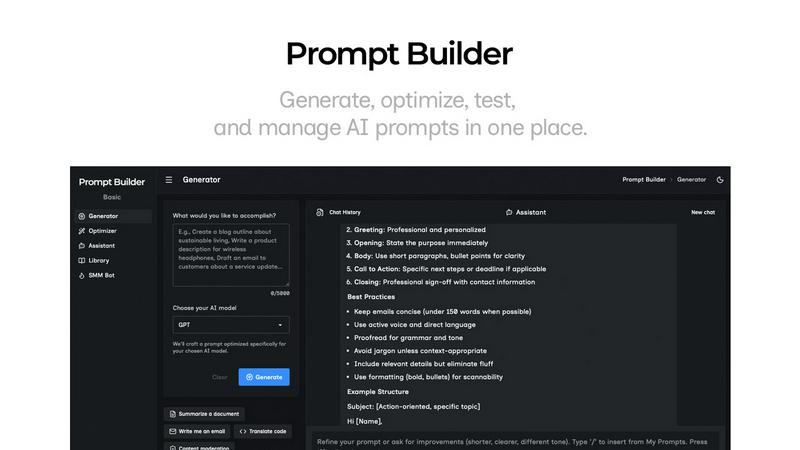
Prompt Builder is a unified platform to generate, optimize, test, and manage AI prompts for models like ChatGPT and Gemini.
Last updated: April 13, 2026

Pullsy organizes your inbox, drafts context-aware replies, and streamlines your day with AI-driven efficiency.
Last updated: February 26, 2026
Visual Comparison
Prompt Builder
Pullsy

Feature Comparison
Prompt Builder
Prompt Generator
The Prompt Generator is the foundational feature that transforms a simple idea into a robust, model-specific prompt. Users describe their intended task in natural language and select their target AI model (e.g., GPT-4, Claude 3, Gemini Pro). The system then crafts a detailed prompt draft tailored to the selected model's nuances and optimal prompting structures. This includes appropriate formatting, context setting, and constraint phrasing, providing a solid, professional-grade starting point that can be further refined in the integrated chat workspace, significantly reducing initial setup time.
Prompt Assistant & Chat Workspace
This integrated feature allows for seamless testing and iteration of prompts without ever leaving the Prompt Builder environment. The Prompt Assistant provides a chat-first interface where users can run their generated or optimized prompts. It includes a model selector to test outputs across different assistants like Grok, Gemini, or DeepSeek. Users can engage in follow-up conversations, make adjustments, and see results in real-time. All chat histories are preserved, enabling fast iterations and preventing the loss of successful prompt versions across disparate tools.
Prompt Optimizer
The Optimizer tool is designed to enhance existing prompts. Users can paste any prompt—whether from an external source or selected from their personal Library—and the Optimizer will analyze and rewrite it for improved clarity, specificity, and effectiveness. It provides structured improvements across key dimensions such as instruction clarity, added constraints, defined output formats, and inclusion of examples. Each optimization is saved in a history log, and optimized prompts can be instantly sent to the Prompt Assistant for testing with a single click.
Prompt Library & Community Templates
This feature offers a dual-purpose repository for prompt management and discovery. The "My Prompts" section allows users to save, pin, organize, and tag their best prompt versions for easy reuse across projects and teams. Simultaneously, the "Community Prompts" section provides a curated library of reusable prompts and templates shared by other users, searchable and filterable by category and model. This fosters knowledge sharing and provides immediate, proven starting points for common tasks, from creative writing to data analysis.
About Pullsy
Intelligent Email Labeling
Pullsy employs advanced algorithms to intelligently label incoming emails based on their content and priority. This feature helps users quickly identify the most important messages, filtering out the noise and ensuring that critical communications are never missed.
Context-Aware Reply Drafting
With Pullsy's context-aware reply drafting, the AI not only suggests replies but tailors them to the specific conversation. It identifies questions that require answers, tasks needing confirmation, and even reminds users about broken promises, ensuring responses are both relevant and timely.
Customizable Tone Options
Pullsy offers users the ability to select from multiple tone options when drafting replies, such as Professional, Friendly, or Quick. This feature allows users to maintain their unique voice and style in emails, enhancing personal communication while benefiting from AI assistance.
Smart Meeting Management
Pullsy helps users stay organized by tracking important meetings and deadlines. It provides reminders and summaries of upcoming appointments, helping users prepare effectively and manage their time efficiently, all from a single dashboard.
Use Cases
Prompt Builder
Content Creation and Marketing
Marketing professionals and content creators can use Prompt Builder to rapidly generate and refine copy for blogs, social media posts, ad copy, and email campaigns. The SMM Bot feature specifically streamlines creating platform-ready content for X, LinkedIn, and Instagram by generating tailored posts with appropriate tones, hashtags, and calls-to-action. This ensures brand-consistent, engaging content is produced efficiently for multiple channels from a single brief.
Technical Development and Coding
Developers and engineers can leverage the platform to create precise prompts for code generation, debugging, documentation, and system design explanations. By generating prompts tuned for models like Claude or GPT-4, which are strong in reasoning, they can get more accurate, syntactically correct code snippets and detailed technical explanations, saving hours of manual coding and research time.
Research and Data Analysis
Academics, analysts, and students can utilize Prompt Builder to craft detailed prompts for summarizing complex research papers, extracting insights from datasets, generating literature reviews, or formulating hypotheses. The ability to optimize prompts for clarity and structure ensures the AI provides comprehensive, well-formatted, and relevant outputs, making the research process more systematic and productive.
Business Process Automation
Business professionals and operations teams can build a library of standardized prompts to automate routine tasks such as drafting reports, generating meeting agendas and minutes, creating standard operating procedures, or formatting data. This ensures consistency in output quality, reduces repetitive work, and allows team members to reuse and share effective prompt templates, scaling best practices across the organization.
Pullsy
Efficient Email Management for Entrepreneurs
Entrepreneurs often juggle multiple responsibilities, making time management crucial. Pullsy helps them quickly sift through emails, prioritize responses, and focus on strategic tasks, allowing for better use of their time.
Enhanced Team Collaboration
For small teams, Pullsy serves as a collaborative tool that keeps everyone on the same page. By organizing emails and providing context-aware replies, team members can communicate more effectively and ensure that important tasks are completed promptly.
Streamlined Client Communication
Professionals dealing with clients can use Pullsy to maintain a polished and professional email correspondence. The AI-driven drafting feature ensures that replies are timely and appropriate, strengthening client relationships and enhancing trust.
Improved Personal Productivity
Individuals looking to boost their productivity can rely on Pullsy to manage their inbox efficiently. By summarizing threads and highlighting essential messages, users can focus on high-priority tasks without getting bogged down by unnecessary emails.
Overview
About Prompt Builder
Prompt Builder is a sophisticated, all-in-one prompt engineering workspace designed to streamline the entire lifecycle of creating and deploying effective AI prompts. It serves as a centralized platform for writing, testing, optimizing, and managing prompts across a vast array of leading large language models (LLMs). The core value proposition lies in eliminating the inefficiencies of manual prompt crafting. Instead of spending hours rewriting and adapting instructions for different AI systems, users describe their task in plain English, select a target model, and Prompt Builder generates a professionally structured, model-optimized draft in seconds. This draft can then be interactively refined within a built-in chat interface, saved into a personal or community library, and executed directly within the platform. It is an indispensable tool for AI practitioners, content creators, developers, marketers, and any professional seeking to maximize the quality, consistency, and reusability of their AI interactions without being locked into a single model's ecosystem.
About Pullsy
Pullsy is an advanced AI-powered inbox assistant tailored specifically for busy professionals, entrepreneurs, and small teams who seek to regain control over their email chaos. By seamlessly integrating with popular email platforms like Gmail and Outlook, Pullsy streamlines the email management process, allowing users to navigate their inboxes with unprecedented efficiency. The tool intelligently labels incoming emails, drafts context-aware replies that reflect the user's unique tone, and provides a smart summarization of lengthy email threads. Users can also leverage the "Ask Pullsy" feature to extract key insights from PDF documents and other attachments. Designed to save time and reduce mental load, Pullsy empowers users to work through their inboxes up to three times faster, enabling confident review and sending of emails. With a straightforward setup, an intuitive interface, and a free 14-day trial, Pullsy transforms the often overwhelming task of email management into a streamlined, AI-enhanced workflow.
Frequently Asked Questions
Prompt Builder FAQ
What AI models does Prompt Builder support?
Prompt Builder supports a wide and growing range of leading large language models. This includes OpenAI's GPT series, Anthropic's Claude, Google's Gemini, Meta's Llama, Mistral AI's models, DeepSeek, xAI's Grok, Perplexity, and Cohere. The platform is designed to be model-agnostic, allowing you to generate prompts tailored for each specific model's strengths and expected input formats.
How does the free plan work?
The free plan offers users a generous starting point to explore the platform's core capabilities. It includes 25 assistant requests per month, allowing you to test and run prompts within the built-in Prompt Assistant using various models. This plan provides access to the Prompt Generator, Optimizer, and Library features, requiring no credit card to sign up, so you can evaluate the tool's effectiveness for your workflow at no cost.
Can I use prompts created in Prompt Builder outside of the platform?
Absolutely. Prompts created, optimized, and saved within your Prompt Builder Library are yours to use. You can easily copy any prompt and paste it directly into the native interface of your chosen AI model, such as the ChatGPT website, Claude.ai, or Google Gemini. The platform is designed to enhance prompt creation for use anywhere, while also providing the convenience of an integrated testing environment.
How does the Prompt Optimizer improve my existing prompts?
The Prompt Optimizer acts as an AI-powered editor for your prompts. It analyzes the provided text and applies structured enhancements focused on key areas: improving overall clarity and instruction specificity, adding necessary constraints to narrow the output, defining a clear format for the response (e.g., JSON, markdown, bullet points), and suggesting or incorporating examples to guide the model. This process transforms vague or generic prompts into precise, high-yield instructions.
Pullsy FAQ
What is Pullsy and how does it work?
Pullsy is an AI-powered inbox management tool that connects to Gmail and Outlook. It organizes messages, highlights important content, and suggests replies, allowing users to clear their inboxes faster and with less mental load.
Is Pullsy safe to use?
Yes, Pullsy prioritizes data security and is Google OAuth Verified. It has completed CASA certification and is GDPR compliant, ensuring that user information remains protected throughout its functionality.
Do I need a credit card to start the free trial?
No, users can start their 14-day free trial of Pullsy without needing to provide a credit card. This allows for a risk-free exploration of the product's features and benefits.
Can Pullsy help with meeting reminders?
Absolutely! Pullsy assists users in managing their schedules by tracking upcoming meetings, providing reminders, and summarizing essential details to ensure users are always prepared for their calls and appointments.
Alternatives
Prompt Builder Alternatives
Prompt Builder is a comprehensive AI prompt engineering workspace designed to streamline the process of creating, optimizing, and managing prompts for large language models. It falls into the category of AI assistants and productivity tools, specifically built for developers, content creators, and professionals who regularly interact with models like GPT, Claude, and Gemini. The platform allows users to transform a simple idea into a refined, executable prompt through an intuitive drafting, testing, and versioning system. Users may seek alternatives to Prompt Builder for various reasons, including budget constraints, specific feature requirements not covered by the platform, or a need for deeper integration within a particular ecosystem or workflow. Some may prioritize open-source solutions, while others might look for a tool with a different user interface or collaboration capabilities. The search often stems from a desire to find the optimal balance of cost, functionality, and ease of use for their unique projects. When evaluating alternatives, key considerations should include the range of supported AI models, the sophistication of prompt testing and optimization tools, and the ability to organize and reuse prompt libraries. Security and data privacy policies are critical for handling sensitive prompts, while collaboration features can be vital for team use. Ultimately, the best choice depends on aligning the tool's core strengths with the user's primary objective: efficiently producing high-quality, reliable outputs from AI models.
Pullsy Alternatives
Pullsy is an AI-powered inbox assistant designed to enhance productivity for busy professionals, entrepreneurs, and small teams. This tool falls under the category of email management solutions, streamlining the email workflow through intelligent features like automatic labeling, context-aware reply drafting, and summarization of threads. Users often seek alternatives to Pullsy for various reasons, such as pricing constraints, specific feature requirements, or compatibility with different email platforms. When choosing an alternative, it is essential to consider factors like ease of integration, user interface, support options, and the overall effectiveness of email management features to find a suitable replacement.