
Receipt Generator vs Refbox
Side-by-side comparison to help you choose the right product.

Receipt Generator
Receipt Generator instantly creates realistic custom receipts for business, creative, or personal use with over 400 free store templates.
Last updated: April 4, 2026

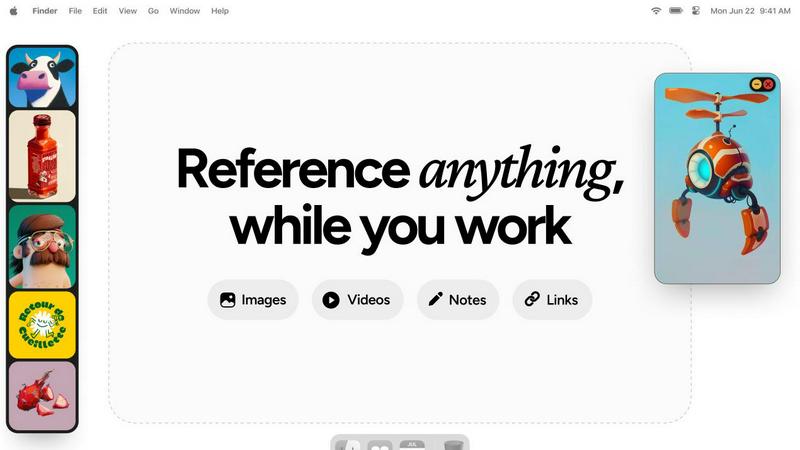
Refbox is a desktop app that keeps your reference images, videos, and notes instantly accessible above your workspace.
Last updated: February 28, 2026
Visual Comparison
Receipt Generator

Refbox
Feature Comparison
Receipt Generator
Extensive Template Library
Receipt Generator provides immediate access to a vast collection of over 400 professionally designed receipt templates from major global and regional brands. This includes detailed templates for retail giants like Walmart and Target, pharmacy chains like CVS and Walgreens, restaurants like Starbucks and Applebee's, and grocery stores like Kroger and ALDI. Each template is crafted with authentic layouts, store-specific logos, correct thermal-style fonts, and appropriate sections for loyalty programs, tax breakdowns, and payment details, ensuring the final receipt is indistinguishable from a genuine one.
AI-Powered "Place in Scene" Technology
This proprietary feature sets Receipt Generator apart from basic receipt makers. Using advanced artificial intelligence, the tool can take a digitally created receipt and generate a photorealistic composite image of it placed on any real-world surface. Users can visualize their receipt as if it were physically printed and left on a wooden desk, crumpled in a pocket, neatly placed in a wallet, or next to purchased products. This eliminates the need for physical printing and staging, making it an invaluable tool for content creators, marketers, and anyone needing authentic visual mockups for presentations or documentation.
Drag-and-Drop Customization Editor
The platform features an intuitive, visual editor that utilizes a block-based system. Users can build their receipt from scratch or modify a template by dragging and dropping different block types, such as headers, line items, totals, barcodes, QR codes, and dividers. This allows for complete rearrangement and fine-tuning of every receipt component without any technical knowledge. Users have full control over styling elements like fonts, spacing, colors, and paper texture, enabling the creation of perfectly tailored receipts for any specific need.
Instant, High-Resolution Export
Efficiency is a core principle of Receipt Generator. Once a receipt is customized, it can be exported immediately with a single click. The platform generates high-resolution PNG or PDF files, ensuring print-ready quality and sharp clarity for digital use. There is no processing queue, lag, or mandatory email sign-up for the basic service. Pro plans remove all watermarks and offer unlimited downloads, facilitating rapid workflow for users who need to generate large volumes of receipts quickly and reliably.
About Refbox
Always-on-Top Floating Frames
The cornerstone feature of Refbox is its ability to create resizable, transparent frames that float above all other desktop applications. Users can pin any reference media—be it an image, a video clip, or a text note—into these frames, ensuring critical inspiration or guidelines are perpetually in view without obstructing the main workspace. This eliminates window management clutter and the need to constantly switch contexts, allowing for direct visual comparison and continuous workflow.
Infinite Canvas and Collections
Refbox provides an expansive, infinite canvas where users can organize their references into distinct Collections. This spatial organization allows for mood boarding, project-based grouping, or categorizing by theme. Users can swiftly switch between entire sets of references with a single click, and view all items in a collection simultaneously for a holistic overview or flip through them in a slideshow mode for rapid comparison and iteration.
Advanced Media Handling and Tools
Beyond simple display, Refbox includes a suite of powerful tools for interacting with reference media. This includes stepping through GIFs frame-by-frame for detailed animation study, a built-in color picker to sample and copy hex codes from any image, and the ability to crop images directly within the app. It also supports unique media types like SVG files and can generate website screenshots simply by pasting a URL, making it an incredibly versatile reference hub.
Intuitive Shortcuts and Workflow Optimizations
Designed for efficiency, Refbox is packed with keyboard shortcuts and smart behaviors that save countless clicks. Users can navigate between references using arrow keys, instantly minimize frames to access underlying applications, and auto-hide their entire Refbox workspace, summoning it only when needed. Additional touches like lockable frames (to prevent accidental clicks) and pixel-perfect rendering modes for pixel artists demonstrate a deep understanding of professional creative needs.
Use Cases
Receipt Generator
Expense Reporting and Business Documentation
Freelancers, contractors, and small business owners can use Receipt Generator to create clear, professional receipts for services rendered or expenses incurred. This is crucial for maintaining accurate financial records, simplifying bookkeeping, and providing clients with polished proof of payment. The ability to customize every detail ensures the receipt meets all necessary legal and professional standards for tax purposes and client invoicing.
Content Creation and Social Media Proof
Digital marketers, influencers, and social media content creators utilize the tool to generate realistic receipt visuals for tutorials, hauls, reviews, and promotional content. The AI "Place in Scene" feature is particularly powerful here, allowing creators to produce engaging photos that show "proof of purchase" or "haul receipts" in aesthetically pleasing, realistic settings without the hassle of actual shopping or printing, thereby enhancing storytelling and audience trust.
Mockup and Prototype Design
Product managers, UI/UX designers, and app developers can employ Receipt Generator to create authentic-looking receipt mockups for applications, websites, or business proposals. Whether demonstrating a financial app's transaction history, designing a point-of-sale interface, or creating training materials, the tool provides highly realistic assets that improve the fidelity and professionalism of prototypes and design presentations.
Resale and Inventory Management
Individuals and businesses involved in reselling, such as on platforms like eBay or Facebook Marketplace, can generate receipts for items sold. This provides buyers with a sense of security and legitimacy regarding their purchase. Sellers can also use the tool to document their own inventory purchases, creating a consistent paper trail for cost tracking and profit calculation, which is essential for effective business management.
Refbox
Digital Illustration and Concept Art
Illustrators and concept artists can pin multiple character sketches, environment photos, and color palettes in floating frames around their drawing software. This allows for constant visual feedback without leaving the canvas, enabling them to accurately translate proportions, lighting, and textures from their references directly into their original artwork, significantly speeding up the ideation and rendering process.
UI/UX and Graphic Design
Designers can use Refbox to keep brand guidelines, mood boards, competitor screenshots, and component libraries visible at all times. While working in Figma or Adobe XD, having these critical references just a glance away ensures design consistency and informed decision-making. The ability to take instant website screenshots and reference them side-by-side with a work-in-progress design is invaluable.
3D Modeling and Animation
3D artists and animators can pin orthographic reference sheets, texture maps, and video clips of motion studies directly over their 3D viewport in software like Blender or Maya. The GIF frame-stepping feature is particularly useful for animators to meticulously study movement cycles frame-by-frame while replicating them in their own scenes, enhancing the accuracy and realism of their work.
Motion Graphics and Video Editing
Motion designers and video editors can keep style frames, storyboards, and inspirational video clips floating above their timeline in After Effects or Premiere Pro. This provides a persistent creative compass throughout the editing process, ensuring the final product aligns with the initial vision. Notes with checklists can also be pinned to track complex project requirements and deliverables.
Overview
About Receipt Generator
Receipt Generator is a sophisticated, web-based platform designed to create highly realistic and customizable digital receipts for a wide array of legitimate applications. It distinguishes itself as the most comprehensive tool of its kind by offering an extensive library of over 400 store-specific templates, meticulously modeled after real-world retailers such as Walmart, Target, Starbucks, CVS, Best Buy, and McDonald's. The platform empowers users with granular control, allowing them to edit every element of a receipt, including store information, line items, individual prices, taxes, dates, and payment methods. The final product can be downloaded instantly as a high-resolution PNG file, ready for use. Its user base is diverse, encompassing small business owners, freelancers, content creators, and resellers who require professional receipt documentation for expense tracking, proof of purchase, inventory management, or creative projects. The standout innovation is its AI-powered "Place in Scene" feature, which generates photorealistic images of receipts placed on any surface—like a desk, wallet, or counter—eliminating the need for physical printing and opening new possibilities for visual content creation.
About Refbox
Refbox is a revolutionary desktop application engineered to fundamentally transform how creative professionals access and interact with their reference materials. It serves as a dynamic, floating workspace that pins images, GIFs, videos, and notes in "always-on-top" frames that hover above any other application window. This core functionality eliminates the disruptive and time-consuming cycle of alt-tabbing between folders, browser tabs, and creative software, allowing users to maintain an uninterrupted state of deep focus. Designed explicitly for artists, designers, animators, illustrators, and 3D artists, Refbox addresses the universal need for constant visual inspiration and technical reference. Its value proposition lies in creating a seamless bridge between a user's source material and their primary work canvas, thereby streamlining complex workflows, accelerating decision-making, and fostering a more intuitive and productive creative environment. By keeping references persistently visible and instantly accessible, Refbox empowers professionals to work faster and with greater accuracy, turning a fragmented process into a fluid and integrated experience.
Frequently Asked Questions
Receipt Generator FAQ
Is Receipt Generator free to use?
Yes, Receipt Generator offers a free tier that allows users to access all templates and create receipts without an account. However, receipts downloaded from the free plan will include a watermark. To remove the watermark and access premium features like unlimited downloads and AI credits, users need to upgrade to a paid Pro plan.
What is the "Place in Scene" AI feature?
The "Place in Scene" AI feature is an advanced tool that transforms your digital receipt into a photorealistic image. It artificially places your receipt onto a photograph of a real-world surface or scene, such as a wooden table, a kitchen counter, or a leather wallet. This creates a highly convincing image of a physical receipt without ever needing to print it, ideal for visual content and realistic mockups.
Can I create a receipt for a store not listed in your templates?
Absolutely. While Receipt Generator offers over 400 pre-made templates for popular stores, its powerful drag-and-drop editor and customization tools allow you to create a receipt for any business from scratch. You can input custom store names, logos, addresses, item lists, and formatting to design a receipt that matches any specific retailer or service provider.
Are the generated receipts legally valid for tax or return purposes?
No. Receipt Generator is designed for legitimate business, creative, and personal use such as expense mockups, content creation, and record-keeping for informal transactions. The receipts are digital creations and are not verified or issued by actual merchants. They should not be used for fraudulent purposes, to claim illegitimate tax deductions, or to attempt returns at retail stores, as this violates the platform's Terms of Service and may be illegal.
Refbox FAQ
What types of files and media does Refbox support?
Refbox supports a wide array of media formats crucial for creatives. You can directly import and display images (JPG, PNG, SVG, etc.), animated GIFs (with frame-by-frame control), and video files. It also supports rich text notes for checklists and instructions. Furthermore, you can paste image data from your clipboard or simply paste a website URL to automatically generate and import a screenshot.
How does Refbox impact my computer's performance?
Refbox is engineered to be lightweight and efficient. It uses minimal system resources when idle and is optimized to handle media display without significant impact on CPU or GPU performance, allowing your primary creative applications like Photoshop, Blender, or Figma to run smoothly alongside it. The auto-hide feature also ensures it's not rendering anything when not in active use.
Can I use Refbox with multiple monitors?
Yes, Refbox is fully compatible with multi-monitor setups. You can drag your floating reference frames and the main Refbox canvas onto any connected display. This allows you to dedicate one screen entirely to your references using the infinite canvas while using another screen for your primary creative application, creating an expansive and organized digital workspace.
Is there a way to organize a large number of references?
Absolutely. Refbox's core organizational system is based on Collections. You can create unlimited collections for different projects, clients, or themes (e.g., "Character Design," "Landscape Project," "Brand Colors"). Within each collection, you can spatially arrange references on the infinite canvas. You can switch between these collections instantly, keeping your workspace clean and context-specific.
Alternatives
Receipt Generator Alternatives
Receipt Generator is a leading online tool in the productivity and management category, specializing in the creation of custom, AI-enhanced receipts. Users often explore alternatives for various reasons, including budget constraints, the need for different feature sets like advanced data export or integration with accounting software, or a preference for a different platform such as a mobile app or desktop software. When evaluating other options, key considerations include the depth and realism of the template library, the availability of advanced features like AI-powered visual mockups, overall ease of use, and the transparency of the pricing model. It's also crucial to assess the output quality and download formats to ensure they meet your specific project or business needs.
Refbox Alternatives
Refbox is a specialized productivity application designed for creative professionals. It functions as a floating reference manager, allowing users to pin images, videos, and notes in always-on-top windows above their primary workspace. This tool is essential for artists, designers, and animators who require constant visual inspiration without disrupting their workflow through constant application switching. Users may seek alternatives to Refbox for various practical reasons. Common considerations include budget constraints, as some may prefer a free or more affordable solution. Others might require specific features not present in Refbox, such as advanced collaboration tools or integration with particular software suites. Platform compatibility is another key factor, with users needing applications that run on different operating systems like Linux or older versions of macOS and Windows. When evaluating an alternative, it is crucial to assess several core functionalities. The ability to create and manage floating, resizable windows is paramount. Equally important are robust media import options from the web, clipboard, and local files. A clean, intuitive interface for organizing references and a reliable note-taking feature are also significant factors that contribute to an efficient and streamlined creative process.