
BarBrain vs Refbox
Side-by-side comparison to help you choose the right product.

BarBrain
BarBrain streamlines inventory management for hospitality, reducing counting time by over 75% while ensuring accurate and reliable data.
Last updated: April 4, 2026

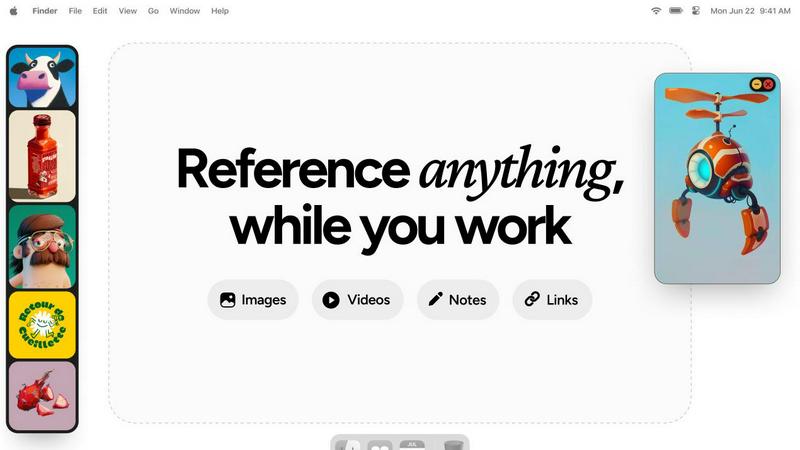
Refbox is a desktop app that keeps your reference images, videos, and notes instantly accessible above your workspace.
Last updated: February 28, 2026
Visual Comparison
BarBrain

Refbox
Feature Comparison
BarBrain
Parallel Counting on Multiple Devices
BarBrain allows simultaneous use on multiple iOS and Android devices, enabling staff to count inventory in parallel. This feature significantly reduces the time spent on inventory tasks, making it an efficient solution for busy hospitality environments.
Extensive Product Catalog
With over 30,000 products in its catalog, BarBrain supports a wide variety of inventory items, from spirits and wines to food and essential supplies. This extensive range ensures that users can track and manage all their inventory seamlessly, regardless of the product type.
Automated Inventory Reports
After each inventory count, BarBrain generates a comprehensive and finished inventory report automatically. This eliminates the need for manual data entry or post-count processing, saving time and reducing the risk of human error.
Food Level Slider for Opened Items
BarBrain simplifies the process of tracking food and beverage products with an intuitive fill-level slider for opened items. This feature enables staff to quickly and accurately record both opened and unopened units with just a single tap, enhancing inventory accuracy.
About Refbox
Always-on-Top Floating Frames
The cornerstone feature of Refbox is its ability to create resizable, transparent frames that float above all other desktop applications. Users can pin any reference media—be it an image, a video clip, or a text note—into these frames, ensuring critical inspiration or guidelines are perpetually in view without obstructing the main workspace. This eliminates window management clutter and the need to constantly switch contexts, allowing for direct visual comparison and continuous workflow.
Infinite Canvas and Collections
Refbox provides an expansive, infinite canvas where users can organize their references into distinct Collections. This spatial organization allows for mood boarding, project-based grouping, or categorizing by theme. Users can swiftly switch between entire sets of references with a single click, and view all items in a collection simultaneously for a holistic overview or flip through them in a slideshow mode for rapid comparison and iteration.
Advanced Media Handling and Tools
Beyond simple display, Refbox includes a suite of powerful tools for interacting with reference media. This includes stepping through GIFs frame-by-frame for detailed animation study, a built-in color picker to sample and copy hex codes from any image, and the ability to crop images directly within the app. It also supports unique media types like SVG files and can generate website screenshots simply by pasting a URL, making it an incredibly versatile reference hub.
Intuitive Shortcuts and Workflow Optimizations
Designed for efficiency, Refbox is packed with keyboard shortcuts and smart behaviors that save countless clicks. Users can navigate between references using arrow keys, instantly minimize frames to access underlying applications, and auto-hide their entire Refbox workspace, summoning it only when needed. Additional touches like lockable frames (to prevent accidental clicks) and pixel-perfect rendering modes for pixel artists demonstrate a deep understanding of professional creative needs.
Use Cases
BarBrain
Independent Bars
For independent bar owners, BarBrain offers a streamlined inventory management solution that saves time and reduces costs. By digitizing inventory processes, bars can focus more on customer service and less on administrative tasks.
Multi-Location Restaurants
Restaurants operating multiple locations benefit from BarBrain's ability to unify inventory management across sites. This feature provides a comprehensive overview of inventory usage and cost across all locations, allowing for better strategic planning and resource allocation.
Hotels and Hospitality Groups
Hotels can leverage BarBrain to maintain accurate inventory of food and beverage products across several departments. This comprehensive oversight ensures that hotels can efficiently manage resources and reduce waste, thus improving profitability.
Event Venues
Event venues with fluctuating inventory needs can utilize BarBrain to adapt their inventory management processes to a variety of events. This flexibility ensures that venues can manage supplies efficiently and respond to changing demands in real time.
Refbox
Digital Illustration and Concept Art
Illustrators and concept artists can pin multiple character sketches, environment photos, and color palettes in floating frames around their drawing software. This allows for constant visual feedback without leaving the canvas, enabling them to accurately translate proportions, lighting, and textures from their references directly into their original artwork, significantly speeding up the ideation and rendering process.
UI/UX and Graphic Design
Designers can use Refbox to keep brand guidelines, mood boards, competitor screenshots, and component libraries visible at all times. While working in Figma or Adobe XD, having these critical references just a glance away ensures design consistency and informed decision-making. The ability to take instant website screenshots and reference them side-by-side with a work-in-progress design is invaluable.
3D Modeling and Animation
3D artists and animators can pin orthographic reference sheets, texture maps, and video clips of motion studies directly over their 3D viewport in software like Blender or Maya. The GIF frame-stepping feature is particularly useful for animators to meticulously study movement cycles frame-by-frame while replicating them in their own scenes, enhancing the accuracy and realism of their work.
Motion Graphics and Video Editing
Motion designers and video editors can keep style frames, storyboards, and inspirational video clips floating above their timeline in After Effects or Premiere Pro. This provides a persistent creative compass throughout the editing process, ensuring the final product aligns with the initial vision. Notes with checklists can also be pinned to track complex project requirements and deliverables.
Overview
About BarBrain
BarBrain is a revolutionary inventory management software specifically designed for the hospitality industry, addressing the unique challenges faced by bar and restaurant owners. Traditional inventory methods often involve tedious hours spent counting stock and reconciling spreadsheets, leading to inefficiencies and inaccuracies. BarBrain streamlines this process, allowing users to conduct inventory counts in a fraction of the time, enhancing operational efficiency. The software provides precise calculations for cost per drink and dish, flags waste and shrinkage in real time, and consolidates supplier orders into one accessible platform. With BarBrain, operators benefit from a user-friendly interface that requires no extensive training. Whether managing a single bar or a multi-location restaurant group, BarBrain equips users with the critical data needed to protect profit margins, eliminate costly errors, and optimize inventory management.
About Refbox
Refbox is a revolutionary desktop application engineered to fundamentally transform how creative professionals access and interact with their reference materials. It serves as a dynamic, floating workspace that pins images, GIFs, videos, and notes in "always-on-top" frames that hover above any other application window. This core functionality eliminates the disruptive and time-consuming cycle of alt-tabbing between folders, browser tabs, and creative software, allowing users to maintain an uninterrupted state of deep focus. Designed explicitly for artists, designers, animators, illustrators, and 3D artists, Refbox addresses the universal need for constant visual inspiration and technical reference. Its value proposition lies in creating a seamless bridge between a user's source material and their primary work canvas, thereby streamlining complex workflows, accelerating decision-making, and fostering a more intuitive and productive creative environment. By keeping references persistently visible and instantly accessible, Refbox empowers professionals to work faster and with greater accuracy, turning a fragmented process into a fluid and integrated experience.
Frequently Asked Questions
BarBrain FAQ
How does BarBrain improve inventory accuracy?
BarBrain enhances inventory accuracy by eliminating manual entry errors and providing real-time data on stock levels, ensuring users have access to reliable information for decision-making.
Is BarBrain easy to implement?
Yes, BarBrain is designed for easy implementation. Users can quickly set up their accounts, and the software's intuitive interface minimizes the need for extensive training.
Can I use BarBrain on multiple devices?
Absolutely! BarBrain supports simultaneous use on multiple iOS and Android devices, facilitating parallel counting and enhancing team efficiency during inventory tasks.
What types of products can I manage with BarBrain?
BarBrain's extensive catalog allows users to manage a wide range of products, including beverages, food items, and housekeeping supplies, making it suitable for various aspects of the hospitality industry.
Refbox FAQ
What types of files and media does Refbox support?
Refbox supports a wide array of media formats crucial for creatives. You can directly import and display images (JPG, PNG, SVG, etc.), animated GIFs (with frame-by-frame control), and video files. It also supports rich text notes for checklists and instructions. Furthermore, you can paste image data from your clipboard or simply paste a website URL to automatically generate and import a screenshot.
How does Refbox impact my computer's performance?
Refbox is engineered to be lightweight and efficient. It uses minimal system resources when idle and is optimized to handle media display without significant impact on CPU or GPU performance, allowing your primary creative applications like Photoshop, Blender, or Figma to run smoothly alongside it. The auto-hide feature also ensures it's not rendering anything when not in active use.
Can I use Refbox with multiple monitors?
Yes, Refbox is fully compatible with multi-monitor setups. You can drag your floating reference frames and the main Refbox canvas onto any connected display. This allows you to dedicate one screen entirely to your references using the infinite canvas while using another screen for your primary creative application, creating an expansive and organized digital workspace.
Is there a way to organize a large number of references?
Absolutely. Refbox's core organizational system is based on Collections. You can create unlimited collections for different projects, clients, or themes (e.g., "Character Design," "Landscape Project," "Brand Colors"). Within each collection, you can spatially arrange references on the infinite canvas. You can switch between these collections instantly, keeping your workspace clean and context-specific.
Alternatives
BarBrain Alternatives
BarBrain is a specialized inventory management tool designed specifically for the hospitality industry, helping bar and restaurant owners streamline their stock counting and management processes. By addressing the unique challenges faced in this sector, BarBrain transforms the traditionally tedious and time-consuming task of inventory management into a more efficient and accurate experience. This software allows operators to focus on their core business rather than getting bogged down by ineffective and generic solutions. Users often seek alternatives to BarBrain for various reasons, including pricing considerations, specific feature needs, or compatibility with existing platforms. When exploring alternatives, it is essential to look for solutions that cater to the distinctive requirements of the hospitality industry, such as ease of use, real-time data insights, and the ability to manage perishable goods effectively. A suitable alternative should not only meet functional needs but also provide a user-friendly experience that aligns with the operational workflows of bars and restaurants.
Refbox Alternatives
Refbox is a specialized productivity application designed for creative professionals. It functions as a floating reference manager, allowing users to pin images, videos, and notes in always-on-top windows above their primary workspace. This tool is essential for artists, designers, and animators who require constant visual inspiration without disrupting their workflow through constant application switching. Users may seek alternatives to Refbox for various practical reasons. Common considerations include budget constraints, as some may prefer a free or more affordable solution. Others might require specific features not present in Refbox, such as advanced collaboration tools or integration with particular software suites. Platform compatibility is another key factor, with users needing applications that run on different operating systems like Linux or older versions of macOS and Windows. When evaluating an alternative, it is crucial to assess several core functionalities. The ability to create and manage floating, resizable windows is paramount. Equally important are robust media import options from the web, clipboard, and local files. A clean, intuitive interface for organizing references and a reliable note-taking feature are also significant factors that contribute to an efficient and streamlined creative process.