
ScopeSnap vs TinyFast
Side-by-side comparison to help you choose the right product.

ScopeSnap
ScopeSnap transforms discovery notes into structured project scopes, accurate estimates, and polished proposals in minutes for freelancers and.
Last updated: March 18, 2026

Compress images, videos, and PDFs effortlessly on your Mac with TinyFast for fast, local, and private optimization.
Last updated: February 28, 2026
Visual Comparison
ScopeSnap

TinyFast
Feature Comparison
ScopeSnap
AI-Driven Backlog Creation
ScopeSnap utilizes advanced AI technology to automatically generate epics and scope items from raw discovery notes. It intelligently surfaces open questions and flags assumptions, which helps users identify gaps in information early in the project planning process.
Streamlined Refinement Process
The platform allows users to iteratively refine their project scopes. Developers can review the structured backlog, assign roles, set estimates, and resolve open questions in a collaborative environment, ensuring that all team members are on the same page.
Proposal Generation
Once the project scope is finalized, ScopeSnap automatically generates a polished Proposal or Statement of Work (SOW). This feature saves users significant time as it eliminates the need to create documents from scratch, ensuring that proposals are not only professional but also aligned with the defined scope.
Client Communication Tools
ScopeSnap includes features that facilitate seamless communication with clients. Users can easily share their proposals and project scopes, making it simple to keep clients informed and engaged throughout the project lifecycle.
About TinyFast
Batch & Drag-Drop Shrink
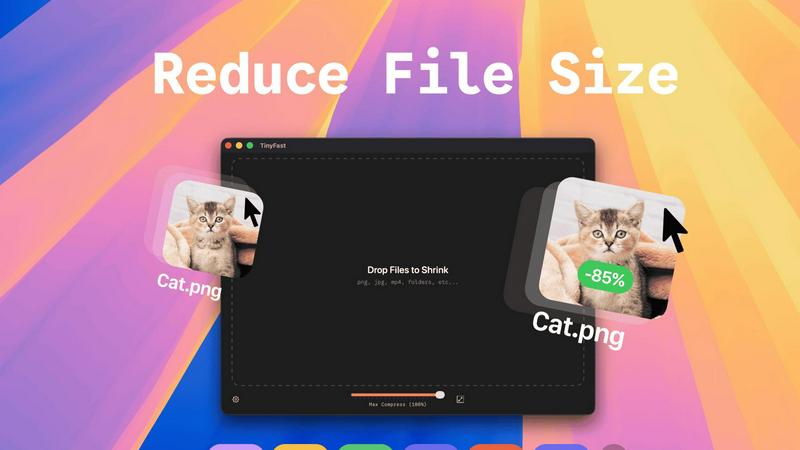
This feature allows users to compress entire folders of files simultaneously, streamlining the workflow significantly. With just a simple drag-and-drop action, users can quickly get optimized outputs in mere seconds, saving both time and effort.
Blazing-Fast Compression
TinyFast utilizes optimized native engines designed for speed, enabling users to shrink large files in seconds. This feature eliminates the waiting times typically associated with uploading and downloading files in online compression tools, providing users with instant results.
Resize Resolution
For image and video files, TinyFast offers an automatic resizing option that allows users to set preferred resolutions. This capability ensures that the output files are not just smaller, but also tailored to specific size requirements, enhancing usability across various platforms.
100% Local & Private
TinyFast is designed with user privacy as a top priority. All files remain on the user's device, ensuring that there are no uploads to cloud servers. This feature is particularly beneficial for professionals handling sensitive or confidential information, as it guarantees total privacy by design.
Use Cases
ScopeSnap
Freelance Development Projects
Freelancers can leverage ScopeSnap to turn initial discovery conversations into well-defined project scopes and proposals. This ensures that they start projects with a clear understanding of client expectations, reducing the chances of scope creep.
Software Agency Client Engagement
Software agencies can use ScopeSnap to enhance their client engagement processes. By converting messy notes into structured documents, agencies can present professional proposals that reflect their understanding of client needs, thus fostering trust and credibility.
Project Scope Refinement Workshops
Teams can utilize ScopeSnap during project scope refinement workshops. The tool facilitates discussions by providing a structured view of project requirements, helping teams to collaboratively address open questions and concerns before finalizing the scope.
Risk Management in Project Estimation
ScopeSnap assists in risk management by ensuring that all aspects of a project are thoroughly considered during the estimation phase. By identifying assumptions and open questions, developers can mitigate potential issues that could arise later in the project.
TinyFast
Graphic Design Projects
Graphic designers can use TinyFast to compress high-resolution images and vector files before including them in their projects. This ensures that the final artwork is optimized for faster loading times on websites without sacrificing quality.
Video Production
For video editors, TinyFast provides an efficient way to compress large video files for easier sharing and uploading. By quickly resizing and optimizing these files, editors can streamline their workflow and enhance collaboration with team members.
Document Preparation
TinyFast is an excellent tool for professionals who frequently work with large PDF or document files. By compressing these documents, users can ensure that email attachments remain manageable in size and accessible for recipients without losing important content.
Web Development
Web developers can benefit from TinyFast by compressing images and other assets before deploying them to websites. This practice optimizes the performance of web pages, contributing to faster loading times and a better user experience.
Overview
About ScopeSnap
ScopeSnap is an innovative AI-driven tool designed to streamline the process of scoping custom software projects for freelance developers and software agencies. It takes the chaos of messy discovery notes and transforms them into structured project scopes, comprehensive estimates, and polished proposals that are ready to present to clients. The main value proposition of ScopeSnap lies in its ability to simplify the often tedious and error-prone task of project estimation. By leveraging artificial intelligence, it enables users to break down project ideas into clear, estimable tasks, ensuring that all requirements are captured and understood. This not only saves time but also mitigates the risks associated with vague project scopes, allowing developers to focus on delivering quality solutions instead of getting bogged down in paperwork.
About TinyFast
TinyFast is a cutting-edge macOS application designed for users who need to efficiently compress various file types including images, videos, and documents. This innovative tool is tailored for developers, designers, and content creators who value speed, privacy, and ease of use. Unlike online compression tools that require users to upload their files to external servers, TinyFast operates entirely on local machines, ensuring that sensitive data remains secure. The application's intuitive drag-and-drop interface allows users to quickly compress files; simply drag a file into the app to start the process and drag it out to retrieve the optimized version. With support for over 500 file types, TinyFast stands out in the market for its ability to deliver high-quality results in a fraction of the time typically required by traditional methods. By prioritizing user privacy and efficiency, TinyFast provides an essential solution for anyone working with large files on a regular basis.
Frequently Asked Questions
ScopeSnap FAQ
How does ScopeSnap ensure accuracy in project estimates?
ScopeSnap enhances accuracy by breaking down project ideas into detailed tasks and allowing users to refine estimates through a structured process. This collaborative approach ensures that all team members contribute their insights, leading to more reliable estimates.
Can I integrate ScopeSnap with other project management tools?
Yes, ScopeSnap is designed to integrate with various project management tools, allowing users to seamlessly transition from scope creation to project execution without losing valuable information.
Is ScopeSnap suitable for teams of all sizes?
Absolutely. Whether you are a solo freelancer or part of a large software agency, ScopeSnap scales to meet your needs, providing tools that enhance collaboration and efficiency regardless of team size.
What types of projects can ScopeSnap be used for?
ScopeSnap is versatile and can be used for a wide range of custom software projects, including web applications, mobile apps, and enterprise solutions. Its structured approach to project scoping makes it applicable across various domains and industries.
TinyFast FAQ
What types of files can I compress with TinyFast?
TinyFast supports a wide range of file types, including images (PNG, JPEG, GIF), videos (MP4, MOV), documents (PDF, DOCX), audio (MP3), and even code files (JS, CSS, JSON). This versatility makes it suitable for various professional needs.
Is TinyFast really free?
TinyFast offers a free plan that allows users to compress up to 5 files per day. This plan provides access to all features, making it a great option for casual users or those who need occasional file compression.
How does TinyFast ensure privacy?
TinyFast operates entirely on the user's local machine, meaning that files never leave the device. There are no uploads to external servers, which significantly reduces the risk of data breaches and ensures that confidential files remain secure.
Can I resize images and videos automatically?
Yes, TinyFast includes a resolution resizing feature that allows users to set preferred sizes for images and videos. This feature is particularly useful for optimizing media for specific platforms or applications where file dimensions matter.
Alternatives
ScopeSnap Alternatives
ScopeSnap is an innovative tool designed to streamline the process of project scoping and proposal creation for freelance developers and software agencies. By leveraging AI technology, ScopeSnap transforms chaotic discovery notes into well-structured project scopes, estimates, and client-ready proposals, significantly enhancing productivity in the software development space. Users often seek alternatives to ScopeSnap for a variety of reasons, including pricing considerations, specific feature requirements, or the need for compatibility with different platforms. When exploring alternatives, it is essential to consider factors such as ease of use, the ability to customize scopes and proposals, integration with existing tools, and the overall effectiveness of the solution in addressing the unique challenges of project estimation and management in software development.
TinyFast Alternatives
TinyFast is an advanced macOS application that falls into the category of file compression tools. It specializes in efficiently compressing a variety of file types, including images, videos, and documents, directly on users' local machines. This ability to keep operations local ensures that sensitive files remain secure and private, making TinyFast a favored choice among developers, designers, and content creators. Users often seek alternatives to TinyFast for various reasons, including pricing, specific feature needs, or compatibility with different operating systems. When considering alternatives, it's essential to evaluate the features offered, ease of use, speed of compression, and privacy policies. Understanding your unique requirements will help in selecting the most suitable file optimization tool.