
TinyFast
Compress images, videos, and PDFs effortlessly on your Mac with TinyFast for fast, local, and private optimization.
Visit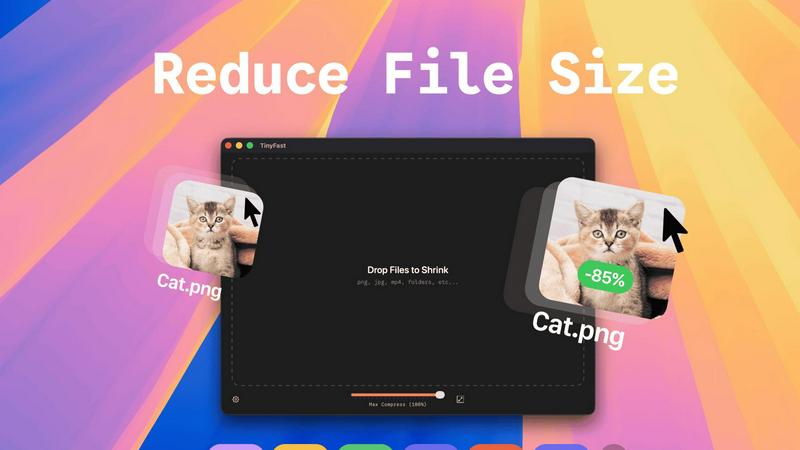
About TinyFast
TinyFast is a cutting-edge macOS application designed for users who need to efficiently compress various file types including images, videos, and documents. This innovative tool is tailored for developers, designers, and content creators who value speed, privacy, and ease of use. Unlike online compression tools that require users to upload their files to external servers, TinyFast operates entirely on local machines, ensuring that sensitive data remains secure. The application's intuitive drag-and-drop interface allows users to quickly compress files; simply drag a file into the app to start the process and drag it out to retrieve the optimized version. With support for over 500 file types, TinyFast stands out in the market for its ability to deliver high-quality results in a fraction of the time typically required by traditional methods. By prioritizing user privacy and efficiency, TinyFast provides an essential solution for anyone working with large files on a regular basis.
Features of TinyFast
Batch & Drag-Drop Shrink
This feature allows users to compress entire folders of files simultaneously, streamlining the workflow significantly. With just a simple drag-and-drop action, users can quickly get optimized outputs in mere seconds, saving both time and effort.
Blazing-Fast Compression
TinyFast utilizes optimized native engines designed for speed, enabling users to shrink large files in seconds. This feature eliminates the waiting times typically associated with uploading and downloading files in online compression tools, providing users with instant results.
Resize Resolution
For image and video files, TinyFast offers an automatic resizing option that allows users to set preferred resolutions. This capability ensures that the output files are not just smaller, but also tailored to specific size requirements, enhancing usability across various platforms.
100% Local & Private
TinyFast is designed with user privacy as a top priority. All files remain on the user's device, ensuring that there are no uploads to cloud servers. This feature is particularly beneficial for professionals handling sensitive or confidential information, as it guarantees total privacy by design.
Use Cases of TinyFast
Graphic Design Projects
Graphic designers can use TinyFast to compress high-resolution images and vector files before including them in their projects. This ensures that the final artwork is optimized for faster loading times on websites without sacrificing quality.
Video Production
For video editors, TinyFast provides an efficient way to compress large video files for easier sharing and uploading. By quickly resizing and optimizing these files, editors can streamline their workflow and enhance collaboration with team members.
Document Preparation
TinyFast is an excellent tool for professionals who frequently work with large PDF or document files. By compressing these documents, users can ensure that email attachments remain manageable in size and accessible for recipients without losing important content.
Web Development
Web developers can benefit from TinyFast by compressing images and other assets before deploying them to websites. This practice optimizes the performance of web pages, contributing to faster loading times and a better user experience.
Frequently Asked Questions
What types of files can I compress with TinyFast?
TinyFast supports a wide range of file types, including images (PNG, JPEG, GIF), videos (MP4, MOV), documents (PDF, DOCX), audio (MP3), and even code files (JS, CSS, JSON). This versatility makes it suitable for various professional needs.
Is TinyFast really free?
TinyFast offers a free plan that allows users to compress up to 5 files per day. This plan provides access to all features, making it a great option for casual users or those who need occasional file compression.
How does TinyFast ensure privacy?
TinyFast operates entirely on the user's local machine, meaning that files never leave the device. There are no uploads to external servers, which significantly reduces the risk of data breaches and ensures that confidential files remain secure.
Can I resize images and videos automatically?
Yes, TinyFast includes a resolution resizing feature that allows users to set preferred sizes for images and videos. This feature is particularly useful for optimizing media for specific platforms or applications where file dimensions matter.
Explore more in this category:
Similar to TinyFast

AgencyFlo is the AI-native operating system for agencies - one platform for projects, time, CRM, proposals, contracts and invoicing.

AI-powered Upwork job feed. Every new job is scored against your profile and strategy in real time, and you get an instant notification


Back up Zoom cloud recordings to Google Drive automatically. Optional auto-delete frees Zoom storage. 60-second setup, then forget it.

Bg Eraser quickly removes backgrounds from photos in batches, creating clean transparent images with no signup and automatic privacy protection.

SiteSpin is an AI-driven website builder that creates a custom site in minutes, tailored to your needs without templates or complex editors.