
FilexHost vs securememo.app
Side-by-side comparison to help you choose the right product.

FilexHost
FilexHost simplifies file hosting and sharing with instant URLs and built-in viewers for various file types.
Last updated: February 26, 2026
securememo.app
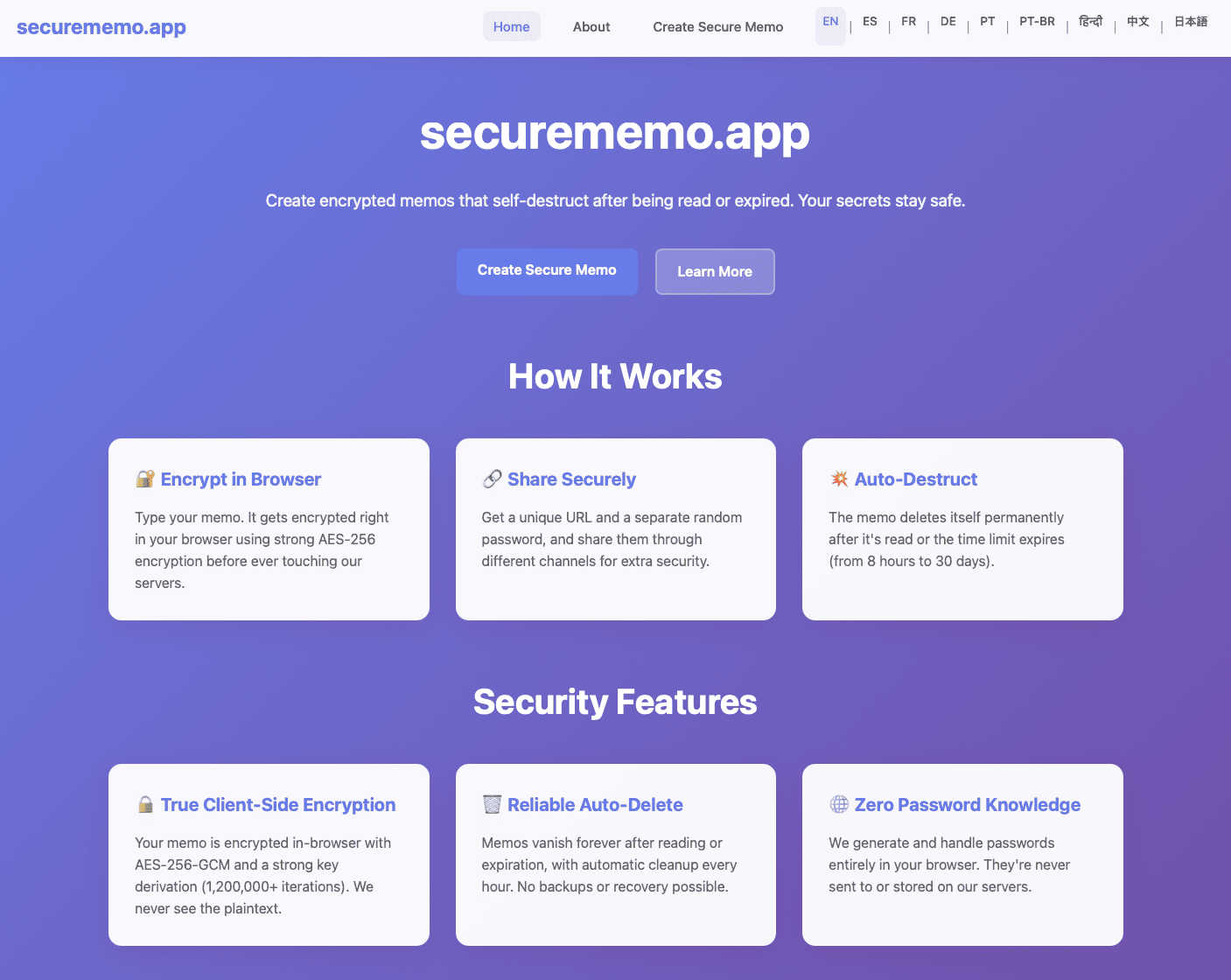
Securememo.app offers a privacy-focused memo service with client-side encryption, ensuring no accounts or tracking ar...
Visual Comparison
FilexHost

securememo.app
Feature Comparison
FilexHost
Instant Subdomains
FileXHost provides users with instant subdomains for their uploaded files, formatted as your-file.filex.host. This feature eliminates the hassles of domain setup, allowing for immediate sharing of files right after upload.
Free SSL Encryption
Every link generated by FileXHost is secured with free SSL encryption. This ensures that all file transfers are secure, protecting sensitive information from unauthorized access and enhancing user trust in the platform.
Smart View Modes
FileXHost's smart view modes allow users to choose between direct rendering of files or a download page. This flexibility ensures that recipients can either view files inline or download them for offline access, catering to different user preferences.
Optional Password Protection
To enhance security, FileXHost offers optional password protection for shared links. Users can set expiry settings for their files ranging from 24 hours to an indefinite period, allowing them to control access and ensure privacy.
securememo.app
Client-Side Encryption
Securememo.app employs advanced client-side encryption, ensuring that all notes are encrypted directly on the user's device before they are sent to the server. This means that only the user can access their data, as it is never exposed to the service provider.
Self-Destructing Notes
The platform offers self-destructing notes that automatically delete themselves after they have been viewed or after a predetermined time. This feature is ideal for users who want to ensure that their sensitive information does not linger online longer than necessary.
Unique Link and Password Generation
When sharing a memo, users can generate a unique link accompanied by a strong, random password. This two-layer approach to sharing maximizes security and ensures that only intended recipients can access the notes.
Multi-Language Support
Securememo.app caters to a global audience by offering support in over 20 languages. This feature makes it accessible and user-friendly for non-English speakers, enhancing its usability across diverse demographics.
Use Cases
FilexHost
Professional Report Sharing
Professionals can utilize FileXHost to share client reports or presentations quickly. The drag-and-drop feature allows for instant uploads, while the secure, shareable links streamline the distribution process, eliminating the need for lengthy email attachments.
Web Development Hosting
Developers can host landing pages or mock APIs effortlessly on FileXHost. The platform's ability to render HTML files as live websites simplifies the testing and demonstration of web projects to clients or stakeholders.
Digital Product Distribution
Creators can distribute digital products such as eBooks, music, or art files without the hassle of email attachment limits. The built-in support for various media types ensures that products are presented professionally and can be accessed easily.
Team Collaboration
FileXHost serves as a valuable tool for teams needing to collaborate on projects. By providing a central repository for files, team members can upload, share, and access necessary documents without complicated permission requests or delays.
securememo.app
Secure Communication
Individuals can use Securememo.app for secure communication, whether it is sharing confidential information with colleagues or exchanging sensitive details with friends. The encryption and self-destructing features guarantee that shared notes remain private.
Temporary Information Sharing
Users can utilize the platform to share temporary information, such as event details or passwords that should not be stored long-term. The self-destructing aspect ensures that such data is automatically erased after use.
Privacy-Conscious Note-Taking
For users who prioritize privacy, Securememo.app serves as an ideal tool for note-taking. Whether documenting sensitive ideas or personal reflections, users can rest assured that their notes are secure and private.
Anonymity in Data Sharing
The no-account requirement allows users to share information anonymously, making Securememo.app particularly useful for individuals who wish to communicate sensitive information without revealing their identity.
Overview
About FilexHost
FileXHost is an innovative file hosting and sharing solution designed to simplify the way users manage and distribute files online. With its intuitive "Drop & Share" functionality, FileXHost allows users to upload a wide range of file types—from documents and images to entire websites—without the need for cumbersome setups or configurations. It caters to professionals, developers, and creators alike, enabling them to share files quickly and securely. The platform's core value proposition lies in its speed and ease of use, allowing users to generate instant secure URLs for sharing files without requiring recipients to navigate complex access requests. With built-in security features like free SSL encryption and customizable sharing settings, FileXHost ensures that users can deliver their files confidently, knowing they are protected and presented beautifully.
About securememo.app
Securememo.app is a cutting-edge, privacy-focused memo service that enables users to create and share encrypted, self-destructing notes directly from their web browsers. This innovative platform is designed for individuals and organizations that prioritize confidentiality and data protection. By employing robust client-side encryption, Securememo.app ensures that all sensitive information is encrypted on the user's device before it is transmitted to the servers, rendering it inaccessible to anyone but the note creator. This level of security is particularly appealing to those who frequently handle sensitive data, such as journalists, researchers, or anyone needing to share private information safely. The service's commitment to user anonymity is further exemplified by its no-account policy, allowing users to access and utilize the platform without revealing personal information. The ability to generate unique links and strong, random passwords for shared notes enhances security, making Securememo.app a reliable option for secure communication in today's digital age.
Frequently Asked Questions
FilexHost FAQ
What is FileXHost?
FileXHost is a file hosting and sharing platform that allows users to upload various file types and generate secure, shareable links instantly. Ideal for professionals, developers, and creators, it emphasizes ease of use and security.
Is it really free?
Yes, FileXHost offers a free plan that allows users to host up to 1,000 files, with a maximum size of 25MB per file. However, this plan includes ads and has a 7-day expiry for hosted files.
What file types are supported?
FileXHost supports a wide range of file types, including PDFs, Excel sheets, images, audio and video files, ZIP archives, and HTML projects, ensuring versatility for various user needs.
How do I update my site?
To update your site, simply upload the new version of your file or website ZIP. FileXHost will generate a new secure link while maintaining the original format and accessibility for recipients.
securememo.app FAQ
How does Securememo.app ensure my data remains private?
Securememo.app uses client-side encryption, meaning all data is encrypted on your device before it reaches the server. This ensures that only you can access your notes.
Is it necessary to create an account to use Securememo.app?
No, Securememo.app does not require users to create an account. This policy enhances user anonymity and simplifies the process of creating and sharing notes.
Can I recover my notes after they have self-destructed?
Once a self-destructing note has been viewed or the timer has expired, it cannot be recovered. This ensures that sensitive information is permanently deleted to protect your privacy.
How can I share a memo securely?
To share a memo securely, generate a unique link and a strong, random password. It is recommended to share the password through a separate communication channel to maximize security.